

What you can and can’t automate on Facebook in 2026
Two API changes decide most of it. Meta removed the publish_actions permission on 1 August 2018, so no outside app can post to a personal profile, and it removed publish_to_groups on 22 April 2024, so no outside app can post to a group. Pages kept their API, which is why every scheduler still handles them.
| Where the post goes | Facebook’s own tools (free) | Cloud and workflow tools (Meta’s API) | Browser extension (your own session) |
|---|---|---|---|
| Your Page: posts, Reels, Stories | Yes, Meta Business Suite | Yes: Buffer, Hootsuite, Zapier, Make | Feed posts |
| A group you admin | Yes: scheduled and recurring posts in the group | No, since 22 April 2024 | Yes |
| A group you only joined | No | No, since 22 April 2024 | Yes |
| Your personal profile | Only in professional mode | No, since 1 August 2018 | Yes |
| Marketplace listings | No | No | Not reliably: list by hand |
| Replies to comments and messages | Automated replies in the Page inbox | Yes, for Pages | First comments under your own posts |
If what you want is to re-share one post into many places automatically, rather than publish new ones, auto-sharing Facebook posts covers the three methods that do that.
How to automate Facebook posts, step by step
The same six steps work whether you run one Page or a Page plus forty groups.
- List where each post has to appear: your Page, groups you admin, groups you joined, your profile. The table above shows which tool can reach each one.
- Batch the writing. Write a week or a month of posts in one sitting, and give each one two or three wordings if it will go to several groups.
- Schedule the Page posts in Meta Business Suite. It is free and runs on Meta’s servers (steps below).
- Schedule the group posts. In groups you admin, use the group’s own scheduler or Admin Assist, as shown in how to post in a Facebook group. For groups you only joined, use a browser extension’s schedule, which runs in your Chrome (details).
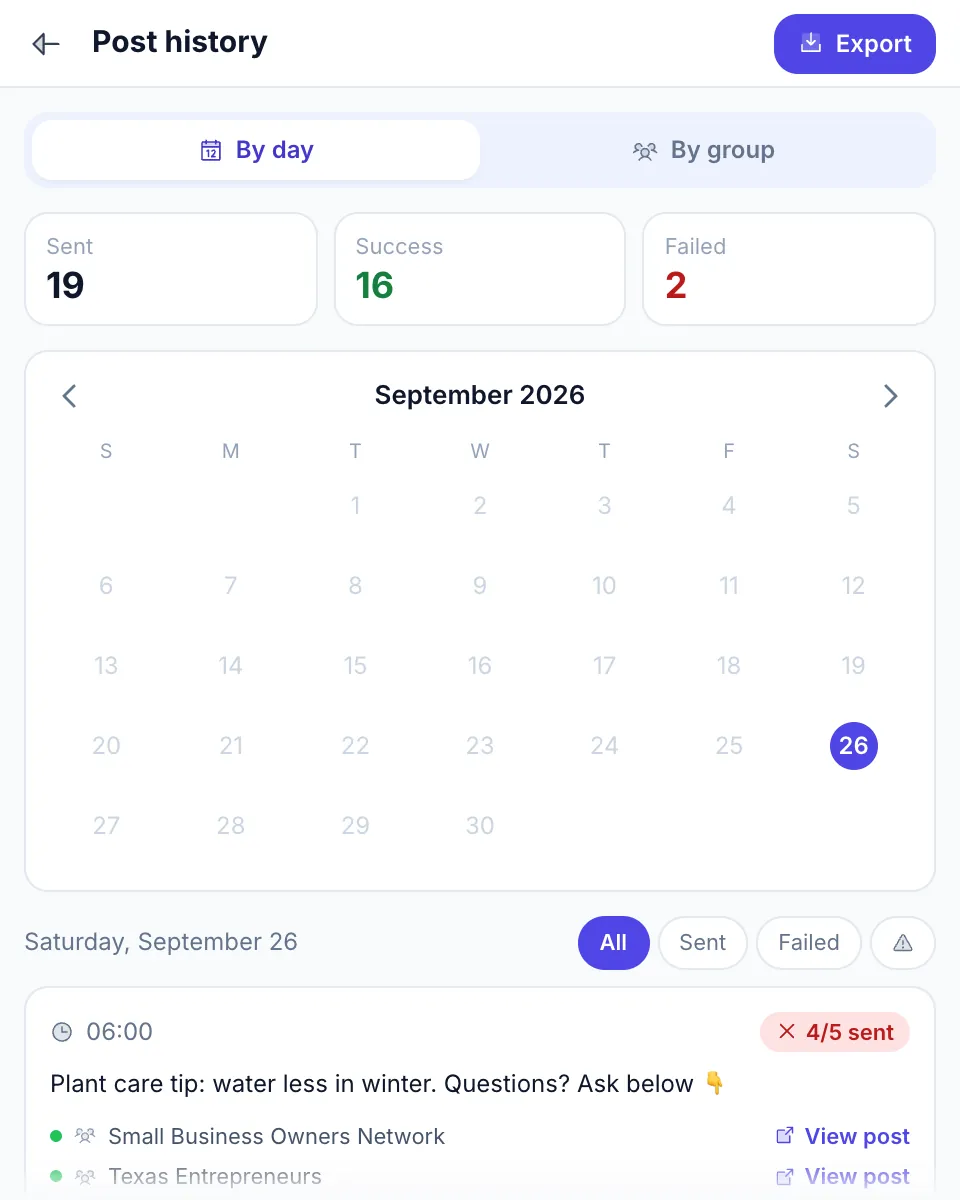
- Check what was published. Meta Business Suite lists each Page’s published posts. An extension such as MultiGroupPoster keeps a post history with a result for every group.
- Review once a week. Drop groups that keep declining your posts, move the times to when people engage, and refresh the wordings.
The three ways to automate Facebook posts
No single tool automates every part of Facebook, because Pages, groups and profiles run on different rules. Picking a tool that can’t reach your audience is the most common way to waste a month of scheduling.

The three real categories:
- Native automation: Meta Business Suite. Free and built by Meta. Pages and their linked Instagram accounts only.
- Browser extensions. They run inside your own logged-in session, which is the only way into groups you joined and onto a personal profile.
- Cloud schedulers and workflow tools. Buffer, Hootsuite, Later, Sprout Social, SocialPilot, Zapier and Make publish through Meta’s API, which since April 2024 means Pages only.
Most people who post in groups end up with two of them: Meta Business Suite or a cloud tool for the Page, and an extension for the groups. Server bots that log in to your account from a data center are a fourth, riskier category; Facebook auto share bots explains why that difference decides your account risk.
1. Meta Business Suite — native automation for Pages
Meta’s own scheduler lives at business.facebook.com and in the Meta Business Suite app. If you manage a Page, you already have it. For a Page-only setup, including Zapier, Make and paid schedulers, see the Facebook Page auto post guide.
How to schedule a Page post:
- Open Meta Business Suite and go to the Planner or Content.
- Click Create post and choose the Page, plus the linked Instagram account if you want the post there too.
- Write the text and add photos or a video.
- Turn on Set date and time and pick when it should go out.
- Click Schedule.
The post publishes from Meta’s servers at that minute, with your computer off. Reels and Stories are scheduled the same way, and the Planner shows everything that is queued.
What it does well:
- Free, with no third-party app connected to your account.
- Suggests times when your audience is usually online.
- Publishes even when your computer is off.
- Posts to Instagram from the same composer.
What it can’t do:
- Post to any Facebook group, even one you admin.
- Post from your personal profile. A profile in professional mode schedules inside Facebook instead.
- Post to Marketplace.
- Repeat a post. There is no repeat setting, so a recurring Page post means copying it and scheduling the copy each time.
- Vary the wording for different destinations.
The Page-only options, native and paid, are compared in more depth in auto-posting to a Facebook Page.
2. Browser extensions — the only route into groups you joined
In April 2024, Meta removed the publish_to_groups API permission (announced in January 2024 with Graph API v19.0). Cloud tools like Buffer and Hootsuite lost group posting overnight and never got it back. What remains is an extension that runs inside your own logged-in Facebook session and posts the way you would: one group at a time, with pauses in between.
What a group-posting extension does:
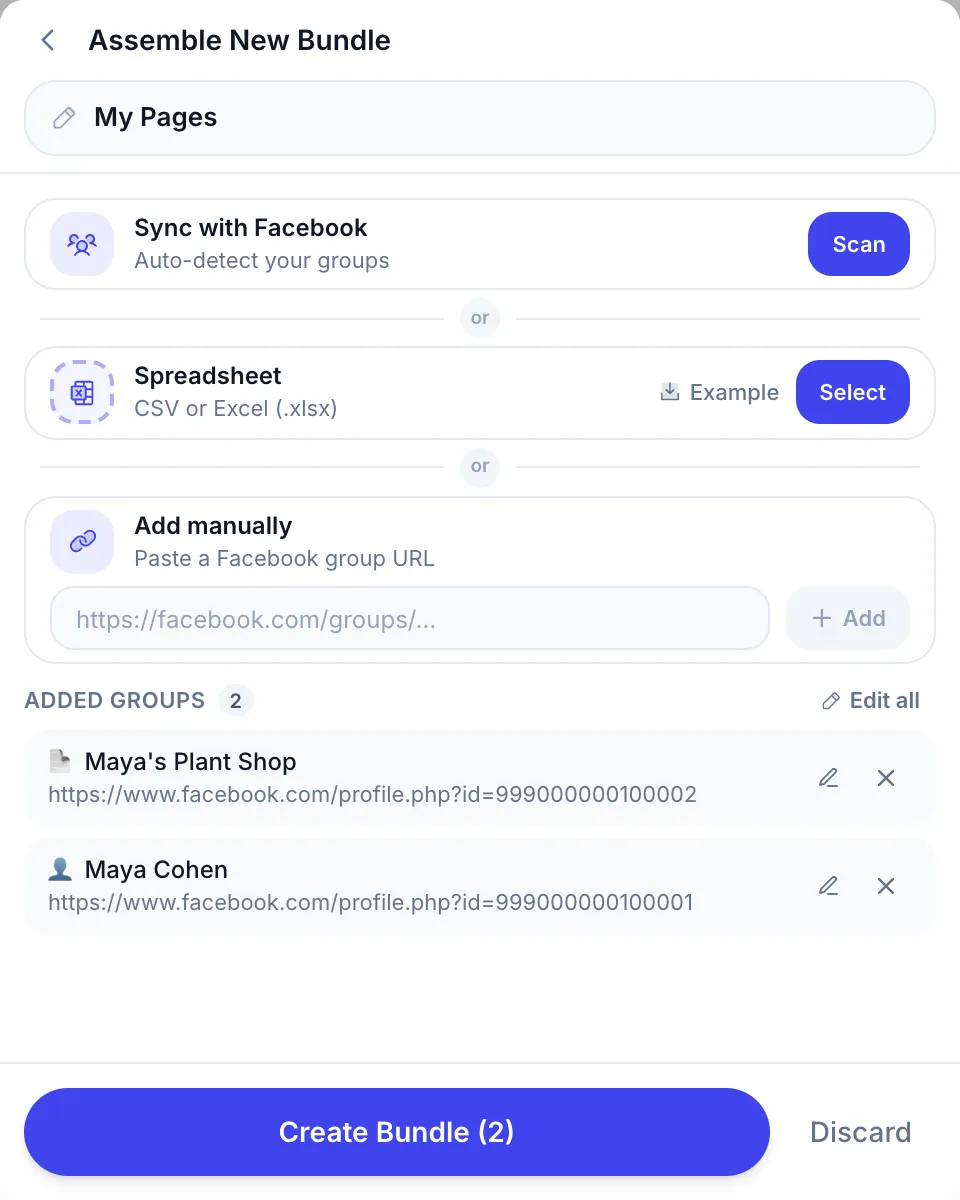
- Imports the groups you’re a member of into reusable lists, such as “Austin local groups” or “Plant lovers”.
- Sends a different wording to each group with Spintax.
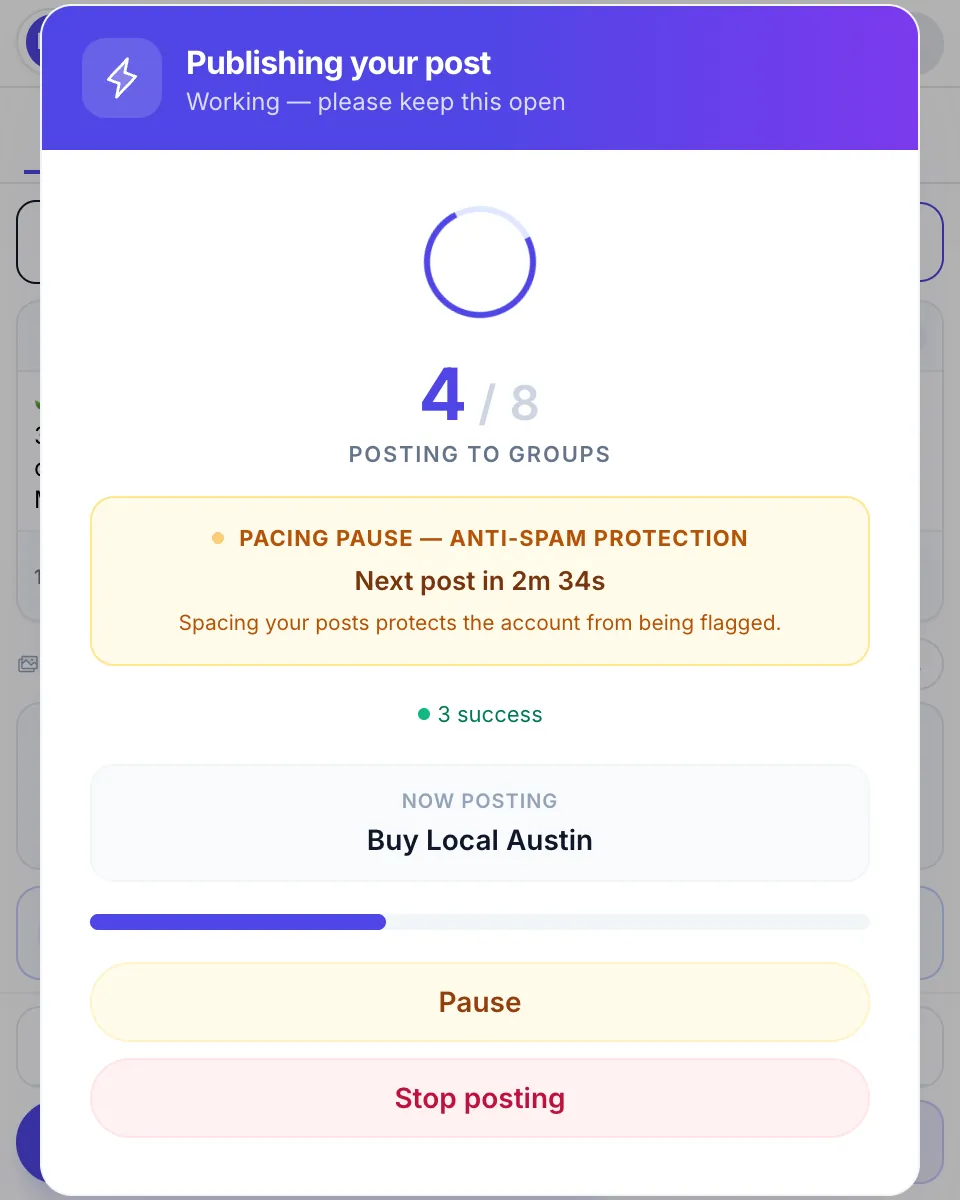
- Paces the run. MultiGroupPoster’s default is a random 3–6 minute pause after every 1–3 posts.
- Posts as your profile, or as a Page you manage in groups that accept Pages.
- Reaches feeds as well as groups: add a Page you manage or your own profile to a list, and the post goes on its own feed too.
- Reports a result for every group: published, pending approval, or failed with the reason.
What it doesn’t change:
- The run happens in your browser, so Chrome has to be open and the computer awake at the scheduled time.
- It doesn’t make posting risk-free. Pacing and varied text still decide how Facebook reacts, as explained in account safety.
What to look for in an extension:
| Feature | Why it matters |
|---|---|
| A check before big runs | Flags a run that is too fast, or the same text everywhere, before it starts rather than after Facebook reacts |
| Randomized pauses | Fixed intervals (30 s, 30 s, 30 s) look machine-made |
| Spintax variations | The same text in 30+ groups is a duplicate-content pattern, whatever the pace |
| A choice of posting method | MultiGroupPoster’s Fast method posts in the background; Safe posts on screen like a person, slower |
| Per-group results | Without them you can’t tell which posts were held for approval or declined |
See the comparison of extension options →
For the full step-by-step, see how to post to multiple Facebook groups at once.
3. Cloud schedulers — for Pages + Instagram + X cross-posting
Buffer, Hootsuite, Later, Sprout Social, SocialPilot and MeetEdgar are the major cloud schedulers in 2026. They share one design: you connect your accounts once, and their servers publish through each network’s official API.
What they do well:
- One composer for a Page plus Instagram, X, LinkedIn, TikTok and Pinterest.
- Team workflows: approval steps, roles, client workspaces.
- Analytics across networks in one dashboard.
- Bulk upload of scheduled posts from a CSV file.
- Hands-off publishing: your computer doesn’t need to be on.
What they can’t do:
- Post to Facebook groups (the API permission was removed on 22 April 2024).
- Post to a personal profile (no API since 1 August 2018).
If you need both Pages and groups, the practical answer is a stack: Meta Business Suite or a cloud tool for the Page, and a browser extension for the groups. Our comparisons with Buffer, Hootsuite and SocialPilot show how each one fits next to a group tool. If SocialPilot itself is the tool you want to replace, SocialPilot alternatives lists the cheaper schedulers.
No-code workflows: RSS, spreadsheets, Zapier and Make
For a Page, automatic posting often means a trigger rather than a calendar: a new blog article, a new product or a new spreadsheet row becomes a Page post without anyone touching it. Zapier and Make both have Facebook Pages actions for this.
A typical Make scenario:
- Trigger: Watch RSS feed items, a new row in Google Sheets, or a new WordPress post.
- Caption: an optional text step that builds the post from the title, a short summary and the link.
- Action: create a post on your Facebook Page.
- Duplicate guard: save each item’s URL in a data store, and add a filter that stops the run when the URL is already there.
Duplicates are the most common complaint with these workflows. They usually come from two scenarios or Zaps watching the same source, or from a feed that gives an item a new ID when it is edited, so the tool treats it as new.
What these tools can’t do any more: Zapier removed its Facebook Groups app on 22 April 2024, and Make retired its Facebook Groups module, so no workflow tool can post into a group. Which Facebook Groups integrations still work maps what survived, for reading groups as well as publishing to them.
How to automate Facebook Page posts for clients (agencies)
Agencies automate client Pages the same way, with two extra concerns: access and approval.
- Get access the right way. Ask each client to add your agency’s business portfolio as a partner and give it access to their Page, in their business settings. You never need their password, and they can remove your access at any time.
- Schedule in Meta Business Suite. Every client Page you have access to appears in the account switcher, and each one has its own Planner. The steps for one Page are the same as in auto posting to a Facebook Page.
- Add a cloud scheduler as the client list grows. Buffer, Hootsuite and SocialPilot add client workspaces, an approval step before publishing, and reports you can send.
- Keep groups separate. No agency tool can post into Facebook groups. If a client’s plan includes groups, the posts come from an account that belongs to them, often the client’s Page in groups that accept Pages, run from the browser of someone who manages that Page.
Recurring content is where agencies lose most time: Meta Business Suite won’t repeat a post, so evergreen posts are copied and rescheduled by hand, or handed to a cloud tool with a recycling queue.
Decision matrix: which tool for which job
| You want to automate posting to… | Best tool category | Example |
|---|---|---|
| Your Facebook Page | Meta Business Suite (free) | Native, no third-party access |
| Your Page + Instagram + X | Cloud scheduler | Buffer, Hootsuite |
| Client Pages (agency) | Business Suite with partner access, plus a cloud scheduler for approvals | SocialPilot, Hootsuite |
| A Page, from a blog feed or spreadsheet | Workflow tool | Zapier, Make |
| Groups you admin | The group’s scheduler and Admin Assist (free) | Daily, weekly or monthly recurring posts |
| Groups you joined | Browser extension | MultiGroupPoster |
| Your personal profile | Professional mode’s own scheduling, or a browser extension | MultiGroupPoster can post on your profile’s feed |
| Facebook Marketplace listings | By hand | No reliable automation tool exists |
| Pages + groups together | Stack: Business Suite or a cloud tool + an extension | Buffer + MultiGroupPoster |
If your honest goal is “post the same listing in 50 Facebook groups every morning”, only a browser extension does it in 2026. Cloud tools can’t, Facebook’s own tools can’t, and by hand it is 90–120 minutes of clicking per round.
Account safety: what actually gets flagged in 2026
Meta’s spam policy is explicit about automation: it forbids posting, sharing or engaging “either manually or automatically, at very high frequencies”, and it can restrict accounts at lower frequencies when there are other signs of spam, such as repetitive content. In July 2025 Meta also announced lower reach for accounts that repeatedly repost other people’s content, and for duplicate copies of videos. Volume matters, but the pattern matters more.
What raises the risk, roughly in this order:
- The same text in many groups within an hour. Duplicate content is the fastest flag.
- Fixed timing. A post every 30 seconds for an hour looks like a machine.
- Sudden volume on a new account, or in groups you joined yesterday.
- The same link in every post.
- Ignoring the signals: groups that keep holding or removing your posts, and warnings in your Support Inbox.
The pattern we recommend, condensed from safe auto-poster settings:
- 50–100 posts a day on accounts older than 12 months, fewer on younger accounts.
- A random pause of a few minutes between posts (MultiGroupPoster’s default is 3–6 minutes after every 1–3 posts).
- Spintax with at least three wordings of the key sentences.
- An image or a video on most posts.
- Posts spread over 4–8 hours, and the same group at most once a day.
No setting makes posting risk-free. Push past these limits, especially volume with fixed timing, and Facebook will eventually react, whether the clicks are yours or a tool’s. The deeper version is bulk posting on Facebook without getting restricted.
A concrete weekly automation workflow
Here is a realistic week for a real-estate agent who posts to a Page and to local buyer groups.
Sunday evening (about 15 minutes):
- In Meta Business Suite, schedule the week’s five Page posts, one per weekday at 9:00.
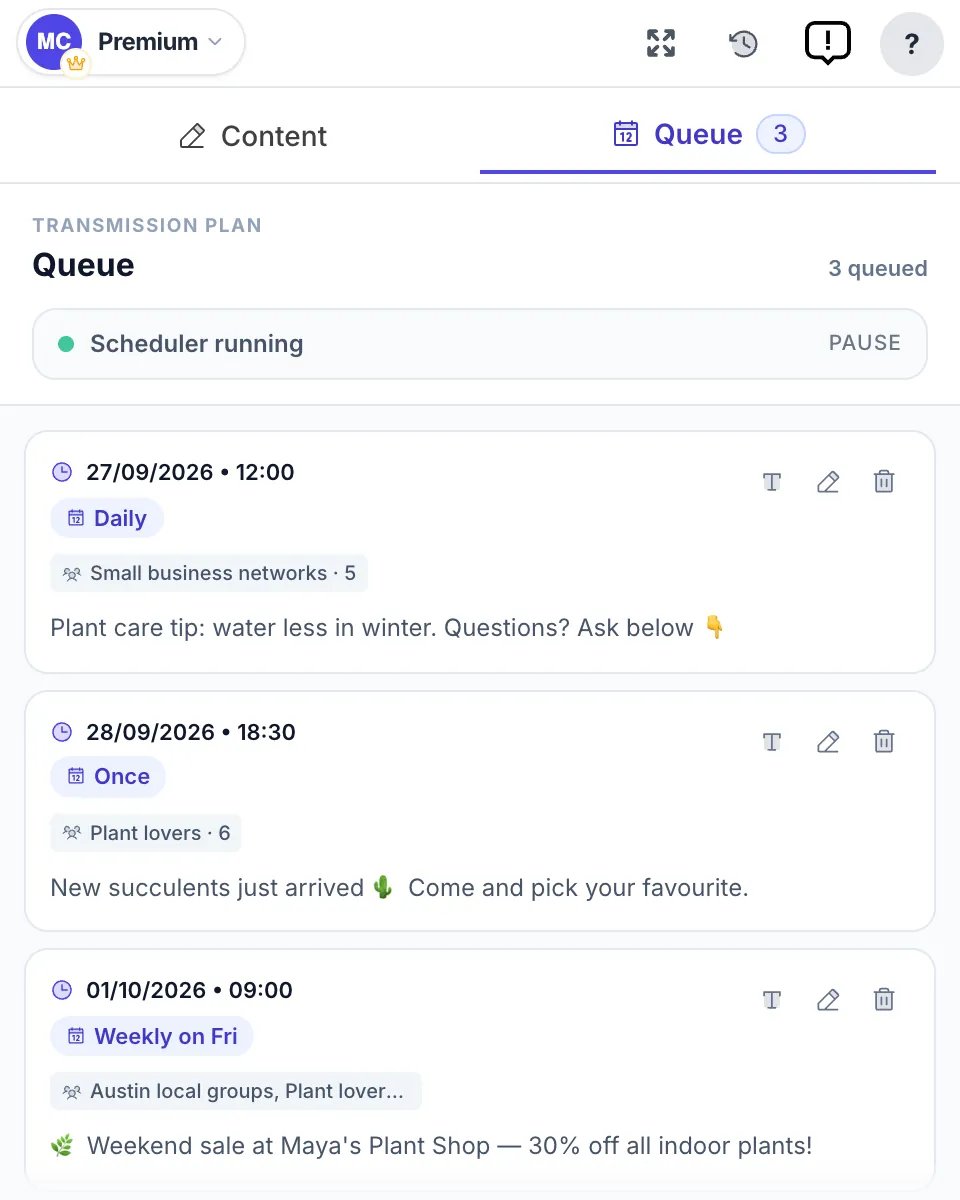
- In MultiGroupPoster, write the group post with Spintax variations, attach three listing photos, pick the saved list “Tampa buyers”, and use Set Schedule: weekly on Monday, Wednesday and Friday at 8:50.
Monday 8:50:
- Chrome is open, so the scheduled run starts. It posts to the first group or two, then waits a few minutes between posts.
Monday 9:00:
- The Page post publishes from Meta’s servers.
Monday, late morning:
- The run ends. A typical result: most groups published, a few pending admin approval, one or two declined with the reason. Pending posts need nothing from you; don’t post them again.
Wednesday and Friday: the same run repeats on its own. Total attention for the week is about 15 minutes on Sunday plus a glance at the results, against 90–120 minutes of clicking for every manual round in 50 groups.
If you would rather queue the group side for the whole week in one sitting, that is what a Facebook group post scheduler is for.
Automatic vs. scheduled posting: where the schedule runs
Automatic Facebook posting and scheduled Facebook posting are the same thing described two ways: the post goes out at a time you set, without you clicking Post at that moment. “Scheduled” stresses the time, “automatic” the hands-off part. What actually differs between tools is where the schedule runs, and that decides whether your computer has to be on:
| Method | Where the schedule runs | Reaches | Computer on at post time? |
|---|---|---|---|
| Meta Business Suite | Meta’s servers | Pages, Instagram | No |
| Cloud scheduler | The vendor’s servers | Pages, Instagram, X and more | No |
| Workflow tool (Zapier, Make) | The vendor’s servers, on a trigger | Pages | No |
| Browser extension | Your own Chrome, in your logged-in session | Groups, your profile, Page feeds | Yes: Chrome open and the computer awake |
The last row is the price of reaching groups at all: the only way into a group you joined is your own session, so the run happens where that session lives. The group side is covered step by step in how to schedule posts to joined Facebook groups.
FAQ
How do I automate Facebook posts for free?
For a Page, use Meta Business Suite: create the post, turn on Set date and time and click Schedule. It is free and publishes from Meta’s servers. Group admins can schedule posts and set daily, weekly or monthly recurring posts inside the group. For groups you only joined, MultiGroupPoster gives you 6 free posting runs to try, one-time, with no credit card.
How do I automate Facebook Page posts for an agency?
Ask each client to add your business portfolio as a partner with access to their Page, then schedule every client Page from Meta Business Suite. Once you handle many clients, a cloud scheduler such as Buffer, Hootsuite or SocialPilot adds client workspaces and approval steps. Groups stay outside both: posts there must come from a member’s own session.
Can you automate posts to Facebook groups?
Not through Meta’s API: the permission that let apps publish to groups was removed on 22 April 2024, so Buffer, Hootsuite, Zapier and Make can’t post there. Group admins can still schedule natively inside the group. Members can automate only with a browser extension that posts from their own logged-in session, at a human pace.
Can I automate posts on my personal Facebook profile?
Not with outside apps: Meta removed the permission to publish to profiles on 1 August 2018. A profile in professional mode gets Facebook’s own scheduling option. Otherwise the only route is a browser extension that runs in your own session; MultiGroupPoster can post on your own profile’s feed as well as in groups.
What is the difference between automatic and scheduled posting on Facebook?
For the reader, none: both publish at a time you set without you clicking Post at that moment. What differs is where the schedule runs. Meta Business Suite, cloud schedulers and Zapier or Make run it on their servers, so your computer can be off. A browser extension runs it in your own Chrome, which must be open with the computer awake.
Is automating Facebook posts allowed?
Scheduling Page posts in Meta Business Suite is Meta’s own feature, and cloud tools that publish to Pages through Meta’s API are approved apps. Extensions that post from your own session sit in a gray area: Meta’s terms don’t name them, but its spam policy forbids posting at very high frequencies, manually or automatically. Pace and content decide the risk.
Why can’t Buffer or Hootsuite post to Facebook groups?
Meta removed the publish_to_groups permission from its Graph API on 22 April 2024, after announcing it in January 2024 with version 19.0. Since then no cloud app can publish to any Facebook group, even one you admin. Group posts have to come from inside a real Facebook session, which means a browser extension running in your own Chrome.
How many posts per day can I automate safely?
Our standard guidance is 50–100 posts a day for accounts older than 12 months, 40–80 for accounts 6–12 months old and 20–40 under 6 months, with MultiGroupPoster’s default pacing: a random 3–6 minute pause after every 1–3 posts, Spintax and an image. No number makes posting risk-free; vary the text and don’t post in the same group twice a day.
Will Facebook ban me if I automate posts?
No tool can promise it won’t. What draws restrictions is the pattern: the same text in many groups, machine-like timing, sudden volume on a new account and the same link everywhere. Slow pacing, varied text and one post per group per day keep the risk low, and the same rules apply when you post by hand.
Does Meta Business Suite repeat or recycle posts automatically?
No. Meta Business Suite has no repeat setting for Page posts: to run a post again, you copy it into a new post and schedule the copy. Facebook’s only native recurring option is for group admins, inside the group. Reposting the same material often can also cost reach, since Meta lowers the distribution of duplicated and unoriginal content.
How do I stop Zapier or Make from posting duplicates to my Page?
Use one trigger that only returns new items, such as Watch RSS feed items, and never run two scenarios or Zaps on the same source. In Make, save each posted item’s URL in a data store and add a filter that stops the run when the URL is already there. Duplicates also appear when a feed changes an item’s ID after an edit.
Can I use AI to write the posts and then automate them?
Yes. Ask ChatGPT, Claude or another assistant for several versions of the same post, then paste them in as Spintax variations or into your scheduler’s queue. Read what it writes before it goes out: Meta lowers the reach of content it sees as unoriginal, and a quick human check catches wrong prices, dates and links before every group sees them.
Want to automate group posts now? Add MultiGroupPoster to Chrome free: 6 posting runs to try (one-time), no credit card. Plans are on the pricing page.