

The limits at a glance
| Where you post | Can you schedule? | How far ahead | How many |
|---|---|---|---|
| Facebook Page (Meta Business Suite or the Page) | Yes | 20 minutes to 29 days | No published maximum |
| Group you manage | Yes, plus recurring posts | Whatever the date picker offers | No published maximum |
| Group you only joined | No, not in Facebook | Not available | Not available |
| Personal profile | Only in professional mode | Whatever the date picker offers | No published maximum |
| Buffer, free plan | Pages | Its own calendar | 10 scheduled posts per channel |
| Later, free plan | Pages | Its own calendar | 12 posts per profile a month |
Facebook limits from Meta’s Help Center, checked 15 October 2026. Third-party plans as listed on each vendor’s site on 3 October 2026.
Pages: 20 minutes to 29 days
Meta’s Help Center page on scheduling Page posts says it plainly: you can schedule posts to publish between 20 minutes and 29 days away. That holds whether you schedule from Meta Business Suite or from the Page itself.
How to schedule a Page post:
- Open Meta Business Suite and click Create post, or start a post on the Page.
- Choose the Page, and more Pages or Instagram accounts if you want.
- Write the post and add the media.
- Next to Scheduling options, turn on Set date and time and pick the moment.
- Click Schedule. The post waits in the Planner, where you can reschedule it, move it to drafts or delete it.
All times use your current time zone. If you travel, check the time before you schedule.
Why other sites say 75 days or 6 months. Earlier Meta pages and many third-party guides quoted longer windows, and some still do. Meta’s current Help Center says 29 days, and Page owners widely report a picker that stops there. If your picker allows a different range, trust the picker; it is what Facebook will accept from your account.
Instagram is a separate case. Meta’s help for its Meta One subscription says eligible public Instagram accounts on the Advanced, Expert or Max plans can schedule up to a year ahead from the mobile app. That applies to Instagram, not to Facebook Pages.

Is there a maximum number of scheduled posts?
Meta’s Help Center doesn’t give one for Pages. In practice the 29-day window is the limit: you can fill each day of the next four weeks, but nothing beyond. Agencies that want a quarter ahead schedule in monthly batches, or use a paid tool that holds the posts and sends each one to Facebook when it falls due.
More posts isn’t automatically better. A Page that posts several times a day reaches fewer people per post than one that posts once a day with something worth reading. Facebook also lowers the reach of duplicated and unoriginal posts, so a full calendar of the same message hurts more than it helps. Facebook organic reach in 2026 has the numbers.
Groups: only the ones you manage
If you are an admin or moderator of a group, its post box has a scheduling option, and Meta also lets you set up recurring posts there, such as a weekly promo thread. Meta’s group help doesn’t publish a window or a count; the date picker shows what you can pick.
In the many groups you only belong to, there is no schedule button. And no outside tool can fill the gap through Meta: the Groups API that Buffer, Hootsuite and Zapier used was switched off on 22 April 2024. How to schedule posts to joined Facebook groups explains what still works.
Personal profiles
A personal profile can schedule only with professional mode turned on, which adds scheduling to the post box. Without it, posts go out when you press Post. Outside tools can’t publish to personal profiles at all: Meta removed that permission (publish_actions) on 1 August 2018.
Limits in third-party schedulers
Cloud schedulers publish to Pages through Meta’s API, so Facebook’s rules apply, and their own plan limits come on top:
| Tool | Free plan scheduling limit | Paid from |
|---|---|---|
| Buffer | 3 channels, 10 scheduled posts per channel | $6 per channel a month |
| Later | 12 posts per profile a month | $25 a month |
| Publer | 3 accounts, 10 scheduled posts each | $5 a month for one account |
| Post Planner | 1 account, 10 scheduled posts | $9 a month, billed yearly |
| Hootsuite | No free plan | $99 per user a month, billed yearly |
As listed on each vendor’s own site on 3 October 2026. Plans change often; check before you buy.
The Facebook post scheduler app comparison covers each one in detail, including bulk uploads.
Scheduling in groups you joined
For groups you are a member of, the only way to schedule is a tool that posts from your own logged-in Facebook session. That is what the MultiGroupPoster Facebook post scheduler does: a Chrome extension that posts one post to the groups on your list, one at a time with a pause between them.
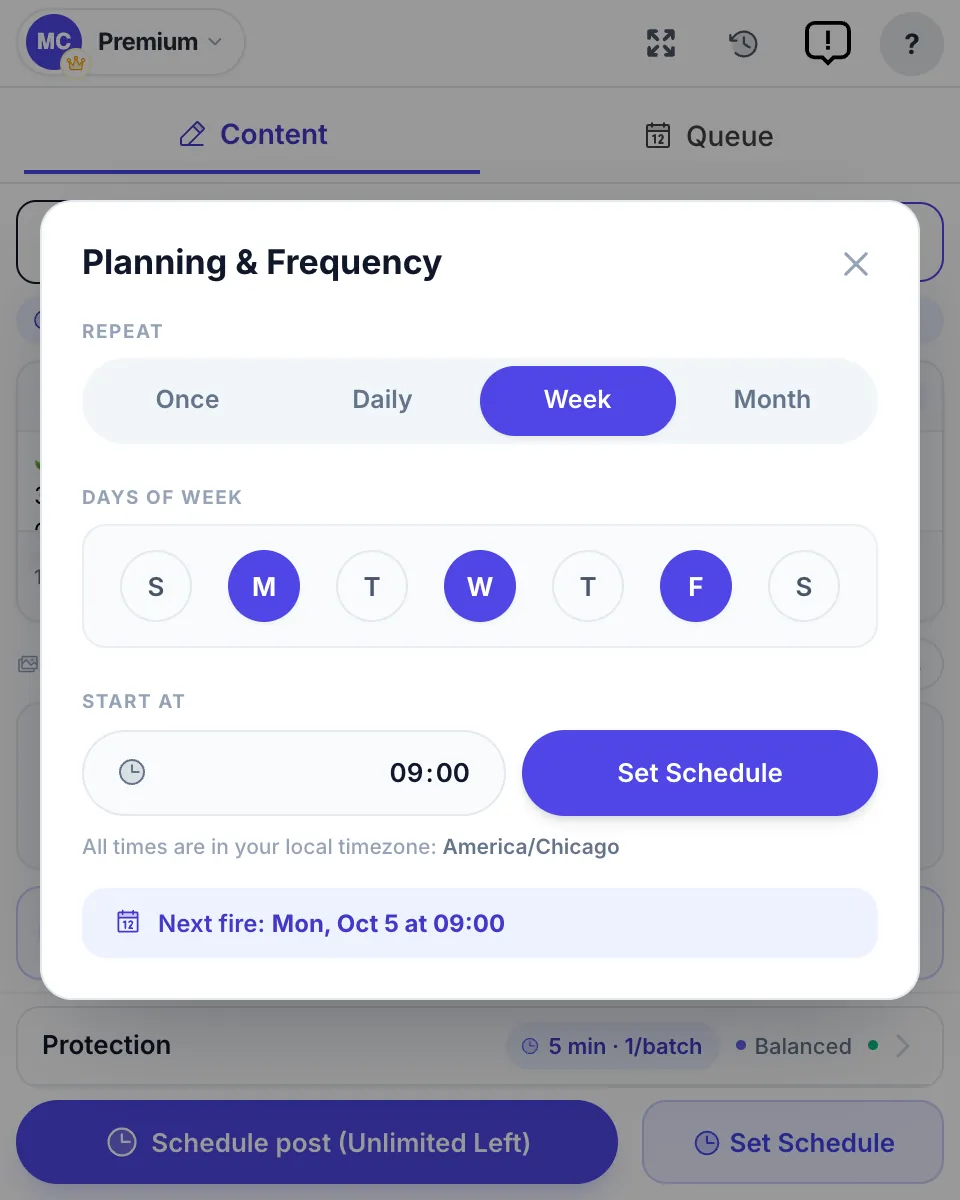
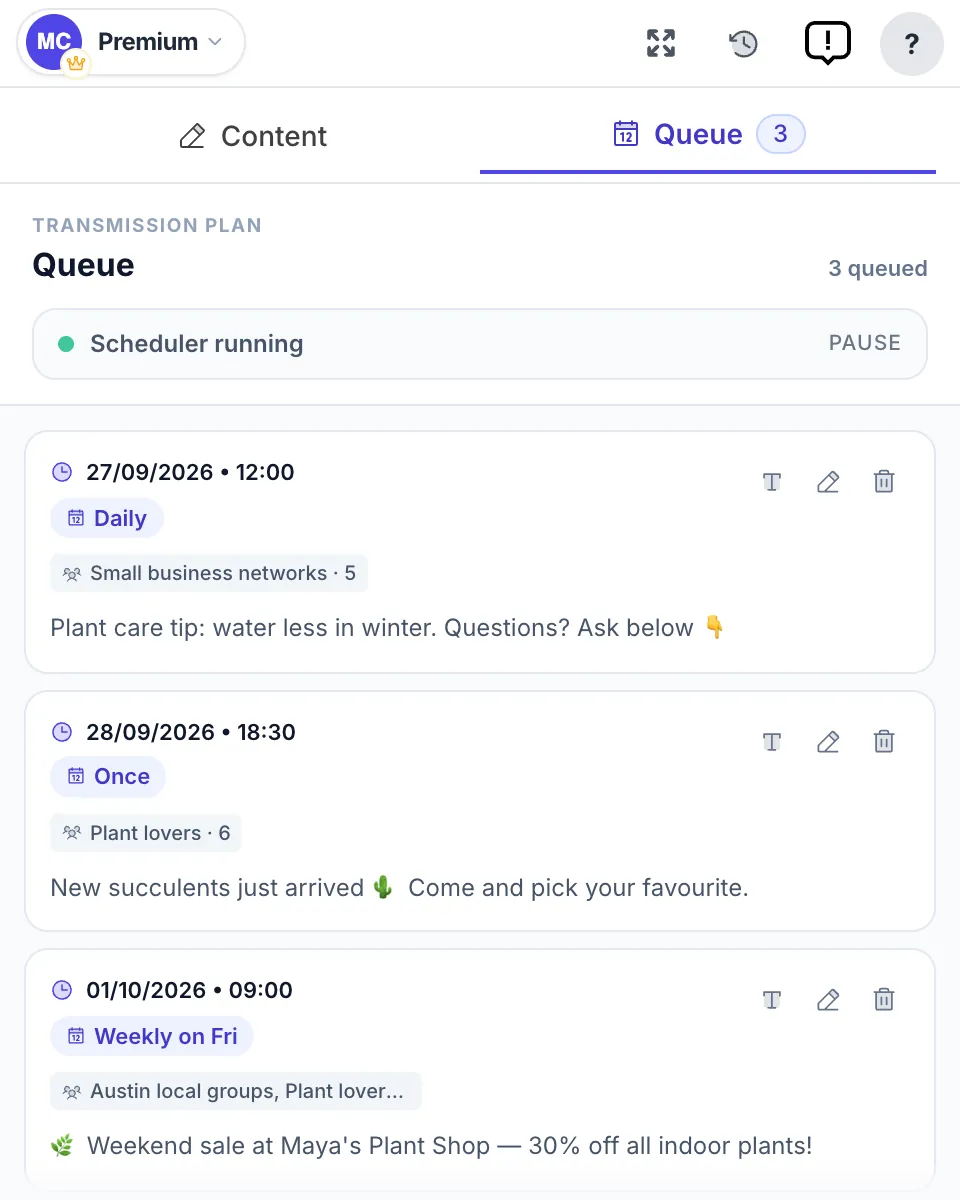
The difference from a Page scheduler is that you rarely need many entries. A post set to repeat daily, weekly or monthly is one schedule, not thirty, and it keeps running until you stop it. The Queue tab shows every scheduled post with its next run, how often it repeats and the lists it goes to.
What to know before you rely on it:
- Chrome must be open at post time, because the extension runs in your browser. A run that falls due while the computer sleeps starts when it wakes.
- Repeats need variety. Use Spintax so each group and each week gets a different wording. Recurring Facebook posts shows how to set that up without tripping duplicate-content filters.
- Plans: 6 free posts to try, then $9.99 a month or $69.99 a year for unlimited posting.
FAQ
How many posts can you schedule on Facebook?
Meta’s Help Center sets no maximum number of scheduled posts for a Page; the limit that applies is time. Page posts can be scheduled from 20 minutes to 29 days ahead (checked 15 October 2026). Free third-party plans do cap the count, for example Buffer’s free plan allows 10 scheduled posts per channel.
How far in advance can you schedule a Facebook post?
For a Facebook Page, between 20 minutes and 29 days ahead, according to Meta’s Help Center on 15 October 2026. Older Meta pages and many guides still say 75 days or 6 months. If the date picker in your account shows a different range, the picker is what Facebook will accept.
Why can’t I schedule a Facebook post more than 29 days ahead?
Because 29 days is the window Meta gives for Page posts. Schedule the next month’s posts once the earlier ones have gone out, or use a paid scheduler that keeps its own calendar further ahead and sends each post to Facebook when it falls due.
Can I schedule posts in a Facebook group?
In a group you manage, yes: admins and moderators can schedule posts and set up recurring posts in the group’s post box. In groups you only joined there is no scheduling option, and outside tools can’t post there since Meta removed group publishing from its API on 22 April 2024. A browser extension can schedule those posts from your own session.
Can I schedule posts on my personal Facebook profile?
Only with professional mode turned on, which adds scheduling to your profile’s post box. A profile without professional mode can’t schedule posts, and third-party tools can’t publish to personal profiles at all, since Meta removed that permission in 2018.
How do I schedule a post that repeats every week?
Meta Business Suite has no repeat option for Page posts; you copy the post and schedule each copy. Group admins can set recurring posts in their own groups. For groups you joined, MultiGroupPoster repeats a post daily, weekly or monthly from one schedule, so one entry covers months.
Pages in Meta Business Suite; groups you joined on a schedule. See the Facebook group post scheduler or add MultiGroupPoster to Chrome: 6 free posts, no credit card.