
What you can ask
Talk to the assistant the way you would talk to a helper. It asks one short question at a time when it needs something (which list, which photos, a first comment).
- “Show me my group lists in MultiGroupPoster.”
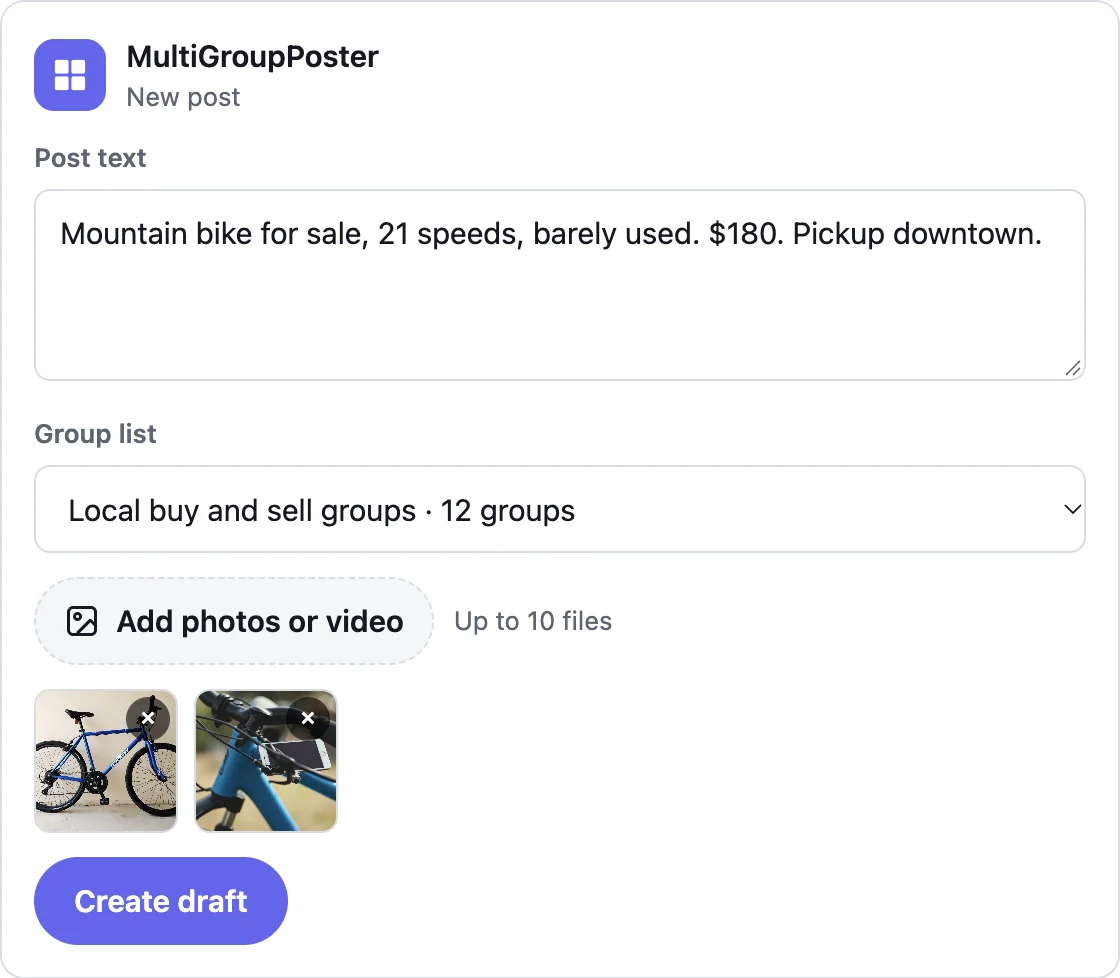
- “Write a short post for my bakery's weekend special and save it as a draft for my local groups.”
- “Here are 3 photos of my car. Write a for-sale post and send it to my buy and sell groups now.”
- “Post this to my real estate groups with a first comment that has my phone number.”
- “Did the post go out? Give me the links.”
The assistant can also check how a post is doing and tell you, group by group, where it was posted and where it failed and why.
Connect Claude in 2 minutes
You need the free MultiGroupPoster extension in Chrome, signed in, with at least one group list. Then:
- In MultiGroupPoster, open Help, then Connect an AI assistant.
- Click Add to Claude. Claude opens with everything filled in. Press Continue, then Connect.
- A MultiGroupPoster sign-in page opens. In MultiGroupPoster, click Get my code and type the 8 digits on that page.
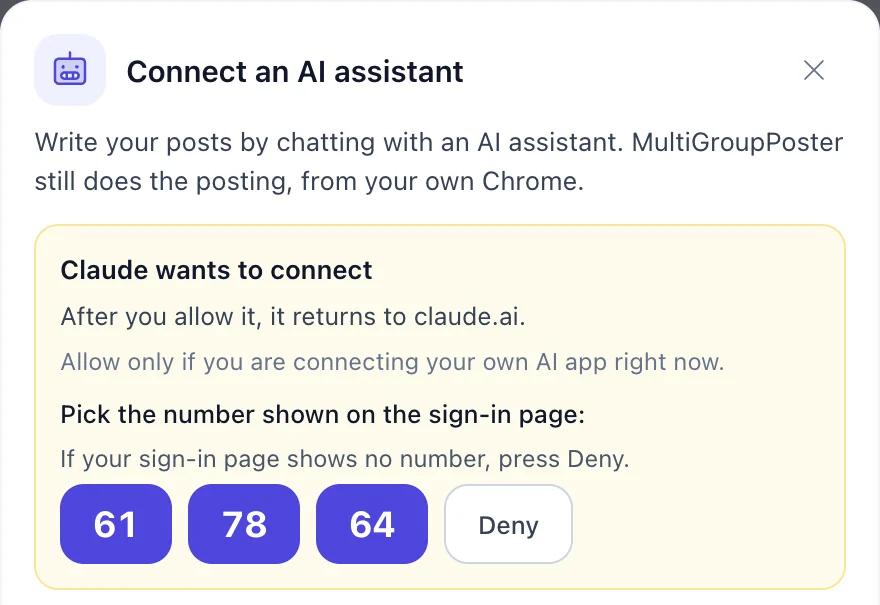
- The page shows a number. In MultiGroupPoster, pick the same number. You are connected, and Claude can start.
https://mcp.multiplegroupposter.com/mcp 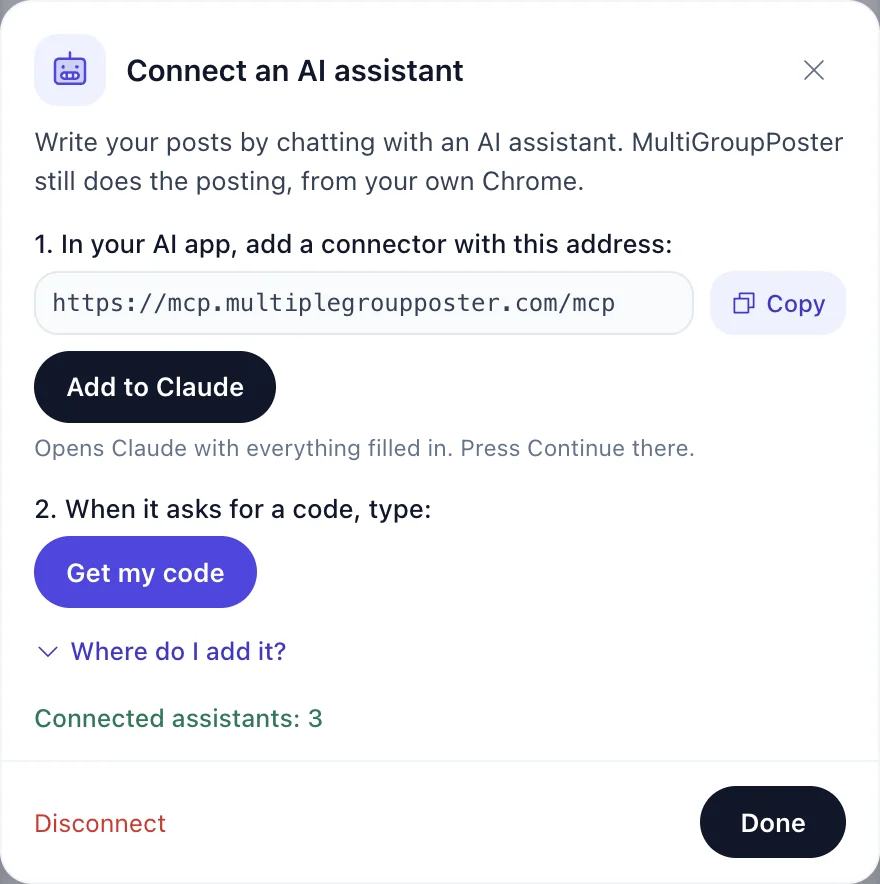
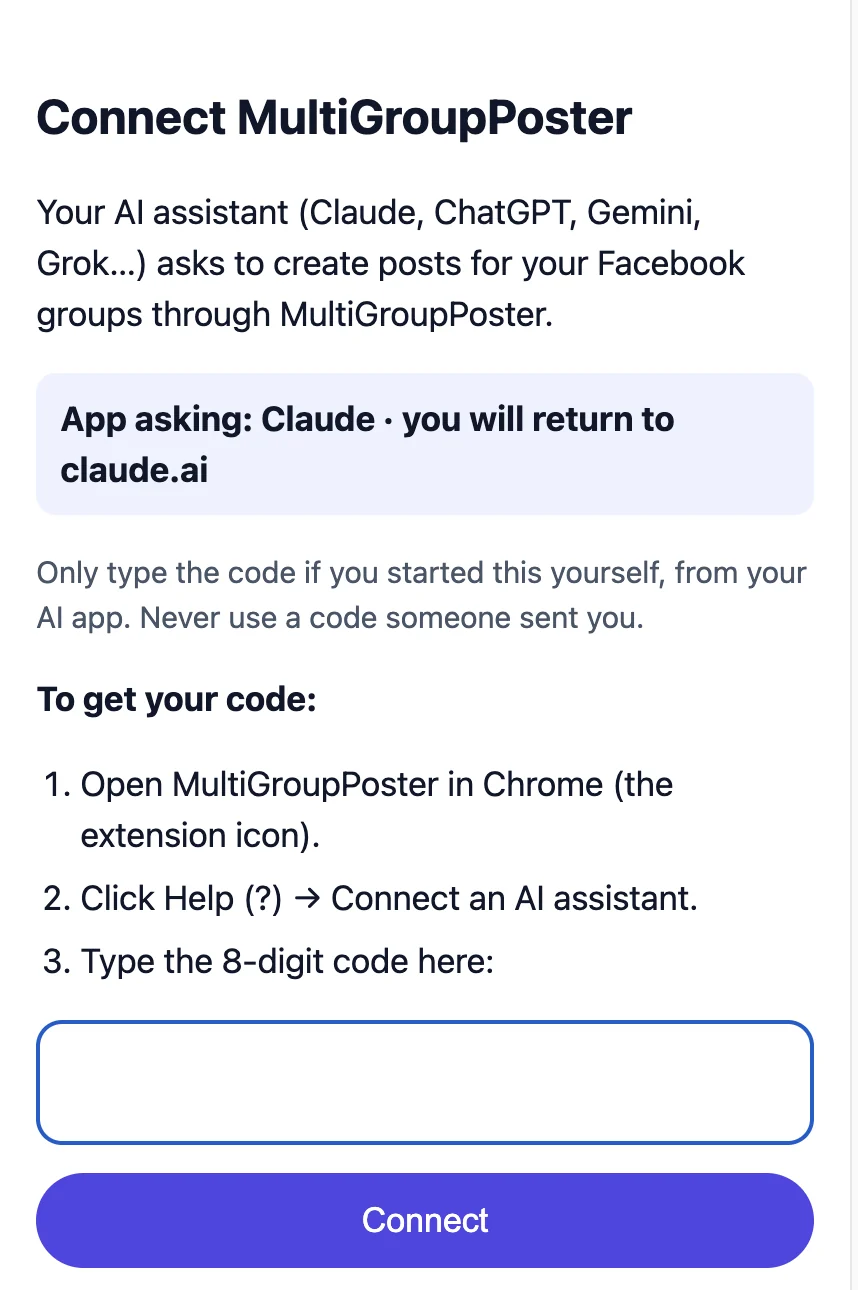
Claude Free allows one custom connector. On a phone, connect once from a computer and it then works in the Claude app too.
Other AI apps
Any app that supports custom MCP connectors can use the same address. The sign-in steps are the same as for Claude.
| App | Where to add it | Good to know |
|---|---|---|
| Claude (web, desktop, mobile) | The Add to Claude button, or Customize, Connectors, Add, Custom connector | Free plan: one custom connector. Team and Enterprise: an owner adds it first. |
| ChatGPT | Plugins, Add custom MCP server | Posting works only on Business and Enterprise plans. On Plus and Pro, custom connectors cannot post. |
| Gemini | Connected apps, Add | For now: US only, in English, with a personal Google account. |
| Grok | grok.com/connectors, New connector, Custom | Paste the address and sign in. |
| Perplexity, Mistral Le Chat | Add a custom (remote) connector | Perplexity: Pro and higher. |
| Codex, Claude Code, Cursor, VS Code | Add a remote (HTTP) MCP server with the address | For technical users. Sign-in opens in your browser. |
Microsoft Copilot and Meta AI do not support custom connectors for personal accounts yet.
What happens when the assistant posts
- Draft is the default: the post waits in MultiGroupPoster, you check it and press Publish.
- To post right away, the assistant first shows a summary (list, number of groups, text, photos, first comment, method) and needs your clear yes. Claude also asks before running any posting tool.
- MultiGroupPoster posts from your own Chrome with your settings: Safe (fills in Facebook’s own post box) or Fast, with your pacing. If Chrome is closed, the post waits until it opens.
- The assistant follows the post and gives you the links. If a group fails it tells you why, and it does not post again blindly, so nothing goes out twice.
- Your plan applies as usual: the free posts to try, then your paid plan.
Privacy
The connector only sees what the assistant sends it: your group list names and how many groups each has, the post text, photos, first comment and the results. Photos are deleted after 24 hours and posts after 7 days. Disconnecting deletes everything right away. Your Facebook password and session never leave your computer, and we do not get your chat with the assistant.
All the details are in our privacy policy.
Try it with a demo account
Want to see how it works before you install anything? On the sign-in page, choose "Try a demo account". You get sample group lists, and posts are only simulated: nothing is posted to Facebook. To post for real, install MultiGroupPoster and connect again with your code.
If something does not work
The assistant says Chrome with MultiGroupPoster looks closed
Open Chrome. A post you already asked for waits and runs when Chrome opens.
It says MultiGroupPoster is not signed in
Click the MultiGroupPoster icon in Chrome and sign in, then ask again.
The sign-in page says the code is not right
Codes work for 20 minutes and only once. Click Get my code again for a new one.
MultiGroupPoster asks me to pick a number, but my page shows none
Press Deny. That request did not come from you.
ChatGPT will not run the posting tool
On ChatGPT Plus and Pro, custom connectors cannot post. Use Claude, or a ChatGPT Business or Enterprise workspace.
Frequently asked questions
Is the AI connector free?
Yes. The connector costs nothing. Posting uses your MultiGroupPoster plan, the same as posting from the extension.
Does the AI assistant get my Facebook password?
No. The assistant only talks to the connector. The posting is done by the MultiGroupPoster extension in your own Chrome, with the Facebook session you are already signed in to.
Can the assistant post without asking me?
No. By default it saves a draft that you publish yourself. To post right away it must show you a summary and get your clear yes first.
Which AI apps work with MultiGroupPoster?
Claude (one click), ChatGPT on Business and Enterprise plans, Gemini in the US, Grok, Perplexity, Mistral Le Chat, and developer tools such as Codex, Claude Code, Cursor and VS Code.
Do I need to keep Chrome open?
Yes, while posts are going out. The extension does the posting from your computer. If Chrome is closed, the post waits and starts when Chrome opens.
How do I disconnect?
In MultiGroupPoster, open Help, Connect an AI assistant, and click Disconnect. You can also remove the connector in your AI app.