
What “auto post” means for a Facebook Page
People who search for a Facebook Page auto post usually want one of three things, and each one points to a different tool:
| What you want | Example | Tool that does it |
|---|---|---|
| Scheduled posts | Write Monday’s post on Sunday and let it go out at 9:00 | Meta Business Suite (free), any paid scheduler |
| Triggered posts | Every new blog article or product appears on the Page by itself | Zapier, Make, RSS features in paid schedulers |
| Recurring posts | The same opening-hours post every Friday | Paid schedulers with recycling; not Meta Business Suite |
All three are easy for a Page, because Pages kept the API that outside apps publish through. Groups and personal profiles did not, which is where most of the confusion starts: a tool that auto posts to your Page can’t touch the groups your customers are in. The wider picture, Pages, groups and profiles side by side, is in how to automate Facebook posts. If you are still comparing tools, our guide to choosing a Facebook posting app sorts them by where they can post.

1. Meta Business Suite: free auto posting for your Page
Meta’s own scheduler lives at business.facebook.com and in the Meta Business Suite app. If you manage a Page, you already have it, and for most Page owners it is all they need.
How to schedule a Page post:
- Open Meta Business Suite with the account that manages the Page.
- Click Create post and choose the Page. Tick more Pages, or the connected Instagram account, if the same post should go there too.
- Write the text and add photos, a video or a link.
- Turn on Set date and time and pick the moment.
- Click Schedule. The post waits in the Planner until it publishes.
The post goes out from Meta’s servers at that minute, so your computer can be off. Reels and Stories are scheduled the same way.
How far ahead you can schedule. Meta’s Help Center gives a window of 20 minutes to 29 days ahead for Page posts (checked October 2026). Older Meta pages said 75 days, so if your date picker allows a different range, trust the picker.
What it does well:
- Free, with no third-party app connected to your Page.
- One post to several Pages and to Instagram at once.
- Suggested times when your audience is usually online.
- A Planner calendar that shows everything queued, where you can edit or reschedule a post before it goes out.
What it can’t do:
- Repeat a post. There is no repeat setting (see recurring posts).
- Post in the groups you joined. At most, groups your Page runs appear under Post to.
- Post from your personal profile. A profile in professional mode schedules inside Facebook instead.
- Send a different wording to each destination.
2. Zapier and Make: auto post to a Page from a feed or a sheet
Sometimes “auto post” means no calendar at all: a new blog article, a new product in your shop or a new row in a spreadsheet should appear on the Page without anyone writing a post. Zapier and Make both have Facebook Pages actions for this.
A typical setup:
- Trigger: a new RSS item from your blog, a new row in Google Sheets or a new WordPress post.
- Text: build the caption from the title, a short summary and the link.
- Action: create a post on your Facebook Page.
- Duplicate guard: keep a record of every link already posted and stop the run when the link is already there.
Duplicates are the usual complaint. They come from two Zaps or scenarios watching the same source, or from a feed that gives an item a new ID when it is edited. One trigger per source and the duplicate guard fix most of them. These tools stop at Pages: Zapier removed its Facebook Groups app on 22 April 2024, as which Facebook Groups integrations still work explains.
3. Paid schedulers: Buffer, Hootsuite, Later, Publer
Cloud schedulers connect your Page once and publish through Meta’s API from their servers. You pay for what Meta Business Suite doesn’t do: other networks in the same composer, team roles and approval, client workspaces, CSV bulk upload and, on some plans, recurring posts.
| Tool | Free plan | Paid from | Worth knowing |
|---|---|---|---|
| Buffer | 3 channels, 10 scheduled posts per channel | $6 per channel a month (Essentials) | Groups only by a reminder you post yourself |
| Hootsuite | None (14-day trial) | $99 per user a month, billed yearly | Bulk scheduler for up to 350 posts |
| Later | 12 posts per profile a month | $25 a month | Facebook Business Pages only |
| Publer | 3 accounts, 10 scheduled posts each | $5 a month for one account (Professional) | Recurring posts and recycling on the Business plan |
| Post Planner | 1 account, 10 scheduled posts | $9 a month, billed yearly | Facebook Pages only |
Plans and prices as listed on each vendor’s own site on 3 October 2026. They change often, so check before you buy.
The honest read: if you run one Page and an Instagram account, these tools are a paid convenience on top of a free one. They earn their price when you juggle several networks, several clients or a team. Our comparisons with Buffer and Hootsuite, and the wider Facebook post scheduler app roundup, go through the trade-offs.
Recurring Page posts: the limits
A post that repeats on its own, every Friday or on the first of the month, is the one kind of auto posting Meta Business Suite doesn’t offer. Your options:
- Copy and reschedule. Copy a published post into a new one and schedule the copy. Free, and fine for a handful of evergreen posts.
- A paid scheduler with recycling. Publer’s Business plan repeats and recycles posts; other tools have similar queues on their higher plans.
- Group admins can set daily, weekly or monthly recurring posts inside their own group, but that is a group feature, not a Page one.
Whatever the tool, repeat with care. Meta lowers the distribution of duplicated and unoriginal content, so a post that runs every week for a year reaches fewer people each time. Rotate two or three wordings and fresh images.
4. A browser extension: your Page plus the groups it posts in
Everything above stops at the Page. If your customers are in local groups, buy-and-sell groups or niche communities, no scheduler reaches them: Meta removed the publish_to_groups permission on 22 April 2024. What remains is a browser extension that posts from your own logged-in Facebook session, one group at a time. That is the job MultiGroupPoster does, and it touches Pages in two ways.
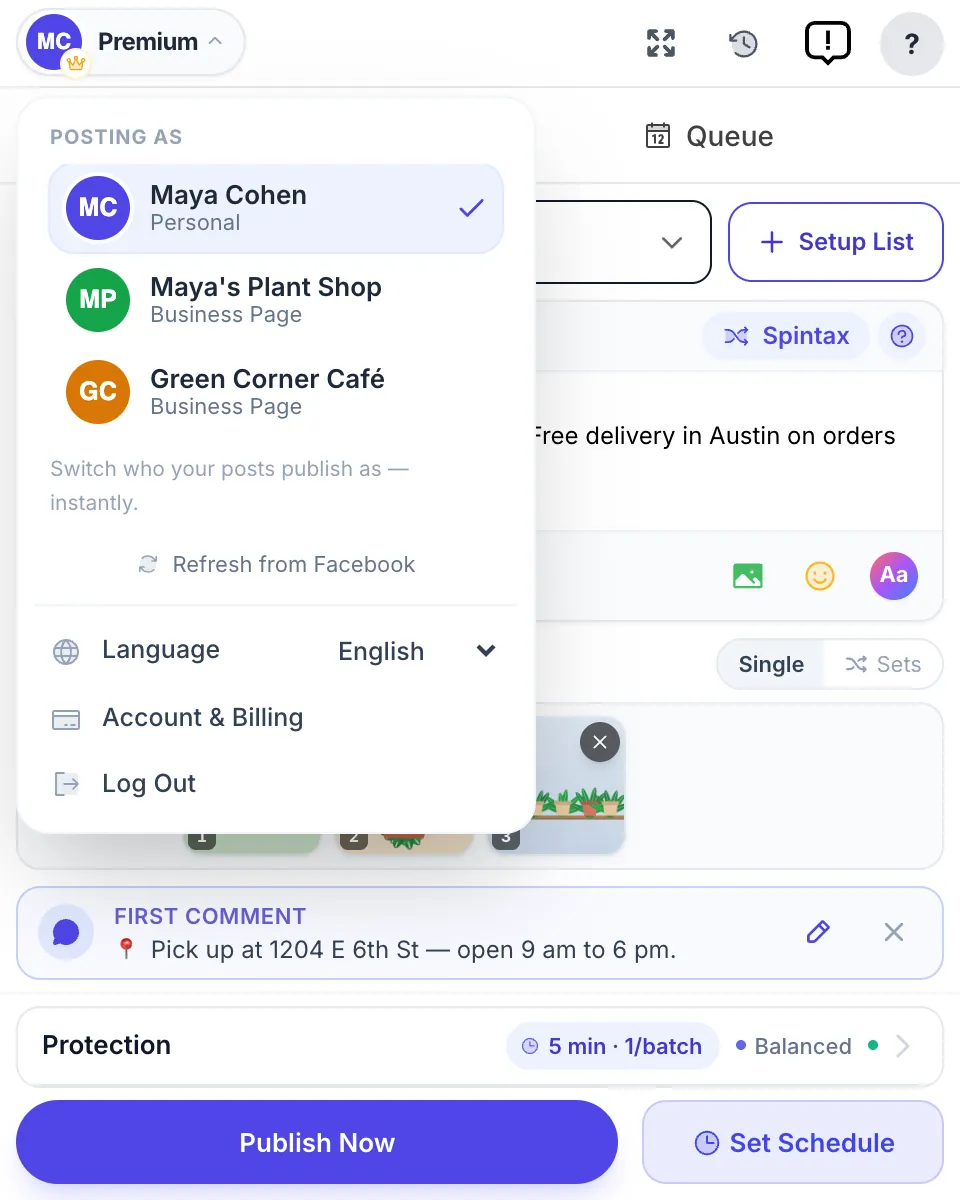
Post in groups as your Page. Open the account menu, and under Posting as pick one of the Pages you manage instead of your personal profile. The next posts go out under the Page’s name, in the groups that accept posts from Pages. Some groups accept only people; those show as failed in the results, with the reason. The full setup is in how to post in a Facebook group as a Page.
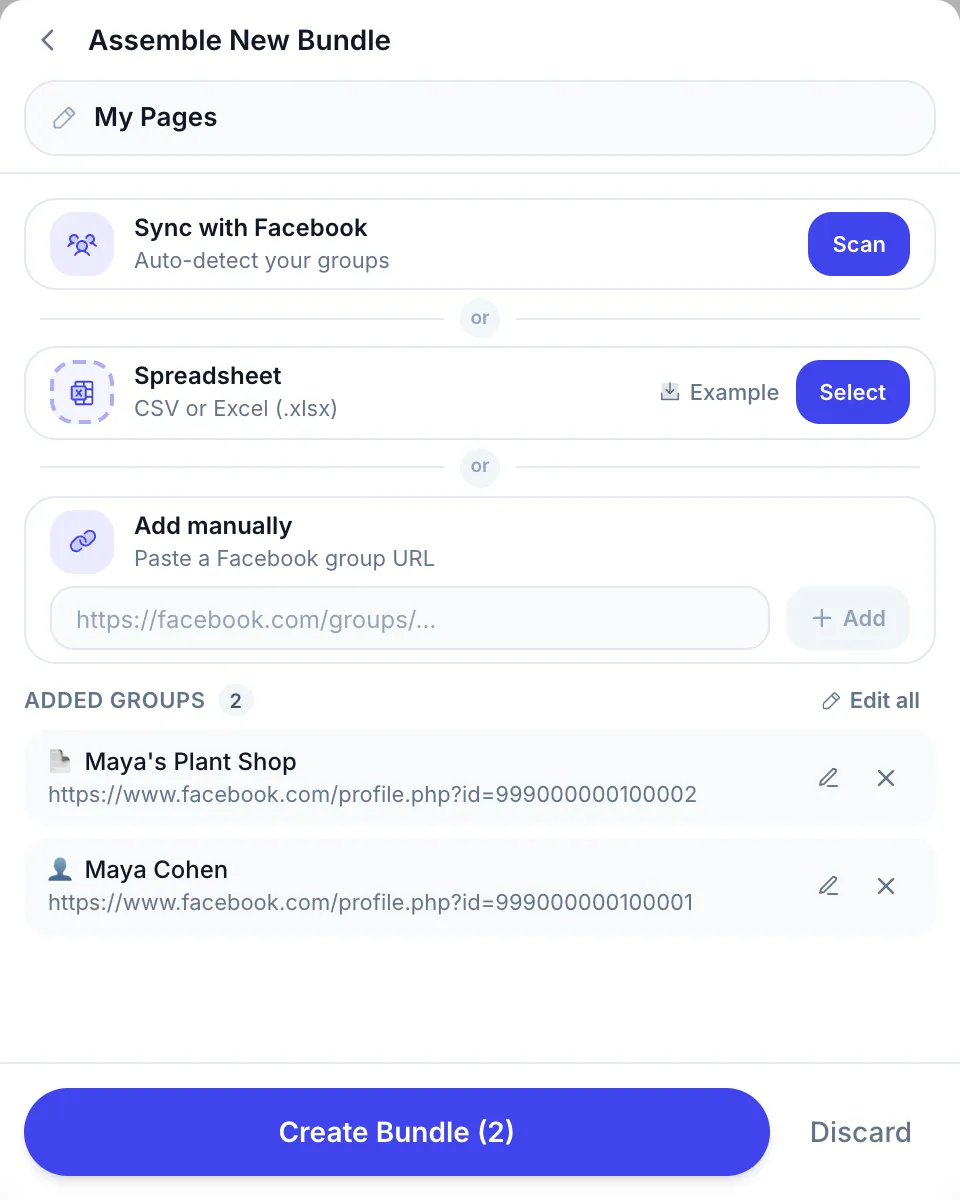
Post on the Page’s own feed. Open Setup List → Create group list, paste the Page’s link under Add manually and press Add. The Page appears with a 📄 icon, and your own profile (👤) can be added the same way. Pick that list for a post like any group list, and one run reaches your groups and your Page feed. Two rules apply: the Page always posts with the Fast method, and a Page you don’t manage is refused before anything is sent. Every step, with screenshots, is in the how-to-use guide.
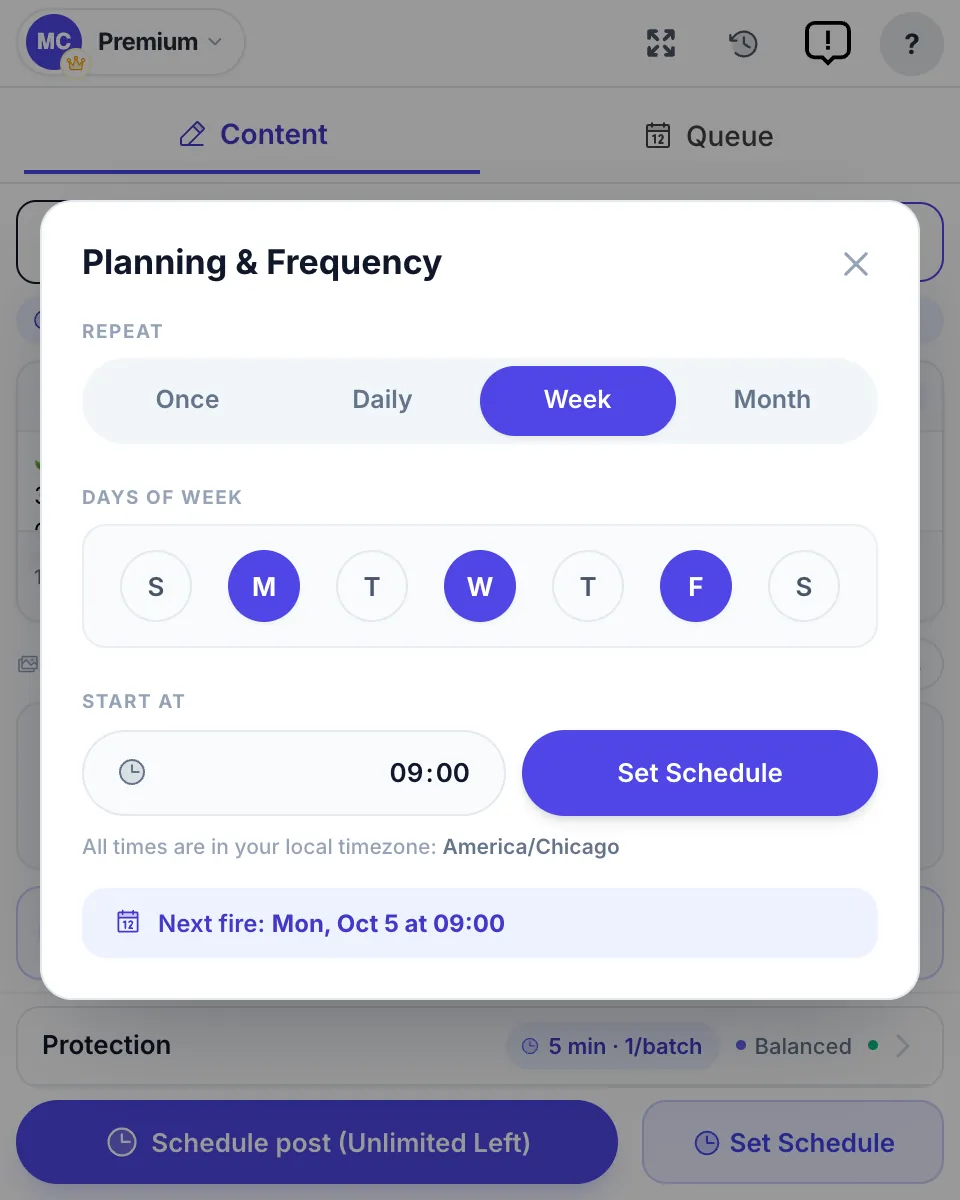
Scheduling. Posts can go out once, daily, weekly or monthly from the extension’s Facebook post scheduler, with a pause of a few minutes between groups.
What it doesn’t change:
- It runs in your Chrome, so Chrome must be open and the computer awake at post time; a run that falls due while the computer sleeps starts when it wakes. Meta Business Suite doesn’t need that, which is why it stays the better tool for Page-only posts.
- No tool makes posting risk-free. Facebook reacts to the pattern: the same text in many groups, fixed timing, sudden volume. Varied wording, pauses between posts and one post per group per day keep the risk low, by hand or with a tool.
Which tool for which job
| You want to… | Best fit | Cost |
|---|---|---|
| Schedule posts to one Page (and Instagram) | Meta Business Suite | Free |
| Post to a Page from a blog feed or sheet | Zapier or Make | Free tiers, then paid |
| Repeat evergreen Page posts | A scheduler with recycling (e.g. Publer Business) | Paid |
| Run several networks or client Pages with approval | Buffer, Hootsuite, Later | Paid |
| Post in groups as your Page | Browser extension (MultiGroupPoster) | 6 free posts to try, then paid |
| Reach your groups and your Page feed in one run | Browser extension with Page links in a list | Same |

The common stack for a small business: Meta Business Suite for the Page, because it is free and runs with your computer off, and an extension for the groups. If you want to re-share one existing Page post into many places rather than publish new ones, auto-sharing Facebook posts covers that.
When a scheduled Page post doesn’t publish
- Look in the Planner. A post still listed as scheduled hasn’t run yet; check the time zone in the date picker. A failed post shows an error you can act on.
- Check your access. If someone changed your access to the Page, posts you scheduled may not go out. Confirm your access in the Page settings.
- Reconnect third-party tools. Buffer, Zapier and the rest lose the connection when you change your Facebook password or remove the app; reconnect the Page in the tool.
- Re-upload the media. A video in a format Meta rejects, or a file that is too large, stops the post. Re-export it and schedule again.
FAQ
How do I auto post to my Facebook Page for free?
Use Meta Business Suite at business.facebook.com or in its app. Click Create post, choose the Page, write the post, turn on Set date and time, pick the moment and click Schedule. It is free, publishes from Meta’s servers with your computer off, and can send the same post to a connected Instagram account.
How far ahead can I schedule a Facebook Page post?
Between 20 minutes and 29 days ahead, according to Meta’s Help Center in October 2026. Older Meta pages said 75 days, so if the date picker in your account shows a different range, trust the picker. For a calendar further out, a paid scheduler keeps a rolling queue of posts.
Can I make a Facebook Page post repeat automatically?
Not in Meta Business Suite: it has no repeat setting for Page posts, so you copy the post and schedule the copy. Some paid schedulers recycle posts, for example Publer on its Business plan. Repeat sparingly, because Meta lowers the reach of duplicated and unoriginal content.
Can I auto post to several Facebook Pages at once?
Yes, if you manage them. Meta Business Suite lets you pick several Pages, and connected Instagram accounts, in one post and schedule it to all of them for free. Cloud schedulers such as Buffer and Hootsuite do the same and add other networks like LinkedIn and X.
Can a Facebook Page auto post into groups?
Not in groups you joined: Meta removed group publishing from its API on 22 April 2024, so Buffer, Hootsuite, Zapier and Make can’t post there. A browser extension such as MultiGroupPoster can post in groups as your Page from your own logged-in session, in groups that accept posts from Pages.
Can MultiGroupPoster post on my Facebook Page’s own feed?
Yes. Paste the link of a Page you manage into a list under Add manually and it appears with a 📄 icon, next to your groups. The post then goes out from the Page itself, always with the Fast method, and a Page you don’t manage is refused before anything is sent. Chrome must be open while it runs.
Why didn’t my scheduled Facebook Page post publish?
Check the Planner in Meta Business Suite first: a post still listed as scheduled has not run yet, and a failed one shows an error. The usual causes are changed access to the Page, an expired connection in a third-party tool, or media Meta rejected. Reconnect the tool or re-upload the media and schedule it again.
Schedule your Page in Meta Business Suite, for free. Need your groups too? Add MultiGroupPoster to Chrome free: 6 posts to try (one-time), no credit card. Plans are on the pricing page.