

How to post in a Facebook group on a computer
These steps match Facebook’s own Help Center as checked in October 2026, and they are the same in Chrome, Edge, Firefox and Safari.
- Go to facebook.com/groups, or click Groups in the left menu of your feed, and select the group.
- If the group opens on another tab, click Discussion at the top first.
- Click the Write something… box at the top of the group feed.
- Type your post, or paste it with Ctrl+V (Cmd+V on a Mac).
- Add what the post needs: photos or video, a GIF, a poll, an event, a file, a check-in or tagged people. If a format isn’t visible, open the composer’s ··· options.
- Click Post.
In an open group the post appears straight away. In a group with post approval it is marked as pending until an admin or moderator approves it, as explained below.
A post written in the group’s composer goes to that group only. To post the same thing in several groups you repeat these steps in each one, which is where posting to many groups comes in.
How to post in a Facebook group from your phone
The Facebook app uses the same steps on iPhone and Android:
- Open the Facebook app and tap Menu. Facebook’s help center puts it at the top left; if your app version shows it somewhere else, look for the Menu icon there.
- Tap Groups, then Your groups, and pick the group. If you don’t see Groups, tap See more.
- Tap Write something… at the top of the group. In some public groups the box reads Create a public post… instead.
- Type your post and add photos or videos from your phone. While you scroll a group’s feed, a Create post button also appears when you scroll down and then back up.
- Tap Post.
For text posts, the app can offer an AI rewrite of your draft. It is optional, and what you post is still up to you.
| Computer (facebook.com) | Facebook app (iPhone and Android) | |
|---|---|---|
| Find the group | facebook.com/groups → the group | Menu → Groups → Your groups → the group |
| Start a post | Write something… | Write something… or Create a public post… |
| Poll, file, event and other formats | The composer’s ··· options | The composer’s options |
| Publish | Post | Post |
How to add photos, videos and links to a group post
Photos. Click or tap the photo/video button in the composer and pick the files. You can select several photos at once, and Facebook lays them out together in the post.
Videos. Use the same button and choose a video file. An uploaded file plays in the feed as a Facebook video, while a pasted YouTube link only becomes a link preview. The trade-offs are in sharing YouTube videos in Facebook groups.
Links. Paste the URL and Facebook builds a preview card with the page’s title and image. Once the card has loaded you can delete the URL from your text and the card stays. Many group marketers put the link in the first comment instead, so the post itself reads as a conversation rather than an ad. If you post in many groups, MultiGroupPoster can add that first comment for you under every post.
Short text posts. Under roughly 130 characters with nothing attached, Facebook offers a coloured background instead of plain text. Facebook colour background posts covers when that helps and when it reads as noise.
Selling something? Buy and sell groups use a listing form instead of the plain composer, as described next.
How to post an item for sale or an ad in a Facebook group
Groups that have Facebook’s buy and sell feature turned on (an admin adds it) give you a listing form. On a computer:
- Go to facebook.com/groups and select the group.
- Click Sell Something.
- Under Create new listing, choose Item for Sale, Vehicle for Sale, Home for Sale or Rent or Sale event.
- Enter the details, such as the price and description, and click Next.
- Choose where else the listing appears: other buy and sell groups you are a member of, and Marketplace. The Marketplace option isn’t offered when you post as a Page.
- Click Post.
You must be an adult to sell in these groups (at least 18 in the United States). Each copy of the listing is edited, marked as sold or deleted separately in each group. Animals, weapons, drugs and counterfeit goods aren’t allowed in buy and sell groups or on Marketplace.
In ordinary groups there is no listing form, so an ad is just a post, and most groups only accept one on a promotion day, in a pinned promo thread or not at all. Check the rules first; how to advertise in Facebook groups shows which groups welcome offers.
Selling the same item in many of these groups? How to post in multiple buy and sell groups covers the 20-group limit and how to combine a listing with regular posts.
How to post anonymously in a Facebook group
Anonymous posting exists only in groups where the admins allow it. When it is available, the steps on a computer are:
- Open the group and click Write something….
- Turn on the Post anonymously toggle, then click Got it.
- Write the post and click Submit.
What members see is Anonymous member (in private groups) or Anonymous participant (in public groups) with an anonymous icon in a random colour. Admins, moderators and Facebook’s systems still see your name and photo. If the group requires approval of posts, or of anonymous posts specifically, an admin reviews it first; otherwise it publishes at once.
If there is no toggle, the admins haven’t allowed anonymous posting, or the feature isn’t available in that group or for your account yet. You can post, comment and react anonymously, but you can’t go live, share content or send messages anonymously, and some post formats are switched off for anonymous posts.
How to post in a group as your Page
By default you post as your personal profile. To post as a Page you manage, open the composer and look for the identity switcher near the top, usually your photo or name. Pick the Page and post. The post then carries the Page’s name and picture.
The switcher only appears in groups whose admins let Pages take part, and only lists Pages where your role lets you post. If your Page isn’t offered, that group is profile-only and there is no setting on your side that changes it. The full walkthrough, including commenting as a Page, is in how to post in a Facebook group as a Page.
Managing several Pages? How to post to multiple Facebook Pages at once shows how to reach their feeds and your groups in one go.
“Pending”: where your post went
If your post says it is pending, or it vanished from your view and isn’t in the feed, the group has post approval turned on. An admin or moderator reviews each post. Approved posts appear in the feed; declined posts are removed. Facebook usually notifies you when your post is approved.

Two more approval steps catch new members:
- Your first post in a public group. Admins can require approval before you post or comment for the first time.
- Limited membership in a private group. A limited member needs admin approval before their first post or comment. The approval can involve answering participation questions and agreeing to the group rules, and only admins and moderators see your answers.
Your own pending posts are listed in the group’s Your content section, where you can delete one. If Facebook says “You’re at the limit for pending content in this group”, you already have as many posts waiting as that group allows; why your Facebook group post won’t publish covers that message and seven other causes.
How long approval takes depends entirely on when an admin next opens the queue: minutes in a busy, well-moderated group, days in a quiet one. Posting when the group is most active is the only lever you have. Pending is not a penalty. Most serious groups approve posts by hand to keep spam out.
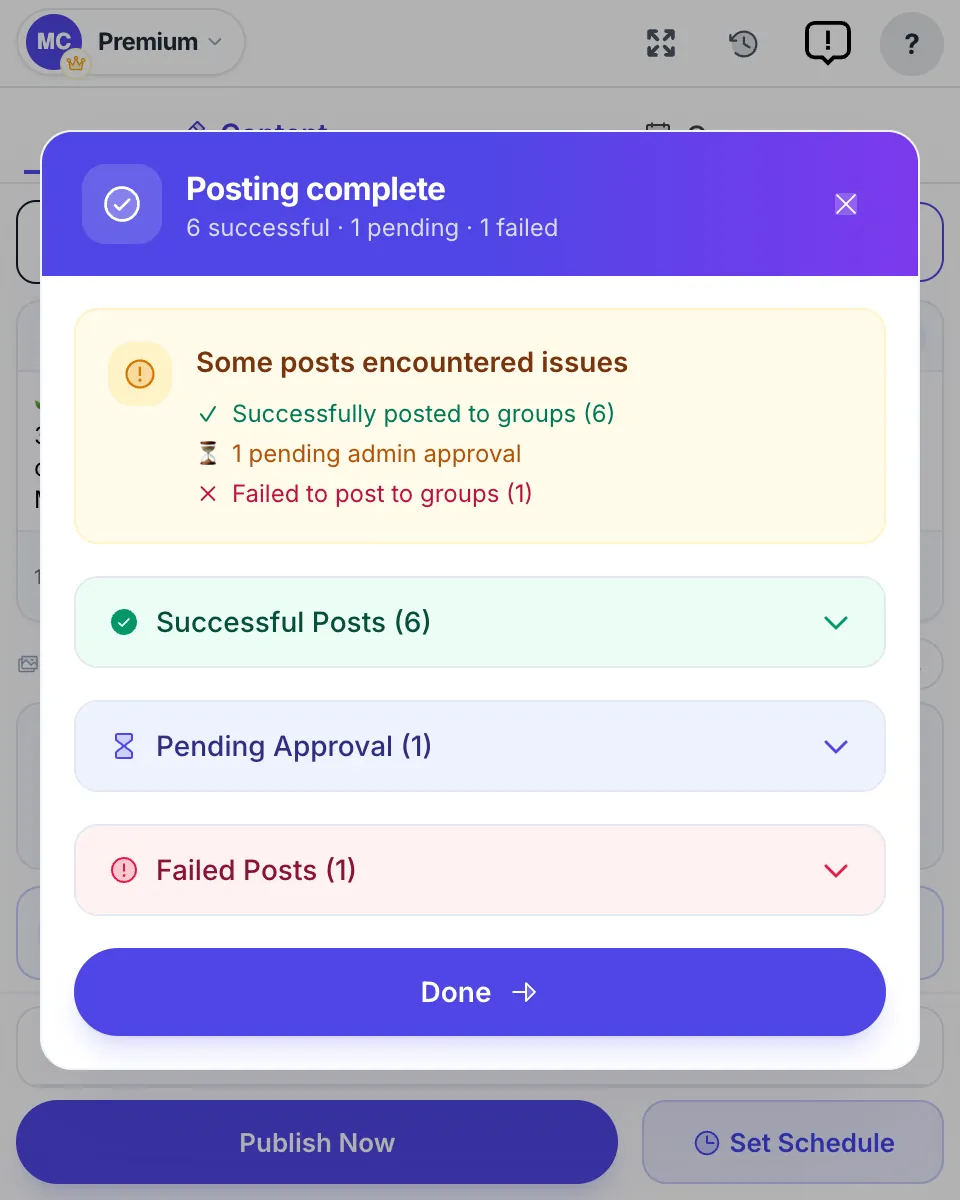
Hit the message “You’re at the limit for pending content in this group”? Why your Facebook group post is pending explains the limit and how to clear your queue.
No “Write something” box? Why you can’t post in a group
A missing post box is almost always explained by one of the situations below. Facebook’s help center lists the same causes.
| What you see | Likely reason | What to do |
|---|---|---|
| A Join group button, or your join request is still pending | You aren’t a member yet | Answer the membership questions and wait for an admin |
| Questions or rules to accept before you can post | First-post approval (public group) or limited membership (private group) | Answer the participation questions and agree to the rules |
| The box is there, but polls, files or videos are missing | Admins switched those formats off | Post plain text or photos, or ask an admin |
| No box at all, or a notice that you can’t post for now | An admin suspended you or limited how often you can post or comment | Wait for the limit to end, or message an admin |
| A notice that your posting is limited on Facebook | Facebook restricted your account for a Community Standards issue | Check your Support Inbox; see blocked from posting in Facebook groups |
If none of these fit, make sure you are logged in to the right profile. A post box can look missing simply because you opened the group while switched to a Page that isn’t allowed to post there.
Group rules and automatic moderation
Admins can decline posts automatically with Facebook’s moderation tools, including Admin Assist. Typical rules decline posts that contain certain keywords (for example “for sale” in a discussion group), include links to particular sites, or come from people who joined the group or Facebook recently.
If your post seems to go through but never shows up, a rule probably caught it:
- Read the group’s rules in About and any pinned post.
- Compare your post with each rule, especially the ones about links and promotion.
- Try the same text without the link, then without the selling words, to find the trigger.
The groups that welcome promotional posts, and how to spot them before you post, are in Facebook group promotion rules.
Can you schedule a post in a Facebook group?
Admins and moderators can. Facebook’s help center describes it this way on a computer:
- Open the group and click Write something… (on the Discussion tab).
- Write your post. The scheduling option only appears once you have started typing.
- Click the Calendar icon next to Post.
- Pick the date and time, then click Schedule.
Scheduled posts live under Scheduled Posts in the group’s admin tools on the left (click Manage first if you don’t see them). From there you can reschedule, post now, edit or delete.
Recurring posts are for admins only. In Admin Assist, click Add next to Publish a custom post, write the post or pick a suggested prompt, choose daily, weekly or monthly and the first date and time, then click Add to Admin Assist. The post shows up in Scheduled Posts 24 hours before each run.
Regular members can’t schedule natively, and cloud schedulers such as Buffer or Hootsuite can’t reach groups at all since Meta removed the Groups API on 22 April 2024. For groups you only joined, the remaining route is a browser extension that runs in your own logged-in session. In MultiGroupPoster that is Set Schedule: once, daily, weekly on the days you pick, or monthly, in your local time zone, with your computer on at the scheduled time.
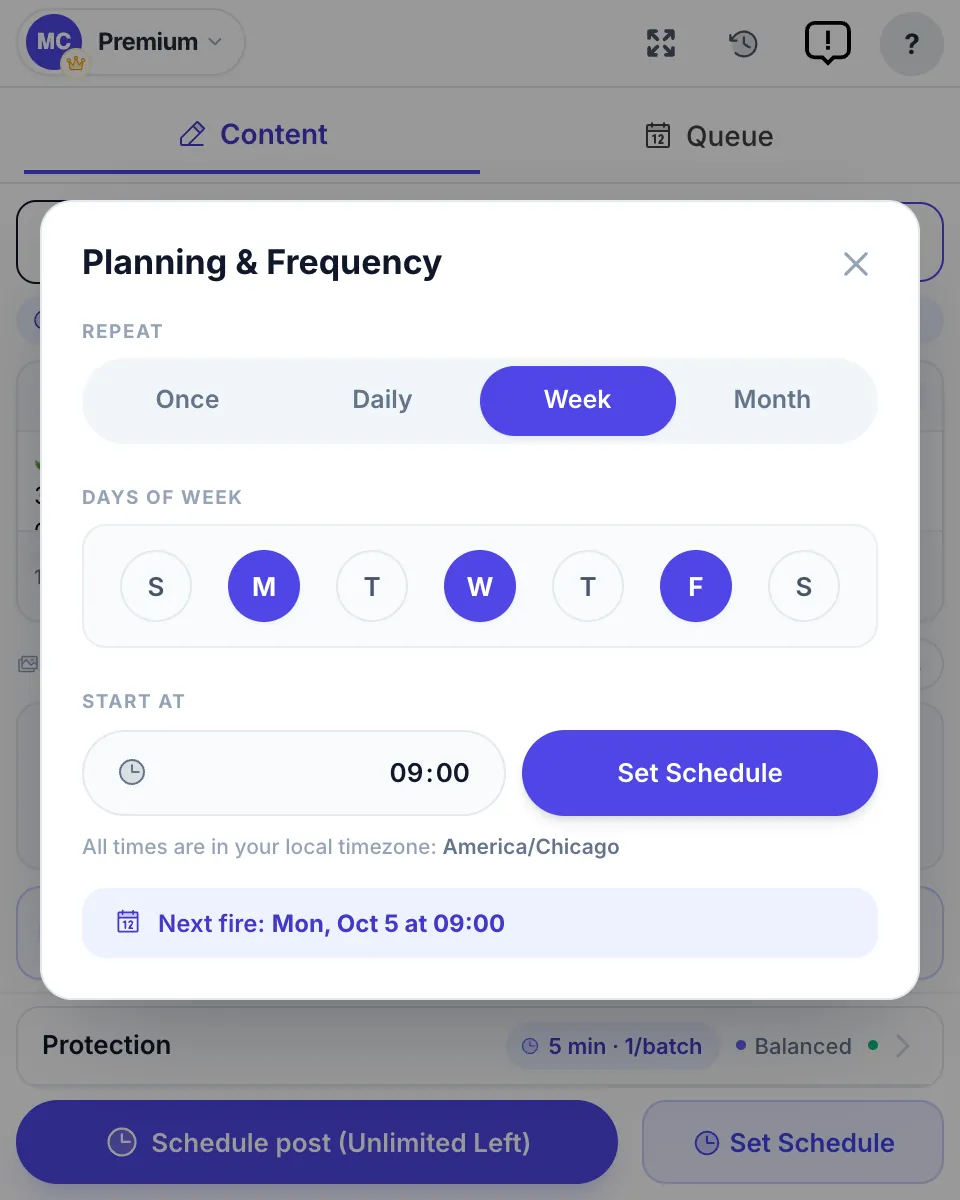
The full method, with what happens if your computer is asleep, is in how to schedule posts to joined Facebook groups.
For how far ahead Facebook lets you schedule, and how many posts, see how many posts you can schedule on Facebook.
How to share an existing Facebook post to a group
To put a post that already exists, yours or someone else’s, into a group:
- Under the post, click Share.
- Choose Share to a group and pick the group.
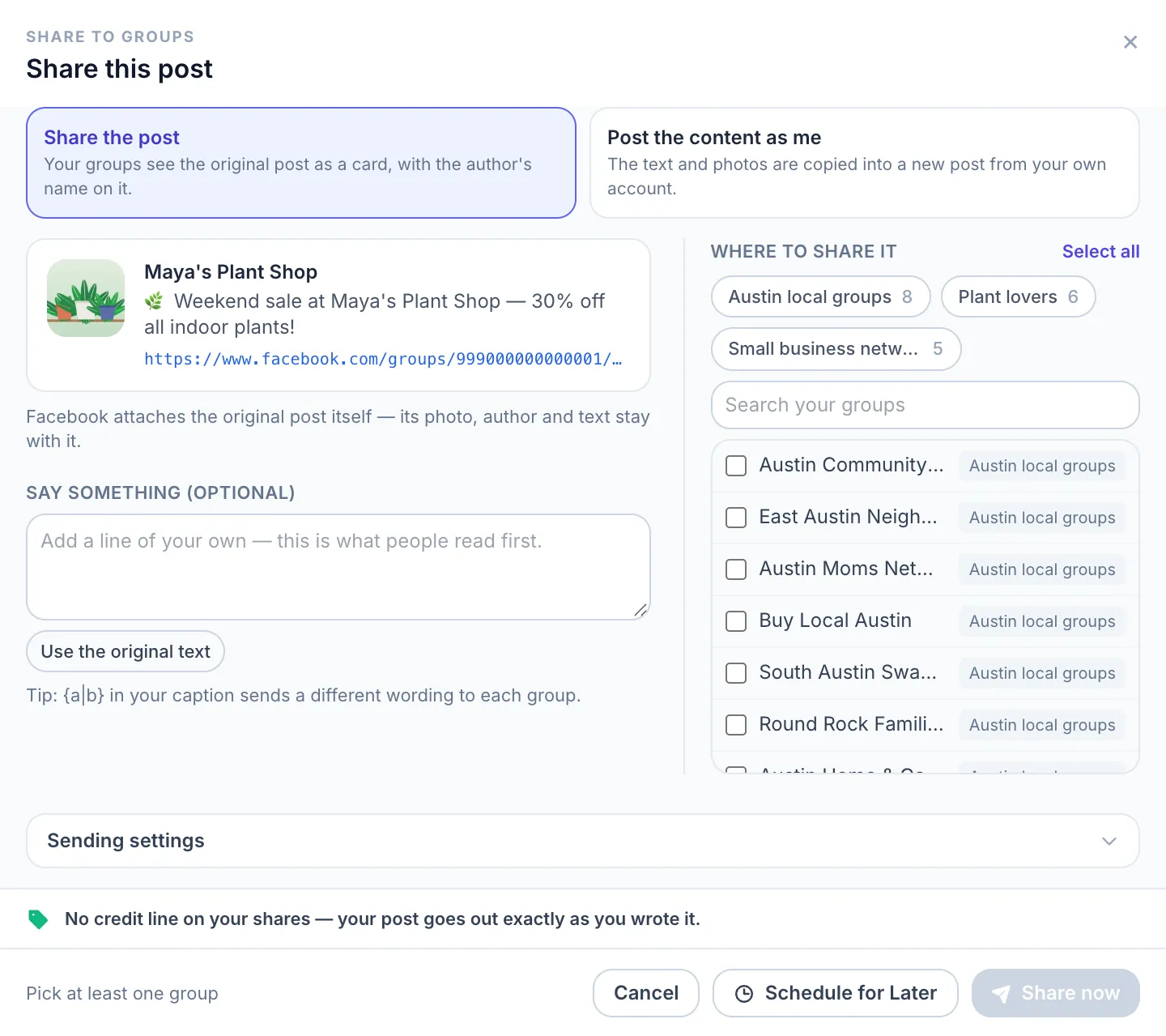
- Add a line of your own, then share it.
The original travels as a card with its author’s name, and the group’s approval rules still apply. Only public posts can be shared into a group, so friends-only posts won’t offer the option. Sharing versus posting fresh, and how often to reshare, is covered in how to repost in Facebook groups. Reposting to your own profile or a Page instead? The Share options for both are in how to repost on Facebook.
Group, “group page” or Page: which one are you posting to?
Many searches for a “Facebook group page” or a “community page” are really about a group. The quickest test is the button under the cover photo:
- Join group or Joined means it is a group. Everything above applies.
- Follow or Like means it is a Page. On a Page you don’t run, open the Mentions tab under its name, click Write something to followed by the Page’s name, and click Post. That only works on Pages that allow visitor posts; if the box isn’t there, comment on the Page’s posts or send it a message instead.
- Your own Page is posted to by switching into the Page, or scheduled for free in Meta Business Suite, as described in how to automate Facebook posts.
- Your own profile isn’t a group at all. Click What’s on your mind? at the top of your Feed or profile, pick the audience (such as Friends or Public) and click Post. Nobody has to approve it, and it reaches your friends or followers rather than a group’s members.
Many local “community pages” are groups with a town name, so check that button before you look for a post box.
How to post an announcement in a Facebook group
A group announcement is an ordinary post that an admin or moderator pins to the group’s Featured section, so it stays at the top of the group for every member.
- Write the post like any other: click Write something…, add your text and any photo, and click Post.
- If you are an admin or moderator, click the ··· options next to the published post.
- Choose Pin to Featured. The post now sits at the top of the group.
Only admins and moderators can pin, so as a member you write the post and ask an admin to pin it. To take an announcement down, the admin opens the same ··· menu and unpins it. Group rules and group features can be pinned in the Featured section too.
Edit or bump a group post
Edit or delete. Click the ··· menu at the top right of your post and choose Edit post. Edited posts show an Edited label to other members. The same menu lets you delete the post.
Bumping. Facebook has no bump button. A new comment on your post counts as activity and moves it back up for members who sort the group by recent activity. Add something useful, such as a price change or a new photo, rather than the word “bump”, which many groups’ rules forbid.
More ways to bring a post back up, with comment templates and how often groups allow it, are in how to bump a post in a Facebook group.
What if you need to post in many groups?
Posting by hand is fine for 5 to 10 groups. Beyond that it eats the week: manual posting to 50 groups takes 90 to 120 minutes of clicking, every time you post. Facebook’s only built-in shortcut is the listing form in buy and sell groups, which can add one item to several of them at once; ordinary posts go in group by group.
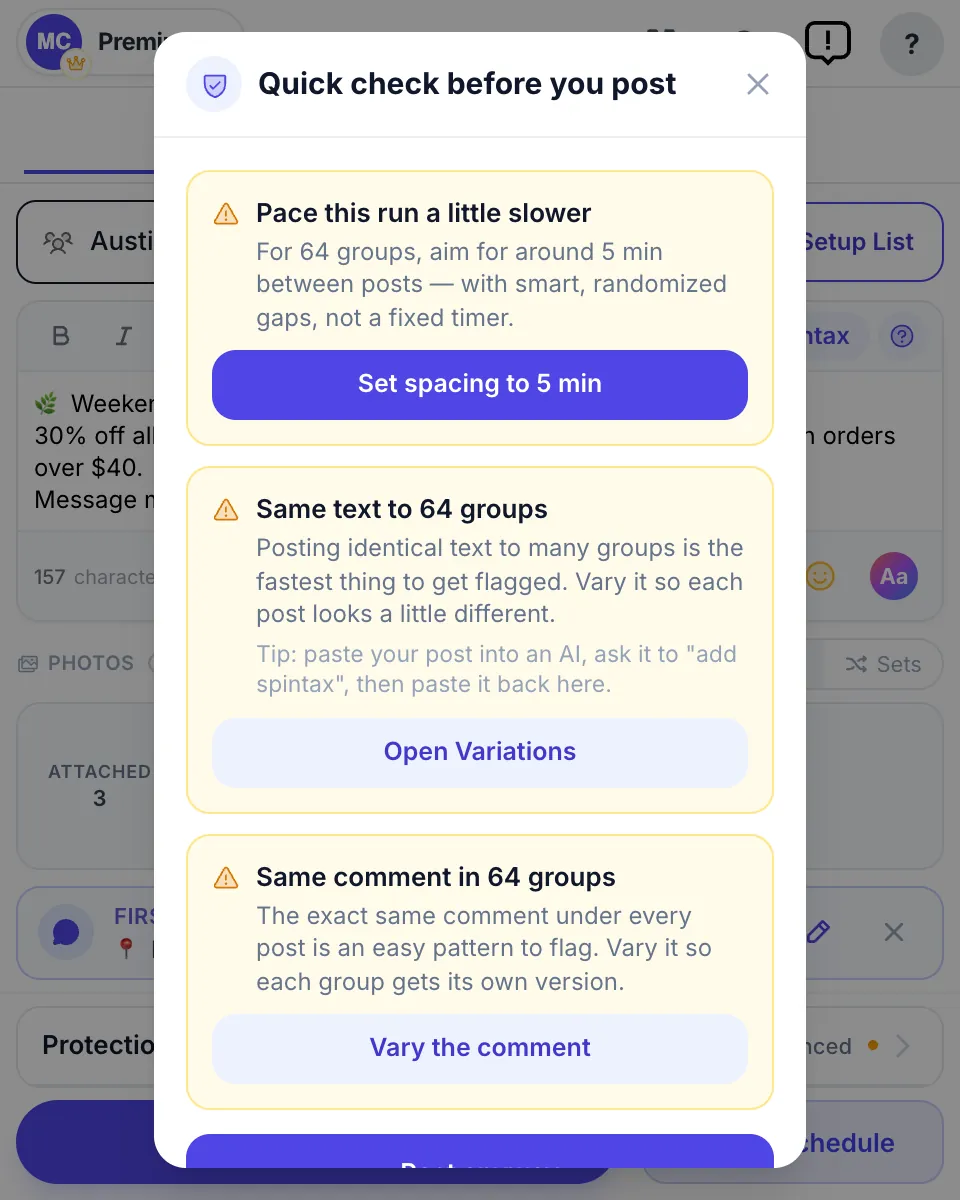
That is the point where most marketers switch to a multi-group poster. MultiGroupPoster is a Chrome extension that posts from your own logged-in session, so it reaches the groups you joined, which cloud tools can’t. By default it waits a random 3 to 6 minutes after every 1 to 3 posts, sends a different wording to each group with Spintax, and runs a Pre-Flight check before big runs. You get 6 free posting runs to try (one-time, no credit card), then Pro is $9.99 a month; see pricing.
Here is what that looks like in the 60-second demo:

The step-by-step version is how to post to multiple Facebook groups at once, and finding Facebook groups worth posting in helps you choose the groups first.
FAQ
How do I post on a Facebook group from a computer?
Go to facebook.com/groups, open the group, click Write something… at the top of the Discussion tab, type your text, add photos or video if you want, and click Post. If the group uses post approval, the post waits for an admin before other members see it.
How do I post to a group on Facebook from my phone?
In the Facebook app, tap Menu, then Groups, then Your groups, and pick the group (tap See more if Groups isn’t listed). Tap Write something… (or Create a public post… in some public groups), add text, photos or video, and tap Post. The steps are the same on iPhone and Android.
How do I post a picture or video in a Facebook group?
Open the composer with Write something…, click or tap the photo/video button and choose the files from your computer or camera roll. You can add several photos to one post. Add a line of text and post. A pasted YouTube link becomes a link preview, not an uploaded video.
Can I post anonymously in a Facebook group?
Only if the group’s admins allow it. In the composer, turn on the Post anonymously toggle, click Got it, write the post and click Submit. Members see Anonymous member or Anonymous participant, but admins, moderators and Facebook’s systems still see your name, and the post may be reviewed before it appears.
Why does my post say “pending” in a Facebook group?
The group has post approval turned on, so an admin or moderator reviews each post before members can see it. Public groups can also require approval of a new member’s first post. Your pending posts are listed in the group’s Your content section, where you can delete one. Nothing is wrong with your account.
Why can’t I see the “Write something” box in a group?
Usually one of four things: your request to join hasn’t been approved yet, the group wants you to answer participation questions first, an admin has suspended or limited your posting, or Facebook has restricted your account. Check the group’s rules, then your Support Inbox for a restriction notice.
Can I schedule a post in a Facebook group?
Admins and moderators can: start typing a post, click the Calendar icon next to Post, choose a date and time and click Schedule. Admins can also set daily, weekly or monthly recurring posts in Admin Assist. Regular members have no scheduling option; for groups you only joined, a browser extension that runs in your own session is the only way.
How do I share a Facebook post to a group?
Click Share under the post, choose Share to a group, pick the group, add a line of your own and share it. The original appears as a card with its author, and the group’s approval rules still apply. Only public posts can be shared into a group.
How do I post an announcement in a Facebook group?
Write it like any other post, then have an admin or moderator pin it: next to the post they click Options, then Pin to Featured, and it stays at the top of the group. Only admins and moderators can pin, so members ask an admin.
How do I post an ad or an item for sale in a Facebook group?
In a buy and sell group, click Sell Something, choose Item for Sale (or Vehicle, Home or Sale event), add the details and price, click Next, pick any other buy and sell groups or Marketplace, and click Post. In ordinary groups an ad is a normal post, allowed only where the rules permit promotion.
How do I bump my post in a Facebook group?
There is no bump button. A new comment on the post counts as fresh activity and moves it up for members who sort the group by recent activity. Add a useful update rather than the word “bump”: many groups’ rules forbid bump comments.
How do I post in a Facebook group as my Page?
Open the composer and use the identity switcher near the top (your photo or name) to choose the Page, then post. The switcher only appears in groups whose admins let Pages take part; if your Page isn’t listed, the group is profile-only.
How is posting in a group different from posting on my profile?
A profile post starts from the What’s on your mind? box at the top of your Feed and reaches the audience you choose, such as Friends or Public. A group post starts from that group’s Write something… box and goes to the group only, where admins may review it first. In a public group, anyone can see it; in a private group, only members.
Can I post in a private group I just joined?
Yes, once your membership is approved: private groups show their feed and composer only to members. Some groups also ask new members to answer participation questions or accept the rules before the first post, and an admin may review it. Your post is visible only to the group’s members.
Can I edit my post after submitting?
Yes. Click the ··· menu at the top right of your post and choose Edit post. The post then shows an Edited label that other members can see. The same menu lets you delete the post.
Why doesn’t my post show up after I clicked Post?
In order of likelihood: it is waiting for admin approval, an automatic moderation rule (keywords, links or new-member limits) declined it, or you posted in a different group than you meant. Check the group’s Your content section first: it lists posts that are still pending.
Posting in 5+ groups every day? See how to automate it safely, or add MultiGroupPoster to Chrome free and get back about 7 hours a week.