

What bumping a post means on Facebook
“Bump” is old forum slang: you reply to your own thread so it jumps back to the top of the list. Facebook groups inherited the habit, especially buy and sell groups, where a listing sinks under dozens of new ones in a day. In Polish groups the same thing is called podbijanie, and the classic bump comment is “up”.
Bumping is not reposting. A bump keeps your original post, with its likes, comments and history, and moves it back into view. A repost publishes the same content again as a new post. If reposting is what you want, the steps are in how to repost in Facebook groups; this guide is about getting the post you already have seen again.
Why a comment moves a post up
A group’s feed can usually be sorted in three ways, from the sort menu above the posts. Facebook keeps changing which ones appear, and some groups only show the default:
| Sort order | How it orders posts | Does a new comment bump your post? |
|---|---|---|
| Most relevant (default) | Ranked by Facebook | Often: new comments are a signal Facebook uses |
| Recent activity | Newest comment or post first | Yes, straight to the top |
| New posts | Newest post first | No: posts stay in creation order |
So a comment is the only bump that works across the board. It moves your post to the top for people who sort by recent activity, and it gives the ranked feed a fresh signal. Members who follow the post also get a notification, which brings some of them back.

6 ways to bump a post in a Facebook group
- Comment with an update. The standard bump. Add information people didn’t have: “Price dropped to $40” or “Two seats left for Saturday”.
- Reply to every comment. Each reply is new activity, and it answers the people most likely to buy or join. Replying a few hours apart spreads the activity out.
- Add a photo in a comment. A comment with a new picture (another angle, the item in use, a before and after) stands out in the thread. Facebook allows photos in comments.
- Answer the question everyone asks. “Yes, it still fits a 13-inch laptop.” It saves you replies and bumps the post.
- Ask a question back. “Would anyone want it delivered on Sunday?” Questions get replies, and replies bump the post again.
- Tag someone who asked. If a member asked to be told when something changed, tag them in your update. Only tag people who asked; tagging strangers to get attention is spam.
Bump comments that don’t look like bumps
Copy and adapt these:
- Price change: “Now $35 (was $50). Pickup in [area] this week.”
- Availability: “Still available. Viewing possible Thursday after 6 pm.”
- Deadline: “Registration closes Friday at noon, 4 places left.”
- New detail: “Measurements: 120 x 60 cm, fits through a standard door.”
- Social proof: “Thanks to everyone who came last week, here are a few photos. Next session is the 24th.”
- Clarification: “A few people asked: yes, it works with both models.”
- Last call: “Last day for this one, it goes to the charity shop tomorrow.”
- Polish groups: instead of a bare “up”, write “Aktualne, cena do negocjacji. Odbiór [dzielnica].”
Does editing a post bump it?
Not reliably. Facebook doesn’t describe edits as activity anywhere in its help pages, and the posts that rise again are the ones with new comments. Two other reasons to treat editing as a tidy-up rather than a bump:
- Approval again. In groups where admins turned on approval for edits, your edited post goes back to the pending queue, and it may be offline until someone approves it.
- Old comments stop making sense. If you change the price in the post, earlier comments about the old price look confusing.
The good pattern is both: edit the post so the details are right, then add a comment saying what changed. The comment does the bumping.
Timed bumps with scheduled comments
Bumping works best when it is spread out: a comment right after posting, another after an hour or two, one the next day. Doing that by hand across several groups means remembering to come back to each post.
Facebook’s own scheduler is only for admins and moderators, and it schedules posts, not comments. In groups you joined as a member there is no built-in way to schedule a comment.
That is one job MultiGroupPoster can do. When you post to several groups, you can add a comment series to your own post: up to 3 comments, each on its own time, right after, after 15 minutes, 1 hour, 3 hours, or a time you set up to 24 hours later. Each group gets its comments that long after its own post, and a comment can include a photo.
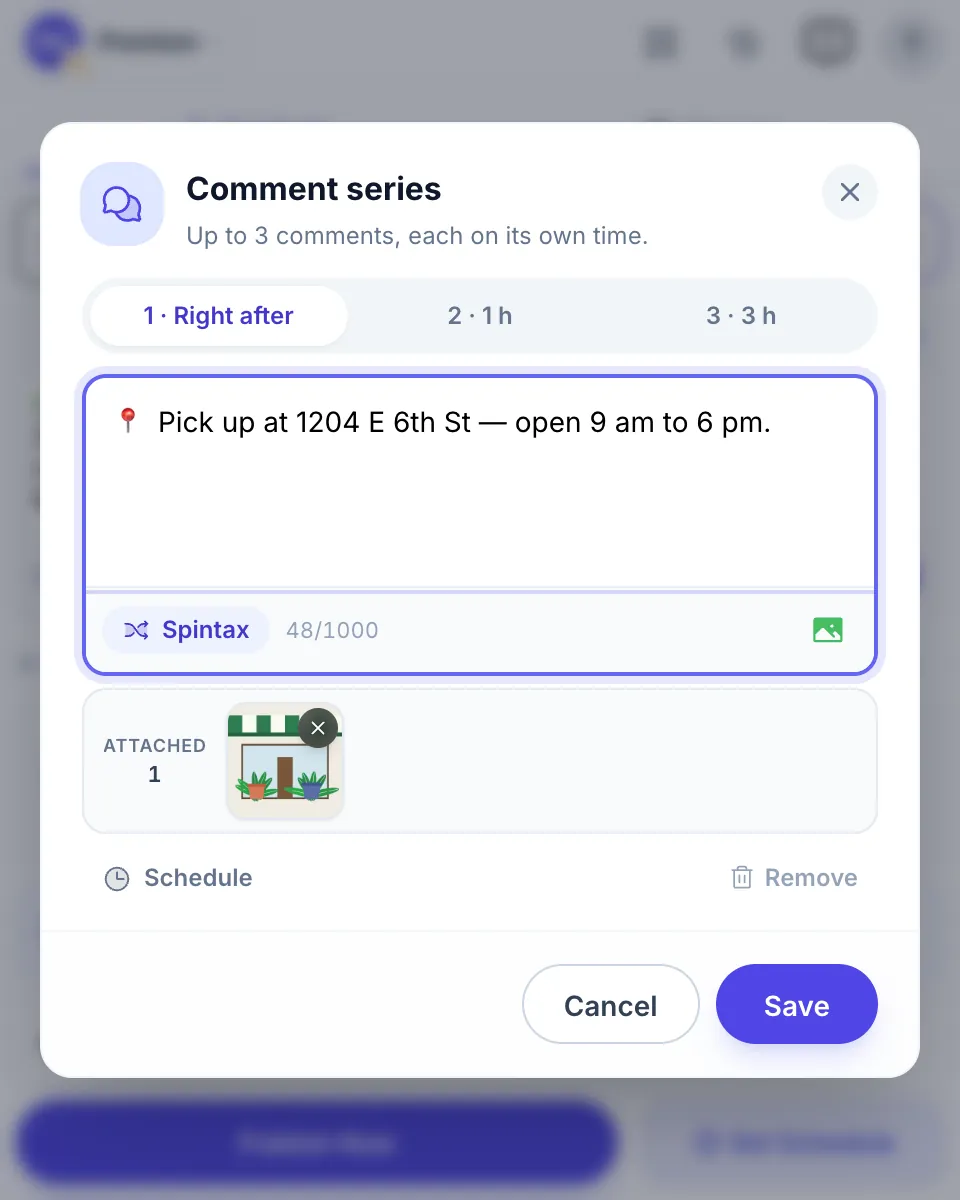
Honest limits: it comments only on posts it published for you, never on anyone else’s. Chrome must stay open and the computer awake until the comments go out. And a timed comment is still a bump, so use it only where the group allows bumps, with comments that add something. More on the format in Facebook first comment strategies.

Bump or repost?
| Bump (comment) | Repost (new post) | |
|---|---|---|
| Keeps likes and comments | Yes | No, starts from zero |
| Creates a duplicate | No | Yes, unless you delete the old one |
| Works in “New posts” sort | No | Yes |
| Typical rule in buy and sell groups | Once per day | Once every few days, old post deleted |
| Best when | The post is days old and has interest | The post is weeks old, or the details changed a lot |
If you repost, delete the old post first. Two copies of the same listing is the most common reason admins remove both, and identical content in many places is also what Facebook’s spam systems look for (how duplicate content detection works).
When reposting is the right call, the Share options for your profile, a Page and a group are laid out in how to repost on Facebook.
Bump rules and how often to bump
Read the group’s rules before your first bump. You will usually find one of these:
- “No bumping.” Then don’t. Answer comments when they come; that still counts as activity.
- “One bump per 24 hours.” Common in buy and sell groups.
- “No ‘bump’ or ‘up’ comments.” Updates are fine; bare bump words are not.
- “Delete and repost after X days.” The group prefers reposts to bumps.
Without a rule, keep to one bump a day and stop after a few days. If nobody responded to three updates, the post itself needs to change: a better first photo, a clearer price, a different title line. The basics of a post that works in a group are in how to post in a Facebook group.
For admins: keeping an important post on top
Admins don’t need to bump. They can:
- Pin or feature a post, so it stays at the top of the group.
- Turn a post into an announcement, where the group offers it.
- Publish a recurring post with Admin Assist (daily, weekly or monthly), for a weekly sales or introductions thread. The Admin Assist setup guide shows how.
If bump comments are flooding your group, write a clear bump rule and enforce it. Our group rules templates include wording for buy and sell groups.
FAQ
How do I bump a post in a Facebook group?
Add a new comment to your own post. A comment counts as fresh activity, so the post moves back up for members who sort the group by recent activity and gets another chance in the ranked feed. Make it a real update, such as a price change or a new photo, rather than the word bump.
Does editing a Facebook post bump it?
Not reliably. Facebook doesn’t document edits as activity, and in practice comments are what move a post. An edit can even send the post back to the approval queue in groups where admins approve edits. Edit to fix the details, then comment to say what changed.
What does bump mean on Facebook?
Bump means commenting on a post, often just the word bump or up, to push it back to the top of a group so more people see it. Many groups ban bare bump comments, so a short useful update does the same job without breaking the rules.
How often can I bump my post?
Follow the group’s rules first; buy and sell groups often allow one bump per day. Without a rule, once every 24 hours is a sensible ceiling. Several bumps in a row look like spam to members and to Facebook, and admins remove them.
Is it better to bump or repost?
Bump when the post is recent and still has its comments, because a bump keeps them and doesn’t create a duplicate. Repost when it is weeks old, out of date or buried under dozens of newer posts, and delete the old one so the group doesn’t see the same thing twice.
Can I schedule a comment to bump my post later?
Facebook can’t schedule comments in groups you joined. MultiGroupPoster can add up to 3 comments to your own post, each at its own time, from right after up to 24 hours later, which works as a planned bump. Chrome must stay open until they go out.