
What changed in April 2024
For most of a decade, a “Facebook groups integration” meant an app on a server holding a permission from Meta, able to read a group’s feed and post into it on your behalf. From 4 April 2018 it came with a condition: Meta’s data-access announcement said every app using the Groups API needed approval from Facebook and from an admin of the group, so integrations only ran in groups whose admin had added the app. Within that limit, a zap could drop a new blog post into a community group, or a scheduler could queue content into a dozen groups overnight.
The official record is short. Meta’s Graph API v19.0 changelog, released on 23 January 2024, lists under “Groups API” the deprecation of the publish_to_groups and groups_access_member_info permissions and of the Groups API itself. The change applied to v19.0 at once and to all versions on 22 April 2024. The same entry removed the ability for group admins to install apps on their group, even apps they administer.
The consequence was immediate: every product that reached groups through the API lost that ability on the same day, and there was nothing to patch, because the dependency lived on Meta’s servers. The raw mechanics are covered in Facebook Groups API discontinued; this article is about the layer above — the integrations people actually wired together, and which of them still connect.
Which integrations broke
The clearest evidence is what the vendors announced about their own features:
- Zapier — its help center says the Facebook Groups app “will no longer be available to use on Zapier from April 22, 2024”. Existing zaps stopped that day and stayed view-only until 22 May 2024. In October 2026, Zapier’s Facebook Groups integrations page returns “404 Not Found”.
- Make — a Make staff post of 4 April 2024 announced it was discontinuing the Facebook Groups app: no new scenarios after 16 April, and scenarios containing the modules stopped working on 22 April 2024.
- Zoho Social — announced that Facebook Groups would not be accessible in any plan from 22 April 2024; posts scheduled only for groups after that date were moved to Drafts.
- Sprout Social — its Facebook FAQ explains that users can no longer post to Facebook Groups via Compose or see group messages in the Smart Inbox.
- Buffer — says it is no longer possible to send group posts automatically and switched groups to notification publishing, a phone reminder you finish yourself.
- Later and Jetpack Social (WordPress) — both document that Facebook Groups are not supported.
- IFTTT — in October 2026 the address of its Facebook Groups service opens the Facebook Pages service instead.
The scope matters. The Pages side of the Graph API still works: Hootsuite, Buffer and the other schedulers publish to Facebook Pages every day. Zapier noted that Graph API v19 still supports one group feature, private replies, but gave no timeline for supporting it. What vanished is the model most integrations were built on: an app posting into the groups a person belongs to.
Every integration, checked one by one
Most searches name a pair — RSS and Facebook groups, Slack and Facebook groups. Here is each pair: what it did before 22 April 2024, its status in October 2026, and the honest replacement. Even before the removal, each of these only worked in groups whose admin had added the app.
| Integration | Before 22 April 2024 | October 2026 | What works instead |
|---|---|---|---|
| Schedule → groups | Timed zaps, scenarios and cloud schedulers posted for you | No API publishing | Native admin scheduling, reminder apps, or an in-session scheduler |
| RSS → groups | Each new feed item posted to a group | Removed | RSS → Page, then share to groups |
| YouTube → groups | Each new video posted to a group | Removed | YouTube → Page, or post the link to groups |
| Instagram → groups | Third-party cross-posting | Meta’s own cross-posting only | Meta Business Suite cross-posting to Facebook Groups |
| Facebook Page ↔ groups | API sharing between Page and groups | Native features only | Share to a group, post as your Page, share to many groups in your session |
| WordPress → groups | Plugins and zaps posted new articles | Jetpack Social: groups not supported | WordPress → Page, then share |
| Webhooks | In and out | Out only, through monitoring | Monitoring service → webhook → Zapier, Make or n8n |
| Slack, Discord, Teams | Group posts as channel alerts | Through monitoring only | Monitoring alerts or incoming webhooks |
| Google Sheets | Log group posts; post rows to groups | Logging through monitoring only | Webhook → Sheets; import group lists from a spreadsheet |
| CRM (HubSpot, Salesforce, Pipedrive) | Leads from group posts | Through monitoring only | Webhook → Zapier, Make or n8n → CRM |
Schedule + Facebook groups
Before April 2024, a zap or scenario could fire on a timer and post into a group, and cloud schedulers queued group posts like any other channel. That is the integration people still search for. In 2026 there are four real options, each covered under the ways left to publish: Facebook’s own scheduling for admins and moderators (with recurring posts through Admin Assist), Meta Business Suite, which lists Facebook Groups as a destination, reminder apps such as Buffer, Publer and SocialBee, and an in-session scheduler for groups you joined. The tools are compared side by side in our Facebook post scheduler app roundup.
RSS feed + Facebook groups
RSS-to-group zaps and applets were the classic way to auto-post every new article into a community. That action is gone. What still works is a two-step route: Zapier’s Facebook Pages integration offers a ready-made “Post new RSS items to Facebook Pages” workflow, and from the Page you share each post into your groups. Facebook’s own way is Share, then Share to a group, one group at a time; MultiGroupPoster’s Share to groups button sends the same Page post to many groups at once, now or with Schedule for Later. If you would rather post the article itself, paste its link into a group post — it becomes a preview card, as when you post by hand. Link etiquette per group is covered in how to post links in Facebook groups.
YouTube + Facebook groups
The same pattern applies to video. Zapier still offers “Send new YouTube videos in a channel to a Facebook Page”, and the Page post can then be shared to groups. For groups you joined, a YouTube link in a normal group post shows a preview card, so a scheduled post with the link and a line of your own reaches the group without any API. Check each group’s rules on links first, and see sharing YouTube videos in Facebook groups for what gets flagged.
Instagram + Facebook groups
Here Meta kept a first-party path. Meta Business Suite’s cross-posting lets an Instagram post go to Facebook Groups as well as the Facebook feed and Threads, and a reel go to Facebook Groups and Facebook Reels, provided your Facebook Page and Instagram account are connected in the same business portfolio. SocialBee’s January 2026 guide adds that only groups linked to a Page appear in Business Suite, so in practice this is not every group you belong to. Third-party apps lost Instagram-to-group posting along with the Groups API.
Facebook Pages + Facebook groups
Pages and groups connect natively. Facebook’s help center explains how to create a group with your Page as the admin, or add your Page as an admin of a group you already run, and says a Page can be the admin of up to 200 groups. It also shows how to share a Page post: switch into the Page, click Share under the post, choose Share to a group, add text and post. To post into groups as your Page, see how to post in a Facebook group as a Page.
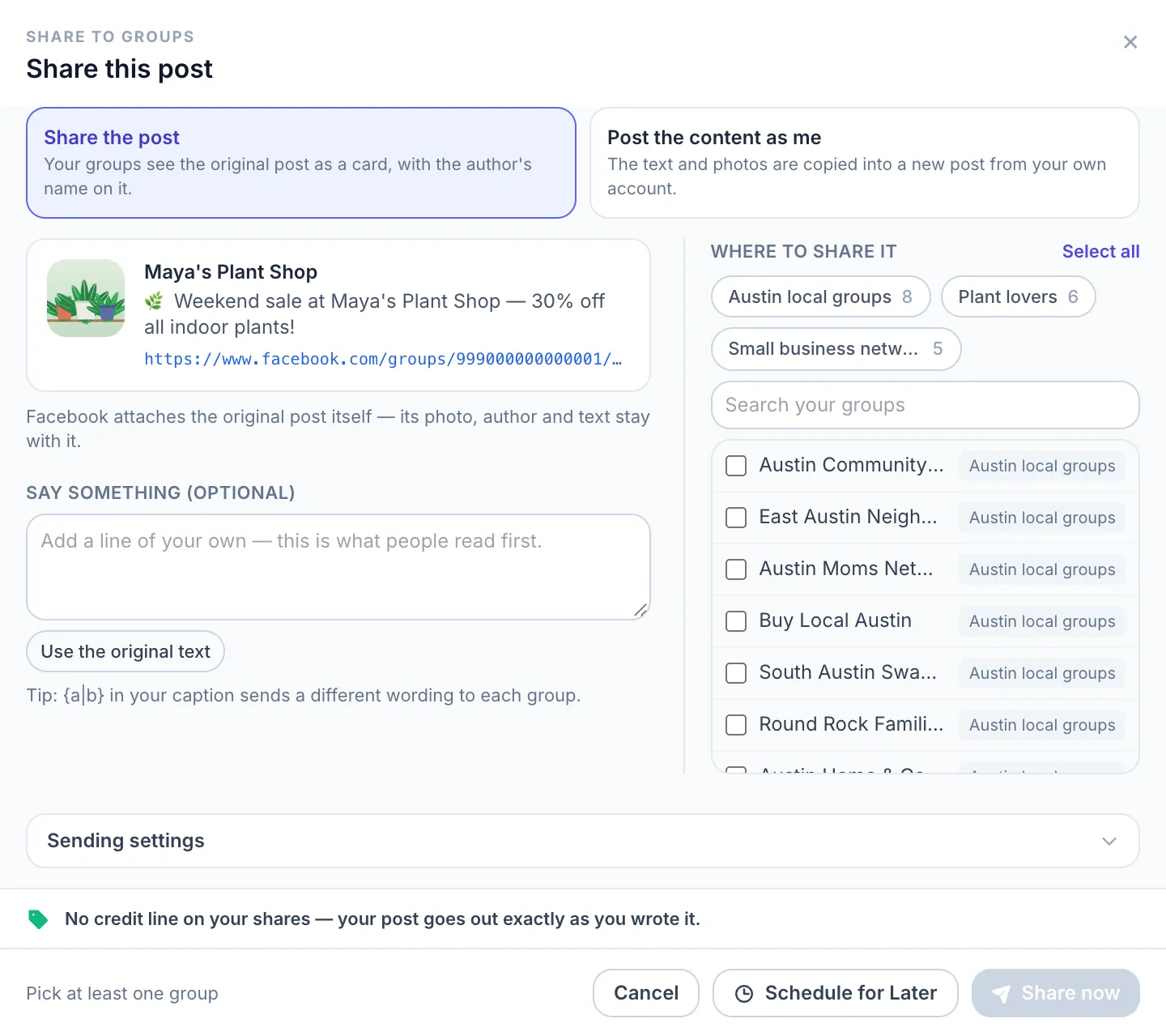
At scale, MultiGroupPoster adds two things: a Posting as switch that publishes to your groups as one of your Pages, and the Share to groups button under every Facebook post, which shares the original post as a card or copies its content into a new post from your account. Some groups turn off posting as a Page; in those, you post as yourself.
WordPress + Facebook groups
Jetpack Social, Automattic’s sharing tool for WordPress sites, says Facebook Groups “cannot be used” with it and that third-party tools can only share to Pages, not profiles, since 2018. Zapier still offers “Post new WordPress posts to your Facebook page”. The reliable route for a blog is therefore WordPress → Page, then share the Page post to your groups, or schedule the article link to your group lists from your browser.
Webhooks, Slack, Sheets and CRMs: monitoring that survived
One whole category of Facebook groups integration is alive: the inbound direction, watching groups rather than posting to them. Monitoring services watch the groups you choose and forward each new post to the tools you already use.
Webhooks + Facebook groups
A webhook cannot post into a group — there is no API to receive it. It works the other way. Groups Watcher, for example, documents that on its managed plan each new post from the groups it monitors is sent to your webhook URL as JSON with the group name, the poster’s name, the post link, its text, images and videos. Zapier catches it with Webhooks by Zapier (Catch Hook), Make with a Custom webhook module, and n8n with a Webhook node.
Slack and Discord alerts
Slack’s documentation describes incoming webhooks as “a way to post messages from apps into Slack”, and Discord’s built-in webhooks send automated messages to a text channel. Monitoring services plug into both directly; Groups Watcher lists Slack, Discord, Microsoft Teams, Google Chat, email and webhooks among its alert channels. A sales channel can then see a “can anyone recommend a plumber?” post soon after it appears, instead of finding it days later.
Google Sheets + Facebook groups
Three different jobs hide behind this search:
- Log new group posts — monitoring webhook → Zapier or Make → a new row in Google Sheets per post.
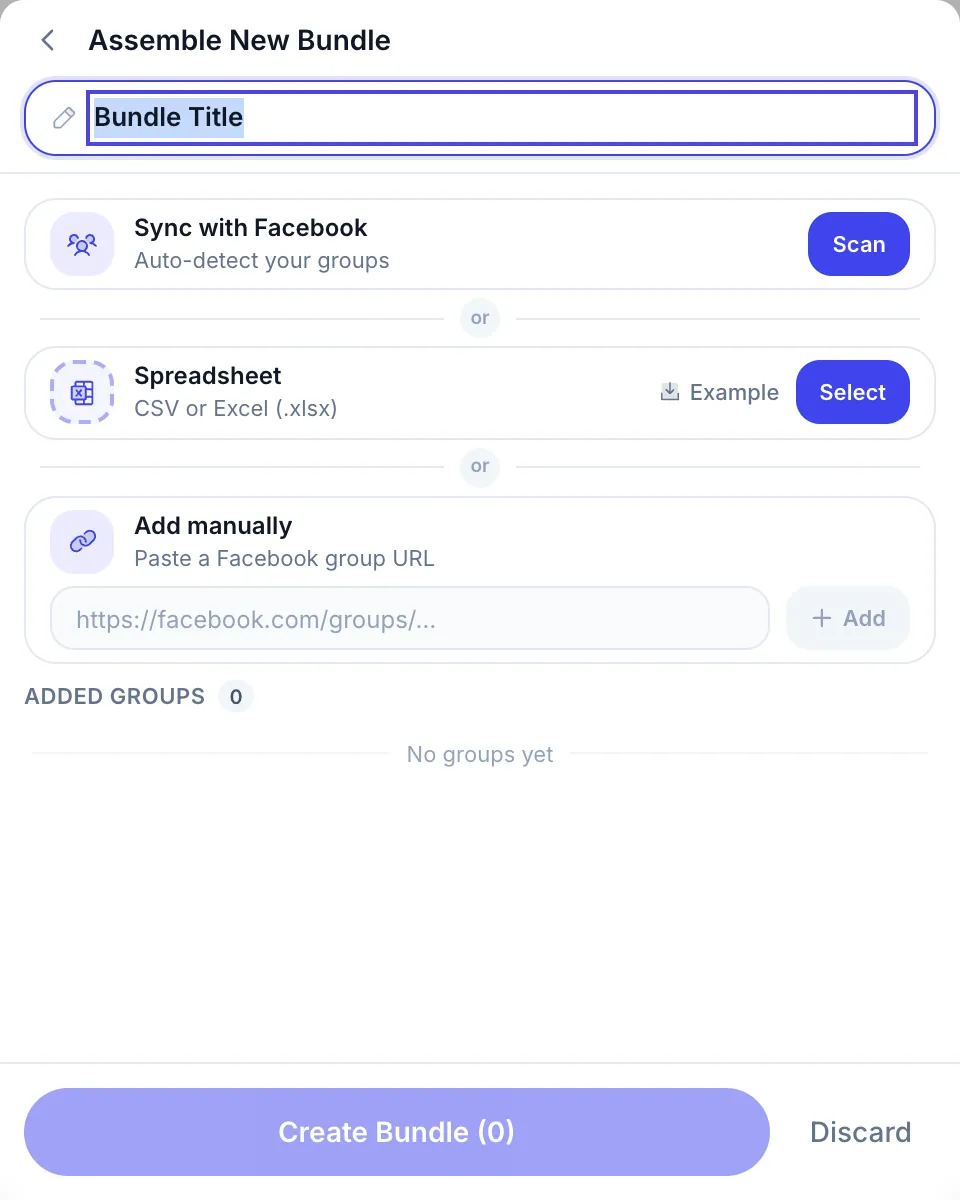
- Keep your group list in a sheet — save the sheet as CSV or Excel and import it in MultiGroupPoster as a group list (Spreadsheet, with an Example file showing the format).
- Record what you posted — MultiGroupPoster’s Post history has an Export button that saves your posting history as a file.
For Pages only, Zapier’s Facebook Pages integration page also describes a spreadsheet route: a new row with a publish time waits in a delay step until that time, then becomes a Page post.
CRMs: HubSpot, Salesforce, Pipedrive
Groups Watcher’s CRM guide maps the same webhook into HubSpot, Salesforce or Pipedrive through Zapier, Make or n8n — for example creating a contact or deal with the poster’s name and a link to the post. This is the modern replacement for the old “new group post” trigger, and arguably a better one: keyword filters decide which posts become leads.
What no monitoring tool does is post back into the group. Watching and publishing are now separate problems solved by separate tools.
The four ways left to publish
If your goal is getting content into groups, four routes remain in 2026, and it helps to be clear about each:
- Facebook’s native group scheduling. Admins and moderators can schedule a post with the calendar icon next to Post, and admins can create posts that recur daily, weekly or monthly with Admin Assist. Members cannot schedule.
- Meta Business Suite. Its composer lists a Facebook Group as a “Post to” destination and its Planner filters by Facebook Groups; SocialBee’s January 2026 guide says only groups linked to a Page appear there.
- Reminder apps. Buffer, Publer and SocialBee let you compose and schedule; at the set time your phone gets a notification and you paste the post and tap Publish. Helpful, but a person finishes every post.
- In-session browser posting. A browser extension runs inside your own logged-in Chrome and does what you would do by hand — open a group, fill the composer, publish — across a list of groups. It does not call the removed API and does not run on a server. For members rather than admins, it is the practical way to post and schedule at scale; the workflow is in scheduling posts to joined Facebook groups.
The 2026 integration landscape
Put together, the map looks like this. The only question that matters is which direction you need: data out of groups, or content into them.
| Integration type | Direction | Works in 2026? |
|---|---|---|
| Zapier and Make Facebook Groups apps | Publish and read | Removed on 22 April 2024 |
| Cloud schedulers (Hootsuite, Later, Sprout Social, Zoho Social) | Publish | Pages only, not groups |
| Reminder apps (Buffer, Publer, SocialBee) | Publish, finished by you | Yes — you tap Publish each time |
| Meta Business Suite | Publish | Groups it lists under Post to |
| Native group scheduling | Publish | Admins and moderators only |
| Webhook monitoring (Groups Watcher and similar) | Read and alert | Yes — Slack, Discord, Sheets and CRMs via Zapier, Make or n8n |
| Browser extension in your session | Publish | Yes — any group you joined |
Two conclusions follow. If you only need to monitor groups, you have more options than ever. If you need to publish to member groups automatically, the field has narrowed to one architecture: a tool that acts inside your own browser session. Multi-network publishers that list Facebook groups among dozens of destinations are a separate category; MultiGroupPoster vs FSPoster shows where each kind of tool fits.
How in-session posting connects
A browser extension like MultiGroupPoster runs in the Chrome (or Edge, or Brave) where you are already logged in to Facebook. It never asks for your Facebook password, and it posts to the groups you are a member of — admin rights not needed. Its connection is your own session, which is why it did not break when the API integrations did.
What that looks like in practice:
- Group lists from anywhere. Scan the groups you belong to, import a CSV or Excel file, or paste group links; a list can also hold a Page you manage and your own profile.
- Posting Method: Fast or Safe. Fast sends each post through the same request the Facebook web app uses; Safe opens each group in its own window and fills in Facebook’s own post box. Neither touches the removed Groups API.
- Paced runs. By default the extension pauses about 3–6 minutes after every 1–3 posts; Time Spacing and Natural Presence vary the timing further. That is about behaving like a person, not a promise that an account can never be limited.
- Different wording per group. Spintax picks one option per group from patterns like
{Hi|Hello|Hey there}, and Image Sets rotate the photos. A first comment and colored backgrounds are available too. - Schedules and shares. Publish Now, or Set Schedule with Once, Daily, Week or Month; share an existing Facebook post to many groups with Share to groups.
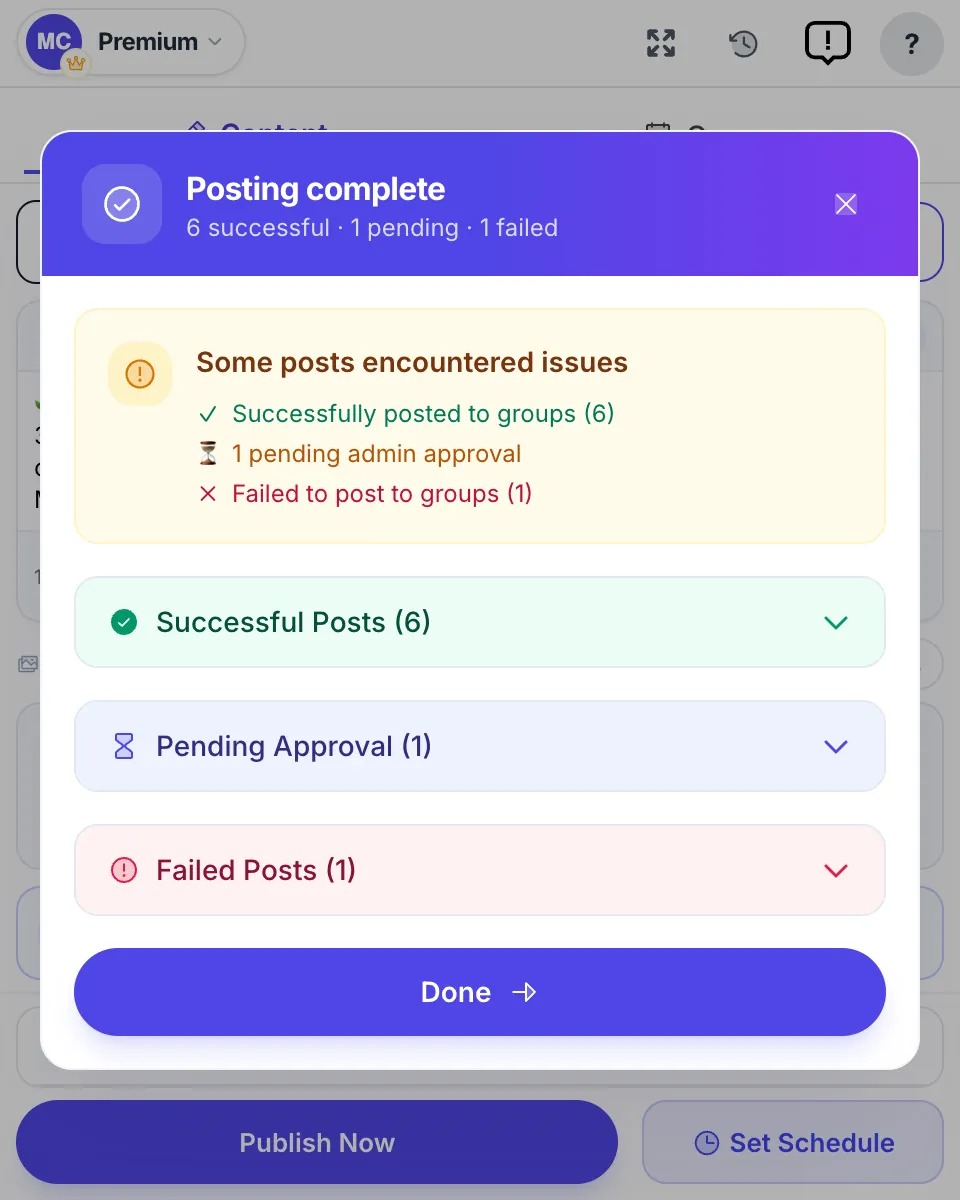
- A result for every group. When a run ends you see which groups have the post live, which are awaiting admin approval, and which failed — with the reason.
This is not a workaround that revives the API; it is what is left once the API closed — you, posting in your own groups, with a tool that does it across many groups at once. Keep a cloud scheduler for Pages and other networks; the two coexist cleanly. The product overview is on the Facebook post scheduler page.
How to rebuild your workflow
If your 2023 stack leaned on an API-based Facebook groups integration, here is how to reassemble it in 2026:
- Separate listening from publishing. Decide whether you need data out of groups (alerts, leads, logging), content into groups, or both. They were one integration; they are now two jobs.
- Route listening through a webhook. Point a group-monitoring service at a webhook and connect it to Zapier, Make or n8n, so each new group post reaches Slack, Discord, Google Sheets or your CRM.
- Send feeds to your Page first. Keep RSS, YouTube and WordPress automations, but point them at your Facebook Page. Use Meta Business Suite to cross-post Instagram content to the Page and to Facebook Groups.
- Use the native tools in groups you run. If you admin or moderate a group, schedule inside it, and set recurring posts with Admin Assist.
- Publish to joined groups from your own session. Install a browser extension such as MultiGroupPoster, build group lists by scanning, importing a spreadsheet or pasting links, and post, share or schedule from your logged-in Chrome.
- Pace the runs and read the results. Vary the text with Spintax, keep a few minutes between posts, and check each group’s result so you can drop groups that refuse posts. Distrust any tool that promises zero risk or claims Facebook cannot see it — the overnight API removal is the best reminder that nothing on Facebook is permanent.
The deprecation felt like the end of automated group work. It was really the end of one architecture — the server-holds-a-permission model Meta could switch off. What survived never needed a special permission: webhooks watching what a member can see, and a browser doing what you are already allowed to do in your own account.
To try the publishing half, MultiGroupPoster has a free trial of 6 posts with no card, connected through your own Chrome session. For the step-by-step version, see how to post to multiple Facebook groups at once.
FAQ
Can I still integrate Facebook groups with Zapier or Make in 2026?
Not for posting. Zapier’s Facebook Groups app stopped working on 22 April 2024, and Make blocked new Facebook Groups scenarios from 16 April 2024 before the same shutdown. Both still work in the other direction: a monitoring service can send each new group post to a Zapier or Make webhook, which then feeds Slack, Google Sheets or a CRM. Both also still post to Facebook Pages.
Is there a Facebook Groups API for posting content?
No. Meta’s Graph API v19.0 changelog, released on 23 January 2024, deprecated the Groups API together with the publish_to_groups and groups_access_member_info permissions, and removed them from every API version on 22 April 2024. It also removed the ability for group admins to install apps on a group. No third-party app can publish into a group through the API today.
How do I connect an RSS feed to a Facebook group?
Not directly any more. The working route is two steps: send the feed to your Facebook Page, for example with Zapier’s Post new RSS items to Facebook Pages template, then share that Page post into your groups with Share and Share to a group, or to many groups at once with MultiGroupPoster’s Share to groups button. You can also paste the article link into a group post, where it shows as a preview card.
Can I automatically share YouTube videos to Facebook groups?
Not through an API. Zapier can still send each new video from a YouTube channel to a Facebook Page, and from the Page you can share the post to a group. To reach many groups you joined, put the video link in a MultiGroupPoster post or share the Page post with its Share to groups button, now or on a schedule.
Can Instagram posts be shared to Facebook groups automatically?
Partly. Meta Business Suite can cross-post an Instagram post or reel to Facebook Groups, provided your Instagram account and Facebook Page are connected in the same business portfolio; SocialBee’s January 2026 guide says only groups linked to a Page appear there. Third-party apps lost this when the Groups API was removed. Groups you only joined need a manual post or an in-session tool.
How do I get Facebook group posts into Slack, Discord or Google Sheets?
Use a group-monitoring service that posts each new group post to a webhook. Groups Watcher, for example, documents alerts to Slack, Discord, email and webhooks, and a Catch Hook in Zapier, a Custom webhook in Make or a Webhook node in n8n can then add a row to Google Sheets or create a lead in HubSpot, Salesforce or Pipedrive. Slack and Discord both accept incoming webhooks natively.
Can I schedule posts to a Facebook group?
Yes, in three ways. Admins and moderators can schedule inside the group, and admins can set daily, weekly or monthly recurring posts with Admin Assist. Buffer, Publer and SocialBee can schedule a reminder that you finish on your phone. To schedule real posts to groups you joined as a member, MultiGroupPoster runs Once, Daily, Week or Month schedules from your own Chrome.
How do I connect my Facebook Page to my Facebook groups?
Switch into your Page and create a group with the Page as admin, or add the Page as an admin of a group you already run; Facebook’s help center says a Page can be the admin of up to 200 groups. To share a Page post into a group, click Share under it and choose Share to a group. MultiGroupPoster can post into groups as your Page, or share one Page post to many groups in one run.
Why did every cloud tool’s Facebook groups integration break at once?
Because they all used the same Meta permission. When Meta removed the Groups API from every version on 22 April 2024, Zapier, Make and Zoho Social dropped group features on that date, Sprout Social lost group posting in Compose, and Buffer moved groups to reminders. It was one upstream removal, not a series of outages, which is why no token refresh or update could fix it.