

Share vs post vs cross-post: what each means
Facebook overloads the word “share” so much that even experienced marketers conflate three different actions. Before picking a tool, make sure you know which one you actually need:
-
A native share is the “Share” button on an existing post. It re-publishes the original post to your feed, a Page you admin, a Group, or a friend’s timeline — but the post still credits the original author. The shared post inherits the original’s URL, comments, and reactions.
-
A new post is content you compose yourself. The text, image, and audience are all yours. Even if the content matches what someone else wrote, it’s published as new from your account.
-
A cross-post is a Facebook-specific feature where two Pages (or a Page and an Instagram account) you admin can publish the same content as separate, original posts. Each post lives in its own Page with its own engagement — not a shared link.
These three behaviors look similar in a feed but behave differently under the algorithm. Cross-posts and new original posts get full original-post reach. Native shares typically perform worse because they’re treated as endorsements of someone else’s content, not new content from you.
Most people who search for “auto share Facebook post”, “auto shares on Facebook”, or “auto share Facebook page post” actually want cross-posting or multi-target original posting — not the native share button.
Looking for a Facebook auto share bot specifically — how server bots differ from browser extensions, and which one gets accounts restricted? That is a separate guide.
If the action you want is the plain one — taking a post that already exists and putting it in front of another group — how to repost in Facebook groups walks through it, and automatic Facebook posting covers doing it on a repeating schedule.
To write one new post and publish it to all your groups instead, the walkthrough is how to post to multiple Facebook groups at once.
Method 1: Native Pages cross-post (Pages → Pages only)
If you admin multiple Facebook Pages (e.g., a main brand Page + regional Pages, or a parent business with sub-brand Pages), Meta’s built-in cross-posting is free and works.
How to enable it (one-time setup):
- Open the receiving Page (the one that will republish content).
- Go to Settings → Cross-Posting (search “cross-post” in Settings if you can’t find it).
- Click Add Page and enter the URL of the source Page.
- The source Page’s admin gets a notification and must accept.
- Once accepted, cross-posting is bidirectional — either Page can publish content the other can pull in.
How to use it (per post):
- Compose a post on the source Page.
- Before publishing, open the Cross-post to other Pages panel.
- Check the boxes for the other Pages you want to publish to.
- Publish.
Each Page now has its own original post that the algorithm treats independently. Reactions on the cross-posted version don’t sync to the source — they’re separate posts as far as Facebook is concerned.
Limitations:
- Only works between Pages, not Groups (Groups don’t have this feature).
- Both Pages must be linked through Business Manager / Meta Business Suite, or one must explicitly authorize the other.
- Photos and text cross-post cleanly; videos cross-post but each Page tracks views independently.
This is the cleanest option if your use case is Pages-only. If you also need to publish to Groups, see Method 3.
Method 2: Meta Business Suite scheduler (multi-Page + Instagram)
Meta Business Suite is Meta’s free dashboard for managing multiple Pages and Instagram accounts. It includes a scheduler that lets you compose one post and publish it as an original post to multiple Pages and Instagram accounts simultaneously.
If what you need is new posts going out on a schedule, rather than re-sharing existing ones, auto post to a Facebook Page walks through Meta Business Suite, Zapier and Make, and the paid schedulers.
Setup (5 minutes):
- Go to business.facebook.com and sign in with your Facebook account.
- Connect every Page you admin (Settings → Pages → Add).
- Connect your Instagram Business or Creator account (Settings → Instagram → Connect).
- Verify each connection — Meta sends a confirmation request to each linked account.
Composing a multi-target post:
- In Business Suite, click Create Post.
- At the top, select the target accounts — multiple Pages and one or more Instagram accounts.
- Write the post. The composer shows live previews per platform (Facebook crop vs. Instagram crop differ).
- Customize per platform if needed (longer caption on Facebook, shorter on Instagram).
- Publish now or schedule for a future time.
What this gets you:
- One composition → publish to your full set of Pages + Instagram accounts in a single click.
- Native scheduling (no PC needs to be on at publish time — Meta’s servers handle it).
- Per-platform customization (different caption per channel).
- Free, no third-party tool required.
What it does NOT do:
- ❌ Cannot publish to Facebook Groups (Groups don’t appear in the target selector).
- ❌ Cannot publish to Twitter/X, LinkedIn, or any non-Meta platform.
- ❌ Cannot bulk-import a list of post variations (Spintax) — one composition per scheduled post.
- ❌ No per-target analytics breakdown for the same scheduled post.
For Page admins managing multi-brand content, this covers most of the auto-share need. For anyone publishing to Groups, you need a third method.
Method 3: Chrome extension (the only way to auto-share to Groups)
In April 2024, Meta removed the publish_to_groups API permission. That means no cloud tool can publish to Facebook Groups — not Buffer, Hootsuite, Sprout Social, Later, or Meta Business Suite itself. If you’ve seen a “post to Facebook Groups” feature advertised on a cloud tool, it’s either out of date or only works for Groups you own (a different API path).
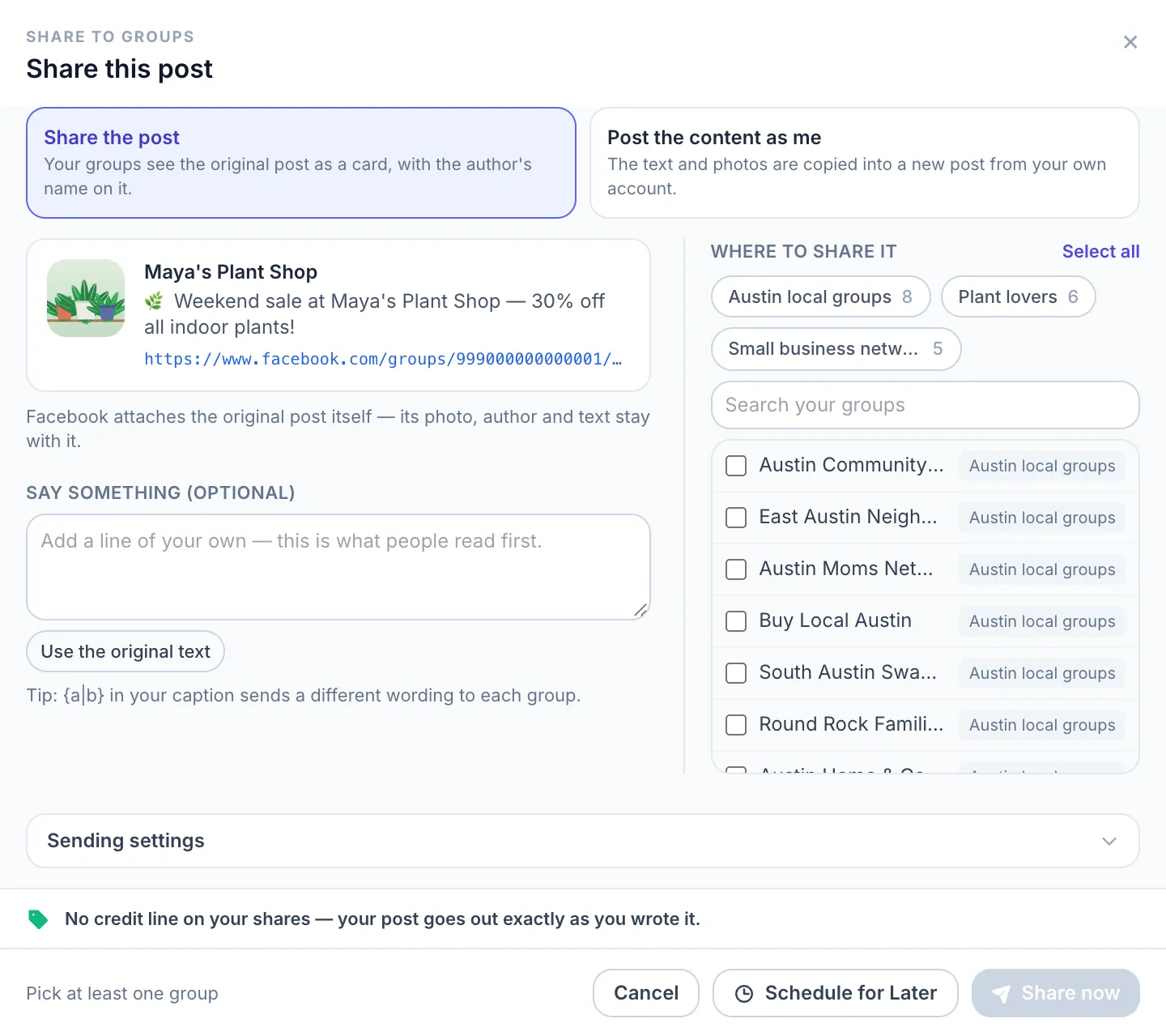
The only technical path to publish in a Facebook Group as a regular member is a session running inside a logged-in browser. That’s why all reliable Group-posting tools in 2026 are browser extensions: MultiGroupPoster, PilotPoster, GroupPosting, and a few smaller ones.
How it works under the hood:
The extension runs as a script inside your own Chrome (or Edge/Brave) browser, in the same session where you’re logged into Facebook. When you click “Post to 50 groups,” the extension automates what you’d do manually — navigate to each group, paste the composer, submit — but at a controlled pace and with content variations between groups. There’s no external server seeing your password or session token.
Quick setup (covered in depth in How to Auto Post to Facebook Groups Safely):
- Install MultiGroupPoster from the Chrome Web Store.
- Pin the extension icon.
- Click it while logged into Facebook — it auto-imports every Group you’re a member of.
- Tag Groups into reusable lists (e.g., “Tampa Real Estate,” “Tech Recruiting”).
- Compose your post once with Spintax variations, click “Post to list.”
A 50-group campaign at the default pacing runs for three to four hours — almost all of it the pauses between posts. You can close the dashboard tab and the extension keeps running in the background. Active attention from you: about 45 seconds.
Pages support inside the extension: MultiGroupPoster also posts to Pages from the same composer if you toggle the target. So if you need Pages + Groups in one campaign, you don’t need to bounce between tools — one composition, multi-target.
The step-by-step version of this — starting from the Share button under a post you are already looking at — is in how to share one Facebook post to multiple groups.
Auto-share to Instagram automatically
This one’s actually built in and many people don’t realize it:
If you’ve connected your Instagram Business or Creator account to a Facebook Page (via business.facebook.com → Instagram → Connect Account), Facebook can automatically mirror posts from the Page to Instagram with no extra setup.
To enable:
- On your Facebook Page, click Settings → Instagram.
- Find the Share to Instagram automatically option (Meta sometimes moves this; search “Instagram” in settings if you can’t find it).
- Choose what types to share: photo posts, video posts, and/or text-only posts.
Now every time you publish a photo or video to that Facebook Page, the same content auto-publishes to Instagram. Caption, hashtags, and image come along. You can opt to customize the caption per-platform when composing.
Limitations:
- One Instagram account per Page (you can’t auto-share to multiple Instagrams from one Page).
- Auto-share works one-way (Page → Instagram). For Instagram → Page direction, set the matching toggle on Instagram in its settings.
- Stories don’t auto-share by default. Reels do, but with restrictions on length/format.
- If the post has multiple images, Instagram’s carousel cap (10 images at the time of writing) may apply.
This is the cleanest way to keep Facebook and Instagram in sync. You don’t need a third-party tool for this specific cross-posting.
Why original posts usually beat shared links
A pattern that trips up new marketers: they post to one Facebook Page, then use the “Share” button to push the same post to 10 Groups. The result is disappointing — the shared posts get a fraction of the reach of the original.

The general pattern is consistent across years of observation by social marketers: Facebook’s algorithm tends to favor original posts over native shares of someone else’s content. Whether the exact reach penalty is 20% or 40% varies by content and audience, but the direction is well-established. Original posts are treated as content; shared links are treated as endorsements.
The fix is to compose each post as a new original at every destination, not share a single source. This is what every serious auto-posting tool does:
- Meta Business Suite cross-post → creates an original post per Page
- MultiGroupPoster → creates an original post per Group (with Spintax variations so each one is unique)
- Native Pages cross-post → creates an original per Page
When the platform sees an original post (even if substantively similar text), it gets full reach weight. When it sees a “shared post” link to an existing one, it down-ranks.
Rule of thumb: post original at each destination, don’t share. The only time the share button is right is for a one-off endorsement (“Look at this great post my friend made”) — not for bulk distribution.
This trade-off is the whole reason a sharing tool offers two modes at all. Which one to pick, and when: share or copy to Facebook groups.
How fast can you auto-share without getting flagged?
Same anti-spam math as bulk posting — Facebook tracks volume and pattern, not the specific technical method:
| Setting | Safe baseline | Why |
|---|---|---|
| Posts per day per account | 50–100 (12+ month accounts) | Below the volume range that triggers Facebook’s anti-spam reviews |
| Delay between cross-posts | A few minutes, randomized | Constant intervals look automated. Random looks human |
| Variations | Use Spintax / per-platform copy | Identical text across many targets risks duplicate-content flags |
| Daily window | Spread across 4–8 hours | Bursting 100 posts in 30 min triggers limits fast |
| Account age | Older = more headroom | New accounts (under 6 months) need 20–40/day max |
The pacing rules are platform-side, not tool-specific. Meta Business Suite’s scheduler will queue 50 cross-posts without complaint, but if all 50 publish within one minute, Facebook’s anti-spam can still throttle the account. Same for any extension.
For deeper coverage on staying under the radar: Bulk posting without getting restricted.
Repeating the same share on a fixed rhythm is its own topic, covered in recurring Facebook posts.
Quick comparison: which method for which use case
| Need | Best method | Why |
|---|---|---|
| Publish to 2-5 Pages I admin | Native Pages cross-post | Free, built-in, no setup needed beyond initial Page link |
| Publish to many Pages + Instagram | Meta Business Suite scheduler | Built for this exact case, free, includes per-platform customization |
| Publish to Groups | MultiGroupPoster Chrome extension | Only working path to Groups since April 2024 |
| Publish to Groups + Pages in one campaign | MultiGroupPoster (extension covers both) | One composition, multi-target, includes Spintax variations |
| Cross-platform (FB + Twitter + LinkedIn) | Buffer or Hootsuite | Meta’s tools don’t touch Twitter/LinkedIn; cloud tools do, but skip Groups |
| Daily auto-share Facebook → Instagram | Native auto-share toggle | Built in, free, no third-party tool ever needed |
| Schedule a single post for the future | Meta Business Suite OR an extension’s scheduler | Both work; Business Suite doesn’t need your computer to be on |
For most marketers running multi-brand content + Group distribution, the practical stack is:
- Meta Business Suite for Pages and Instagram (free, scheduled, no PC needed at publish time)
- MultiGroupPoster Chrome extension for Groups (the missing piece Meta doesn’t cover)
- Buffer or Hootsuite if you also need Twitter/LinkedIn auto-posting
That covers most multi-target auto-share scenarios with two free tools and one paid one. Adding a fourth tool to the stack rarely justifies the complexity.
FAQ
Can I auto-share a single Facebook post to multiple Groups in one click?
Not via Facebook’s native features — Groups don’t have a cross-post button. The only working method is a Chrome extension running in your logged-in session. MultiGroupPoster auto-shares a single composition (with Spintax variations) to many Groups in one click. Free tier: 6 posts to try (one-time).
Does Buffer or Hootsuite let me auto-share to Facebook Groups?
No. Buffer, Hootsuite, Sprout Social, Later, and every other cloud-based scheduler dropped Facebook Group support in April 2024 when Meta removed the publish_to_groups API. They can still publish to Facebook Pages and Instagram. For Groups in 2026, you must use a browser extension.
How is “auto share” different from “auto post”?
They overlap. Most people who say “auto share” mean either (1) cross-post the same content to multiple destinations as original posts, or (2) use the native Share button to re-publish. The first is what most marketers actually want, and what all the tools above do. The second is what the native Share button does — and it generally underperforms because the algorithm treats shares as endorsements rather than as your own content.
Will Facebook ban my account for auto-sharing?
No tool can guarantee zero risk. With safe settings (50-100 posts/day, randomized pauses of a few minutes, Spintax variations, images attached, account 12+ months old), reported issues are rare. Crossing 200+ posts/day with identical text triggers Facebook’s anti-spam regardless of the tool — including manual posting at that speed.
Can I auto-share from Instagram back to Facebook?
Yes. In Instagram settings → Account → Sharing to other apps → Facebook → set to “On.” Now every Instagram post auto-publishes to your linked Facebook Page. This works the opposite direction of the Facebook → Instagram auto-share toggle.
Does auto-sharing work for Facebook Reels?
Partially. Reels auto-share between Page → Instagram (when both are connected and the toggle is on). Reels do NOT auto-share between Pages (only static photo/video posts do reliably). And no extension reliably automates Reels uploading in 2026 — the file size and format requirements make it more fragile than feed posts.
What about auto-sharing to Twitter/X and LinkedIn?
Meta’s tools don’t touch other platforms. For Twitter/X and LinkedIn auto-share, the cleanest options are Buffer or Hootsuite. Note that those tools can’t help with Facebook Groups — the platforms complement each other.
Is there a free way to do all of this?
Yes, mostly. Meta Business Suite is free for unlimited Pages and Instagram. MultiGroupPoster has a free tier (6 posts to try (one-time), no credit card). Native auto-share Facebook ↔ Instagram is free. The only thing you’d pay for is Twitter/LinkedIn cross-posting (Buffer’s free tier covers a few channels and limited scheduled posts).
Ready to auto-share to your Groups? Install MultiGroupPoster free — handles the one piece Meta’s native tools can’t.