MultiGroupPoster vs Buffer for Facebook Groups Skip to main content
MultiGroupPoster
Comparison · Updated

MultiGroupPoster vs Buffer

They solve different problems. Here's the actual difference and which one fits your workflow.

MultiGroupPoster

Posts to Facebook groups

vs

Buffer

Posts to Facebook Pages (not groups)

Why can't Buffer post to Facebook groups?

This is a permission scope issue, not a Buffer choice. Facebook's Graph API exposes two scopes for posting:

Since April 2024, the only way to programmatically post to a Facebook group is from inside a real Facebook session — which means a browser extension running in your own Chrome instance. Cloud services like Buffer don't have access to your browser session, so they literally cannot post to groups via the official API.

(Some cloud tools claim "group posting" by spinning up server-side browser instances and automating them remotely. This works occasionally but has very high account-restriction rates because Facebook's automation detection treats data-center IPs with maximum suspicion.)

When to use Buffer

When to use MultiGroupPoster

Can I use both?

Yes, and many marketers do. Buffer schedules your Page content + Instagram/Twitter posts. MultiGroupPoster handles your group posts. The two don't conflict and serve different parts of your funnel:

Feature comparison (where they overlap)

FeatureMultiGroupPosterBuffer
Posts to FB groups✓✗ (phone reminder only)
Posts to FB PagesLimited (groups only)✓
Posts to Instagram✗✓
Posts to Twitter / X✗✓
Posts to LinkedIn✗✓
Spintax variations✓✗
Randomized pauses between posts✓N/A (cloud)
ArchitectureBrowser extensionCloud SaaS
Free plan6 posts to try3 channels, 10 scheduled posts each
Starting price$9.99/mo$6/mo per channel ($5 billed yearly)

The conclusion: if you need group posting specifically, MultiGroupPoster is the only option among these two. Buffer simply doesn't do that job.

Buffer's plans and prices: buffer.com/pricing; its group reminders: Buffer Help Center. Both checked on 26 September 2026.
The actual tool

Everything you need to post to Facebook groups, in one place.

Real screens from the extension. No mockups, no stock photos — this is exactly what you'll use.

One-click bulk posting

Write it once. Post to all your groups.

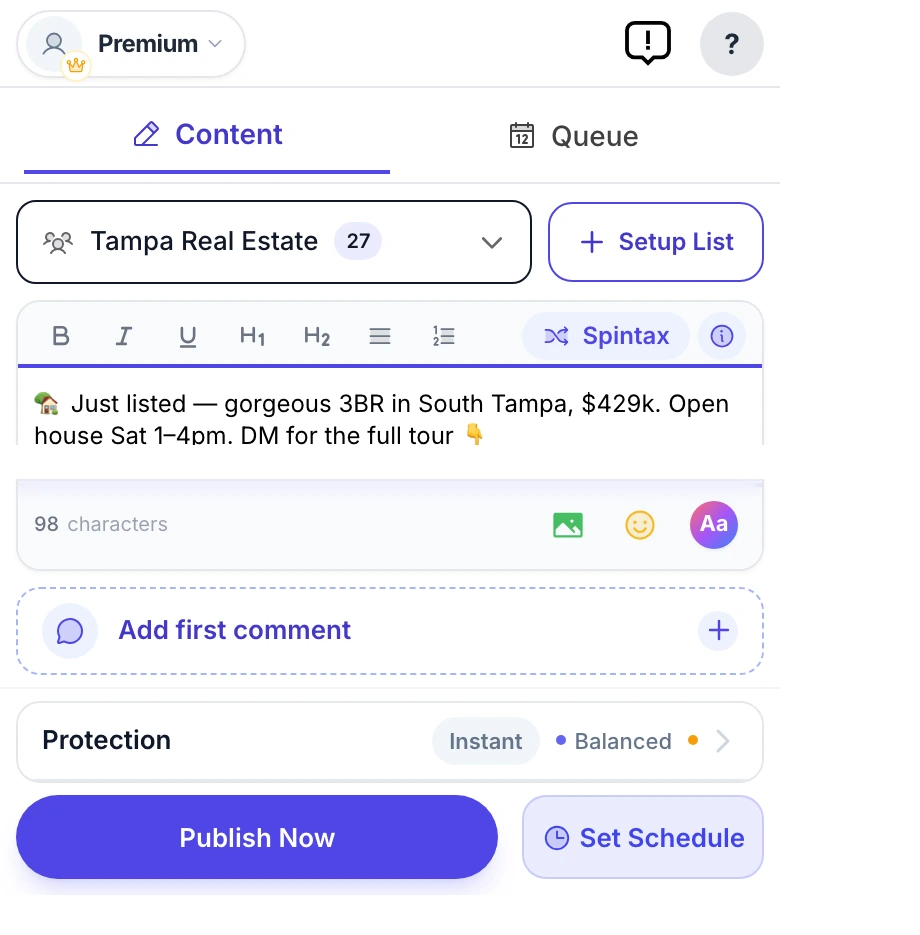
Stop copy-pasting the same post into one group after another. Write it once, pick a saved group list, and MultiGroupPoster posts it to every Facebook group on that list, one group at a time.

  • Reusable group bundles you set up once
  • Text, photos, video, emoji, link previews & color posts
  • Watch every group go out, live, with per-group results
MultiGroupPoster main screen (real extension popup) — composing a Facebook post with the Spintax, first-comment, color, and Protection controls, ready to publish to every group
Unique every time · Spintax

Every group sees a different version.

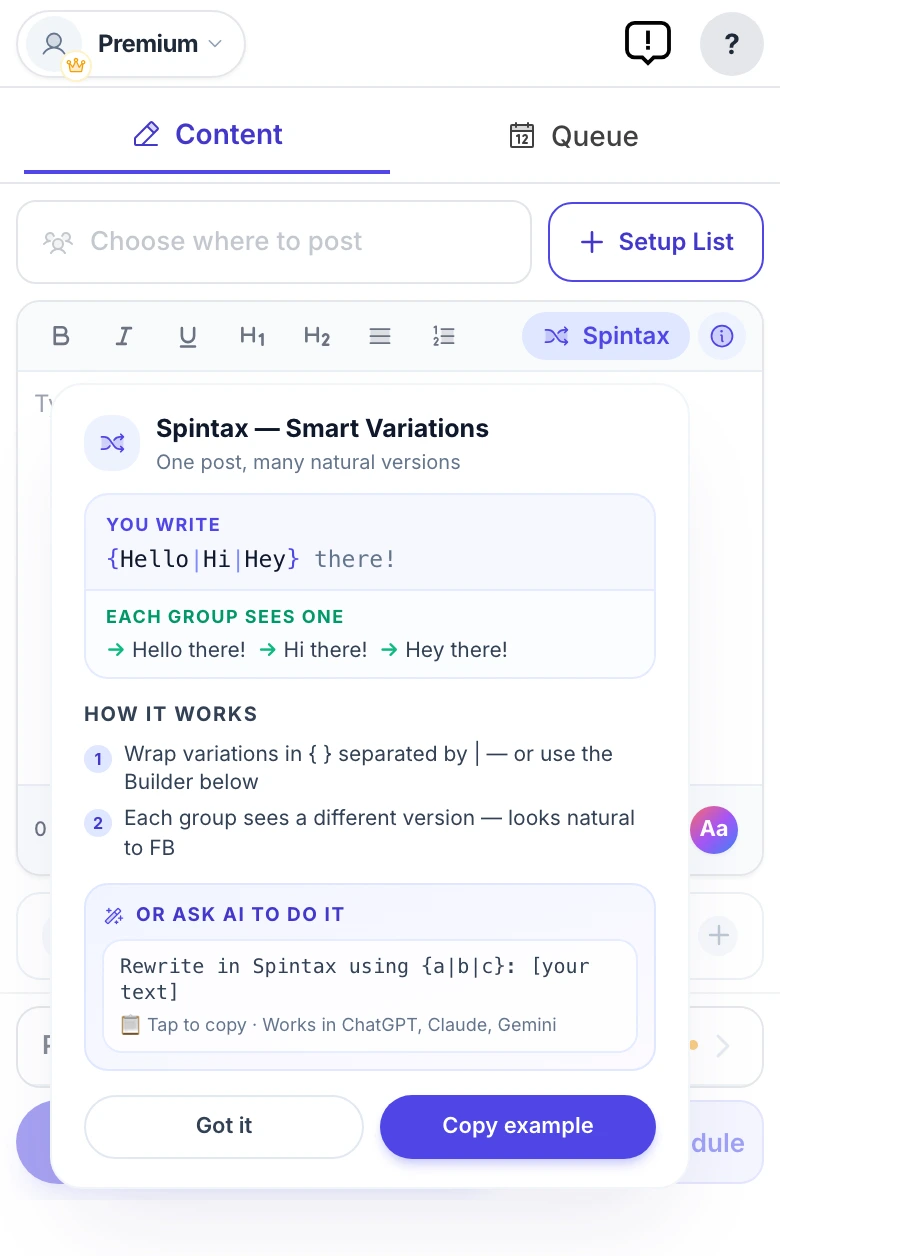
Pasting the exact same text into many groups is a common reason posts get reported as spam. Spintax rewrites your wording for each group, so {Hi|Hey|Hello} turns into a different version every time and no two groups get an identical copy.

  • No two groups get the same post — automatically
  • Different wording in every group, not one copy pasted everywhere
  • Paste ChatGPT or Claude variations straight in
MultiGroupPoster Spintax variation builder generating a different version of a Facebook post for each group, with a live preview
Posting at a pace you set

Spread out over time, not fired off at once.

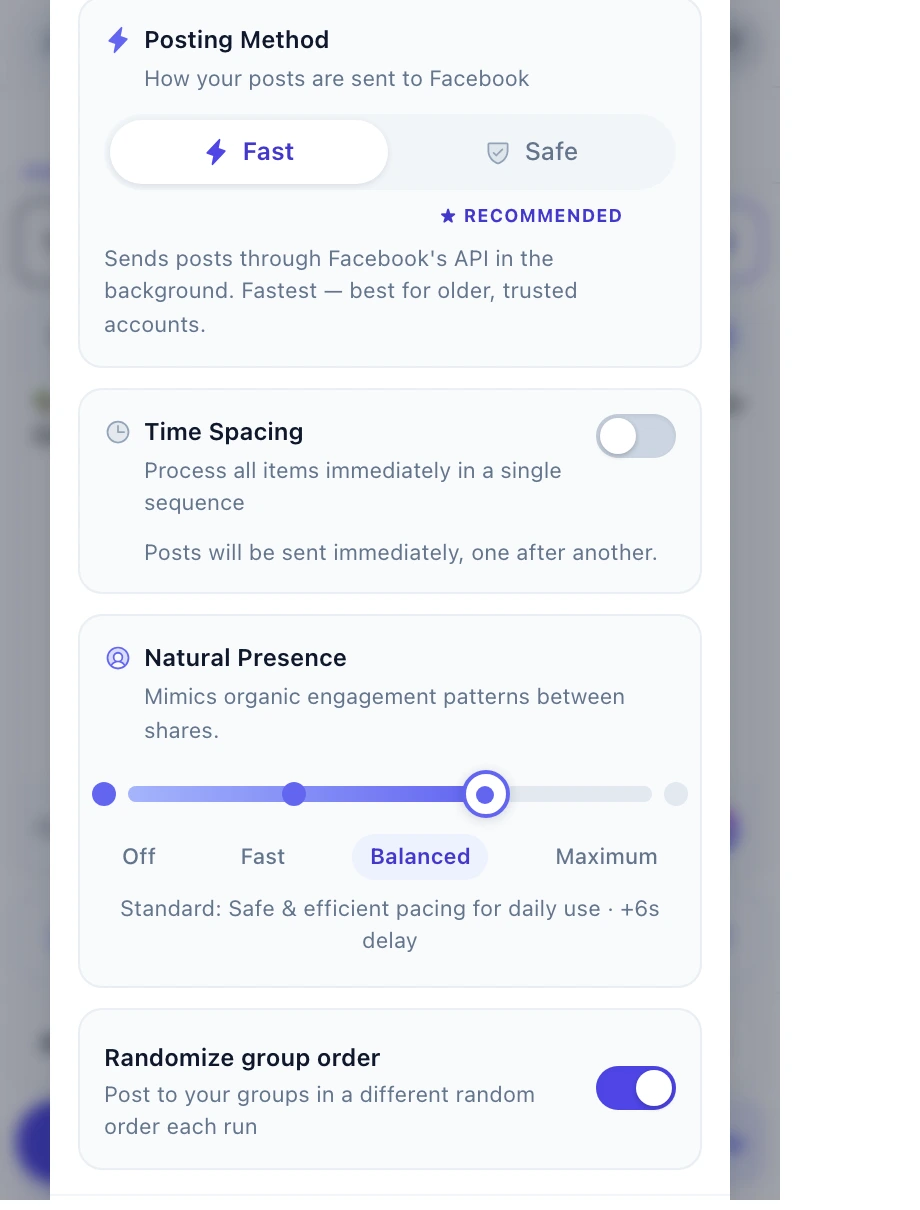
Firing 50 posts in 50 seconds is how accounts get restricted. Time Spacing sends your posts out in rounds with pauses in between, and Natural Presence adds a wait between posts. One group at a time, at the pace you choose. No tool can promise Facebook won't limit an account, but a steady pace is the sensible way to post.

  • Time Spacing: rounds with randomized pauses
  • Natural Presence: four levels of wait between posts
  • A 200-posts-a-day limit that asks you before going past it
MultiGroupPoster Protection settings: Time Spacing between posting rounds and a four-level Natural Presence slider that sets the pause between posts
Set it and forget it

Schedule once. It runs on autopilot.

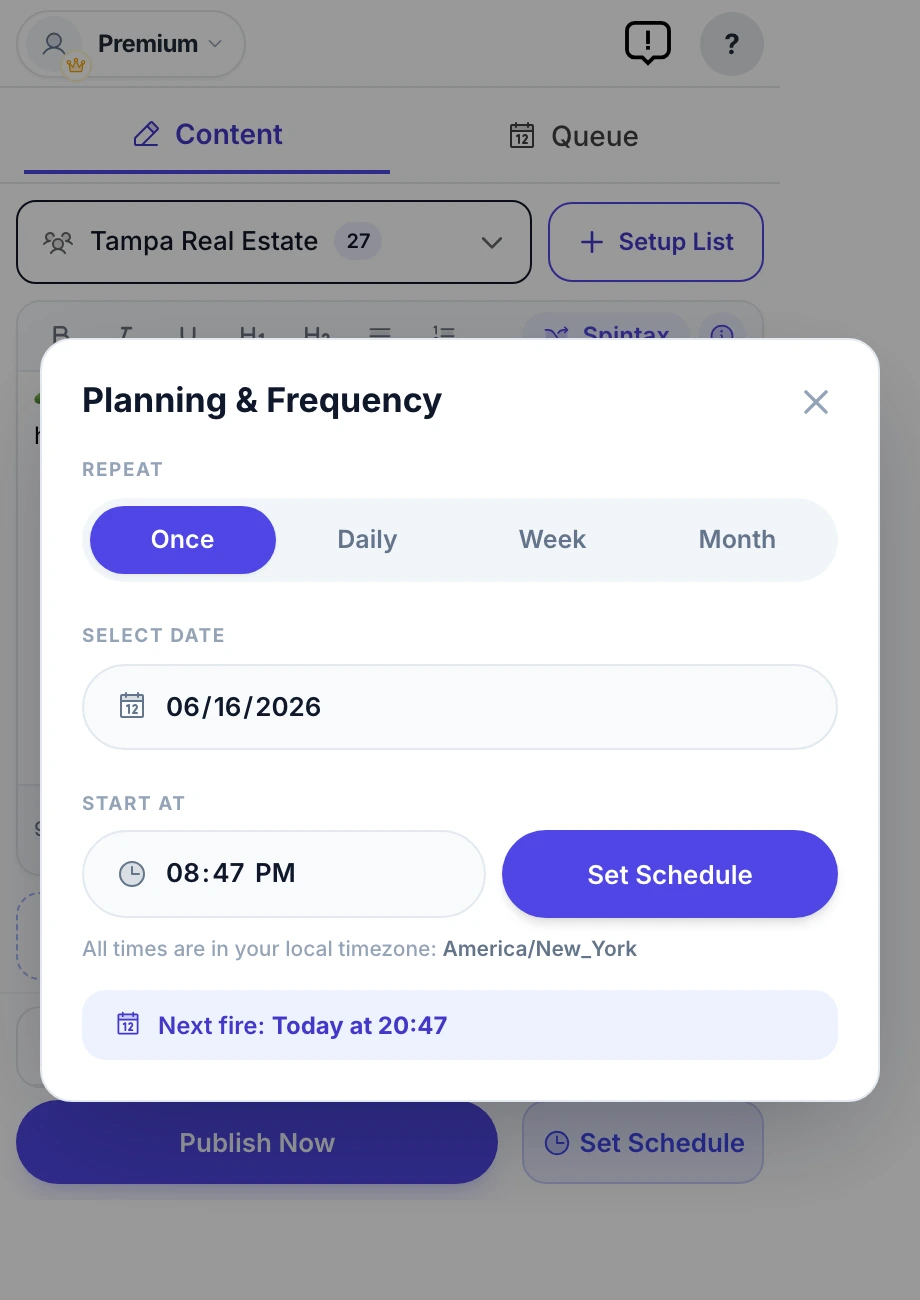
Queue your posts for the perfect moment — once, daily, weekly, or monthly. MultiGroupPoster fires them on schedule and shows you exactly what landed in every group.

  • Once / Daily / Weekly / Monthly frequencies
  • Per-group results you can open on Facebook
  • Pause, edit, or reorder the whole queue anytime
MultiGroupPoster Planning & Frequency scheduler set to auto-post to Facebook groups on a recurring weekly schedule
Build lists in seconds

Pull all your groups straight from Facebook.

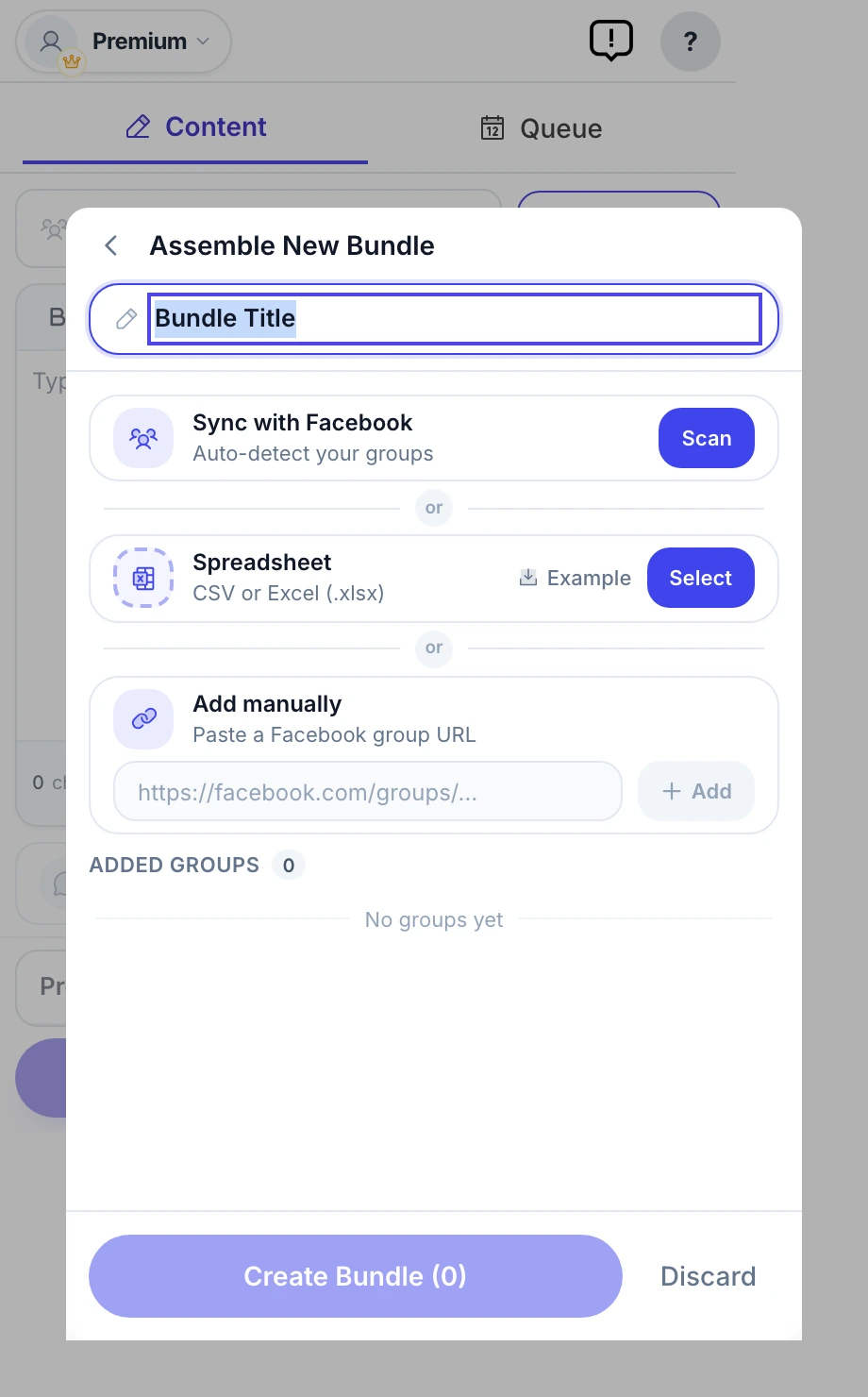
No manual copy-pasting of group URLs. Sync scans your Facebook account and imports every group you're a member of — then save targeted bundles you reuse for each campaign.

  • One-click sync from your own Facebook account
  • Or import a CSV / add group URLs manually
  • Save reusable bundles per niche or campaign
MultiGroupPoster Assemble Bundle screen — sync Facebook groups automatically, import a spreadsheet, or add group URLs by hand to build a reusable posting list

Auto first comment

Put your link in the first comment under your own post, in groups whose rules allow links in comments.

Color background posts

Eye-catching text-on-gradient posts that stop the scroll — no image required.

Post as a Page

Switch between your personal profile and any Facebook Page you manage — per campaign.

Photos, video & emoji

Attach up to 10 images or a video per post, plus a 90+ emoji picker.

Reusable templates

Save your winning posts and reload them into a new campaign with one click.

Scheduling queue

Every scheduled post in one place, sorted by next run — pause the whole queue anytime.

Per-group results

See success / pending-approval / failed for each group, and open any live post on Facebook.

One-click diagnostics

A built-in self-test and downloadable report — no DevTools needed if anything looks off.

Need to post to Facebook groups? Buffer can't help. We can.

MultiGroupPoster is free for 6 posts to try (one-time). No credit card.

Add to Chrome — Try Free
Free trial · No credit card
Add to Chrome