

Scheduling to Facebook groups rather than Pages? Use a Facebook group post scheduler — the cloud apps in this list publish to Pages, and since April 2024 they cannot publish to groups on their own.
2026 comparison table
Every price and limit below was checked on the vendor’s own pricing or help page in October 2026. Pricing pages change often, so read this as a dated snapshot rather than a quote, and confirm on the vendor’s site before you pay.
| App | Free option | Paid plans (as of October 2026) | Facebook Pages | Facebook groups |
|---|---|---|---|---|
| Meta Business Suite | Free | No paid tier | Yes, 20 minutes to 29 days ahead | Lists a Facebook Group under Post to |
| MultiGroupPoster | 6 posts, one-time trial | $9.99/month or $69.99/year | A Page’s own feed, as the Page | Any group you joined, automatically |
| Buffer | 3 channels, 10 scheduled posts each | $6–$12 per channel a month ($5–$10 billed yearly) | Yes | Phone reminder, you tap Publish |
| Publer | 3 accounts, 10 scheduled posts each | From $5–$10 per account a month, 1 account ($4–$8 billed yearly) | Yes | Phone reminder, you tap Publish |
| Hootsuite | 14-day trial | $99–$399 per user a month, billed annually | Yes | No: its FAQ line on admin groups predates the 2024 removal |
| Later | 14-day trial | $25–$110 a month ($18.75–$82.50 billed yearly) | Pages only | No |
| SocialBee | 14-day trial | $29–$99 a month ($290–$990 a year) | Yes | Mobile-app reminder |
| Sprout Social | 30-day trial | $79–$399 per seat a month, billed annually | Yes | No since the API deprecation |
Two columns decide most choices: whether there is a free option you can live with, and whether the tool reaches the place your audience actually reads. The sections below explain each row with its source.
Best Facebook scheduling apps in 2026, by job
If you read one part of this page, read this. Each pick is the strongest fit for one job, based on the plans and limits checked below:
- Best free app for a Facebook Page: Meta Business Suite. Free, native, up to 29 days ahead.
- Best free plan for several networks: Buffer Free, 3 channels with 10 queued posts each.
- Best value paid scheduler: Publer, from about $5 a month per account, with CSV bulk scheduling.
- Best for finding content to post: Post Planner, from $9 a month billed yearly, with a free plan for one account.
- Best for teams and agencies: Hootsuite or Sprout Social, from $99 and $79 per user a month billed yearly.
- Best for Facebook groups you joined: MultiGroupPoster, the only app on this list that posts to member groups automatically.
First question: Page, group or profile?
The biggest mistake when picking a Facebook scheduler app is treating “Facebook” as one destination. It is three, and each has different rules in 2026:
- Facebook Pages — the business profile you manage. Every app in this list schedules to Pages, because Meta’s Pages API is still open to third-party tools.
- Facebook groups — communities you admin or simply joined. Meta deprecated the Groups API with Graph API v19.0 on 23 January 2024 and removed it from every version on 22 April 2024, together with the
publish_to_groupspermission. Since then no third-party cloud scheduler publishes into a group by itself. - Your personal profile — Jetpack’s documentation notes that since 2018 third-party tools can only share to Pages, not profiles, and Later’s help center says the same about scheduling to profiles.
If you schedule listings to “home buyers in Tampa”, that is a group destination, and none of the cloud apps below will post it for you. If you schedule brand updates to your business Page, any of them works. As a rule of thumb, local sellers, agents, recruiters and coaches mostly need groups; brands and agencies mostly need Pages.
The 8 Facebook scheduling tools, one by one
1. Meta Business Suite — free and native
- Schedules to: Facebook Pages and Instagram, with cross-posting to Threads. Meta’s help center also lists a Facebook Group as a “Post to” destination; SocialBee’s January 2026 guide adds that only groups linked to a Page appear there.
- Price: free — Meta describes Business Suite as a free platform.
- Scheduling window: Page posts can be scheduled between 20 minutes and 29 days ahead.
- Good at: Planner, a week and month calendar of everything scheduled; Active times, which suggests slots based on when followers were most active over the past 7 days; a mobile app that schedules posts, reels and stories.
- Not for: groups you joined as a member, or networks outside Meta such as LinkedIn, TikTok and X.
Verdict: the default for anyone with a Page. Start here before you pay for anything.
For the Page side alone, including how to repeat posts that Meta Business Suite won’t repeat, see how to auto post to a Facebook Page.
2. MultiGroupPoster — the groups you joined
- Schedules to: Facebook groups you are a member of (admin rights not needed), a Page’s own feed, and your own profile — from your logged-in Chrome, Edge or Brave.
- Price: free trial of 6 posts (one-time, no card), then Pro at $9.99 a month or $69.99 a year, with a 7-day money-back window on a first purchase.
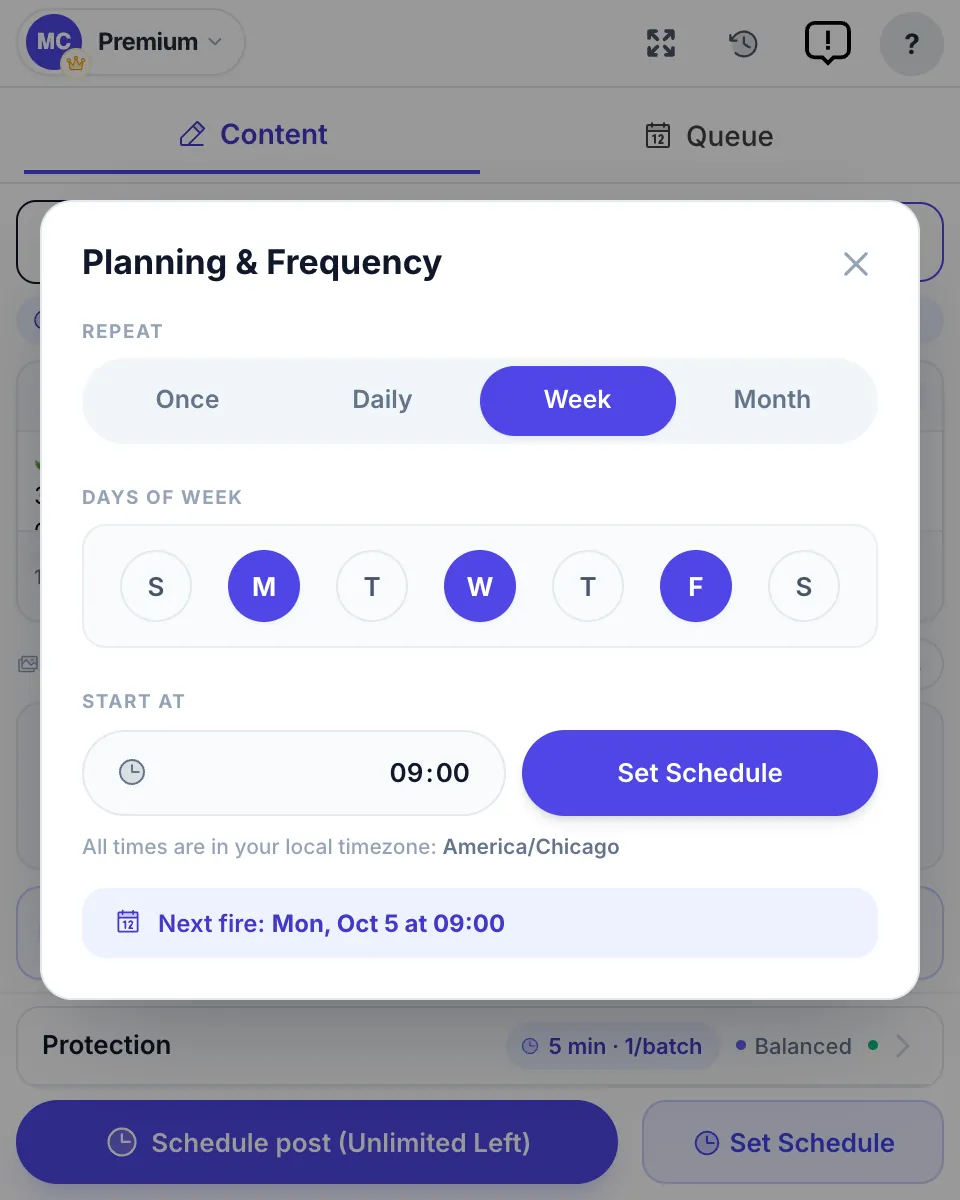
- Schedule types: Publish Now, or Set Schedule with Once, Daily, Week (pick the weekdays) or Month, at a start time in your computer’s time zone.
- Good at: one post to many groups per run from saved lists; Spintax so each group gets its own wording; Image Sets; a first comment; a default pause of 3–6 minutes after every 1–3 posts; a result for every group (posted, awaiting approval, or failed with the reason).
- Not for: Instagram, LinkedIn or X. It also runs on your computer, so Chrome must be open and the computer awake at the scheduled time.
Verdict: the practical way to schedule posts to member groups in 2026. Pair it with a cloud tool for Pages. Facebook auto poster page · step-by-step guide
3. Buffer — the cheapest multi-network option
- Schedules to: Facebook Pages plus Instagram, LinkedIn, TikTok, Pinterest, YouTube, Threads, Bluesky, Mastodon, X and Google Business Profile.
- Free plan: up to 3 channels and 10 scheduled posts per channel at a time.
- Paid: Essentials and Team cost $6–$12 per channel a month, or $5–$10 billed yearly (as of October 2026); Team adds unlimited team members; 14-day free trial.
- Groups: Buffer’s help center says it is “no longer possible to schedule posts to be sent automatically” to groups after Meta’s April 2024 change. Its notification publishing covers Facebook Groups (plus Instagram, TikTok and YouTube): you get a phone notification and paste the post yourself.
Verdict: the best value if you post to a handful of channels and want a real free tier.
4. Hootsuite — teams and agencies
- Schedules to: Facebook Pages (its FAQ still mentions groups you admin, a line written before Meta removed group publishing in April 2024; see can Hootsuite post to Facebook groups) plus Instagram, LinkedIn, TikTok, X, Threads, Bluesky and more.
- Price: Standard, Professional and Advanced run $99–$399 per user a month, billed annually (as of October 2026); Enterprise is custom. Standard manages up to 10 social accounts.
- Trial: 14 days, no free plan. Trial accounts have daily posting limits, and bulk scheduling is not available during the trial.
- Good at: a calendar and list view of organic and paid posts, a shared inbox, approvals, and a bulk scheduler for up to 350 posts at once.
Verdict: overkill for one person, strong for a team. Need Hootsuite-style scheduling for the groups you joined? See Hootsuite alternatives that post to Facebook groups.
5. Later — visual planning
- Schedules to: Facebook Pages only — Later’s help center says personal profiles, Facebook Groups and Facebook Stories aren’t supported — plus Instagram, Pinterest, TikTok, LinkedIn, Threads, YouTube Shorts and Snapchat.
- Free plan: none on its pricing page in October 2026, only a 14-day trial; its help center still describes an older Free plan of 12 posts per profile a month.
- Price: Starter, Growth and Scale run $25, $50 or $110 a month, or $18.75, $37.50 or $82.50 a month billed yearly (as of October 2026); Starter allows 30 posts per profile per month.
- Trial: 14 days on paid plans.
Verdict: a good fit when your planning is image-first and Instagram matters as much as Facebook.
6. Publer — a free plan and recurring posts
- Schedules to: Facebook Pages, profiles and groups, Instagram, LinkedIn, TikTok, YouTube and others. Publer auto-posts only to Facebook Pages and Location Pages through the API; posts meant for Groups or personal profiles go out as push-notification reminders instead.
- Free plan: 3 social accounts (X excluded) and 10 scheduled posts per account.
- Paid: from $5 a month (Professional) or $10 a month (Business) for one account, 20% cheaper billed yearly (from $4/$8); the per-account price drops from 3 accounts on. 7- and 14-day trials.
- Good at: a drag-and-drop calendar on every plan; CSV bulk scheduling (up to 500 posts) and unlimited RSS automations from Professional; recurring posts and content recycling from Business.
Verdict: the strongest free alternative to Buffer, with more automation per dollar.
7. SocialBee — evergreen content on a loop
- Schedules to: Facebook Pages and the other major networks. For groups and profiles it uses Universal Posting: at the scheduled time the SocialBee mobile app sends a notification and you finish the post.
- Price: Bootstrap, Accelerate and Pro run $29–$99 a month, or $290–$990 a year (as of October 2026), for 5 to 25 social profiles.
- Trial: 14 days, plus a 30-day money-back period.
- Good at: content categories with a recycle option, so evergreen posts go out again; unlimited AI content generation; CSV uploads on Accelerate and Pro.
Verdict: for solo marketers who want a queue that never runs dry.
8. Sprout Social — analytics and customer care
- Schedules to: Facebook Pages plus the other major networks. Sprout’s support center explains that after Meta’s Groups API deprecation, users can no longer post to Facebook Groups via Compose or see group messages in the Smart Inbox.
- Price: Essentials, Standard, Professional and Advanced run $79–$399 per seat a month on annual billing (as of October 2026) — Essentials is $79 a month annual or $99 monthly for 5 profiles; Enterprise is custom.
- Trial: 30 days, no credit card.
- Good at: reporting, listening and a unified Smart Inbox for larger teams.
Verdict: the most expensive option here, and worth it only if reporting and customer care matter as much as publishing.
Free Facebook post schedulers: what you can do for $0
“Free” covers three different things: a tool that is free for good, a free plan with limits, and a trial that ends. As of 15 October 2026, these are the real free options:
| Free option | What you get | Where it stops |
|---|---|---|
| Meta Business Suite | Page and Instagram scheduling, 20 minutes to 29 days ahead | Meta networks only; not groups you joined |
| Facebook’s group scheduler | Admins and moderators schedule inside their group; admins set daily, weekly or monthly recurring posts with Admin Assist | Only groups you admin or moderate |
| Buffer Free | 3 channels, 10 scheduled posts per channel at a time | Groups only as phone reminders |
| Publer Free | 3 social accounts (no X), 10 scheduled posts per account | Groups only as reminders; published posts kept 24 hours |
| Post Planner Free | 1 social account, 10 posts in the queue, 3 posts a day | Facebook Pages, not groups |
| MultiGroupPoster | 6 posts to groups you joined, one-time, no card | A trial, not a free plan: then $9.99 a month |
| Trials | Later, Hootsuite and SocialBee 14 days, Sprout Social 30 days | Paid after the trial |
Later is no longer on the free list: its pricing page shows only paid plans and a 14-day trial, although its help center still describes an older 12-post Free plan.
How to schedule a Facebook post for free with Meta Business Suite
These are Meta’s own steps for a Page, from its help center:
- Switch to the Page you want to post from.
- In the Page’s left menu, click Meta Business Suite.
- Click Create post and add your text, photos or video.
- Next to Scheduling options, turn on Set date and time.
- Pick the date and time, or click Active times to see suggested slots.
- Click Schedule.
Posts can be scheduled between 20 minutes and 29 days ahead, in your own time zone. You move or edit them later in Planner.
How to schedule a post in your group for free
If you are an admin or moderator of the group:
- Open the group and click Write something…
- Write the post, then click the calendar icon next to Post.
- Choose the date and time and click Schedule.
Scheduled posts wait under Scheduled Posts in the group’s admin tools. For a post that repeats daily, weekly or monthly, admins open Admin Assist and add Publish a custom post. Members cannot schedule in groups they do not run.

Which free option fits
- One Page, plus Instagram: Meta Business Suite. Nothing else is needed.
- Up to 3 channels on different networks: Buffer Free or Publer Free. Buffer has the simpler editor; Publer adds more automation on its paid plans.
- One account, and you want post ideas: Post Planner Free, capped at 3 posts a day.
- Groups you run: Facebook’s own group scheduler.
- Groups you joined as a member: no free-forever option posts automatically. MultiGroupPoster’s 6 free posts let you test it on your own groups before paying.
So the honest answer to “is there a free Facebook post scheduler?” is yes for Pages, through Meta Business Suite, and partly yes for small multi-network setups through Buffer, Publer or Post Planner. For posting to many groups you only joined, there is no free-forever automatic option: cloud tools cannot do it, and an in-session extension is a paid tool after its trial.
Can a scheduler app post to Facebook groups?
This is where most comparisons go wrong, so here is the precise state in October 2026:
- Group admins and moderators can schedule a post inside the group with the calendar icon next to Post, and admins can create recurring posts that repeat daily, weekly or monthly through Admin Assist. Ordinary members cannot schedule at all — Facebook’s help center says the option is only for admins and moderators.
- Groups your Page runs can be reached from Meta Business Suite, which lists a Facebook Group under Post to; SocialBee’s January 2026 guide says only groups linked to a Page appear there. Facebook’s help center says a Page can be the admin of up to 200 groups.
- Reminder apps — Buffer, Publer and SocialBee — let you compose and schedule, then ping your phone at the time so you paste and tap Publish. Useful, but a person still finishes every post.
- API-only apps — Later and Sprout Social — state that groups are not supported, and Hootsuite’s FAQ line about groups you admin predates the April 2024 removal.
- Groups you joined as a member are reachable only by software that posts as you, from your own logged-in browser. That is what MultiGroupPoster does: you compose once, pick a saved group list, choose Once, Daily, Week or Month and a start time, and each group gets its own result when the run ends.
The full walkthrough for members is in how to schedule posts to joined Facebook groups, and the history of the API removal is in Facebook Groups API discontinued.
Bulk scheduling for multiple Facebook Pages and groups
A common question is which tools allow bulk scheduling across several Pages and groups at once. The answer splits by destination again:
- Many posts to Pages: Hootsuite’s bulk scheduler takes up to 350 posts at once on paid plans; SocialBee includes CSV uploads on Accelerate and Pro; Publer schedules in bulk from a CSV file or a multi-media uploader. All three publish to Pages and other networks — not automatically to groups.
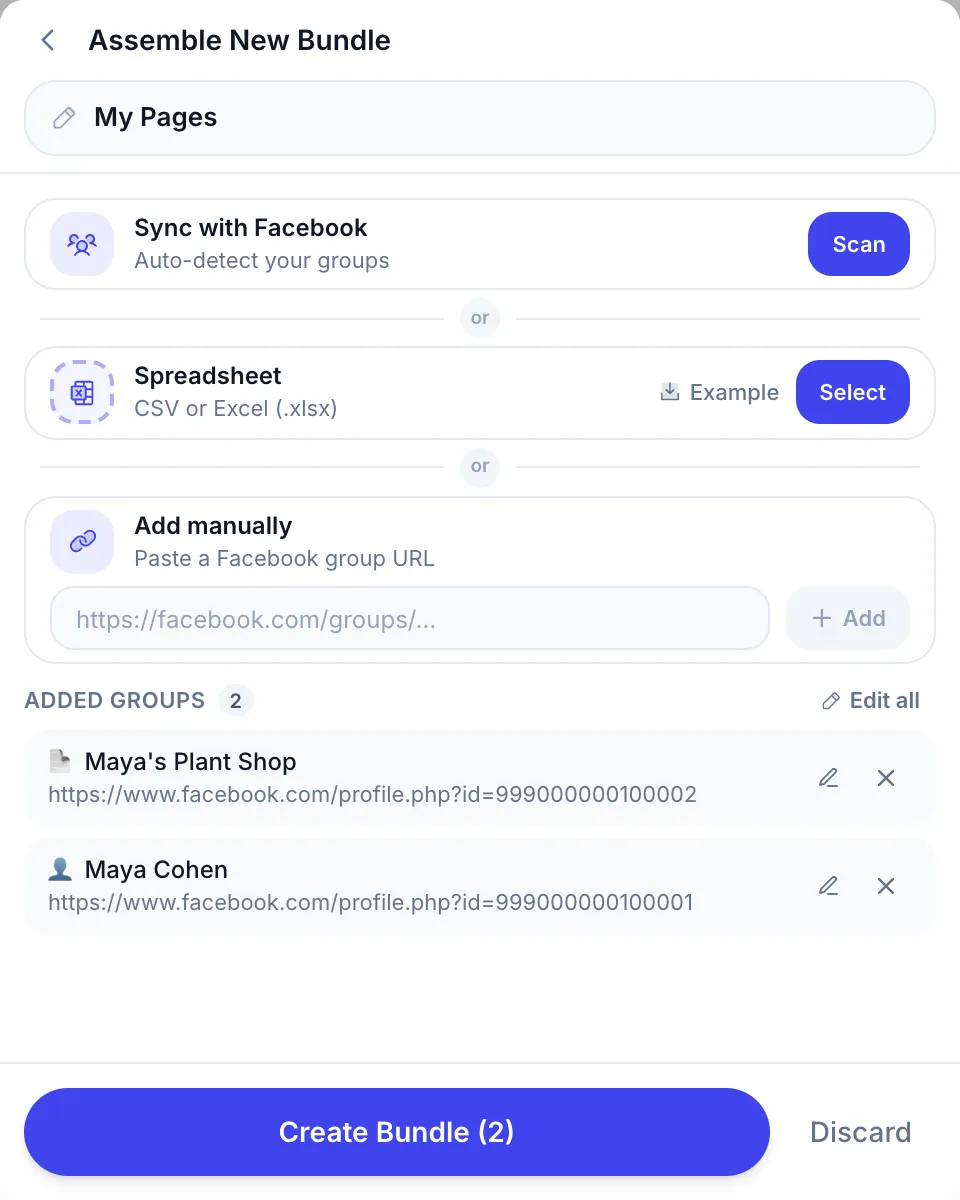
- One post to many groups: MultiGroupPoster sends a post to many joined groups in one run from saved lists. Lists are built by scanning the groups you belong to, importing a CSV or Excel file, or pasting group links, and a list can also hold a Page you manage and your own profile.
- Many different posts to many groups: queue several campaigns, each with its own list and schedule, and stagger their start times so your account never fires everything in the same minute.
Whatever the tool, vary the text per group (Spintax), keep a few minutes between posts, and send the same post to the same group no more than once a day.
If the job is one post on many Pages rather than many posts, how to post to multiple Facebook Pages at once walks through the free Meta Business Suite route and where groups fit.
Facebook planner apps and content calendars
People searching for a “Facebook planner app” usually want a calendar they can see the month in. The options:
- Meta Business Suite Planner — free; week and month views of posts, stories, reels and ads, with filters for Facebook Page, Facebook Groups and Instagram, and a Schedule button on each future day.
- Hootsuite — calendar or list view of organic, paid, published and scheduled content.
- Publer — a calendar with drag-and-drop rescheduling and holiday hashtags per day.
- Later — a drag-and-drop content calendar for every scheduled post.
- Post Planner — a separate app with that name has a Free plan for one account and paid plans from $9 a month billed yearly or $14 billed monthly (as of October 2026); see Post Planner and its alternatives.
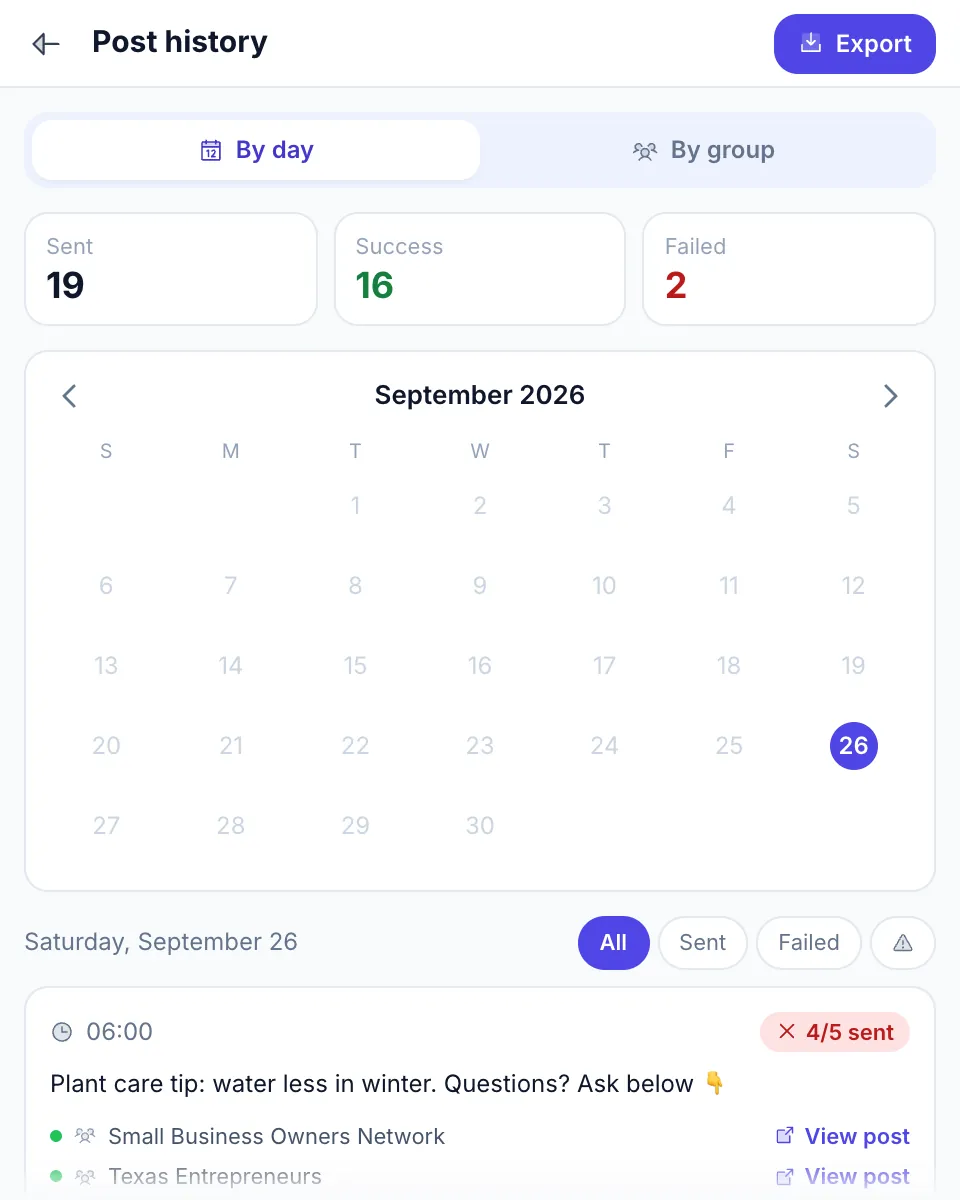
- MultiGroupPoster Post history — a calendar of your group campaigns with Sent, Success and Failed totals and a result for every group, plus an Export button.
Wondering how far ahead each tool, or Facebook itself, lets you plan? How many posts you can schedule on Facebook has the current limits.
Decision matrix by destination
Scheduling is only one job. If you are still choosing which tool to publish with at all, the broader shortlist is in the best app for posting to Facebook; for running posts unattended on a repeating cadence, see automatic Facebook posting.

| You want to schedule to… | Best app | Why |
|---|---|---|
| One Facebook Page | Meta Business Suite | Free and native |
| Page + Instagram + Threads | Meta Business Suite | One composer, free |
| Page + Instagram + LinkedIn + TikTok | Buffer or Publer | Free plans, low per-channel prices |
| Groups you admin | Facebook’s own group scheduler | Free; recurring posts via Admin Assist |
| Groups you joined | MultiGroupPoster | Posts as you, from your browser |
| Small business: Page, Instagram and local groups | Meta Business Suite + MultiGroupPoster | Free + $9.99 a month |
| Multi-client agency work (Pages) | Hootsuite or Sprout Social | Approvals, inbox, reporting |
| Image-first brand (Pages, Instagram, TikTok) | Later | Visual calendar |
| Evergreen content on autopilot | SocialBee | Categories that recycle posts |
Price tiers: free to enterprise
Prices as listed on each vendor’s site in October 2026, in US dollars before tax:
| Tier | Monthly cost | Tools |
|---|---|---|
| Free | $0 | Meta Business Suite; Buffer Free; Publer Free; Post Planner Free |
| Solo, one network group | $5–$12 | Buffer Essentials (per channel) or Publer Professional (per account) |
| Solo + groups | $9.99 | Meta Business Suite (free) + MultiGroupPoster Pro |
| Small team | $25–$110 | Later Starter to Scale; SocialBee Bootstrap to Pro; Sprout Social Essentials |
| Mid-market | $99–$299 per user | Hootsuite Standard or Professional; Sprout Social Standard or Professional |
| Larger teams | $399+ per user | Hootsuite Advanced; Sprout Social Advanced; Enterprise plans |
For a solo marketer who needs Pages and groups, the cheapest working stack is $9.99 a month: Meta Business Suite for the Page and MultiGroupPoster Pro for groups. Pro Annual at $69.99 works out to about $5.83 a month — $49.89 less per year than paying monthly.
Apps to schedule Facebook posts from your phone
If you want an app to schedule Facebook posts from your phone:
- Meta Business Suite app — schedules posts, reels and stories for your Page and Instagram with “Schedule for later”.
- Later — schedules to Facebook from the web or its iOS and Android apps.
- Sprout Social — mobile apps for iOS and Android on every plan.
- Buffer, Publer and SocialBee — their mobile apps are also where group reminders arrive; Buffer’s notification goes to every phone connected to the account.
- MultiGroupPoster — a desktop browser extension (Chrome, Edge or Brave on Windows, Mac or Linux), so there is no phone app. Schedule from the computer once; the runs then go out while Chrome is open, without you at the keyboard.
When to schedule
Use your own numbers first. Meta Business Suite’s Active times shows when your followers were most active over the past 7 days, which beats any generic chart. Without data, these are reasonable starting windows to test, in your audience’s time zone:
| Audience | Starting windows to test |
|---|---|
| Consumers | 8–10 AM, 12–1 PM and 5–7 PM on weekdays |
| B2B and professionals | 9–11 AM, Tuesday to Thursday |
| Real estate | Sunday evening and Monday morning, when buyers plan the week |
| E-commerce | Lunchtime and 7–9 PM |
| Recruiting | Monday morning |
For groups, the rules of each group matter more than the clock: many allow promotion only on one weekday. Our guide to the best time to post in Facebook groups covers group-specific timing.
What to avoid in 2026
- Cloud apps that promise automatic group posting. Since 22 April 2024 there is no API for it. A cloud tool that “posts to groups” either sends you a reminder, reaches only groups linked to your Page, or logs in to Facebook from its own servers — ask which before paying.
- Apps that ask for your Facebook password. Page tools use Meta’s login (OAuth); extensions use the session already open in your browser. A tool that wants your password is a red flag.
- Absolute safety claims. No tool can promise an account will never be limited. Treat any promise of zero risk, or of being invisible to Facebook, as a reason to walk away.
- Annual plans before a trial. Hootsuite, Later and SocialBee give 14 days and Sprout Social 30 — schedule a real week of posts before you commit.
- Tools with no changelog since 2024. The Groups API removal broke many old tools. If a product shows no updates for 12 months, assume it has not adapted.
FAQ
What is the best Facebook post scheduler app in 2026?
It depends on where the post goes. For a Facebook Page, Meta Business Suite is the best starting point because it is free, native and schedules up to 29 days ahead. For several networks at once, Buffer or Publer are the cheapest paid options and Hootsuite or Sprout Social suit larger teams. For groups you joined as a member, no cloud app can publish automatically, so a Chrome extension such as MultiGroupPoster is the option that does.
Is there a free Facebook post scheduler?
Yes. Meta Business Suite is free for Facebook Pages and Instagram. Buffer’s free plan covers 3 channels with 10 scheduled posts each, Publer’s covers 3 social accounts with 10 each, and Post Planner’s covers 1 account with 10 queued posts (as of October 2026). Group admins can also schedule inside their own group for free. For groups you only joined, MultiGroupPoster offers a one-time trial of 6 posts with no card, then $9.99 a month.
Can any app schedule posts to Facebook groups?
Not automatically from the cloud. Meta removed the Groups API on 22 April 2024, so Buffer, Publer and SocialBee now send a phone reminder and you tap Publish yourself, while Later and Sprout Social do not offer groups at all. Group admins and moderators can schedule natively inside their group. To schedule posts to groups you joined as a member, use a browser extension that posts from your own logged-in session.
How far in advance can you schedule Facebook posts?
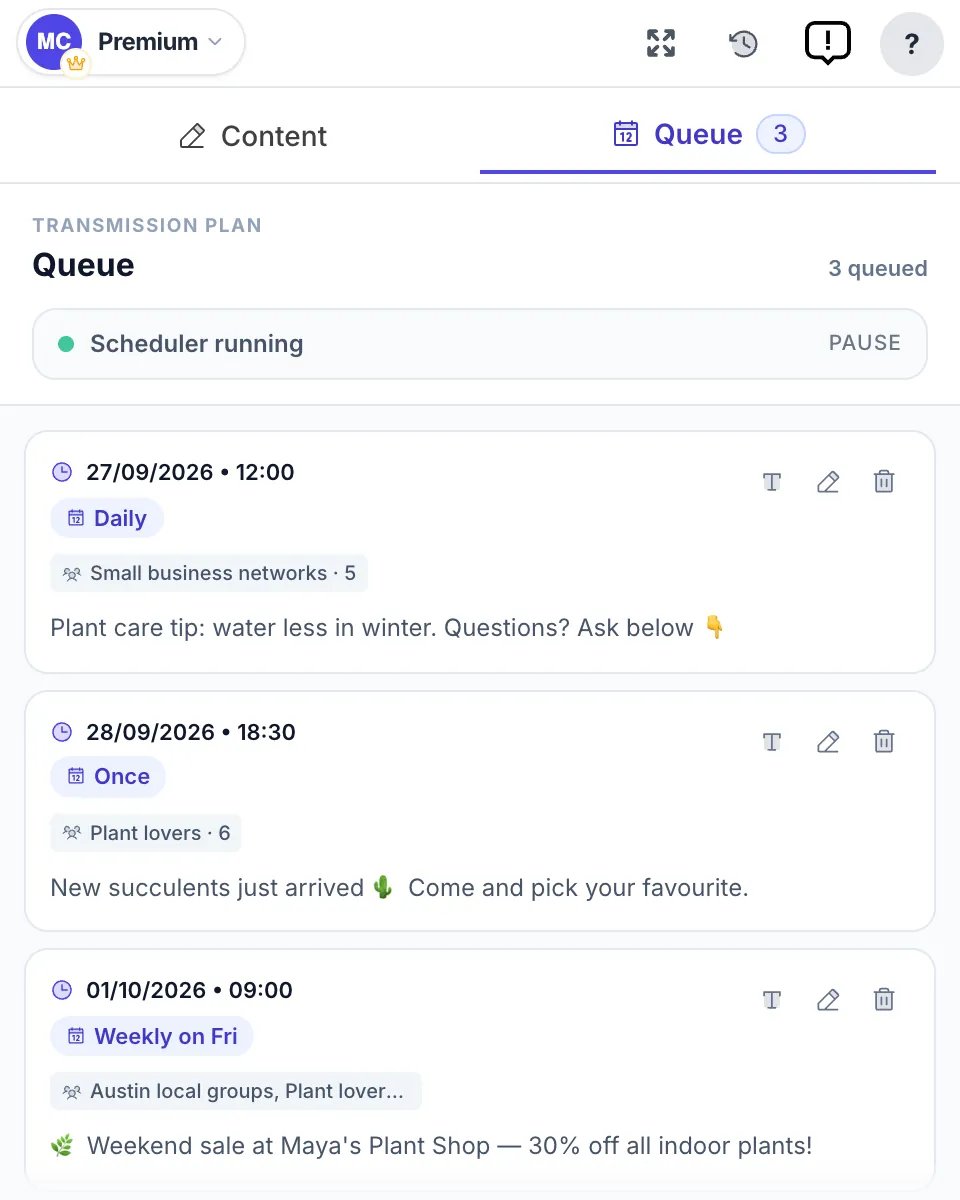
For a Facebook Page, Meta lets you schedule a post between 20 minutes and 29 days ahead. Third-party schedulers set their own limits per plan, such as Buffer’s 10 queued posts per channel on the free plan. In MultiGroupPoster you pick Once, Daily, Week or Month and a start time, and recurring schedules keep repeating until you pause or delete them in the Queue tab.
Can I schedule Facebook posts without Meta Business Suite?
Yes. Buffer, Hootsuite, Later, Publer, SocialBee and Sprout Social all schedule to Facebook Pages from their own dashboards, and group admins can use the calendar icon next to Post inside their group. For the groups you joined and for your personal profile, MultiGroupPoster schedules from Chrome with Set Schedule, without touching Meta Business Suite.
Which tools allow bulk scheduling for multiple Facebook Pages and groups?
For Pages, Hootsuite’s bulk scheduler takes up to 350 posts at once (not during the trial), SocialBee includes CSV uploads on its Accelerate and Pro plans, and Publer offers CSV bulk scheduling. None of them publishes to groups automatically. For groups, MultiGroupPoster sends one post to a saved list of joined groups per run, and a list can also hold a Page you manage and your own profile.
Does my computer need to be on for scheduled posts to go out?
Not for cloud schedulers: Meta Business Suite, Buffer, Hootsuite and the rest publish from their own servers. For MultiGroupPoster, yes: posts go out from your own browser, so Chrome must be open and the computer awake at the scheduled time. A run that falls due while the computer is asleep starts when the browser next wakes, not on time.
Can I schedule Instagram and Facebook posts together?
Yes. Meta Business Suite schedules Facebook Page and Instagram posts in one composer and can cross-post to Threads. Buffer, Hootsuite, Later, Publer, SocialBee and Sprout Social also schedule both networks from one dashboard, on paid plans or within their free limits. MultiGroupPoster does not post to Instagram; it covers Facebook groups, your profile and Page feeds.
What is the difference between Meta Business Suite and Hootsuite?
Meta Business Suite is Meta’s own free tool for Facebook Pages, Instagram and Threads. Hootsuite is a paid third-party platform, from $99 per user a month on annual billing as of October 2026, that adds LinkedIn, TikTok, X and others, a shared inbox, team approvals and a bulk scheduler. If you only run one Page and an Instagram account, Meta Business Suite does the scheduling for free.
Is there a Facebook planner app with a content calendar?
Yes. Meta Business Suite includes Planner, a free week and month calendar of everything published or scheduled on your Page and Instagram, and it can filter by Facebook Groups. Later, Publer and Hootsuite have their own calendar views. For group campaigns, MultiGroupPoster’s Post history shows a calendar with every day’s runs and the result in each group.
Need a scheduler that actually posts to the groups you joined? Add MultiGroupPoster to Chrome — 6 posts free to try (one-time, no card), then Once, Daily, Week or Month schedules from your own browser.