

Meta Business Suite: several Pages, one post
If you manage more than one Facebook Page, you already have the free tool for this. Meta Business Suite, at business.facebook.com or in its app, can publish the same post to several Pages in one go:
- Open Meta Business Suite with the account that manages the Pages.
- Click Create post.
- Under Post to, tick every Page that should get it. Tick connected Instagram accounts too if you want.
- Write the text and add photos, a video or a link. Check the preview of each Page on the right.
- Click Publish, or turn on Set date and time and click Schedule.
The post goes out from Meta’s servers, so your computer can be off. Meta’s Help Center gives a window of 20 minutes to 29 days ahead for scheduled Page posts (checked 15 October 2026); how many posts you can schedule on Facebook covers the other limits.
What it doesn’t do: post in the groups you joined, send a different wording to each Page, or repeat a post on a schedule. For a single Page, Facebook Page auto post compares Meta Business Suite with Zapier, Make and paid schedulers.

Sharing one Page’s post to your other Pages
Sometimes the post already exists on one Page and you want it on the others. Under the post, click Share and choose to share it to a Page you manage, add a line and post. Followers of the second Page see a shared card that points to the original, so likes and comments stay split between the two.
Sharing works one Page at a time. For a handful of Pages it’s fine; for ten it’s cleaner to publish once from Meta Business Suite with all of them ticked.
Bulk scheduling across many Pages
“Bulk” usually means one of two things, and the tools differ:
- One post to many Pages. Meta Business Suite does this for free, as above.
- Many posts at once. A month of posts uploaded from a spreadsheet. Meta Business Suite has no upload from a file. Paid schedulers do: as of October 2026 Hootsuite’s bulk scheduler takes up to 350 posts at once on paid plans, Publer imports posts from a CSV file, and SocialBee includes CSV uploads on its Accelerate and Pro plans.
Paid schedulers also add LinkedIn, X, TikTok and other networks to the same calendar, team roles and approvals, and recycling of evergreen posts. Our Facebook post scheduler app comparison goes through prices and plans tool by tool.
Pages and groups in one run
Every tool above stops at Pages. Meta removed the publish_to_groups permission on 22 April 2024, so no cloud scheduler can post into the groups you belong to, and that is where many small businesses find their customers. Why the Facebook Groups API was discontinued has the history.
MultiGroupPoster is a Chrome extension that posts from your own logged-in session, one destination at a time with a pause between them. It covers Pages in two ways.
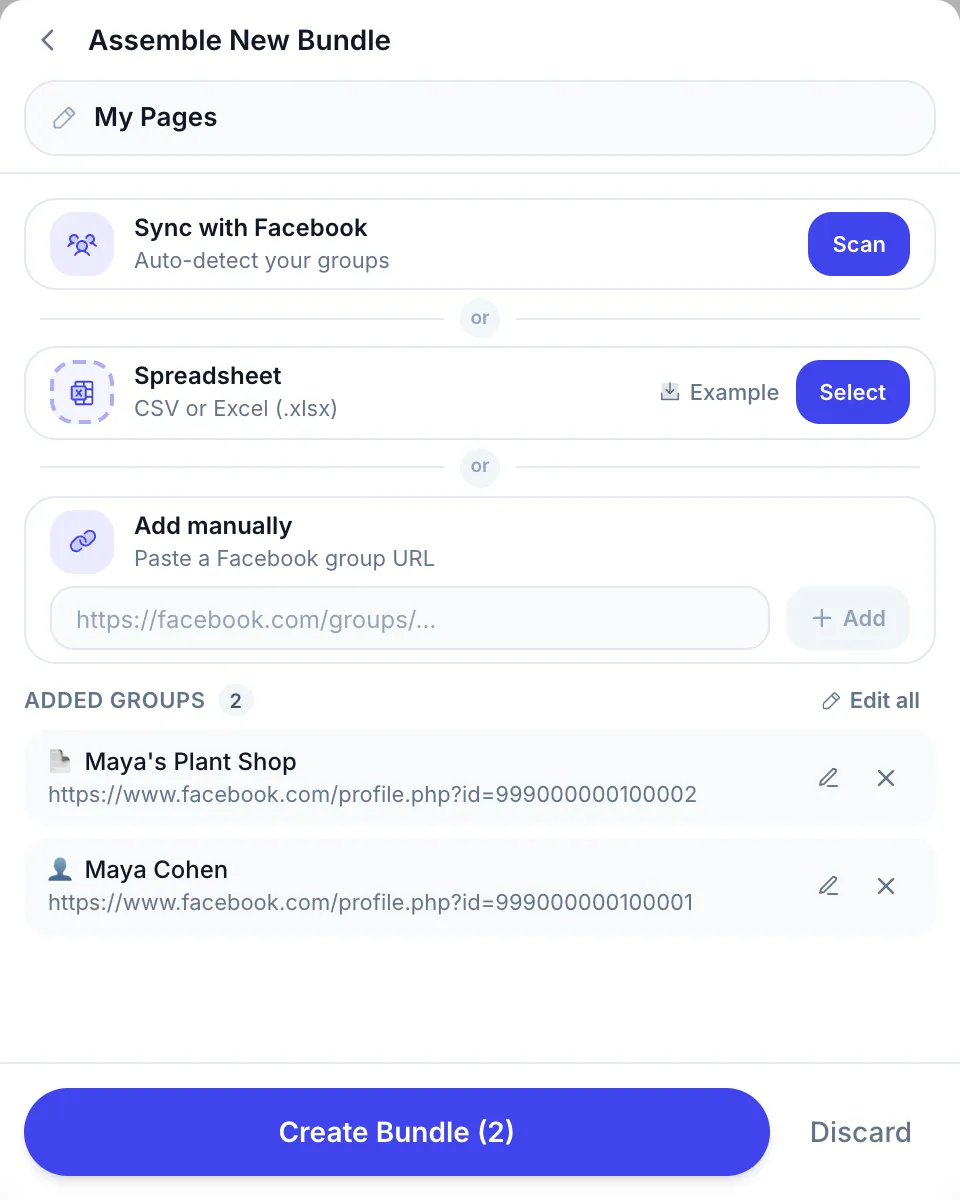
Your Pages’ own feeds, in the same run as your groups. Open Setup List → Create group list, paste the link of each Page you manage under Add manually and press Add. Each Page shows with a 📄 icon, next to your groups. When the list runs, every Page gets the post from the Page itself, always with the Fast method, and a Page you don’t manage is refused before anything is sent.
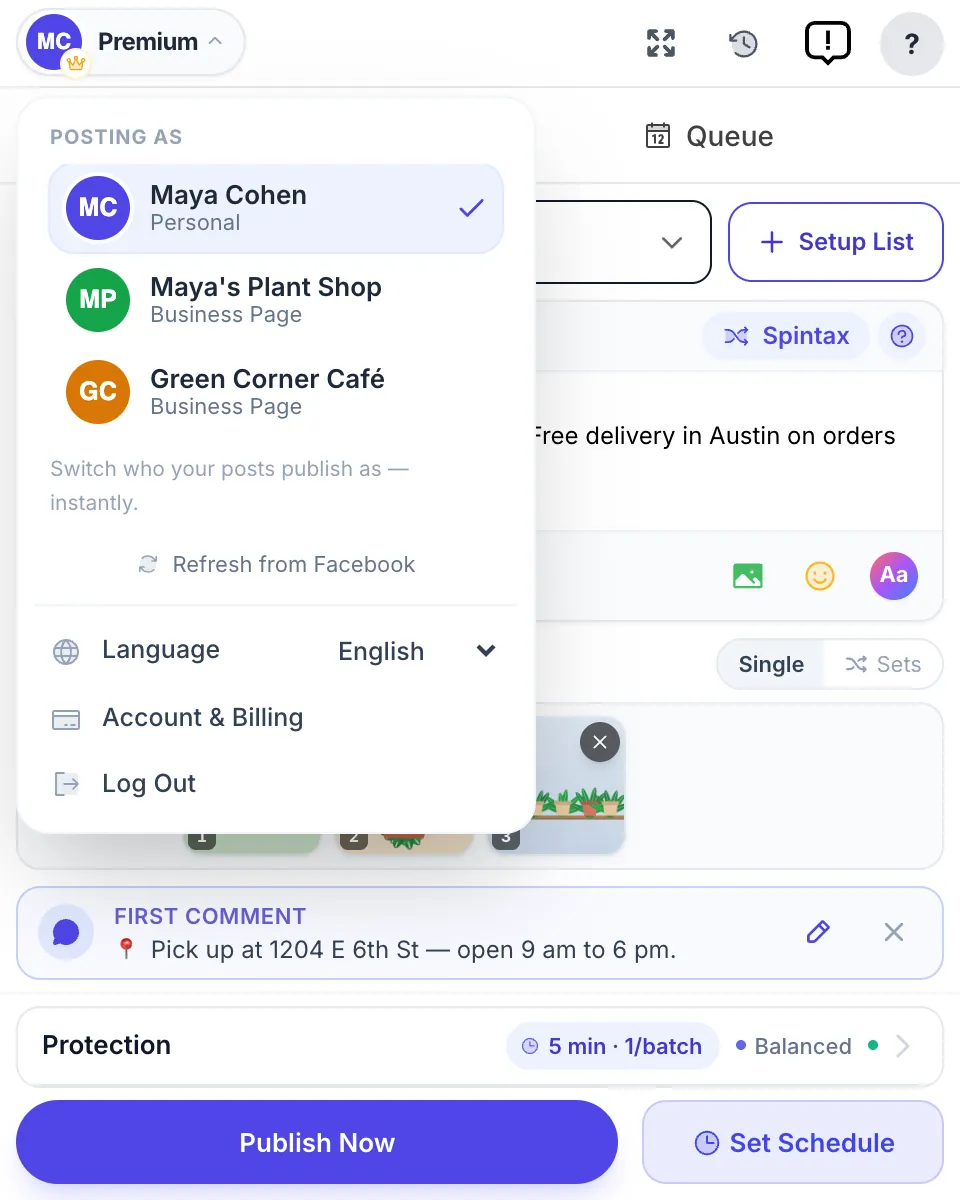
Posting in groups as a Page. Open the account menu and, under Posting as, pick one of your Pages instead of your profile. Every group in the next run gets the post under the Page’s name, in groups that accept posts from Pages. The Page has to be a member of each group; groups that refuse it show the reason in the results. How to post in a Facebook group as a Page has the manual steps, and the post as your Facebook Page feature page has the setup and limits in one place.
Runs can go out now or on a schedule, once, daily, weekly or monthly. Chrome has to be open at post time, which is the trade-off against Meta Business Suite’s servers. Spintax gives each destination a different wording, so ten Pages and forty groups don’t all show the same sentence.
Which tool for which job
| You want to… | Best fit | Cost |
|---|---|---|
| Post one update to several Pages you manage | Meta Business Suite | Free |
| Upload a month of Page posts from a spreadsheet | Hootsuite, Publer or SocialBee | Paid |
| Run Pages plus LinkedIn, X or TikTok with a team | A paid scheduler | Paid |
| Post in the groups you joined | Browser extension (MultiGroupPoster) | 6 free posts, then paid |
| Reach your Pages’ feeds and your groups in one run | MultiGroupPoster with Page links in a list | Same |
| Post in groups as a Page | Facebook by hand, or MultiGroupPoster | Free / same |
A common setup: Meta Business Suite for the Pages, because it is free and runs with the computer off, and MultiGroupPoster for the groups. If the post already lives on a Page and you want it in groups, how to share one Facebook post to multiple groups shows the share route.
Keeping reach when Pages share a post
Posting the same update on several Pages is normal for a business with branches or brands. It becomes a problem when the same people follow several of those Pages and see the post three times, or when a Page repeats itself every week. A few habits help:
- Change the opening line per Page. The first line is what shows in the feed; “Our Austin store” and “Our Dallas store” read as two posts.
- Swap the image where you can.
- Mind the clock. Pages with followers in different time zones should post at different times.
- Don’t stack Pages and groups in the same minute. A few minutes between destinations spreads the volume out instead of sending everything in one burst.
FAQ
How do I post to multiple Facebook Pages at once?
Use Meta Business Suite at business.facebook.com. Click Create post, tick every Page you want under Post to, write the post and click Publish or Schedule. It is free, and the same post can go to connected Instagram accounts too. Some Page settings stay separate, so check the preview of each Page before you publish.
Can I schedule the same post to several Facebook Pages?
Yes. In Meta Business Suite, pick several Pages in one post, turn on Set date and time and click Schedule. Meta’s Help Center allows Page posts from 20 minutes to 29 days ahead (checked 15 October 2026). For larger batches, paid tools such as Hootsuite and Publer upload many posts at once from a file.
Which tools allow bulk scheduling for multiple Facebook Pages and groups?
For Pages: Meta Business Suite for free, or paid schedulers like Hootsuite, Publer and SocialBee for bulk uploads and other networks. For groups none of those work, because Meta removed group publishing from its API on 22 April 2024. A browser extension such as MultiGroupPoster posts in groups, and can add the feeds of Pages you manage to the same run.
Can I post the same thing on many Facebook Pages without hurting reach?
Each Page’s followers see only that Page’s copy, so a shared post is normal for related Pages. Reach drops when the same followers see identical posts from several Pages, or when one Page repeats itself. Change the first line and the image per Page, and post at the time each Page’s audience is online.
Can MultiGroupPoster post on several of my Pages’ feeds?
Yes, for Pages you manage. Paste each Page’s link into a list under Add manually; each one shows with a 📄 icon. When the list runs, every Page gets the post from the Page itself, always with the Fast method. A Page you don’t manage is refused before anything is sent.
Can I post to Facebook groups as my Page?
Yes, in groups that accept posts from Pages. On Facebook, choose your Page in the group’s post box. In MultiGroupPoster, pick the Page under Posting as in the account menu and every group in the run gets the post under the Page’s name. Groups that accept only people show as failed, with the reason.
Pages in Meta Business Suite, groups in Chrome. Add MultiGroupPoster to Chrome: 6 free posts to try (one-time), no credit card. Plans are on the pricing page.