

What “pending” means on a group post
When you publish in a group and Facebook says Your post is pending (or “Pending admin approval”), the post went into the group’s review queue instead of the feed. It exists, but only you and the group’s admins and moderators can see it. When an admin approves it, it appears in the group as if you had just posted it. When they decline it, it disappears, and Facebook may tell you why.
Pending is a group setting, not a verdict on you. Large groups use it to keep out spam, and many groups review every member’s posts all the time. If your post doesn’t appear and isn’t pending either, the cause is something else: a filter removed it, you hit a temporary limit, or the group restricts who can post. Why your Facebook group post won’t publish goes through those causes one by one.

Why your post went to the queue
There are four usual reasons, and you can’t always tell which one applies:
| Reason | What the admins set up | What you can do |
|---|---|---|
| Post approval for everyone | Every member’s post is reviewed | Nothing but wait; it isn’t about you |
| You are a new member | Posts from people who joined recently are reviewed | Take part in comments for a while; later posts may skip the queue |
| An automatic rule | Admin Assist or a filter sends posts with links, certain words or certain formats to review | Try the same post without the link, or put the link in the first comment |
| Your posts in particular | An admin put your posts under review or limited how often you can post | Read the rules again and ask an admin if you’re not sure why |
Groups with Admin Assist can also approve pending posts automatically when they meet the admin’s criteria. That is why some of your posts appear at once and others in the same group wait.
“You’re at the limit for pending content in this group”
This message appears when you try to post in a group where you already have the maximum number of posts waiting for approval. Each group counts only your pending posts in that group, so you can still post in other groups. Meta doesn’t publish the number, and it isn’t a block on your account.
To get past it:
- Wait for an admin to approve or decline what is already in the queue.
- Delete a pending post you no longer need. Open the group, go to Your content, choose Pending, and delete it. That frees a slot.
- Don’t post copies. The usual way people reach the limit is by posting the same thing again because the first one “didn’t show”. Each copy takes a slot.
- Check the group is alive. If your oldest pending post is more than a week old, the admins may not be reviewing at all. Delete your pending posts and spend the effort on an active group.
How to check and manage your pending posts
Every group has a Your content page with your posts sorted into Pending, Published, Declined and Removed.
- On a computer: open the group, click the ⋯ menu or the More tab, and choose Your content.
- In the app: open the group, tap your profile picture or the menu in the group, then Your content.
From Pending you can open a waiting post, edit it or delete it. Editing a pending post usually keeps it in the queue. Declined tells you a post was turned down, sometimes with the rule it broke, which is worth reading before you post there again. How to post in a Facebook group shows these screens step by step on a computer and on a phone.
How long approval takes
There is no deadline. It depends on how many admins the group has and how often they look:
- Active, well-run groups: minutes to a few hours.
- Big groups with one or two admins: often a day or more.
- Groups with absent admins: sometimes never.
Facebook doesn’t publish a time after which pending posts expire. If you post at a regular time in a group that approves slowly, your post may appear many hours later than planned, so offers with a deadline belong in groups that approve fast or don’t review at all.
Pending posts when you post in many groups
When the same post goes to 20 or 50 groups, some will always land in a queue. That is normal; the job is to tell the queue apart from a real failure and to never repost into a group that already has your post waiting.
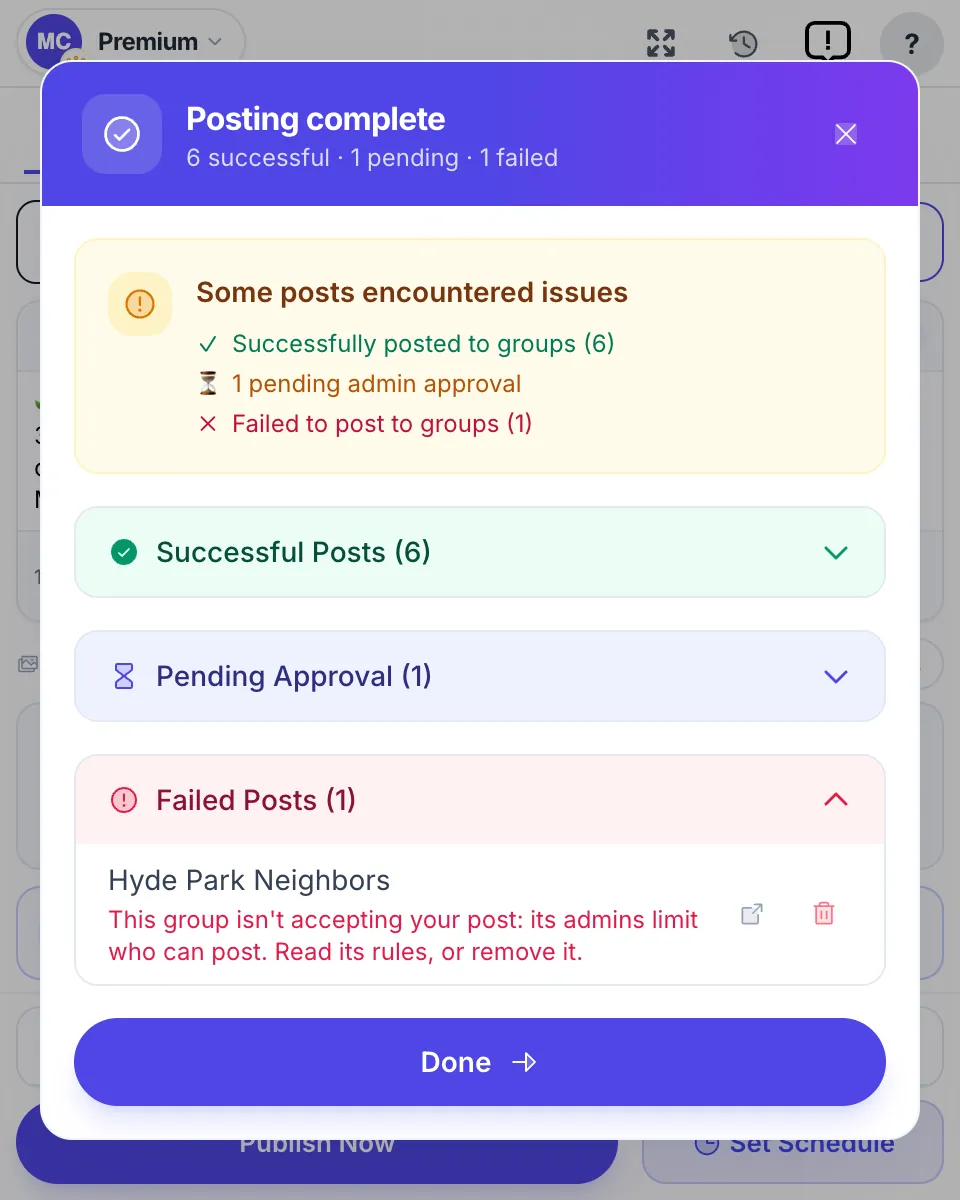
MultiGroupPoster lists pending groups in their own Pending Approval section of the results, apart from the posts that went live and the ones that failed, with the note “Sent. The group’s admin will review it, so don’t post it again.” A first comment you set waits until the admin approves the post, then goes out. If the post is still not approved after 2 days, the comment is skipped. The post history keeps the run, so you can open each group later and see whether it was approved.
Two habits keep queues from piling up:
- Space out posts in approval groups. One post per group per day is plenty; a group that reviews posts rarely wants more from the same member. Facebook group posting limits covers sensible volumes.
- Drop groups that never approve. If a group has declined or ignored your last few posts, take it out of your list and look for an active one. Facebook group promotion rules explains what admins usually turn down.
If you are the admin
You review the queue under Admin tools → Pending posts, where you approve, decline or edit each post. To keep the queue short:
- In Settings, decide whether every post needs approval or only posts from new members.
- Use Admin Assist to decline posts with links or keywords you never allow, and to approve posts automatically when they meet your criteria.
- When you decline, choose a rule as the reason. The member sees it, and you get fewer second attempts.
Members who keep hitting the pending limit in your group are usually reposting the same thing. Facebook’s Limit activity setting lets you cap how many posts a member can publish per day for a while.
FAQ
Why is my Facebook group post pending?
The group reviews posts before they appear. Either the admins turned on post approval for everyone, or an automatic rule sent your post to the queue, for example because you are a new member or the post has a link. Only an admin can approve it, and until then only you and the admins can see it.
What does ‘You’re at the limit for pending content in this group’ mean?
You already have as many posts waiting for approval in that group as it allows from one member. Nothing new will go through there until an admin approves or declines them, or you delete one of your pending posts from the group’s Your content page. Meta doesn’t publish the exact number.
How long does Facebook group approval take?
It depends entirely on the admins. Active groups often approve within minutes or hours; groups with busy or absent admins can take days, and some posts are never reviewed. Facebook doesn’t publish a deadline. If nothing happens after a few days, delete the post and try a more active group.
How do I see my pending posts in a Facebook group?
Open the group and go to Your content (on a computer it is under the group’s menu, on the app tap your profile picture in the group). The Pending tab lists posts waiting for approval; the other tabs show published, declined and removed posts. You can delete a pending post from there.
Will posting the same thing again get it approved faster?
No. A second copy joins the queue behind the first, uses up one more of your pending slots, and makes the post look like spam to the admin. Wait for a decision, or delete the pending copy before you post an edited version.
Does a pending post mean Facebook blocked me?
No. Pending is the group’s own review, not an action against your account. A block looks different: Facebook tells you that you can’t post or comment for a set time, and it affects every group at once. Pending posts in one or two groups are normal.
Posting in many groups and losing track of which ones are pending? Add MultiGroupPoster to Chrome: 6 free posts to try (one-time), no credit card.