

Why buy and sell groups work differently
About one in five people who use MultiGroupPoster post to at least one buy and sell group: in our own usage data for 28 August to 26 September 2026, 348 of 1,551 active users (22%) had one in a run. Most of them first met the same surprise. The post that went out fine in their other groups was refused in the buy and sell ones.
That is by design. When an admin switches a group to Facebook’s buy and sell format, members no longer see the usual Write something box. They see Sell Something, which opens a listing form:
| You choose | Facebook asks for |
|---|---|
| Item for sale | Photos, title, price, condition, location, description |
| Vehicle for sale | Type, year, make, model, mileage, price, location |
| Home for sale or rent | Rental type, bedrooms, bathrooms, price per month, address |
| Sale event | A Facebook event for a yard sale or similar |
From a personal profile, Facebook accepts only these listings in such a group. A regular post, even one with a price and photos, is turned down. Admins are the exception and can still write ordinary posts, which is why you may see a few in the feed.
If you only want a list of groups worth joining, our guide to Facebook groups for ecommerce sellers covers finding and choosing them. This article is about the next step: getting one listing into many of them.
Facebook’s way: one listing in up to 20 groups
Facebook has one built-in shortcut for multi-group posting, and it exists only for sellers:
- Open any buy and sell group you belong to and click Sell Something.
- Choose Item for Sale, Vehicle for Sale or Home for Sale or Rent.
- Add photos, the title, price, condition and location, then click Next.
- Tick the other groups that should get the listing. As of October 2026, Facebook allows up to 20 groups per listing. Starting from a group, Marketplace is an option you can switch off.
- Click Post. Facebook reviews the listing, then it appears in each group you ticked.

Two limits remain. The list in step 4 shows only the groups that accept listings, usually a small share of the groups you have joined. And it works for listings only, so a regular announcement or offer still goes group by group. How to crosspost on Facebook groups compares the native crosspost with the other ways to reach several groups.
How to tell which of your groups are buy and sell
You can’t go by the name. When we checked groups while building this feature, five groups with “buy and sell” in their names were all ordinary discussion groups that take regular posts. Three reliable signs:
- The post box. A buy and sell group shows Sell Something where other groups show Write something.
- The tabs. It usually has a Buy and Sell tab and no Discussion tab.
- The listing form. The groups offered in step 4 above are the ones that accept listings.
Checking 50 groups by hand takes a while, which is the gap the next section fills.
One listing plus one post in one run
Most sellers don’t post only in buy and sell groups. A plant shop, a furniture flipper or a car dealer usually mixes them with neighbourhood groups, hobby groups and business groups. MultiGroupPoster handles both kinds in the same run. The short version, with a step table and the limits on one page, is the buy & sell group poster.
It finds the buy and sell groups for you. In the background it reads each group’s type from Facebook itself, not from its name, a few groups at a time. Buy and sell groups get a Buy & sell tag in your lists, and from a profile they are left out of a regular post instead of failing, with a note in the results.
You add the listing once. When the groups you selected include buy and sell groups, a Sell something button appears in the editor bar, with the number of those groups next to it.
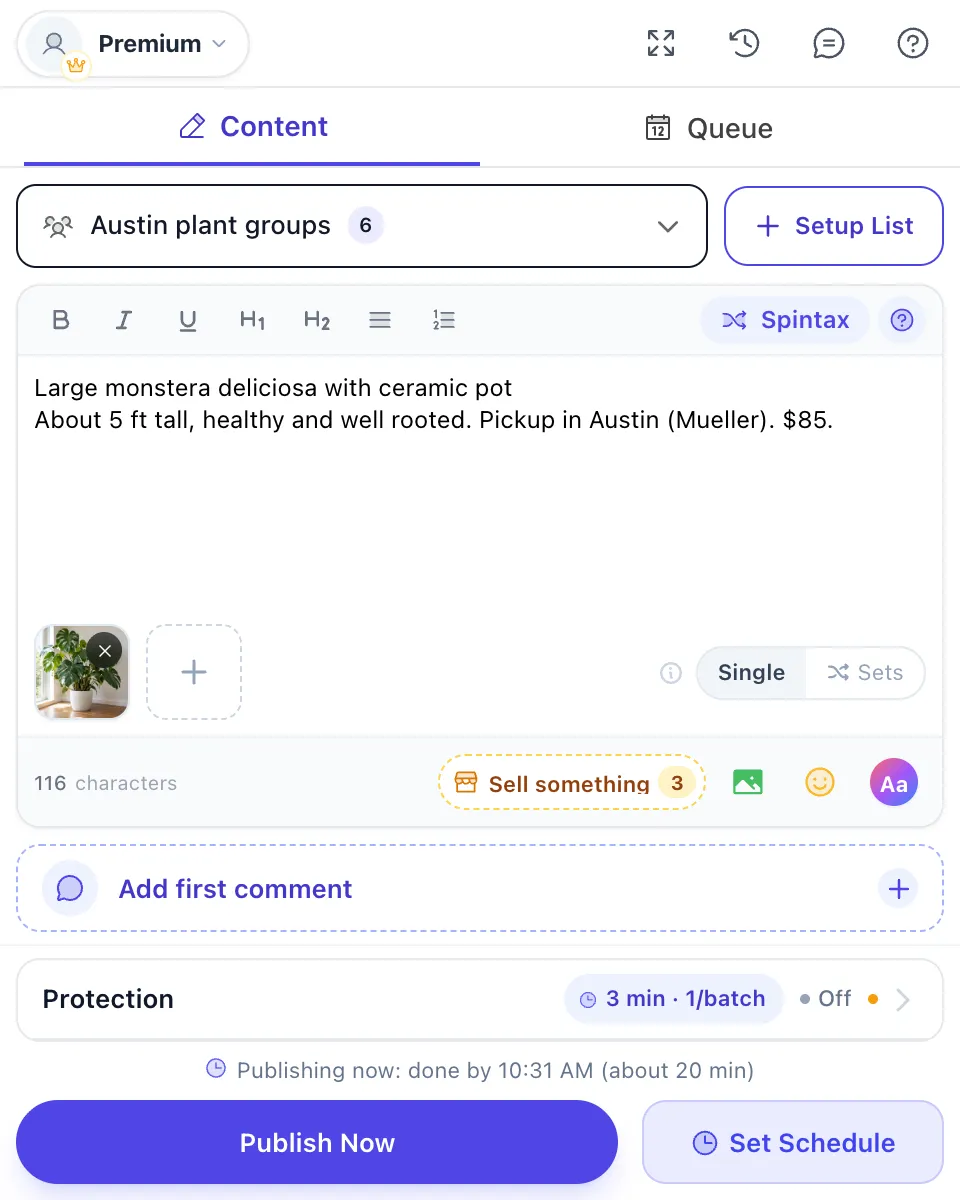
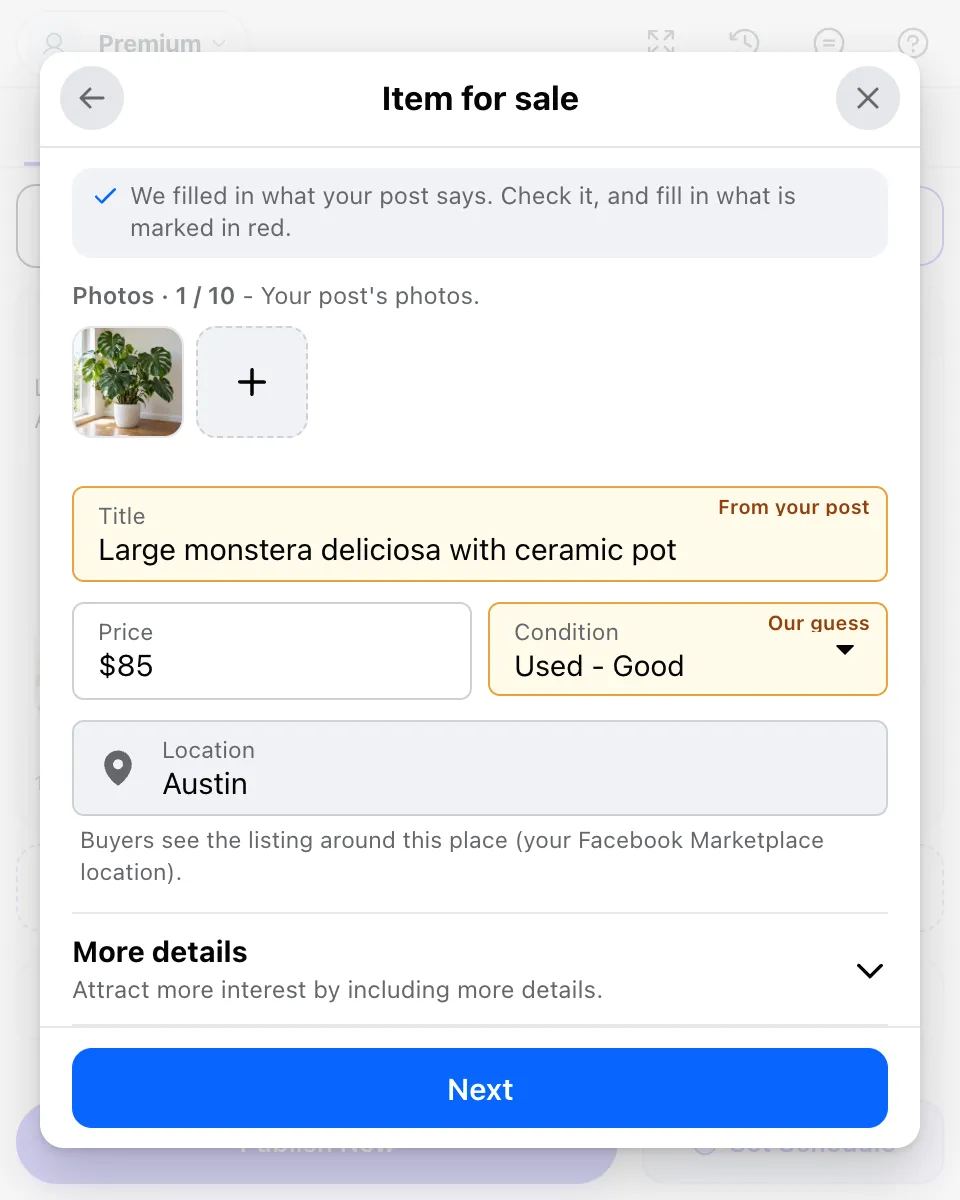
Click it and pick the same three types Facebook offers: item for sale, vehicle for sale, or home for rent. The form copies what your post already says. The title, the price and a guess at the condition come from your text, the photos are your post’s photos, and the location is your Facebook Marketplace location. Anything taken from the post is marked so you check it.
Then you see where it goes. The next screen shows a preview of the listing as buyers will see it and the buy and sell groups from your selection that will get it.
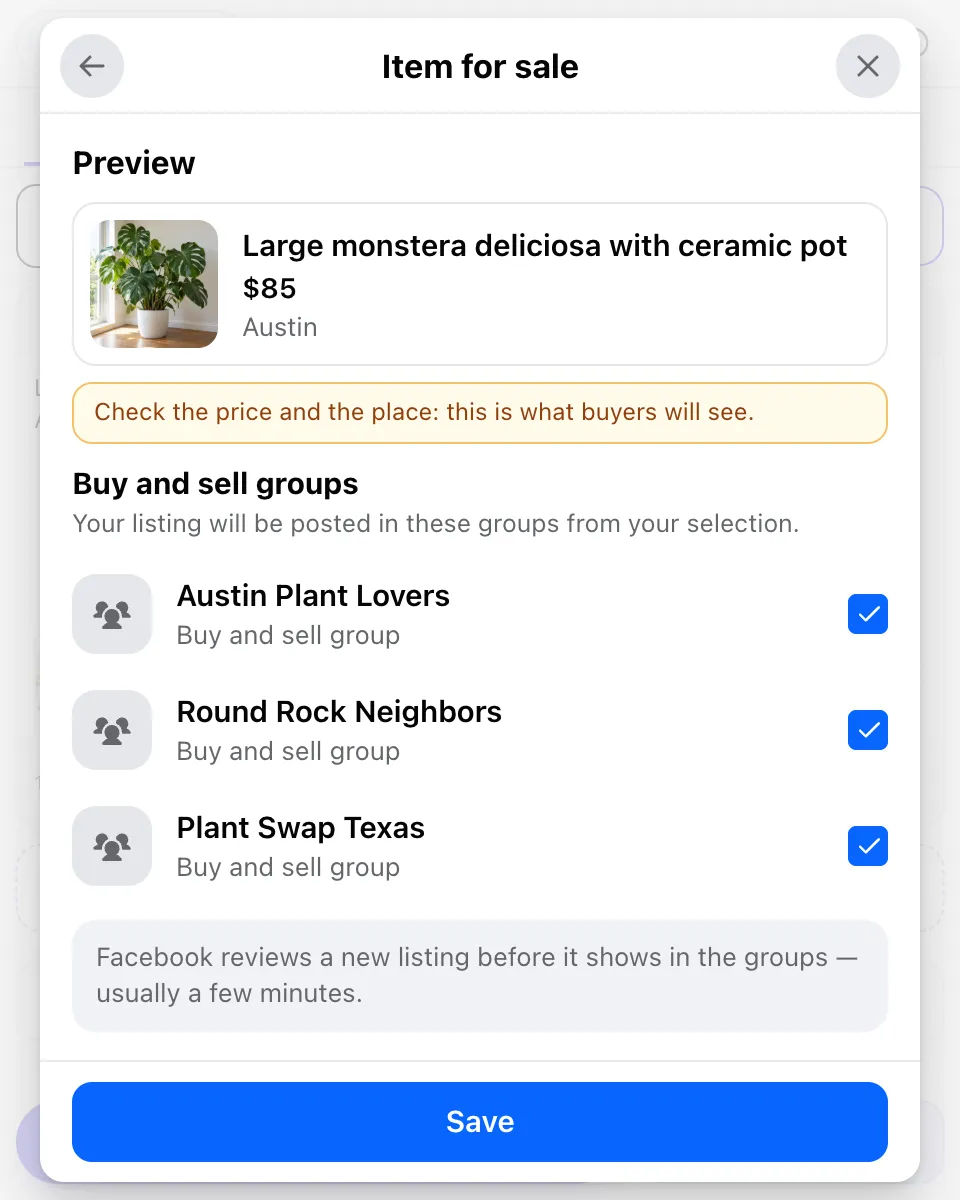
When you publish, the listing goes out first, in one request to up to 20 buy and sell groups, the same way Facebook’s own form sends it. Then the regular post goes to the rest of your groups, one at a time with a pause between them. The results list each buy and sell group as in review until Facebook shows the listing.
A few honest limits:
- Profile only. Facebook doesn’t let Pages use Marketplace, so when you post as a Page there is no listing option.
- A photo is required. Without one, the buy and sell groups are skipped and the other groups still get the post.
- Scheduling. A one-time schedule can carry a listing. A repeating schedule sends it on its first run only, so the same item never lands in the same groups every week.
- Chrome must be open at post time, because the extension runs in your own browser with your own Facebook session.
Limits that keep a listing welcome
Buy and sell groups are where members report sellers fastest, because they joined to buy, not to scroll past the same sofa ten times. MultiGroupPoster builds in three limits for that reason:
- 3 listings a day per account. A fourth waits until the next day.
- 20 groups per listing, Facebook’s own cap.
- No repeats within 24 hours. The same listing is never sent to the same group twice in a day.
The group’s own rules come on top. Many cap listings at one per day or one per week, ban reposting the same item before a set number of days, or ask for the price and pickup area in the title. Facebook group promotion rules shows how to read them, and Facebook group posting limits explains how volume limits work across groups. Sold the item? Mark it as sold in each group, so buyers stop messaging you.
When the listing doesn’t show up
- It is still in review. Facebook checks every new listing. It usually turns active within a few minutes; some take longer.
- The group approves posts. If the admin reviews new posts, the listing waits for them as well. Why your Facebook group post is pending explains the approval queue and the “limit for pending content” message.
- Commerce rules. Animals, weapons, drugs, recalled products and counterfeit goods aren’t allowed in listings. A rejected listing tells you which rule it broke.
- The location is wrong. Buyers see the listing around your Marketplace location. Check it before you list an item from another city.
Don’t post the same listing again while it waits. You end up with two copies in every group that approves both.
FAQ
How do I post one listing in several buy and sell groups at once?
Open a buy and sell group, click Sell Something, fill in the item, vehicle or home, click Next, and tick the other buy and sell groups that should get it. Facebook allows up to 20 groups per listing. The group list only shows groups that accept listings, so plain discussion groups never appear there.
Why can’t I write a normal post in a buy and sell group?
A group with Facebook’s buy and sell format gives members a Sell Something button instead of the usual post box. From your profile, Facebook accepts only a listing there: an item, a vehicle, or a home for sale or rent. Admins can still write regular posts, which is why you sometimes see them.
How many buy and sell groups can I post a listing to?
Up to 20 groups per listing, as of October 2026, plus Marketplace if you leave it on. To reach more groups, create the listing again later for the next set of groups, and keep the same item out of any group that already has it. Groups that take regular posts can get the offer as a normal post.
Can MultiGroupPoster post listings to buy and sell groups?
Yes, from your personal profile. When your selection holds buy and sell groups, a Sell something button appears in the editor. Fill in the listing once and it goes to up to 20 of those groups in one request, before your regular post goes to the other groups. Listings are not available when you post as a Page.
Why is my buy and sell listing not showing in the group yet?
Facebook reviews every new listing before it appears. The listing says it is in review, and it usually turns active within a few minutes, sometimes longer. If the group also has admin approval turned on, an admin still has to approve it. Don’t post it again while it waits, or the group gets a duplicate.
Can I post in buy and sell groups as a Facebook Page?
Not as a listing. Facebook doesn’t let Pages use Marketplace, and listings in buy and sell groups go through it. A Page that is a member of the group may be able to write a regular post there, if the group allows it. To sell an item, list it from your personal profile.
Selling in buy and sell groups and regular groups? Add MultiGroupPoster to Chrome: 6 free posts to try (one-time), no credit card. Plans are on the pricing page.