

What Facebook treats as duplicate content
“Duplicate content” on Facebook is not a single rule you can read in the Terms of Service. It is the observable behavior of the platform’s spam and integrity systems, which appear to demote or block posts that closely repeat something already on the platform. Facebook does not publish the internals, so treat everything below as known, public behavior — what the systems are widely observed to do — rather than a leaked algorithm.
In practice, duplicate content shows up in four forms, and it is worth separating them because each has a different, honest fix:
- Text — the same or near-identical wording pasted into many posts.
- Images — the same image file re-used across posts, which image hashing is designed to recognize.
- Links — the same external URL shared repeatedly in a short window.
- Pattern — the timing of all of the above: machine-regular intervals, or a burst of many posts at once.

The mistake most marketers make is assuming duplicate detection is only about text. It is not. You can rewrite every word and still get flagged if the image, the link, and the timing all scream “automation.”
Why it is about patterns, not volume
Here is the single most useful reframing in this whole article: Facebook appears to flag repetition and pattern far more than it flags raw volume.
A person who runs a legitimate business genuinely might post an announcement into ten relevant groups over an afternoon. Facebook cannot treat “posting to ten groups” as spam without punishing normal community behavior. What it can treat as suspicious is how those posts are made:
- Same-ness. Are all ten posts byte-for-byte identical text, the same image, the same link?
- Speed and regularity. Did they land forty seconds apart, forty seconds apart, forty seconds apart — a cadence no human types at?
- Burstiness. Did thirty posts appear inside a five-minute window and then nothing?
A human posting the same news to ten groups naturally varies the wording (“thought this group would love this…” vs “quick heads-up for anyone here…”), takes uneven breaks, and does not fire at a metronome. Automation, by default, does the opposite of all three. That contrast — not the number ten — is what the pattern detection is built to notice.
This is why volume-based advice (“stay under N posts a day”) is only half the story. You can trip the spam filter with twenty identical, burst-posted messages, and you can post far more than that safely when every post is varied and spread out. The rest of this article is about closing the gap between how a bot posts and how a human posts.
Signal 1: Identical or near-identical text
Exact-match text is the easiest duplicate signal for any platform to detect, which makes it the first thing to fix. Comparing whether two blocks of text are identical (or nearly so) is computationally cheap and extremely reliable, so it is reasonable to assume Facebook does it well.
The problem case is what communities call copypasta — the same promotional paragraph pasted into group after group. It fails on two fronts at once:
- Machine detection. Verbatim repetition is a clean, high-confidence fingerprint. There is no ambiguity for the system to resolve.
- Human reports. Members recognize copied-and-pasted promotion instantly. Reports from real people are among the strongest signals a group’s moderators and Facebook’s systems can act on.
Near-identical text — same paragraph with one word swapped, or emojis sprinkled in — is not a reliable escape. Trying to defeat text matching with cosmetic tweaks is precisely the low-effort manipulation these systems are designed to see through, and relying on it tends to erode your standing over time.
The honest fix is Spintax: write your message once with alternatives in braces — {Hey everyone|Quick note for the group|Hi all} — so every group receives genuinely different wording assembled from your own variations. Three alternatives in three places already yields 27 unique combinations; five in four places yields 625. No two groups see the same paragraph, and the exact-match fingerprint disappears without any trickery. The full syntax and examples live in the Facebook group Spintax guide.
The same logic applies when you bring an old post back: how to repost and reshare in Facebook groups shows how to re-circulate content without publishing identical text twice.
Signal 2: The same image file (hashing)
This is the signal marketers most often underestimate. Platforms at Facebook’s scale are widely observed to use perceptual image hashing — a technique that generates a compact fingerprint of what an image looks like, not of its exact bytes. That distinction matters enormously:
- A plain checksum (like an MD5 of the file) changes the moment you re-save or rename the image.
- A perceptual hash is designed to stay stable through re-saving, light cropping, minor recoloring, and format changes — because the picture still looks the same.

The practical consequence: you cannot make an image look “new” by editing its metadata, changing its filename, re-compressing it, or nudging a few pixels. Those tactics — hash-busting, metadata scrubbing, pixel manipulation — are exactly what the hashing approach exists to defeat, and building a workflow on them is a losing game that can also draw more scrutiny, not less. We won’t walk you through them, because they don’t durably work and they’re the wrong instinct.
The genuine fix is to actually use different images. If you have five product photos, five workspace shots, five customer results, then post variety A to some groups, B to others, C to others, and so on. Each group sees a real, distinct picture — which is what a human posting across communities would naturally do anyway.
In MultiGroupPoster this is what Image Sets are for: you build rotating image sets, and each post draws from them so different groups get different real images. It is the product’s only image-variation mechanism — deliberately, because the honest version of “vary your images” is “have more than one image,” not “trick the hash.” There’s a deeper walkthrough in varying images across Facebook groups.
Signal 3: The same link repeated fast
External links get their own scrutiny for a simple business reason: Facebook prefers to keep people on Facebook. Posts that push users off-platform tend to get less reach to begin with, and the same external URL shared rapidly across many groups is a well-known spam pattern — it’s how link-spam and scam campaigns behave.
You are not trying to hide your link; you are trying to avoid the repeated-link-in-a-burst footprint. Two honest moves do most of the work:
- Put the link in the first comment, not the post body. The post itself stays link-free (so it ranks more normally), and your link sits one tap away in the top comment. This is standard, legitimate behavior — one relevant first comment per post is normal. Facebook’s own ranking dynamics and the full rationale are covered in auto first comment on group posts.
- Space the posts out. A link appearing in three groups over an hour reads very differently from the same link appearing in thirty groups in five minutes. Pacing (next signal) is what converts “campaign” into “someone sharing something useful.”
The broader checklist for posts that carry a link is in how to post links in Facebook groups without spam flags.
Signal 4: Robotic timing and bursts
Timing is the signal that ties the other three together, and it is the one automation gets wrong by default. A script, left alone, posts at a constant cadence and in tight bursts. A human never does. Facebook’s automation detection is widely observed to watch for exactly this: regular intervals and sudden spikes of activity.
Two timing tells give a bot away:
- Regularity.
40s, 40s, 40s, 40sis a machine.47s, 92s, 38s, 121s, 55sis a person who paused to read a reply, got distracted, came back. - Burstiness. Thirty posts in one five-minute window, then silence, is a batch job. The same thirty posts spread across a few hours, with uneven gaps, looks like normal activity.
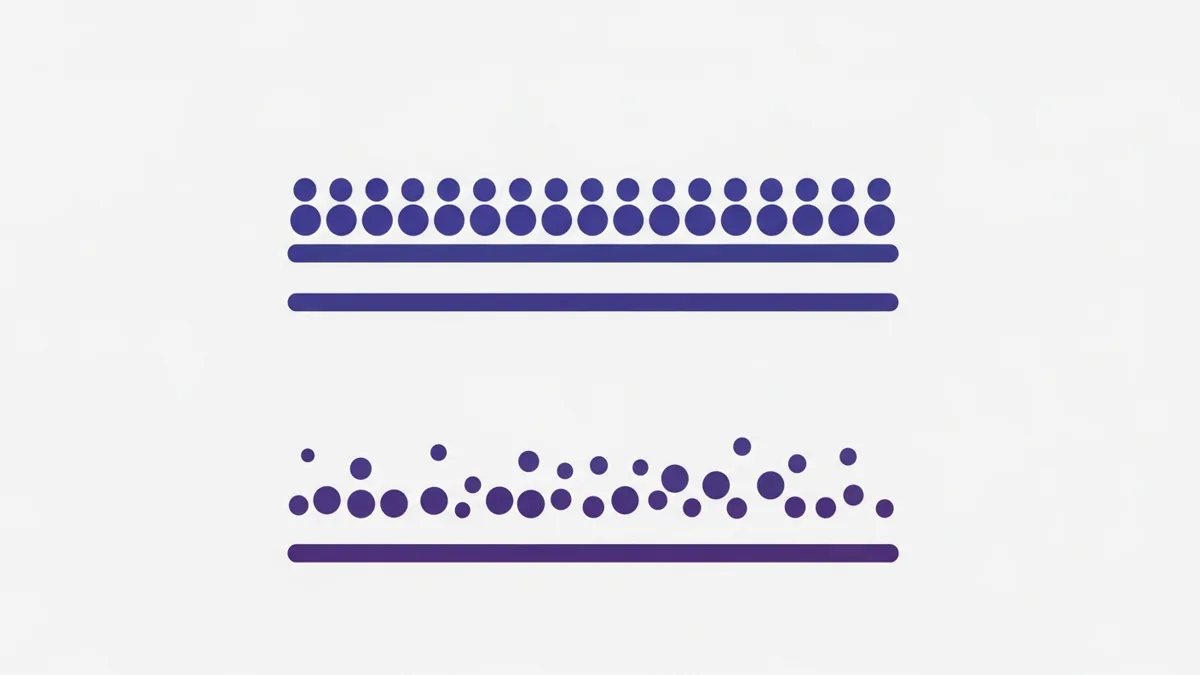
The fix is randomized delays and spreading posts over hours instead of minutes. MultiGroupPoster’s Time Spacing does this by default — it inserts randomized gaps between posts rather than a fixed interval — and its Natural Presence setting (Off, Balanced, Maximum) and default Balanced Protection are built to make the whole sequence look human-paced rather than scripted. None of that makes posting undetectable; it makes the pattern look less like a bot, which is the honest goal.
If you want the broader account-safety picture beyond duplicate content specifically — pacing, account age, media, warm-up — see bulk posting without getting restricted.
Signals and honest fixes
Here is the whole model in one place: each duplicate-content signal, why Facebook appears to flag it, and the genuine fix — no hash-busting, no metadata tricks, just real variety and human pacing.
| Signal | Why it appears to get flagged | The honest fix |
|---|---|---|
| Identical / near-identical text (copypasta) | Exact-match text is cheap and reliable to detect at scale, and members report copied promotion on sight. | Spintax — write once with {A|B|C} alternatives so every group gets genuinely different wording. |
| Same image file re-used | Perceptual image hashing fingerprints what a picture looks like, so re-saving, cropping, and filename changes don’t make it “new.” | Rotating image sets — post genuinely different real photos to different groups. |
| Same external link repeated fast | Off-platform links get less reach anyway, and a rapidly repeated URL is a classic link-spam footprint. | First comment for the link + space posts out, so it’s not the same URL in a burst. |
| Robotic timing (regular intervals) | A constant cadence is a cadence no human types at; automation detection watches for regularity. | Randomized delays (Time Spacing) so gaps are uneven, like a person. |
| Bursts (many posts at once) | A spike of activity then silence reads as a batch job, not a person. | Spread over hours, not minutes; use Natural Presence / Balanced pacing. |
The pattern across every row is the same: the durable fix is genuine variety and human pacing, never a trick to slip past a check. Tricks are what the systems are built to catch.
The honest fix: post with real variety
Put the four fixes together and you have a way of posting that simply looks like a person sharing something across communities they belong to — which is the point. None of this is a loophole; it’s the difference between broadcasting a spam blast and participating.
The checklist:
- Vary the text with Spintax. No two groups see the same paragraph. Three or more alternatives in three or more spots. → Spintax guide
- Vary the images with rotating image sets. Different real photos to different groups — not one photo re-saved. → Vary images across groups
- Put external links in the first comment. The post stays clean; the link is one tap away. → First comment
- Randomize your delays and spread posts over hours. Uneven gaps, no bursts. → Bulk posting without getting restricted
- Post like a human. Post to groups you’re actually a member of, keep volume reasonable for your account’s age, and don’t push through warnings.

This is exactly what MultiGroupPoster is built to do, using only what the tool actually does. It’s a Chrome extension that runs inside your own logged-in Chrome session — it never stores your password and only posts to groups you’re already a member of. Spintax handles text variety; Image Sets handle image variety (the only image-variation mechanism, on purpose); Auto First Comment places your link in the top comment; Time Spacing inserts randomized delays; Natural Presence (Off → Balanced → Maximum) and the default Balanced protection shape human-looking pacing; and Fast or Safe posting methods let you choose how posts are delivered. There’s also scheduling and a queue, group bundles, and a one-click profile switch. The reporting is deliberately simple — a post success/failure list, so you see which groups accepted a post and which didn’t. There are no per-group analytics, and no claim anywhere that this makes you undetectable, ban-proof, or immune to Facebook’s spam filter. What it does is make each post look unique and human-paced, which reduces the risk of being flagged.
You can test all of it on the free trial — no credit card — and upgrade through Freemius if it earns a place in your workflow. If you post to a lot of groups, the difference between “identical blast” and “varied, human-paced” is the difference this whole article is about.
FAQ
What counts as duplicate content on Facebook?
Duplicate content is any post that closely repeats something you (or others) already posted — identical or near-identical text pasted across many groups, the same image file re-used again and again, or the same external link shared rapidly. Facebook’s spam systems appear to care most about repetition and pattern, not the raw number of posts. One image posted to three groups is normal; the same text-plus-link fired into forty groups in ten minutes is the pattern that gets flagged.
Does Facebook really detect duplicate images?
It is widely observed to. Platforms of Facebook’s scale routinely use perceptual image hashing, which produces a fingerprint of what an image looks like rather than of the exact bytes. That means small edits — re-saving, light cropping, changing a filename — do not reliably make an image look ‘new’ to the system. The honest way to vary images is to post genuinely different photos, which is what rotating image sets do.
Will I get banned for posting the same thing to multiple groups?
Not automatically, and volume alone is rarely the trigger. What appears to raise flags is the combination of identical content plus a robotic pattern — the same text, the same link, posted at machine-regular intervals in a short burst. Vary the wording, space the posts out over hours, and post like a human, and the same reach across the same groups looks far more natural. No tool can promise you will never be flagged.
How do I avoid the Facebook spam filter when posting to groups?
Reduce the two signals the filter appears to weigh most: sameness and speed. Vary your text with Spintax so no two groups see the same paragraph, vary your images with rotating image sets, put external links in the first comment instead of the post body, and use randomized delays so posts land over hours rather than in one burst. These make each post look unique and human-paced; they reduce risk, they do not eliminate it.
Is ‘copypasta’ — the same block of text everywhere — actually a problem?
Yes. Verbatim copypasta across many groups is one of the most legible duplicate-content signals there is, because exact-match text is trivial to detect at scale. It also reads as low-effort to the humans in each group, who report it. Rewriting the same offer as several genuinely different versions — the point of Spintax — removes the exact-match fingerprint and reads better.
Do hashtags, emojis, or tiny edits fool the duplicate-content check?
Do not count on it, and do not build a strategy around tricking the system. Swapping a word, adding emojis, or inserting invisible characters is exactly the kind of low-effort manipulation spam systems are designed to catch, and leaning on it tends to make things worse over time. The durable approach is real variety: different sentences, different images, different pacing — content a human would actually recognize as distinct.
Want the settings dialed in from day one? MultiGroupPoster ships Spintax, rotating image sets, first-comment, and randomized pacing as defaults — the variety this guide recommends, without configuring anything by hand. Start on the free trial and see what your groups receive before you publish.