

The exact message
The wording changes a little between the app and a computer, but the core sentence is always the same. In English it reads:
We limit how often you can post, comment or do other things in a given amount of time in order to help protect the community from spam. You can try again later.
Sometimes it comes with a heading, Slow down to keep using this feature or You can’t use this feature right now, and a line saying “You may want to slow down or stop to avoid a restriction on your account.” It can open as a pop-up, or show up as plain text inside the post box when you press Post, which is easy to miss.
The same message in other languages starts like this:
| Language | Opening words |
|---|---|
| Spanish | ”Limitamos la frecuencia con la que puedes publicar, comentar o realizar otras acciones…” |
| Polish | ”Ograniczamy liczbę postów, komentarzy i innych działań w określonym czasie…” |
| French | ”Nous limitons la fréquence à laquelle vous pouvez publier, commenter…” |
| Portuguese | ”Limitamos a frequência com que você pode publicar, comentar…” |
What the message means
Facebook keeps a running count of what each account does: posts, comments, shares, reactions, friend requests, group joins, messages. When the count for one action goes past what Facebook expects from a normal person in that window of time, it stops that action and shows this message. The help page linked from the message calls it protection from spam.
Three things are worth knowing:
- It is automatic. No person reviewed your post. A counter tripped.
- It is about speed and repetition, not about what you said. A perfectly fine post can trigger it if you send it to many places quickly.
- It is the first step, not the last. If the activity continues, the next step is a temporary block with an end date, and after that a restriction on the account. The guide to posting blocks covers those stages in detail.
How long the limit lasts
Facebook doesn’t publish a duration, and the message itself only says “try again later”. From what MultiGroupPoster users tell our support team:
- Most often, a few hours. The action works again later the same day.
- Sometimes up to a day or two, especially on newer accounts or after a second hit in the same day.
- Longer if you keep pushing. Retrying every few minutes, or switching to another action (sharing instead of posting), can turn the limit into a block with a stated end date.
If you want to know where you stand, open Settings and privacy, then Account Status. If Facebook placed a real restriction, it is listed there with the date it ends. If nothing is listed, you are dealing with the short rate limit, and waiting is the fix.
What triggers it
The usual causes, roughly in order of how often we see them:
- Many posts in a short time. Posting the same thing to 20 or 30 groups in a few minutes is the classic trigger. The safe posting limits guide has the ranges by account age.
- The same text and link everywhere. Identical content repeated across groups is a strong spam signal. More on that in how duplicate content detection works.
- A new or quiet account. A profile that was created recently, or that posted nothing for months and suddenly posts a lot, gets a smaller allowance.
- Lots of small actions. Joining 15 groups, sending friend requests, commenting on many posts or liking dozens of posts in a row all count.
- Links that others reported. A domain that many people marked as spam makes every post that carries it more suspicious.
It is often a mix. A newer account posting one link to 25 groups in ten minutes ticks three boxes at once.
What to do right now
- Stop. Close the post box. Don’t press Post again, and don’t switch to sharing or commenting instead.
- Check Account Status (Settings and privacy, then Account Status) for anything with an end date.
- Don’t delete what already went out. Mass-deleting posts is more activity, and those posts are fine.
- Give the profile a break. A few hours is often enough; a full day is safer.
- Use the time to fix the cause. Shorten the group list, write two or three versions of the text, and drop any link that keeps getting removed.
What not to do
- Don’t log out and back in, or clear cookies, to “reset” it. The limit is on the account, not the browser.
- Don’t use a VPN or another device. It changes nothing about the count and a sudden location change can add a security check on top.
- Don’t switch to a second account to finish the job. Posting the same content from linked accounts is a pattern Facebook looks for.
- Don’t buy a tool that promises it can’t happen. No tool can promise that. Anyone who says “undetectable” or “ban-free” is selling the claim, not a feature.

Limit, block or restriction?
| What you see | What it is | How long | What to do |
|---|---|---|---|
| ”We limit how often you can post…” | Rate limit on one action | Usually hours | Stop and wait, then post less |
| ”You’re temporarily blocked” / “You can’t post in groups until [date]“ | Temporary block | Days, with an end date | Wait for the date; steps here |
| ”Your account is restricted” in Account Status | Restriction | Days to weeks | Read the reason, appeal if it’s wrong |
| Your post sits in “Pending” | Group approval, not Facebook | Until an admin acts | Pending posts explained |
| Post vanishes with no message | Group or spam filter | Per post | Why posts don’t publish |
The full picture of how these escalate, and how people end up in “Facebook jail” for a week, is in how to avoid Facebook jail. When only commenting is blocked, often in a single group, the cause is usually the group’s admins; why you can’t comment in a Facebook group covers those cases.
How to post again without hitting it
When the break is over, come back below the level that triggered it:
- Post to fewer groups at a time. If 30 tripped it, try 10 today and see how the account behaves.
- Leave minutes, not seconds, between posts. Two to five minutes between groups is a sensible starting point. Bulk posting without getting restricted goes deeper on pacing.
- Change the wording per group. A different first line, a different call to action, the link in a comment instead of the post. The spintax guide shows how to write several versions at once.
- Spread posting over the day instead of one burst in the morning.
- Keep doing normal things. Reply to comments on your posts. An account that only ever posts and never talks looks like a bot.
None of this guarantees you won’t see the message again. Facebook doesn’t publish its thresholds and they differ between accounts. It lowers the odds, and it makes a limit far less likely to turn into a block.
If you post to many groups
This message is the main thing that stops people who post the same offer to many groups, and it usually shows up halfway through, when half the groups have the post and half don’t.
MultiGroupPoster is a Chrome extension that posts one message to the groups on your list, one at a time, with a pause between groups (2 minutes by default) and a different wording per group if you write versions. It doesn’t make the limit go away. What it does is react to it the right way:
- When Facebook shows this message, or a block, MultiGroupPoster stops the campaign instead of pushing on to the next group.
- A card tells you what happened and what to do: usually give the profile about a day off, then start again with fewer groups, a slower speed and a little variety in the text.
- Post the rest tomorrow selects only the groups that didn’t get the post yet and sets a schedule for tomorrow at about the same time. You check it and confirm; nothing is saved before that.
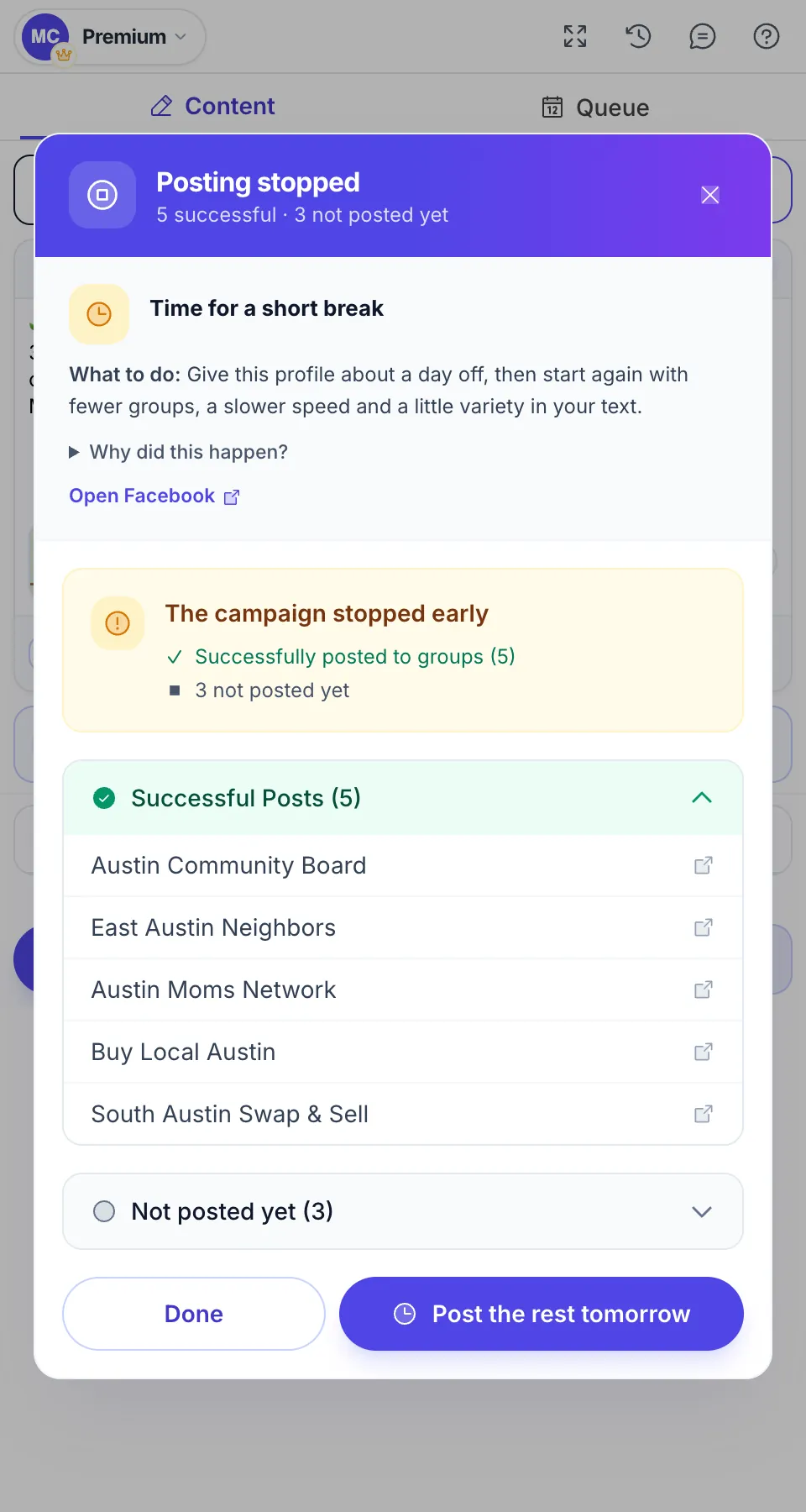
For a day after a stop, the quick check before you post reminds you that Facebook asked for a break. The full walkthrough is in the guide’s When Facebook stops you chapter. Chrome needs to stay open while posts go out, and the safer the pace you pick, the longer a campaign takes.
FAQ
What does “We limit how often you can post” mean on Facebook?
It means Facebook’s spam protection counted too many actions from your account in a short time, such as posts, comments, shares or group joins, and paused that action for a while. It is a rate limit, not a ban: your account still works, and the action comes back on its own.
How long does the “We limit how often you can post” limit last?
Facebook doesn’t give a time; the message only says you can try again later. Most people can post again within a few hours to a day. If you keep trying while it is active, or it keeps happening, it can turn into a longer block with an end date, which then shows in Account Status.
How do I fix “We limit how often you can post”?
There is no button that removes it. Stop the action that triggered it, don’t retry every few minutes, and give the profile a break, ideally a day. When you start again, post to fewer groups, leave several minutes between posts and change the wording from group to group.
Can I get around the limit with another browser, a VPN or another account?
No, and trying makes it worse. The limit is on your account, not your device, so a new browser or VPN changes nothing, and switching IPs or accounts looks more suspicious to Facebook. The only thing that clears it is time.
Is “We limit how often you can post” the same as being blocked?
No. It is the mildest step. A temporary block (“You’re temporarily blocked”, “You can’t post in groups until…”) comes with a date and lasts days. A restriction or a disabled account is more serious and is listed in Account Status. Treat the limit as a warning that the next step is a block.
Why do I get this message when I barely posted?
Facebook counts more than posts. Comments, shares, likes on many posts, friend requests, joining groups and sending the same link many times all add up, and newer accounts get a lower allowance. Ten posts of the same text with the same link in ten minutes can be enough.