

How to schedule a post in a Facebook group on a computer
- Open the group and click Write something.
- Write the post. Photos, a link, a poll or a background color all work as usual.
- Click the clock icon next to the Post button.
- Choose the date and the time. The time is your own local time.
- Click Schedule.
That’s it. The post doesn’t appear in the feed yet, and members get no notification until it publishes. If a Schedule or clock option isn’t there, jump to the five reasons it goes missing.
One thing to check before you click: a scheduled post goes out exactly as written. If it mentions “today” or “this weekend”, make sure that is still true on the day it publishes.
How to schedule a group post in the Facebook app
- Open the group in the Facebook app on iPhone or Android.
- Tap Write something and write the post.
- Look at the bottom of the post screen for the scheduling option. Depending on the app version it is a clock icon, Schedule or Scheduling options.
- Set the date and time, then tap Schedule (or Save and then Schedule).
The app changes its labels more often than the website does. If you can’t find the option on the phone, open the same group on a computer: if it’s there, your app is the problem, not your role.

Find, edit or move a scheduled post
Scheduled posts live in the group’s admin area, not in the feed:
- Open the group and go to Admin tools (on a phone, the shield icon near the top of the group).
- Choose Scheduled posts.
- Click the three dots (···) on a post. You can edit it, reschedule it to another time, post now or delete it.
Other admins and moderators see the same list, so a team can check each other’s posts before they go live. If you want a post at the top once it publishes, pin it afterwards; how to pin a post in a Facebook group shows the Featured section.
Recurring posts in a group
Groups you manage get something Pages don’t: a repeat option. When you schedule the post, set it to come back daily, weekly or monthly. That fits the posts a group runs on, such as a Monday introductions thread, a Friday “share your offer” post or a monthly rules reminder.
If you’d rather have Facebook handle that kind of routine automatically, Admin Assist can also post and decline posts on rules you set; see the Admin Assist guide. And for a whole month of group posts planned in one sitting, the group content calendar template has a week laid out.
No schedule option? 5 reasons
- You are a member, not an admin or moderator. This is by far the most common one. Members never get the clock icon.
- You are acting as the wrong profile. If you switched to a Page or another profile, switch back to the one that holds the admin role.
- The app is behind. Update Facebook, or try the same group on a computer.
- The post type can’t be scheduled. Some formats, like a live video or certain sale listings, don’t offer scheduling.
- The time is out of range. Facebook rejects times that are too soon or too far ahead and says so before it saves. For Pages, Meta’s Help Center gives 20 minutes to 29 days; for groups, go by what the date picker offers. How many posts can you schedule on Facebook covers those limits.
Scheduling as a member
In a group you only joined, Facebook has no scheduling option, and outside tools can’t add one through Meta. Buffer, Hootsuite and the other cloud schedulers used Meta’s Groups API, which was switched off on 22 April 2024; the Groups API post has the details.
What still works is a tool that posts from your own browser, while you are logged in, the same way you would by hand. That is the method behind scheduling posts to joined Facebook groups: the post goes out as you, so it reaches any group you are allowed to post in, and the group’s own rules still apply. If the group reviews posts, your scheduled post lands in the queue like any other; pending approval explains that part.
Scheduling one post for many groups
Facebook’s scheduler works one group at a time. If you run five groups, you schedule five times. If you are a member of forty, you can’t schedule at all.
MultiGroupPoster is the Chrome extension we make for that case. You write the post once, pick the group lists it goes to and set Once, Daily, Week or Month with a start time in your own time zone:
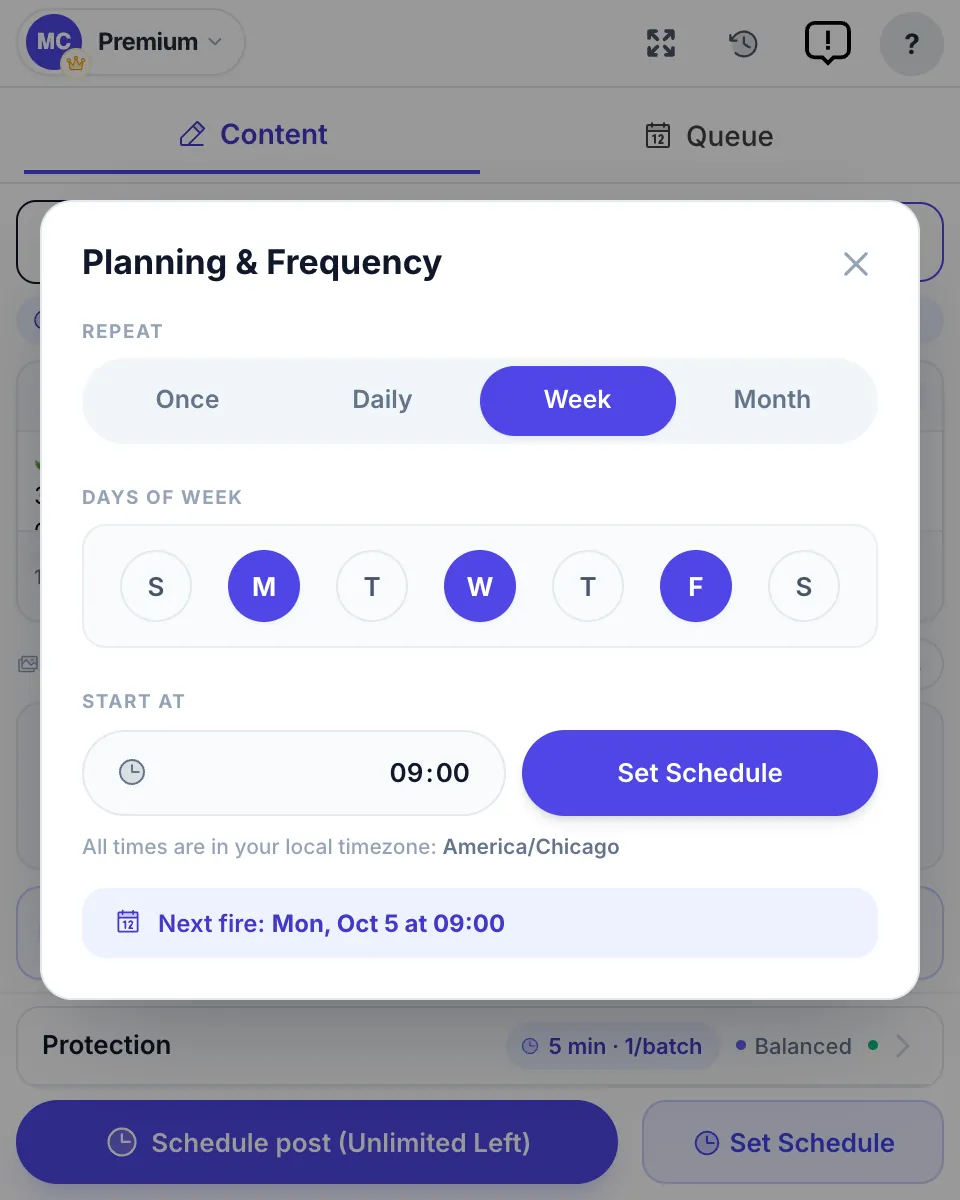
When the time comes, it posts to each group in turn with a pause between them, from your own session. Two honest limits: Chrome has to be open at that time (if the computer sleeps, the run starts when it wakes), and a schedule doesn’t make volume safe. A queue that fires a hundred posts in ten minutes carries the same risk as doing it by hand, which is why the posting limits guide matters more than the scheduler. If Facebook does ask you to slow down, the “We limit how often you can post” message explains what to do.
| You want to | Use |
|---|---|
| Schedule a post in one group you manage | Facebook’s clock icon in that group |
| Repeat a post in a group you manage | Facebook’s repeat option, or Admin Assist |
| Schedule a post in a group you only joined | A browser extension that posts from your session |
| Schedule one post for many groups | A browser extension with group lists, such as MultiGroupPoster |
| Schedule a Page post | Meta Business Suite or the Page itself |

FAQ
How do I schedule a post in a Facebook group?
Open the group, click Write something, write the post, then click the clock icon next to the Post button. Pick a date and time and click Schedule. The post waits under Admin tools, in Scheduled posts, until it goes out. Only admins and moderators get the clock icon.
Why can’t I schedule a post in a Facebook group?
Because you are a member, not an admin or moderator. Facebook only gives the scheduling option to people who manage the group. If you do manage it and the clock is missing, update the app, try a computer, and check you are posting as the profile that holds the admin role.
Where do I find scheduled posts in a Facebook group?
Open the group, go to Admin tools (the shield icon in the app) and choose Scheduled posts. From there you can edit a post, change its time, publish it now or delete it.
Can I schedule a recurring post in a Facebook group?
Yes, if you manage the group. When you schedule a post, Facebook offers a repeat option for groups you run, which suits a weekly promo thread or a Monday check-in. Members have no repeat option.
Can I schedule the same post in several Facebook groups?
Not in Facebook itself. Each group has its own scheduler and you would set the post up group by group, and only in groups you manage. For groups you joined, a browser extension such as MultiGroupPoster schedules one post for a list of groups from your own session.
How far ahead can I schedule a post in a Facebook group?
Facebook doesn’t publish a window for groups; the date picker shows what it will accept. For Pages, Meta’s Help Center says 20 minutes to 29 days, and if your time is outside the allowed range Facebook tells you so before it saves.