

What “Facebook group management software” actually means in 2026
Search “Facebook group management software” and you’ll get articles recommending tools that solve four different problems mashed together — and, since 2024, many tools that no longer touch groups at all:
| Problem | Who has it | What handles it in 2026 |
|---|---|---|
| ”Spam is overwhelming my 10,000-member group” | Admin | Facebook’s Admin Assist and moderation alerts (free) |
| “I don’t know which content drives engagement” | Admin | Group Insights (free) |
| “I want new members’ answers in my CRM” | Admin | A membership-answer browser extension |
| ”I post the same listing to 50 groups every morning” | Member | A posting browser extension |
The first thing to do before evaluating any tool is figure out which problem is yours. Paying for a $99-a-month social suite when your real problem is “posting to many groups takes too long” is a common mistake — and in 2026 that suite can’t post to those groups anyway.
If what you need is a connection between groups and your other tools (a CRM, Zapier, an RSS feed) rather than an app, which Facebook Groups integrations still work covers that side.
Facebook management software vs group management software
If you searched for “Facebook management software”, most results are social media suites built to manage Facebook Pages. On April 22, 2024, Meta removed the publish_to_groups and groups_access_member_info permissions and the Groups API from every version of its Graph API (what changed). Since then the suites have had no official way into groups. Here is what each one documents, checked on their own sites in October 2026:
| Tool | What it says about Facebook groups | Price range (October 2026) |
|---|---|---|
| Meta Business Suite | Lists a Facebook group as a “Post to” option beside your Page and Instagram account; doesn’t say which groups qualify | Free |
| Buffer | Groups only through notification publishing: you get a reminder and finish the post yourself | Free plan; paid $5–$12 per channel a month |
| Hootsuite | Help centre covers connecting Pages only (an older FAQ still mentions groups) | $99–$399 per user a month, billed annually |
| Sprout Social | Group messages can’t reach its inbox or be posted from Compose | $79–$399 per seat a month, billed annually; Enterprise custom |
| Agorapulse | Facebook group management no longer supported since April 2024 | $79–$199 per user a month |
| Loomly | Facebook connection supports Pages; no group option documented | $49–$332 a month |
| NapoleonCat | Built for Pages — comments, Messenger and ad comments | About $67–$799 a month, by plan and number of profiles |
So “Facebook management software” and “Facebook group management software” are now two different shopping lists. Use a suite for your Page if you need one; use Facebook’s own admin tools — and, if you post to many groups, a browser extension — for groups.

Page owners also ask about the Messenger side: the automatic greeting people get when they message your Page is free in Meta Business Suite, and our Messenger greeting examples cover what to write.
Step 1: identify your role
Two roles map to two completely different toolsets:
Role A — Member who posts to multiple groups
You are: real estate agent, recruiter, e-commerce seller, coach, network marketer, freelancer.
Your problem: posting the same content to 30–500 groups takes hours per day.
You don’t need: admin moderation tools, group analytics, member onboarding flows.
You need: a browser extension that posts to many groups in one run. See the Member stack below.
Role B — Admin running one or more groups
You are: course creator, community lead, brand-community manager, mastermind host.
Your problem: moderating spam, growing engagement, understanding what content works.
You don’t need: bulk posting tools (you only post to your own group), and you probably don’t need any paid admin tool yet.
You need: Facebook’s native admin tools first, then maybe a membership-answer extension. See the Admin stack below.
If you’re both (you admin one group AND post to many other groups), you need one tool from each role.
If you are the admin, the day-to-day side of the job is covered in running a Facebook group at scale. If you are the member posting to many groups, there are role-specific playbooks for real estate agents, recruiters, e-commerce sellers and network marketers.
Stack for group admins
For admins running their own Facebook group(s).
Tier 0 — Facebook’s own tools (free, and enough for most groups)
-
Admin Assist — rules that act on their own, set per group. As of October 2026 Meta’s Help Center lists:
- Approving participants or member requests by account age, answers to participation questions, friends in the group and location — or declining them, for example brand-new accounts
- Declining posts and comments with the Spam posts and Spam comments presets, or that link to sites you name
- Removing posts reported a set number of times, and turning off comments on contentious posts
- Suspending people who had several posts or comments removed within 24 hours
- Publish a welcome post or a custom post daily, weekly or monthly
- Optional automatic approval of pending posts and participant requests when Meta’s systems are highly confident
-
Moderation alerts — keyword alerts (no limit on how many words) and engagement alerts, so you hear about a heated or off-topic thread while it is happening.
-
Group Insights — growth, engagement, popular days and times, top posts and top contributors; age, gender and location breakdowns once the group has 250 members.
-
Membership questions and rules — up to 3 questions of up to 200 characters each, and up to 10 group rules.
For most admins this combination is enough, and it is the bar any paid tool has to clear. The details are in Facebook group moderation tools and Facebook group analytics.
Tier 1 — Paid, for specific gaps
Membership-answer capture. These Chrome extensions save the answers new members give to your membership questions — usually an email address — into Google Sheets or a CRM when you approve them. Prices as of October 2026:
- Group Leads — $27–$57 a month, with about 30% off for yearly billing; sends answers to Google Sheets and 70+ autoresponder integrations
- GroupKit — a 14-day free trial; its sales page doesn’t list plan prices
- Groupboss — $19–$49 a month, or $79–$189 a year
- Group Collector — $25 a month, or $297 once for lifetime access
Worth it if your group is a lead source for a business; unnecessary otherwise. Collect only what your membership questions say you will, and only with members’ consent.
Analytics. We could not verify a working third-party analytics product for Facebook groups in October 2026: Grytics, the best-known one, no longer has a product site, and Sotrender analyses Pages, not groups. The practical upgrade is a monthly spreadsheet of your Insights numbers.
Most of an admin’s automation lives in Admin Assist, which is free; the Admin Assist setup guide shows each rule step by step.
Tools for managing Facebook group comments
“Leading tools for managing Facebook group comments” is a common question, and the honest 2026 answer is Facebook’s own. The comment-moderation suites built for Pages — NapoleonCat, Agorapulse, Sprout Social — don’t reach group comments. Inside a group you have:
- Admin Assist comment rules — decline comments with the spam preset or with links to sites you name
- Keyword alerts — a notification when a comment uses a word on your list
- Turn off commenting — on any post, by admins, moderators or the post’s author
- Slow down comments — one comment per person every five minutes, in groups where it is available
- Limit Activity — a cap on how many comments each member can make per hour
- Suspend — for members who keep breaking comment rules; Admin Assist can do it after repeated removals
For a team, the tool that matters most is not software but a shared rulebook: which comments get removed, which get a reply, and who handles escalations. The full playbook is in how to moderate Facebook group comments.
Stack for group members (multi-group posters)
For members posting to many groups daily.
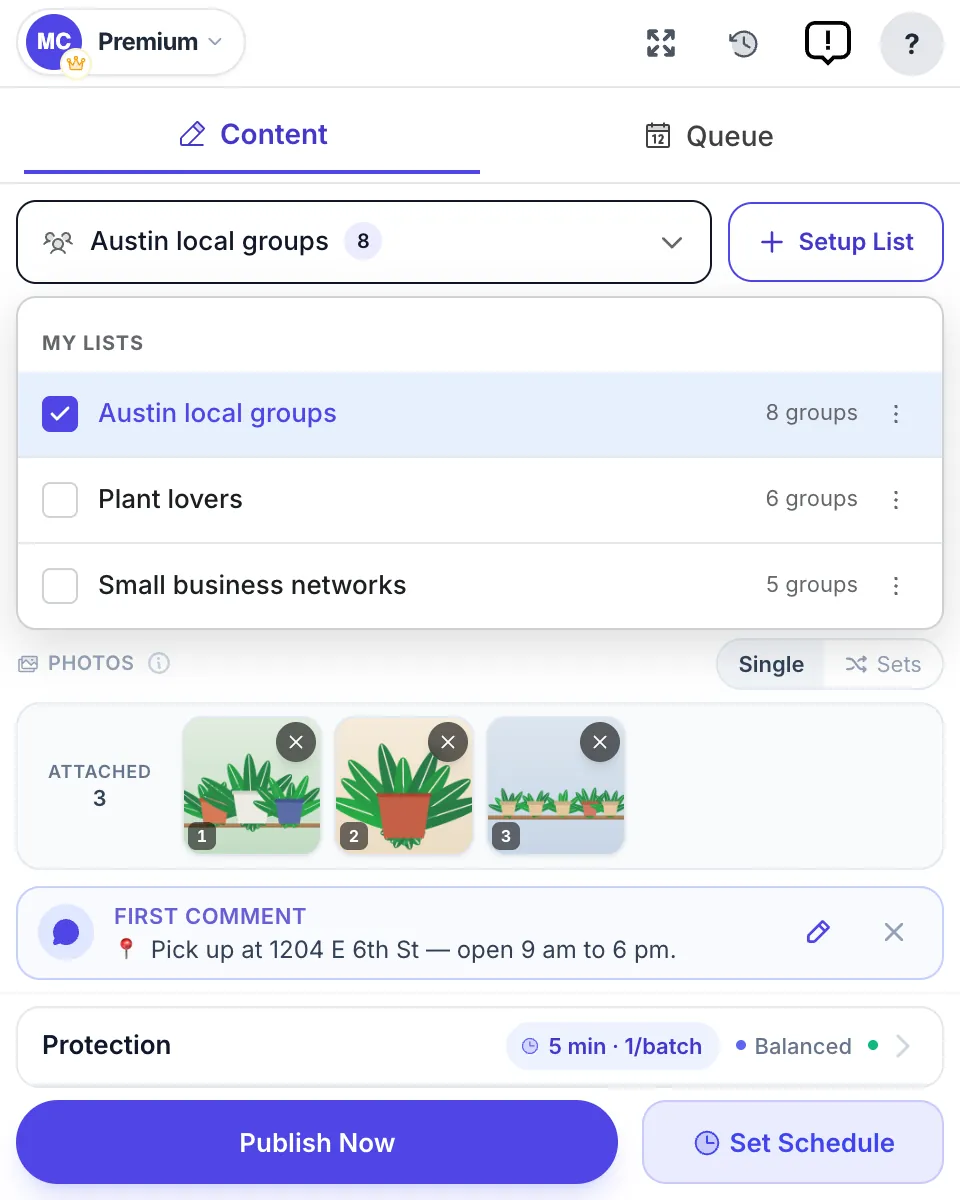
Tier 0 — Browser extensions (the only path)
Since the API change, posting to groups you’re a member of works only from inside your own logged-in browser session.
-
MultiGroupPoster — Chrome extension that posts from your own session, with a Fast and a Safe posting method, Spintax and randomized pacing. Free plan with 6 posts to try, then $9.99 a month or $69.99 a year.
-
PilotPoster — alternative Chrome extension; about $47 a month after a 1-day trial that needs a card (as of October 2026).
-
Group Posting Pro — alternative with a free Lite plan of 5 group posts a day; paid plans from €69 a year up to €24 a month, or €279 for lifetime access (as of October 2026).
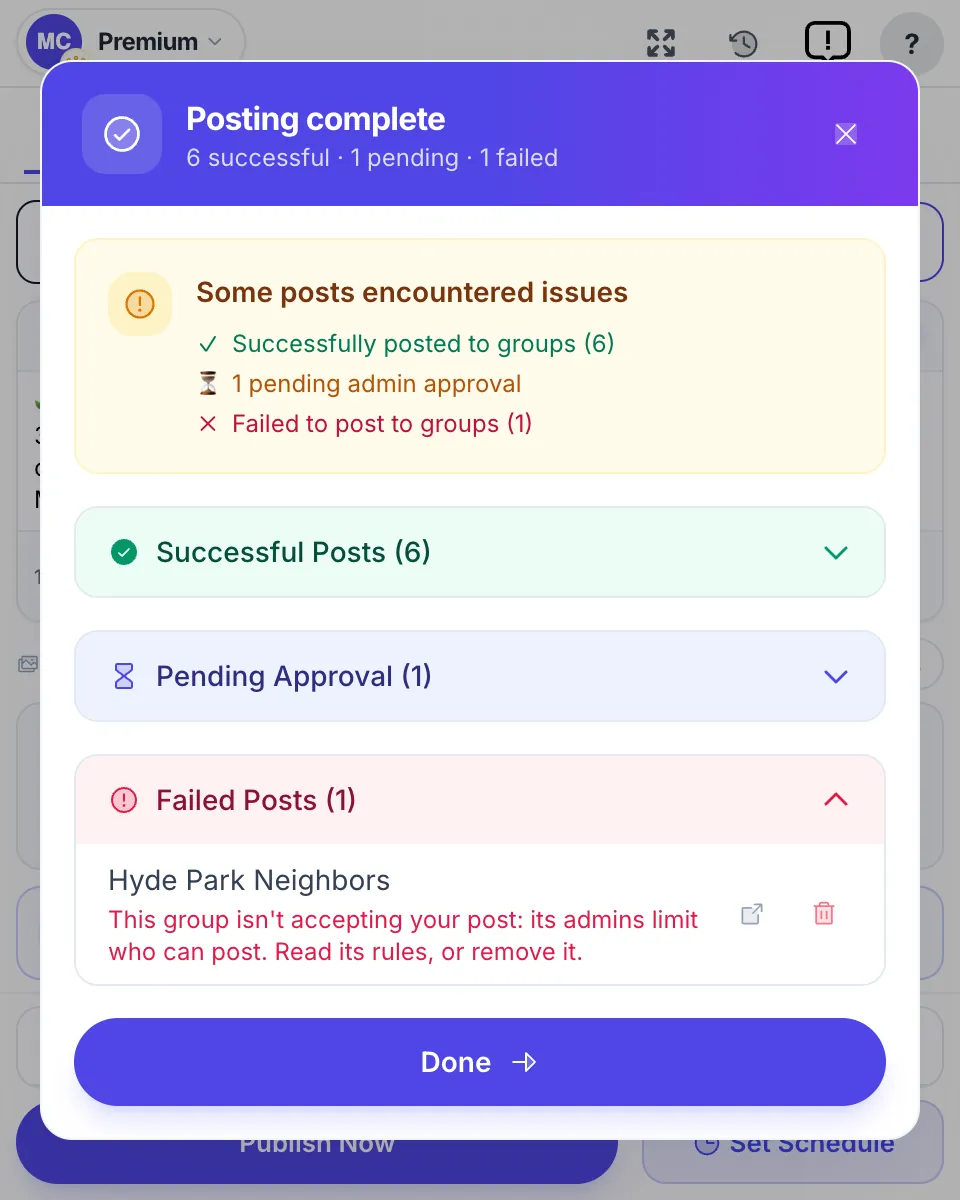
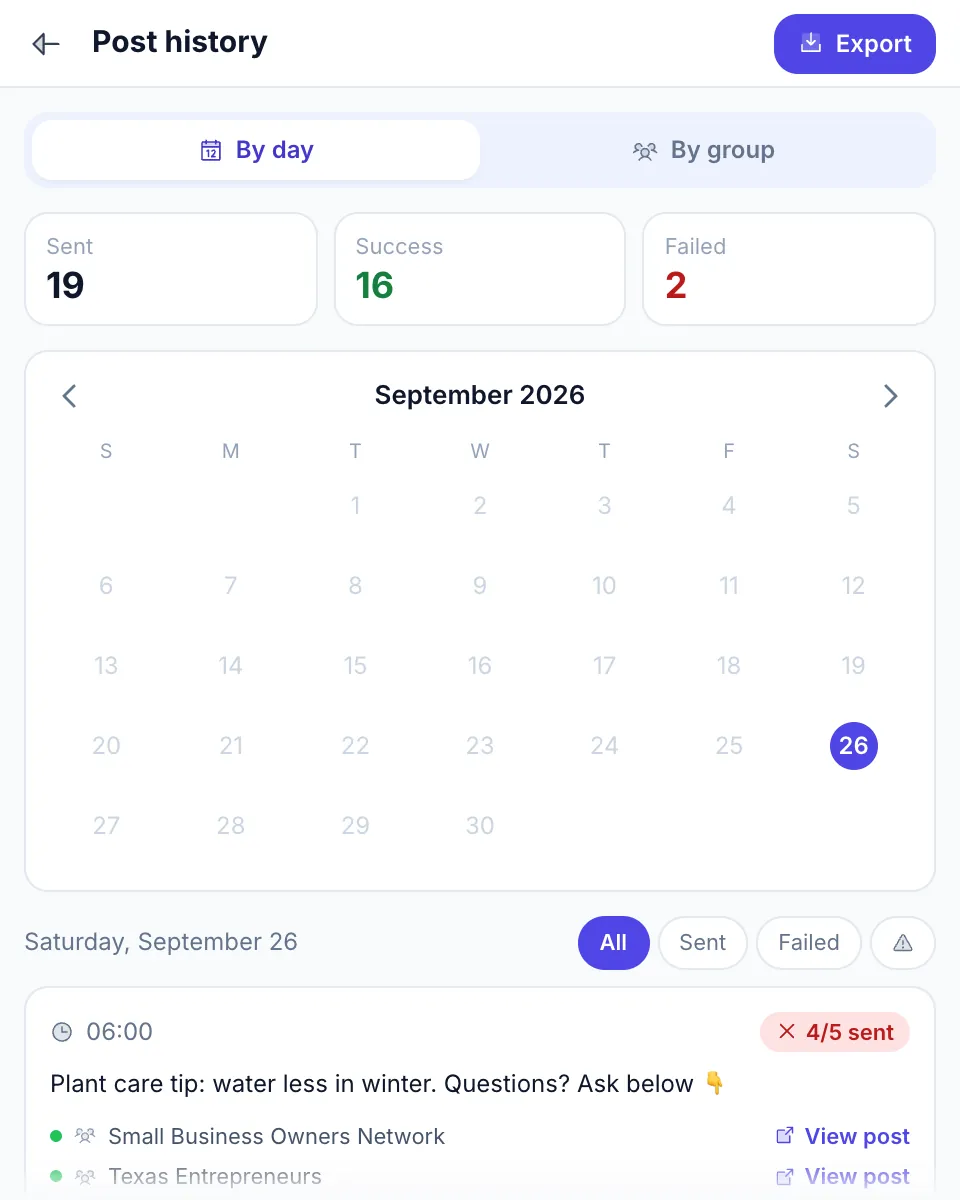
Whichever you choose, insist on per-group results. A posting tool should tell you which groups published the post, which are holding it for admin approval and which refused it — otherwise you keep posting into groups that never show your work.
Tier 1 — Add for cross-platform (Page + Instagram + groups)
If you also post to your Page or Instagram, pair the extension with a Page tool:
- Meta Business Suite (free) — for Pages and Instagram
- Buffer (free plan; paid $5–$12 per channel a month) or Hootsuite ($99–$399 per user a month) — only if you also need other networks
The “extension for groups + suite for Pages” combination covers more than any single enterprise suite, none of which posts to the groups you’ve joined.
For a deeper comparison: Best Facebook group posting tools.
Stack for agencies managing client groups
If you’re an agency running groups for several clients:
Access: ask each client to make you an admin or moderator of their group. Never accept a client’s Facebook password — roles can be removed cleanly when the contract ends.
Moderation: Admin Assist and moderation alerts, configured per group. Since 2024 there is no third-party dashboard that moderates several groups at once, so document each group’s settings in a shared sheet.
Reporting: a monthly Insights snapshot per group — members, active members, posts, comments, top posts — in the same sheet. For posting campaigns you run for clients, keep the per-group delivery record too.
Lead capture: a membership-answer extension (Group Leads, GroupKit, Groupboss) if the client’s group feeds a CRM.
Content planning for the client’s Page: a suite such as Loomly ($49–$332 a month) — for Pages only.
At October 2026 prices, the paid group parts — lead capture plus a posting extension — come to roughly $30–$70 a month per client. A Page suite adds $49–$399 a month if the client needs one.
Pricing reality check
The dollar landscape for Facebook group management in October 2026:
| Tier | Tools | Monthly cost |
|---|---|---|
| Free | Admin Assist, moderation alerts, Group Insights, Meta Business Suite, Buffer free plan, MultiGroupPoster Free (6 posts to try), Group Posting Pro Lite | $0 |
| Admin with a lead funnel | Native tools + a membership-answer extension | $19–$57 |
| Member posting to many groups | MultiGroupPoster $9.99 ($69.99 a year); alternatives from about €6 to $47 | about $6–$47 |
| Agency, per client | Lead capture + posting extension | ~$30–$70, plus $49–$399 for a Page suite |
| Enterprise social suite | Hootsuite, Sprout Social — for Pages, no group support | $79–$399 per user |
The takeaway: most admins and posters never need to spend more than $10–$60 a month, and the most expensive suites don’t cover groups at all.
Six questions to ask before you pay
- Which job is it for — moderation, analytics, onboarding or posting? If it claims all four, check each.
- Does its own help centre say it supports Facebook groups in 2026? Ads and old FAQ pages lag behind; Hootsuite’s FAQ still mentions groups while its help centre documents Pages only.
- How does it get in? Admin roles or your logged-in browser session are fine. A request for your Facebook password is not.
- Has the changelog moved in the last 12 months? Group tools that weren’t updated after April 2024 mostly stopped working.
- What does it do that Admin Assist or Insights doesn’t? If you can’t name it, you don’t need it yet.
- Can you leave easily? Monthly billing, a trial without a card, or a refund window — know which before you subscribe.
What to avoid in 2026
-
Tools that ask for your Facebook password. Reputable tools use admin roles or your existing logged-in session — never password access. After the 2024–2025 Chrome extension supply-chain attacks, this is a hard rule.
-
Cloud tools claiming “Facebook group scheduling”. The official API lost group publishing on April 22, 2024. A cloud tool that still claims it is either sending you a reminder to post yourself, limited to narrow cases, or running a server-side browser with your login — a very high account risk. Verify before paying.
-
Engagement pod tools. Tools coordinating fake likes and comments. Meta’s spam policy targets exactly this kind of high-frequency, inauthentic engagement.
-
Analytics and “all-in-one” tools that stopped evolving. Check that the domain still hosts the product and the changelog has moved recently. Grytics, once the standard group analytics recommendation, no longer has a product site.
-
Tools without a public team or company. Anything without a clear team behind it is too risky for an account that matters.
-
Free tools that monetize via data. If a tool is “completely free” with no paid tier, ask how they make money.
FAQ
What is the best Facebook group management software?
It depends on the job. For moderation and analytics in a group you run, Facebook’s own free tools — Admin Assist, moderation alerts and Group Insights — are the strongest option in 2026. To capture new members’ answers into a CRM, use a membership-answer extension such as Group Leads or GroupKit. To post to many groups you belong to, use a browser extension such as MultiGroupPoster.
Is there free Facebook group management software?
Yes. Admin Assist, moderation alerts, Group Insights, membership questions, group rules and scheduled posts are all built into Facebook and free for admins. Meta Business Suite is free for Pages, Buffer has a free plan, and MultiGroupPoster’s free plan includes 6 posts to try with no card.
Can Hootsuite, Sprout Social or Buffer manage Facebook groups?
Not in the way they manage Pages. As of October 2026, Hootsuite’s help centre documents connecting Pages only, Sprout Social says group messages can’t reach its inbox or be posted from Compose, Agorapulse dropped group management in April 2024, and Buffer supports groups only through notification publishing — it reminds you and you finish the post yourself.
What are the leading tools for managing Facebook group comments?
Facebook’s own. Comment-moderation suites built for Pages, such as NapoleonCat, Agorapulse and Sprout Social, don’t cover group comments in 2026. In a group you use Admin Assist’s comment rules, keyword alerts, Turn off commenting, Slow down comments where available, Limit Activity and suspensions.
Can I manage multiple Facebook groups from one dashboard?
Not for moderation: since Meta removed group API access on April 22, 2024, no third-party dashboard can moderate several groups at once, so you configure Admin Assist in each group. For posting, a browser extension can send one post to many of your groups from a single screen.
What’s the difference between group management software and bulk posting software?
Group management means admin work — moderation, analytics and onboarding — in groups you run. Bulk posting means sending the same content to many groups you are a member of. They are separate categories with separate tools, and many people need only one of them.
Can software help me grow my Facebook group?
Indirectly. Group Insights shows which posts and times drive engagement so you can do more of what works, and a scheduled welcome post makes new members feel noticed. Growth itself still comes from content and from recruiting the right members, which no software replaces.
Where can I find Facebook group management services?
If you want a person rather than software, look for community managers on freelance marketplaces such as Upwork or Fiverr, or ask agencies that run communities for clients. Give them a moderator or admin role in the group — never your Facebook password — and agree in writing which decisions they can make alone.
These tools handle moderation, analytics, onboarding and posting. For the people side — getting members to engage — see Facebook group engagement tactics and Facebook group moderation tools and tips.
Need a member-side tool for posting? Add MultiGroupPoster to Chrome free — 6 posts to try (one-time), no credit card.