
What a Facebook group manager actually does
“Facebook group manager” sounds like a full-time job, and for a handful of very large communities it is. For everyone else it is a set of three recurring jobs that fit into a short daily routine:
- Moderation — approving on-topic posts, declining spam, muting repeat offenders, and de-escalating conflict before it spreads.
- Content — posting on a consistent cadence and sparking the discussions that give members a reason to return.
- Growth — approving the right new members, welcoming them well, and reviewing which content actually drives engagement.
The mistake most new managers make is treating this as a reactive, all-day activity — refreshing the group, firefighting whatever pops up. The managers who run healthy communities for years do the opposite: they build a repeatable routine, automate the obvious cases, and reserve their attention for the judgment calls that actually need a human.
If you are starting from zero, begin with how to create a Facebook group.
Admin vs. moderator: who does what
If you manage a group with anyone else, get the roles straight first — it prevents most of the friction that comes later.
| Capability | Admin | Moderator |
|---|---|---|
| Change group settings (name, rules, privacy) | Yes | No |
| Assign or remove admins and moderators | Yes | No |
| Approve or decline posts and comments | Yes | Yes |
| Approve or decline member requests | Yes | Yes |
| Remove or block members | Yes | Yes |
| Mute members and pin posts | Yes | Yes |
The practical split: admins own the strategy and the settings; moderators own the queue. A common and durable structure is one or two admins who set the rules and content direction, plus several moderators who each cover a slice of the day so the pending queue never sits for hours. Delegating the day-to-day queue to moderators is what lets a single group scale past the point where one person can watch it alone.
How to add an admin or moderator
Sharing the work starts with giving someone a role. Only an admin can do it, and the person has to be a member of the group already:
- Open the group and go to its member list.
- Find the person, then open the menu (···) next to their name.
- Choose to make them an admin or a moderator.
- Facebook sends them an invitation. The role only applies once they accept it.
Give the moderator role by default and keep admins to the people who should be able to change settings and roles. If someone stops helping, an admin can remove the role the same way.
The daily workflow (20–30 minutes)
Here is the routine that keeps a group healthy without eating your day. It maps to the how-to steps in this article’s structured data, so it is easy to hand to a moderator.
- Triage the queue (5 min). Open pending posts and member requests. Approve what is on-topic, decline the obvious spam, and let Admin Assist handle the rest so you only touch edge cases.
- Clear reported content (5 min). Work the reported-posts and flagged-comments queues. Remove rule-breaking content promptly — inconsistent enforcement erodes trust faster than almost anything else.
- Post on cadence (5 min). Publish the day’s post using a deliberate content mix (more on that below), and lead with a question or prompt that invites replies.
- Engage in the first window (10 min). Reply to comments in the first 60 to 120 minutes while the post still has momentum. Welcome new members and thank helpful contributors by name — recognition is the cheapest retention lever you have.
- Review growth weekly (5 min). Once a week, open Group Insights and adjust next week’s cadence and content mix based on what actually performed.
Daily moderation genuinely does not need to be long. Five to ten focused minutes on the queue, handled consistently, beats a two-hour cleanup once a week — because problems compound when they sit.
Moderation without burning out
The single highest-leverage move for any group manager in 2026 is turning on Meta’s Admin Assist. It is free, native, and it removes the repetitive decisions from your plate:
- Auto-decline posts containing banned keywords or links.
- Auto-approve posts from trusted, long-standing members.
- Hold first-time posters for review.
- Mute members who repeatedly break the rules.
- Auto-decline images the spam classifier flags.
Configure those rules once and the bulk of your queue handles itself. What is left for you is the judgment: the borderline post, the heated thread, the member who is technically within the rules but dragging the tone down.
Three principles keep moderation sustainable:
- Enforce consistently. A rule you enforce sometimes reads as unfair, and perceived unfairness is what makes good members quietly leave. Apply the same standard to everyone, including your friends and your best contributors.
- Handle conflict privately. When two members clash, resolve it by DM, not in the thread. Public call-outs escalate; private notes de-escalate.
- Remove promptly, explain briefly. Take down rule-breaking content quickly, and where it helps, drop a one-line note about which rule it hit. Clear expectations prevent repeat offenses.
For a deeper look at the tooling side — from native Admin Assist to third-party moderation bots — see our Facebook group moderation tools guide.
Posting cadence and content mix
Consistency is what trains a community. Members learn your rhythm — a “Tips Tuesday,” a weekend share thread — and that ritual is what turns passive lurkers into people who show up expecting something.
A practical cadence by group size:
| Group size | Posts per day | Notes |
|---|---|---|
| Small (under 5k) | 1–2 | Quality over quantity; one strong prompt beats three weak ones. |
| Large (5k–50k) | 3–5 | Spread across peak windows (morning, midday, evening). |
| Mega (50k+, global) | 5–8 | Every few hours during waking hours across time zones. |
Frequency matters less than two things: posting on a schedule members can anticipate, and being available to reply in the first hour or two after you post. A post you cannot engage with in its first window will underperform no matter how good it is.
For the content itself, a durable mix for community groups is roughly 50% value (educational, genuinely useful), 30% community (questions, polls, member spotlights), and 20% promotion. The exact split flexes with your group’s purpose, but the principle holds: if promotion creeps toward the majority, engagement drops and the feed starts to feel like an ad board. For the deeper version of this, see Facebook group engagement tactics.
Growth: onboarding and retention
Growth is not just a bigger number at the top of the group — it is more of the right people, staying engaged. Two levers do most of the work.
Screen at the door. Facebook lets you ask up to three membership questions. Use them: ask why someone is joining, how they found the group, or what they hope to get out of it. The questions filter out fake profiles and drive-by promoters, and the answers feed your onboarding. If your group grows fast, set auto-approval rules for the profiles that clearly fit so the queue does not become a bottleneck — a slow approval is a lost member.
Win the first 24 hours. A new member’s first day decides whether they become an active participant or a silent name in the count. Turn on the automated welcome post, tag them in, and give them one clear, low-effort action (“introduce yourself below,” “drop your biggest question”). Momentum in the first day compounds; silence in the first day rarely reverses.
For the full playbook on scaling a community toward five figures, see how to grow a Facebook group to 10,000 members.
For the welcome itself, Facebook group welcome message examples has templates; once the group is big enough to fund itself, how to monetize a Facebook group compares the models that work.
Running many groups at scale
There are two very different meanings of “managing many groups,” and they use completely different tools.
Admin of many groups you own. Here scale means moderation across communities. Meta removed third-party Groups API access in April 2024, so there is no dashboard that moderates all your groups at once — you configure native Admin Assist per group and split the day-to-day queue across a moderator team. The leverage is delegation and automation rules, not a single control panel.
Member posting the same content to many groups. This is the other, very common role — the recruiter, seller, agent, or community builder who needs the same post to land in 30, 100, or 500 groups they belong to. The April 2024 API change means cloud schedulers (Buffer, Hootsuite, Sprout) simply cannot post to groups anymore. The only working path is a browser extension that runs inside your own logged-in session and posts the way a person would.
That is exactly what MultiGroupPoster does. Because it runs in your own browser session — never on a server, never with your password — it can post to groups you are a member of, not just Pages. It auto-imports your group memberships, lets you tag them into reusable lists, and fires a paced campaign across all of them from one popup. Features that matter for a manager operating at scale:
- Bulk posting to 100+ groups in a single run.
- Scheduler with Once / Daily / Weekly / Monthly recurrence.
- Spintax so the wording varies per group instead of reading as copy-paste.
- Image Sets that rotate different image sets across posts (real varied images — not pixel or hash tricks).
- Auto First Comment to keep external links out of the post body.
- Randomized time spacing so a batch does not fire in a robotic burst.
- Per-group success/failure results so you can see exactly what posted, what is pending approval, and what was rejected.
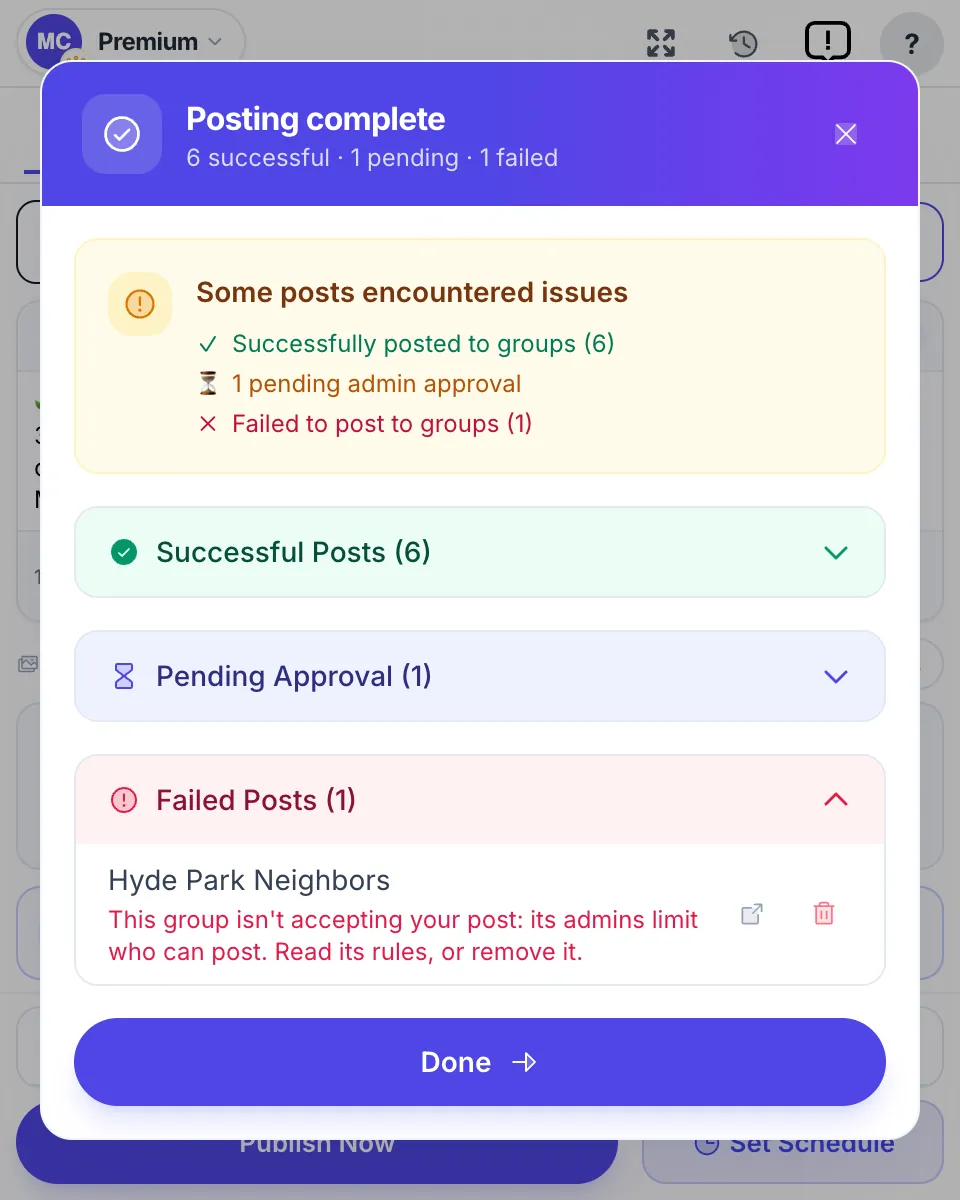
No tool can promise you will never hit a limit — anyone claiming “ban-free” or “undetectable” is overselling. What a well-built extension does is make bulk posting more human and more paced, which reduces risk. Used with a sane cadence, that is what keeps a multi-group operation sustainable.
The tool stack for a group manager
You do not need much. Match the tool to the job. A fuller catalogue, including the third-party options, is in Facebook group tools; the numbers side of the job is in Facebook group analytics.
| Job | Tool | Cost |
|---|---|---|
| Moderate one group | Meta Admin Assist (native) | Free |
| Understand what works | Meta Group Insights (native) | Free |
| Post one content item across many groups | MultiGroupPoster (extension) | Free tier, then from $9.99/mo |
| Deeper cross-group analytics (agency) | Third-party analytics platforms | Paid |
For most managers running a single community, the free native tools cover it. If you are a member pushing content to many groups, add a posting extension. MultiGroupPoster’s free tier gives you 6 posts to try with no credit card; Pro starts at $9.99/mo (or $69.99/year). For the full landscape of what exists — admin, posting, analytics, and engagement categories — see our Facebook group management software buyer’s guide.
The through-line for every tool decision: reputable tools run in your existing logged-in session and never ask for your Facebook password. That single rule filters out most of the risky options.
FAQ
What does a Facebook group manager actually do?
Three jobs: moderation (approve posts, decline spam, handle conflict), content (post on a consistent cadence and spark discussion), and growth (approve the right members, welcome them, review what performs). In practice it is a short daily routine plus a weekly review, not an all-day job.
How do I make someone an admin or moderator of a Facebook group?
Only an admin can do it. Open the group’s member list, find the person, open the menu next to their name and choose to make them an admin or a moderator. Facebook sends them an invitation, and the role only applies once they accept it. They need to be a member of the group first.
What is the difference between an admin and a moderator?
Admins have full control — settings, roles, and the ability to remove other admins or moderators. Moderators run the day-to-day queue: approving and removing posts, handling member requests, and enforcing rules, without the ability to change core settings. Most healthy groups run with one or two admins and several moderators.
What is Admin Assist in Facebook groups?
Admin Assist is Facebook’s free, built-in set of rules for a group. You choose criteria such as keywords, links, how long someone has had a Facebook account or been in the group, and Facebook then approves or declines posts and comments for you. It is in the group’s admin tools and handles most of the repetitive moderation.
How often should I post in a Facebook group?
One to two quality posts a day is a solid baseline for a normal community. Large and mega groups can sustain three to eight across peak windows. Consistency and being available to reply in the first hour matter more than raw frequency.
Can I manage multiple Facebook groups from one dashboard?
For moderation, no — Meta removed third-party Groups API access in April 2024, so admin actions happen inside Facebook per group. For posting the same content to many groups you belong to, a browser extension like MultiGroupPoster handles dozens or hundreds from one popup that runs in your own session.
Do I need paid software to manage a group?
Usually not for a single group — native Admin Assist and Group Insights cover most needs for free. Paid tools earn their place when you post the same content across many groups, or when an agency-scale operation needs cross-group analytics.
Post to many groups without the manual grind? Add MultiGroupPoster to Chrome free — 6 posts to try (one-time), no credit card, runs in your own session.