

Why “joined groups” is the hard part
Most marketing happens in groups you don’t run. You’re a member of 50 buyer groups, niche communities, and local boards — and posting your offer by hand to each one takes hours.

Here’s the catch almost every guide skips: the popular scheduling tools cannot post to groups you only joined. Meta removed the publish_to_groups API permission in April 2024, and the API never covered member groups anyway. So Buffer, Hootsuite, Sprout, and Later can only schedule to:
- Facebook Pages you manage, and
- Groups where you are an admin and have connected the group to a Page.
If you’re just a regular member, those tools show you nothing to post to. That’s the gap.
How a Chrome extension solves it
A browser extension doesn’t use Meta’s API. It runs in your own logged-in tab and does exactly what you’d do by hand — open the composer, type, attach media, click Post — just automatically and across many groups in a row. Because it acts as your account, it can post to any group you’re a member of and allowed to post in, admin or not.
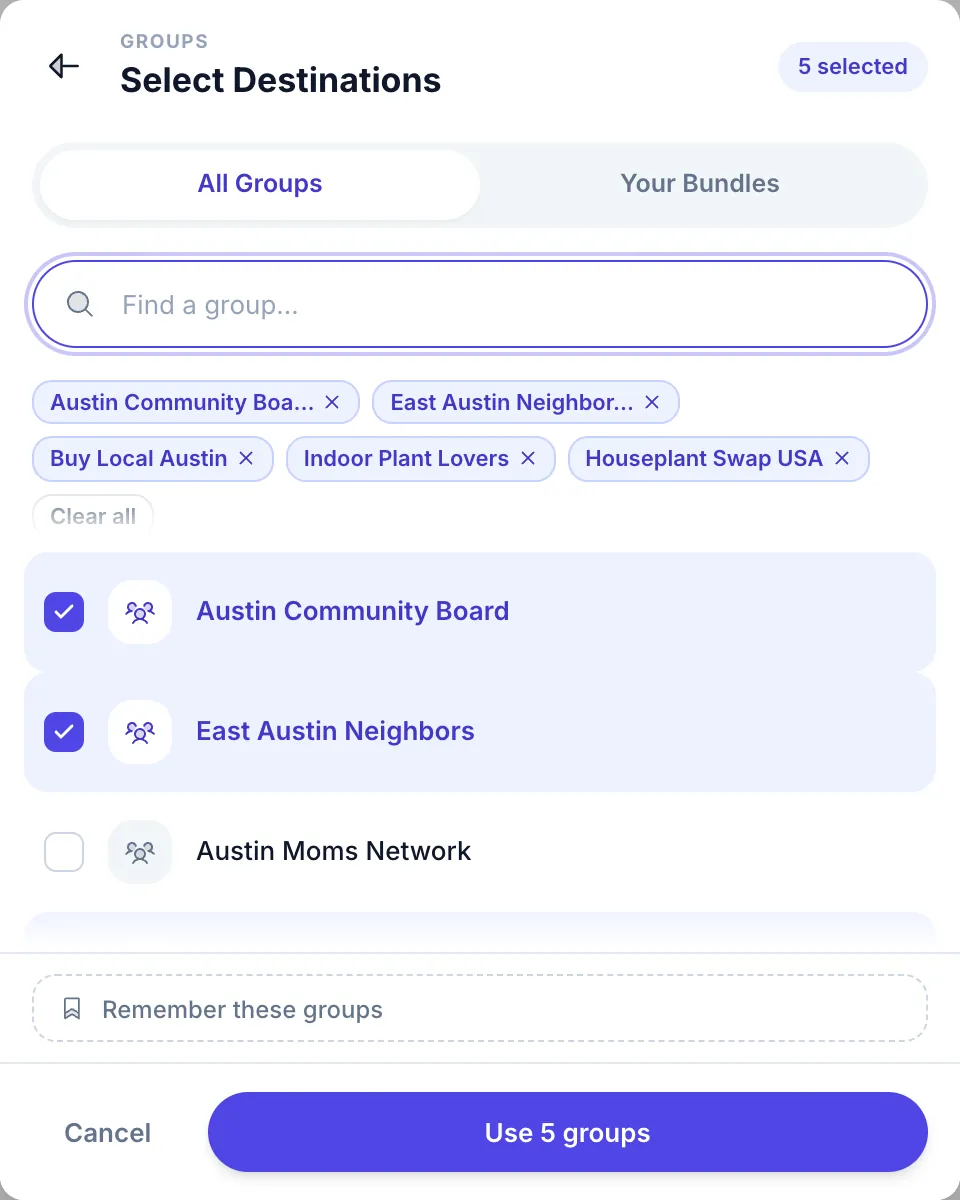
MultiGroupPoster does this with three things that matter for member-group posting:
- Auto-imports your group memberships — every group you’ve joined shows up in a list, ready to select.
- Human pacing — a randomized pause of roughly 3–6 minutes after every 1–3 posts, plus Spintax variations so each post is unique. This is what keeps a member account from looking automated.
- Per-group results — you see which groups accepted the post and which need a manual check.
Step by step: auto post to your joined groups
- Install the extension from the Chrome Web Store (about 30 seconds, no signup).
- Let it import your groups. Open Facebook in the same browser; the extension reads the groups you’re a member of and builds your list.
- Organize once. Tag your groups — by niche, region, or audience — and save the set as a named list. This one-time step saves all future time.
- Compose your post once. Add text, an image or video, and wrap the variable parts in Spintax (
{Hi|Hey|Hello}) so each group sees a slightly different version. - Pick your list and a safe pace. Keep the default randomized delay on. For an established account, 50–100 groups per session is a safe ceiling.
- Click post and walk away. The extension posts to each joined group one at a time, with pauses you control, and reports back when it’s done.
To run the same list on a timetable instead of clicking post, use the Facebook group post scheduler.
Stay safe: posting to member groups without getting flagged
Posting to groups you don’t admin is the area Facebook’s anti-spam systems watch most, because it’s where spammers operate. The rules that keep a real marketer safe:
- Pace it. 50–100 posts/day for accounts older than 12 months; under 40/day for new accounts. Randomized pauses of a few minutes — never a constant interval.
- Vary the content. Identical text pasted into 50 groups is the clearest automation signal. Spintax (even a 3×3 template yields 27+ unique versions) fixes this.
- Attach media. Posts with an image, video, or link preview look more natural than text-only.
- Respect each group’s rules. Some groups require approval; the extension can’t bypass that, and you shouldn’t want it to.
See the full safe-settings guide for account-age-specific limits.
When a post doesn’t go through: common errors and fixes
Member groups run their own moderation, so on any sizeable list a few posts will not land on the first try. The usual messages, and what to do about each:
- “Your post is pending approval.” The group reviews posts before they appear. That is normal: admins act anywhere from minutes to a few days later, and Facebook notifies you when they do.
- The post publishes but never shows in the feed. Almost always the group’s automated moderation: external links, certain keywords (“for sale” in a discussion group) or a filter on brand-new accounts. Read the group’s About → Rules, and work through why a Facebook group post won’t publish for the full checklist.
- “You’re posting too fast.” Stop for an hour, keep the next two or three days to 30–50 posts, lengthen the pauses to five minutes or more, then ramp back up gradually. If the warning turns into a block, blocked from posting in Facebook groups explains how long it lasts and how to get it lifted.
- “This action wasn’t allowed” in one specific group. That group has restricted you, often after an admin rejected earlier posts. Take it off your list rather than retrying.
- A post as your Page is rejected. Some groups switch off posting as a Page. Post to those groups from your profile instead.
Joined groups vs. admin groups: what each method can do
| Method | Posts to groups you admin | Posts to groups you only joined |
|---|---|---|
| Buffer / Hootsuite / Later (cloud) | Limited (admin + connected Page only) | No |
| Meta Business Suite | Your Pages only | No |
| Manual posting | Yes | Yes (but ~2 hours for 50 groups) |
| Chrome extension (MultiGroupPoster) | Yes | Yes — 50 groups for ~4 minutes of your time |
FAQ
Can I schedule posts to groups I joined? Yes — but only with a browser extension, not a cloud scheduler. MultiGroupPoster lets you schedule campaigns to your joined-group lists. See how to schedule posts to multiple groups.
Will Facebook ban me for auto posting to member groups? Not if you post like a careful human: safe daily volume, randomized delays, varied content, and media attached. The risk comes from speed and identical text, not from automation itself.
Do I need to be an admin of the group? No. You only need to be a member who is allowed to post. If you can post manually, the extension can automate it.
Is there a free way to try it? Yes — MultiGroupPoster’s free trial gives you 6 posts to try (one-time), no credit card. See pricing.
Ready to automate the groups you actually post in? Add MultiGroupPoster to Chrome — it imports your joined groups and posts to all of them in one click. For the complete workflow, read how to post to multiple Facebook groups at once.