

Listing or post? Know which group you’re in
Facebook has two kinds of groups for selling, and they work differently:
| Buy and sell group | Regular group that allows sales | |
|---|---|---|
| How you sell | Sell something → a listing | A normal post |
| Fields | Title, price, condition, location, photos | Whatever you write |
| Mark as sold | Yes, built in | Edit the post or delete it |
| Age | Adults only for listings | Group rules |
| Reach | Can go to up to 20 groups at once, and Marketplace if you leave it on | One group at a time |
A buy and sell group often has no normal post box at all, only Sell something. If you only see a “Write something” box, it’s a regular group, and selling depends on its rules. Facebook’s own help pages say commerce groups follow its Commerce Policies, and that some features, such as anonymous posts, aren’t available in them.
If what you sell is a product line or a store rather than single items, start with which Facebook groups actually sell products, then come back for the post itself.
Read the rules first (60 seconds)
Open the group’s About tab and look for:
- What can be sold. Many local groups ban businesses, MLM, services or certain items.
- When. “Promo Saturday only” or a weekly sales thread is common in regular groups.
- Format. Some admins want the price in the title, a location tag or “no links”.
- How often. “One post per item per week” is typical. Reposting earlier gets you muted.
Breaking these is the main reason sale posts disappear. Our Facebook group promotion rules guide lists the rules you’ll meet most.
A sale post that gets buyers
Most people decide in the first line and the first photo. Build the post in this order:
- First line: item, key detail, price. “iPhone 13, 128 GB, blue, $320”. The price up front filters out people who were never going to buy and saves you dozens of “how much?” messages.
- Condition, honestly. “Small scratch on the back, screen perfect, battery 86%.” Say the flaw before the buyer finds it.
- Where and how. “Pickup in Westside, or I can meet at the mall. Cash or bank transfer.”
- Why you’re selling (one line, optional). “Upgraded, no longer needed.” It answers the unspoken “what’s wrong with it?”
- One clear next step. “Message me” or “Comment and I’ll send details.” Not both, not five options.
Keep it short. In a buy and sell feed, a post of four to six lines gets read; a wall of text gets scrolled past.

4 sale post templates to copy
These are examples to adapt, not magic wording. Swap in your own details.
Single item (local pickup)
Oak dining table, seats 6, $180 Solid wood, a few light marks on top (see photo 4). 180 x 90 cm. Pickup in Riverside, you’ll need a van or a big car. Message me if you want to see it.
Handmade or small business (where the group allows it)
Handmade soy candles, 3 for $25, delivered free in town this week Scents: lavender, cedar, orange. 40-hour burn each. Order by comment or message, I deliver Thursday and Friday.
Several items at once
Moving sale, everything must go by Sunday
- Desk, $40 2. Office chair, $25 3. Bookshelf, $30 Photos in order. Pickup in Northgate, cash only. Comment the number you want.
A service (only where the group allows services)
Lawn mowing in Oakwood, from $30 a visit Weekly or one-off, I bring my own mower. Photos are from last week’s jobs. Message me your street and I’ll give you a price today.
Photos that sell
- Your own photos, never stock pictures or photos from a store’s site. Buyers trust them less, and Facebook can reject listings over them.
- Daylight, plain background, the item filling most of the frame.
- Three to six photos: the whole item, close-ups of details, the label or model number, and any flaw.
- Best photo first. The feed shows a collage, and the first photo leads it. How many photos a post takes and how they display is covered in how many photos you can add to a Facebook group post.
Price, haggling and “Is this still available?”
- Check what actually sells. Search the same item on Marketplace in your area and price near what sold, not the highest asking price.
- Leave a little room if you expect to haggle, or write “price is firm” so people know.
- Answer the standard question with information, not just “yes”: “Yes, still available. I can do pickup tonight after 6 or tomorrow morning.” That moves the sale forward.
- Never send items before payment to someone you don’t know, and meet in a public place for local sales.
After you post: replies, bumps and “sold”
- Reply within the hour if you can. The first person you answer is often the one who buys.
- Bump, don’t repost. A useful comment (“Price dropped to $150” or “Still available, pickup this weekend”) moves the post up for people who sort by recent activity. More in how to bump a post in a Facebook group.
- Mark it sold. In a buy and sell group, use Mark as sold on the listing. In a regular group, edit the first line to “SOLD” or delete the post. People who keep messaging about sold items get annoyed, and so do admins.

Selling in several groups at once
Most sellers belong to more than one group: a town buy and sell group, a neighbourhood group, a hobby group. Two ways to reach them:
- Facebook’s own way, for listings: when you create a listing from a buy and sell group, you can tick up to 20 groups to share it to, and switch Marketplace on or off. Step by step in how to post one listing in multiple buy and sell groups.
- For a mix of groups: MultiGroupPoster is a Chrome extension that sends one listing to up to 20 buy and sell groups and the normal post to your other groups in the same run, one group at a time with a pause between them. It runs in your own browser with your own Facebook account, so Chrome has to be open, and each group’s rules still apply.
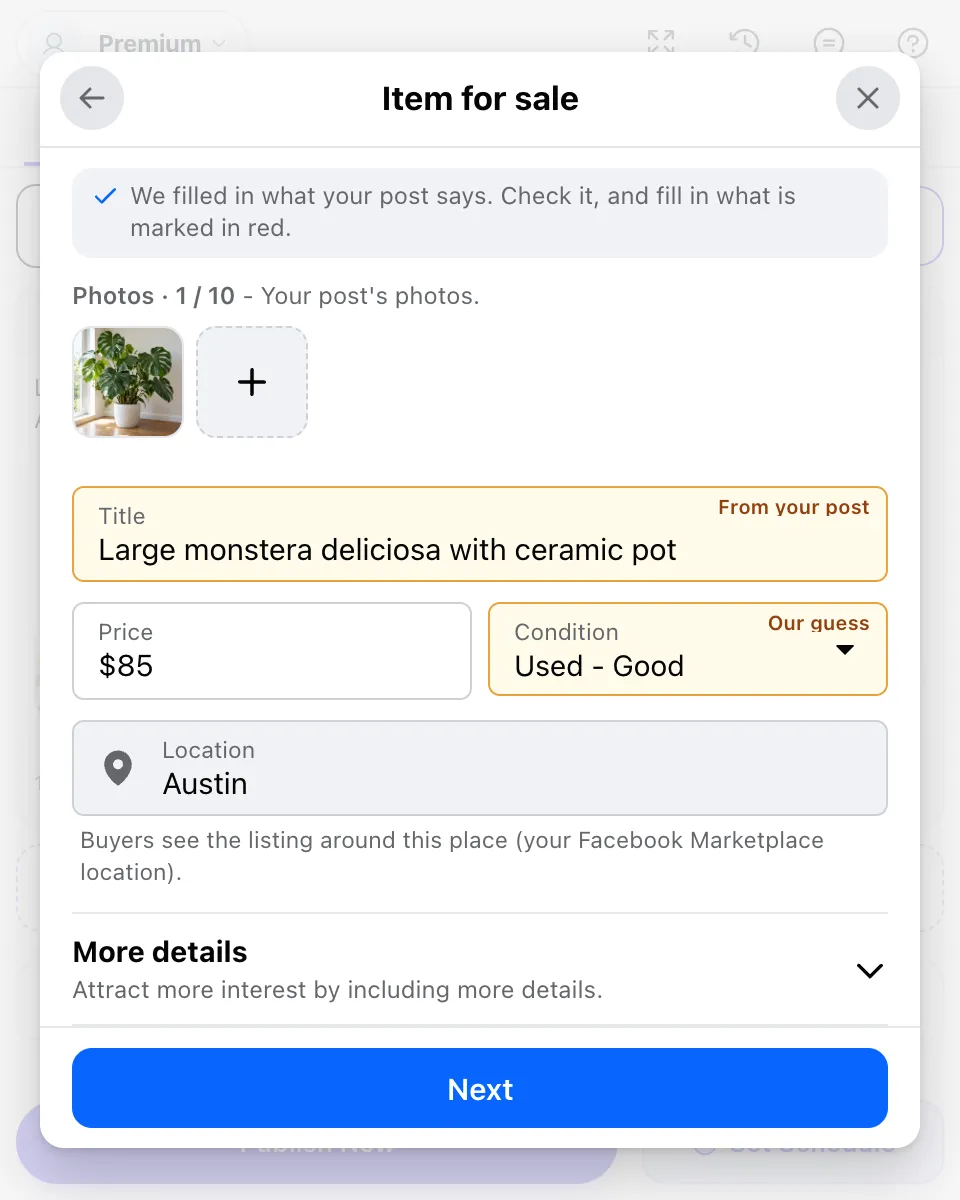
Whichever way you do it, don’t drop the same post in every group at the same minute. Space them out, and change the first line a little for each group. People in several of your groups notice copy-paste, and so does Facebook.
Mistakes that get sale posts removed
- Posting on the wrong day, or outside the weekly sales thread.
- Reposting the same item every day instead of bumping it.
- Links to an outside store where the group bans links. Put details in the post, or ask the admin.
- Selling things Facebook doesn’t allow: animals, drugs, weapons, counterfeits and more. Those listings are removed in groups and on Marketplace alike.
- “DM for price.” Many groups require the price in the post, and buyers skip posts without one.
- Using a Page where the group only accepts profiles. Listings in buy and sell groups are made from a personal profile.
If you can’t post at all, or your posts never appear, see why your Facebook post isn’t publishing. And if the problem is Marketplace itself, why you can’t post on Facebook Marketplace covers status checks and reviews.
FAQ
How do I sell something in a Facebook group?
Read the group rules first. In a buy and sell group, click Sell something and create a listing with photos, a price and a location. In a regular group that allows sales, write a post with the item, price, condition, area and how to buy, plus your own photos.
What should a sale post in a Facebook group say?
Item and price in the first line, then condition, size or model, where you are and how pickup or shipping works, then one clear next step such as “message me” or “comment and I’ll send details”. Three to six of your own photos do most of the selling.
Do I need to be 18 to sell in Facebook groups?
Yes, for listings. Facebook says you must be an adult (for example 18 in the United States) to buy, sell or see listings in a buy and sell group. Younger members can still take part in the group outside listings.
Why was my sale post removed from a Facebook group?
Most often it broke the group’s rules: wrong day for promotions, a link, a repeated post, or an item the group or Facebook doesn’t allow. Read the rules, ask an admin, and repost in the format they want.
How often can I post the same item for sale in a group?
Follow the group’s rules; many allow one post per item per week or ask you to bump the old post instead of reposting. Across several groups, space your posts out and vary the wording.
Is it better to sell on Marketplace or in Facebook groups?
Both. Marketplace reaches people nearby who are searching. Groups reach people who share an interest or a neighbourhood and trust each other. A listing created from a group can also go to up to 20 groups at once.