

How many photos can you add to one Facebook group post?
Facebook’s help center doesn’t give a number, for groups or for posts in general. We checked on 14 November 2026. Third-party guides disagree: you’ll find 30, 50 and 80. The figure that comes up most, and the one people search for (“how to add more than 80 photos”), is 80. Treat it as a practical ceiling people run into, not an official rule.
What you can count on:
- Many photos in one post works on a computer and in the app.
- Photos and videos mix in the same post.
- Only the first few show in the feed. Facebook builds a collage and puts a +number on the last tile, so most people see four or five pictures unless they tap.
That last point matters more than the limit. A post with 40 photos isn’t seen as 40 photos; it’s seen as one collage. If every picture matters, an album or a few separate posts work better.

How to post several photos in a Facebook group on a computer
- Open the group and click Write something….
- Click Photo/video (the green picture icon).
- Select several files at once (hold Ctrl on Windows or Cmd on a Mac while you click), or drag them into the box.
- To add more, click Add photos/videos in the post box.
- Click Edit all to change the order, crop or add a caption to each photo.
- Write your text and click Post.
If the group uses post approval, the post shows as pending until an admin approves it; see what to do when a post is pending. The full posting walkthrough, with text formatting and tagging, is in our guide on how to post in a Facebook group.
How to post photos in a Facebook group from your phone
- Open the group in the Facebook app and tap the post box.
- Tap Photo/video.
- Tap several photos and videos to select them. The numbers show the order they’ll appear in.
- Tap Done (or Next), add your text and tap Post.
On a phone, give the upload time to finish before you leave the app. A big video on mobile data can take minutes, and closing the app early can leave the post stuck.
Posting more photos: make an album in the group
When the photos belong together (an event, a product range, a room by room tour), an album is cleaner than one huge post:
- Open the group and go to Media (on some groups it’s under More).
- Click Create album.
- Name it, add the photos and videos, and post.
Members can open the album any time from the Media section instead of scrolling back to find an old post. Facebook doesn’t publish a photo limit for group albums either; if an upload stops, add the rest in a second batch.
Video in a group post: format, size and length
Facebook’s help page on video formats (read 14 November 2026) says it recommends MP4 or MOV, and lists about 30 formats it accepts, from AVI and MKV to WMV and GIF.
On size and length, be careful with numbers you see online. Facebook’s help center doesn’t currently list a file size or length limit for videos in ordinary posts. Video spec guides quote 10 GB and 240 minutes; we couldn’t find that in Facebook’s own help pages, so treat it as a rough guide, not a rule for groups. In practice:
- Export as MP4 (H.264). It uploads fastest and plays everywhere.
- Keep group videos short. People scroll groups quickly; a 30 to 90 second clip gets watched.
- Upload over Wi-Fi. Most “video won’t upload” problems are the connection, not Facebook.
If you want to share a YouTube video rather than upload one, the link route is different; see how to share YouTube videos in Facebook groups.
Photo size and shape that looks best
Facebook removed its old help page on photo sizes, so there’s no official pixel number today. What works reliably:
| What | Recommendation |
|---|---|
| Width | At least 1080 px; Facebook shrinks bigger photos anyway |
| Shape | Square (1:1) or portrait (4:5) fill more of the feed than landscape |
| Format | JPG for photos, PNG for screenshots and graphics with text |
| Text on images | Keep it short and large; most people see it on a phone |
| First photo | Your strongest one, it leads the collage |
Can’t add photos to a Facebook group post? 6 causes
- It’s a buy and sell group. Some only accept listings through Sell something, not a normal photo post. See posting one listing in buy and sell groups.
- The file format. iPhone photos are often HEIC. Some computer browsers can’t read them; export as JPG or post from the phone.
- The upload timed out. Big files on a slow connection fail quietly. Try fewer at once or switch to Wi-Fi.
- The group is paused or you’re muted in it. Paused groups accept no new posts at all.
- You were restricted. If Facebook limited your posting, every group is affected; our guide to being blocked from posting in groups explains what to do.
- The browser or app is out of date. Update the app, or try another browser.
Posting the same photos in many groups
If you post the same offer to several groups you belong to, two things are worth knowing. Identical photos in many groups look repetitive to the people who are in several of them, and admins notice too. And uploading 10 photos by hand to 30 groups is slow.
MultiGroupPoster is a Chrome extension that posts one post with up to 10 photos or videos to the groups you choose, one group at a time with a pause between them. With Image sets you can add several different photo sets, and each post picks one at random, so your groups don’t all get the same pictures.
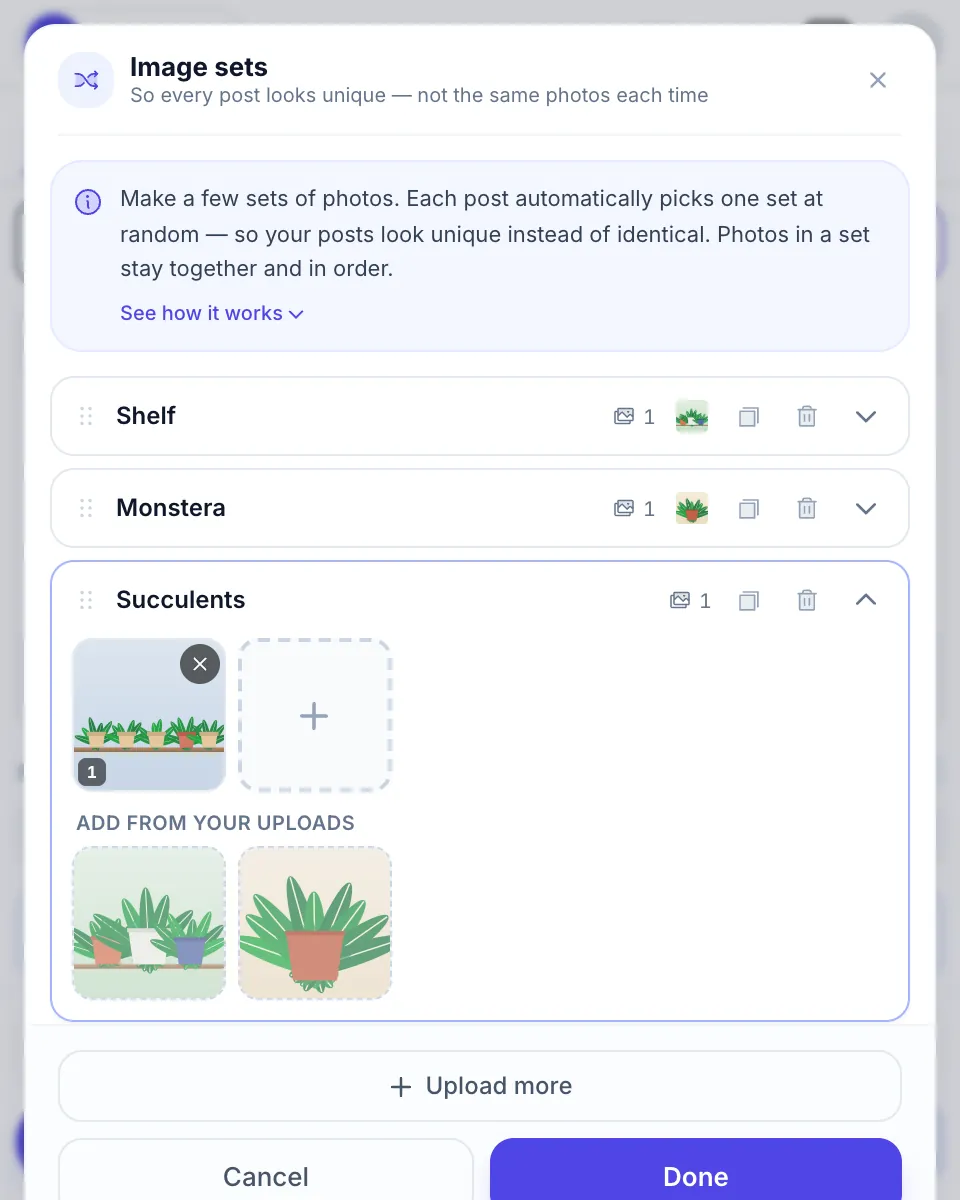
It runs in your own browser with your own Facebook session, so Chrome has to stay open while it posts, and group rules and Facebook’s limits still apply. More on why varied images matter in using different images across Facebook groups.
FAQ
How many photos can you add to a Facebook group post?
Facebook doesn’t publish a number. One post takes many photos, and several guides put the ceiling at about 80, but we couldn’t confirm that from Facebook. For more, or to keep them together, make an album in the group instead.
Can I post photos and a video in the same group post?
Yes. Click Photo/video in the group’s post box and select photos and videos together. They show as one post with a collage at the top.
What size should a photo be for a Facebook group post?
Facebook no longer publishes a recommended size. Photos at least 1080 pixels wide look sharp, and square (1:1) or portrait (4:5) photos take up the most room in the feed. Use JPG or PNG.
What video format does Facebook accept in groups?
Facebook recommends MP4 or MOV and accepts about 30 formats in total. Its help center doesn’t list a size or length cap for ordinary posts today; guides quote 10 GB and 240 minutes, but that isn’t confirmed by Facebook.
Why can’t I add photos to a Facebook group post?
The usual causes: a buy and sell group that only takes listings, a paused group, a file format the browser can’t read (such as HEIC on some computers), or a slow upload that times out. Try the app, or convert the photo to JPG.
How many photos show in the post before people tap?
The feed shows a collage of the first few photos, and when there are more, a +number appears on the last tile. People see every photo only after they tap, so put your best photo first.