

How to edit your post in a Facebook group
On a computer
- Open the group and find your post. Your own posts are also listed under Your content in the group.
- Click ··· at the top right of the post.
- Click Edit post.
- Change the text, or click Add to your post to add photos, tags or a feeling.
- Click Save.
To remove one photo from a post with several, hover over the photos and click Edit all, then Remove on the photo. To remove them all, hover and click the Remove cross at the top right.
In the Facebook app (iPhone and Android)
- Open the group and tap the ··· on your post.
- Tap Edit post.
- Make your changes and tap Save at the top right.
Members who already saw the post aren’t notified of the change, so if you fixed a price or a date, say so in a comment. Anyone who can see the post can open View edit history from the three dots, so the first version doesn’t disappear.
How to delete your post in a Facebook group
On a computer
- Find your post in the group, or under Your content.
- Click ··· at the top right of the post.
- Click Delete post, then Delete to confirm.
In the Facebook app
- Tap the ··· on your post.
- Tap Delete post, then Delete.
A deleted group post is gone, along with its likes and comments, and there is no undo. If you only want to correct something, edit instead.
You can also delete single posts from your Activity Log: go to your profile, click ··· under your name, choose Activity Log, then Your Facebook activity, Groups, and Group posts and comments. Find the post, click the three dots and choose Delete. This is the fastest way to find an old post when you don’t remember which group it was in.

How to delete all your posts in a Facebook group at once
- Click your profile picture at the top right, then your name.
- Click ··· under your name and choose Activity Log.
- In the left menu, click Your Facebook activity, then Groups.
- Click Your Group membership activity.
- Find the group, click the three dots next to it and choose Delete your activity.
- Click Delete to confirm.
This removes the posts, comments, photos and other content you shared in that group. It doesn’t touch event activity, reactions or documents other people edited. If you were blocked from a group, or the group is hidden, this is the only way to delete your content there: single posts can’t be deleted.
Can’t edit or delete your post? 7 reasons
- It isn’t your post. You can only edit what you shared. On someone else’s post, the three dots show Report and Hide, not Edit.
- It was shared from somewhere else. If you shared a post, you can edit the line you added, not the original. Posts from other apps (a song, a news site) can’t lose their attached media.
- It’s a poll with votes. A poll can be edited only until someone votes.
- The group is paused. In a paused group members can still delete their posts and comments, but not post or edit.
- An admin restricted you. If you are suspended or limited in the group, editing may be blocked. See blocked from posting in Facebook groups.
- You are acting as a different profile. If you posted as your Page, switch to the Page first; your personal profile can’t edit the Page’s post.
- The app is out of date. Update Facebook or try a computer. The Edit option sometimes lags in older app versions.
Does editing a post bump it to the top?
No, not reliably. Facebook doesn’t count an edit as new activity the way it counts a comment. And in groups where the admins turned on approval for edits, your edited post can go back to the pending queue and disappear from the feed until someone approves it again.
The good habit: edit to fix the details, then add a short comment saying what changed. The comment is what moves the post up for members who sort by recent activity. The guide to bumping a post covers what works and what admins remove.
Pending, scheduled, sale and shared posts
- Pending posts: open Your content in the group, then Pending. You can edit or delete a post that hasn’t been approved yet. Deleting one also frees a slot if you hit the pending limit; see why your post is pending.
- Scheduled posts (admins): they live under Scheduled Posts in the group’s admin tools. From there you can edit, reschedule, post now or delete. More in how to schedule a post in a Facebook group.
- Items for sale: in buy and sell groups each copy of a listing is edited, marked as sold or deleted separately in each group. Marketplace listings need their own edit.
- Posts you shared into a group: deleting your share removes it from the group only. The original post stays where it was.

Posted the same thing in many groups?
Facebook has no button to edit or delete a post in all groups at once. Every copy is a separate post, so a wrong price in ten groups means ten edits. The slow part is usually finding them all.
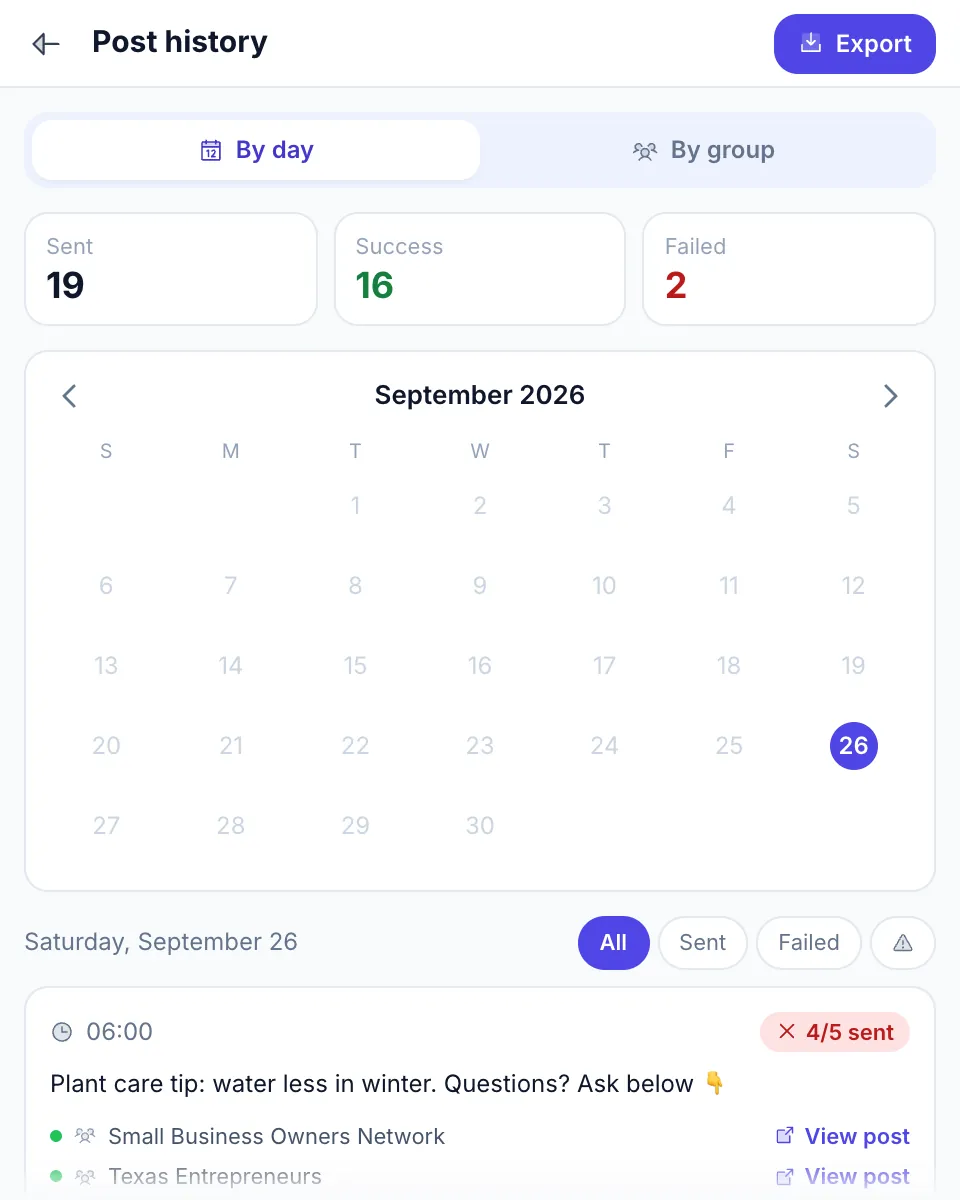
If you published through MultiGroupPoster, its Post history keeps a list of every run, group by group, with a View post link that opens each live post. You still edit or delete each one on Facebook yourself, but you don’t have to hunt for them.
For admins: remove someone else’s post
Admins and moderators don’t delete members’ posts; they remove them. Click ··· on the post, choose Remove post, select the rule it broke and, if you want, add a note and turn on Give a warning. The member gets a notification with the rule and your note for 14 days, signed by an anonymous admin. Members on the other side of that can read why was my post declined or removed. Admins can also edit the group’s own scheduled and recurring posts from the admin tools.
FAQ
How do I delete my post in a Facebook group?
Open the group, find your post, click or tap the three dots (···) at its top right and choose Delete post, then confirm with Delete. You can also delete it from your Activity Log under Group posts and comments. Admins and moderators use Remove post for other people’s posts.
How do I edit my post in a Facebook group?
Click the three dots (···) on your post, choose Edit post, make your changes and click Save. You can change the text, add or remove photos and add items such as tags. Other members see an Edited label and can open the edit history.
Why can’t I edit my post in a Facebook group?
You can only edit posts you wrote yourself. A poll that already has votes, a post shared from another app and some listing formats can’t be edited fully. In a paused group, or if an admin restricted you, you can delete but not edit. Updating the app or trying a computer fixes the rest.
Does editing a post in a Facebook group bump it?
No, not reliably. Facebook doesn’t treat an edit as new activity the way it treats a comment. In groups where admins approve edits, an edit can even send the post back to the pending queue. Edit to fix details, then add a comment to bring the post back up.
Can I delete all my posts in a Facebook group at once?
Yes. Go to your profile, open Activity Log, then Your Facebook activity, Groups, Your Group membership activity. Find the group, click the three dots and choose Delete your activity, then Delete. It removes your posts, comments and photos in that group in one go.
Does leaving a Facebook group delete my posts?
No. Your posts and comments stay in the group after you leave. Delete them first, one by one or with Delete your activity in the Activity Log. If you were blocked from the group, you can only delete everything at once, not single posts.