

Can ChatGPT or Claude post to Facebook by itself?
No. People search for this a lot (“can chatgpt post to facebook”, “can claude post to facebook”), and the honest answer is the same for both. An AI assistant writes text in a chat window. It has no login to your Facebook account and no way to press Post in a group.
To do anything outside the chat, an assistant needs a connector. Most of them today are MCP servers (Model Context Protocol), a standard that Claude, ChatGPT, Gemini and others use to call outside tools. The connector decides what the assistant can actually do.
That’s where groups get stuck. Facebook connectors exist for ads and for Pages, and several of them work well for a Page you manage. None of them can post into groups through Meta, because Meta retired the Groups API and its publishing permission on 22 April 2024. Since then no app can post to a group from a server. The Groups API post has the history.
So if you want an AI assistant to post to the groups you joined, the connector has to work with something that posts from your own logged-in browser, the way you would post by hand.

How posting from a chat works
MultiGroupPoster is the Chrome extension we make for posting one post to many Facebook groups. Its AI connector adds a chat on top. The chain looks like this:
- You tell the assistant what you want, in plain words.
- The assistant (Claude, ChatGPT or another app) writes the post and calls the connector.
- The connector at
https://mcp.multiplegroupposter.com/v2stores the job. It never posts anything itself. - The extension in your Chrome picks the job up and posts it to your group list, with your own Facebook session, your method (Safe or Fast) and your pacing.
- The assistant follows the post and gives you the links, group by group, and why any group failed.
Because the last step runs on your computer, it reaches any group you are allowed to post in, groups you only joined included. The group’s own rules still apply, and if a group reviews posts, yours goes into its queue like any other.
Which AI apps and plans can post
Any app that supports custom MCP connectors can use the same address. What differs is whether the app lets a custom connector run tools that change things, like creating a post. As of November 2026:
| AI app | Can it post to your groups? | Good to know |
|---|---|---|
| Claude (web, desktop, mobile) | Yes, one-click setup | The free plan allows one custom connector. On a phone, connect once from a computer. |
| ChatGPT | Business and Enterprise only | On Plus and Pro, custom connectors can read but can’t post. |
| Gemini | Yes, with limits | US only, in English, with a personal Google account for now. |
| Grok, Perplexity, Mistral Le Chat | Yes | Perplexity needs Pro or higher. |
| Codex, Claude Code, Cursor, VS Code | Yes | For technical users; sign-in opens in your browser. |
| Microsoft Copilot, Meta AI | Not yet | No custom connectors for personal accounts. |
If you are on ChatGPT Plus and want this today, Claude’s free plan is the shortest way in. The AI assistants page keeps this table current.
Connect Claude or ChatGPT in 2 minutes
You need the free MultiGroupPoster extension in Chrome, signed in, with at least one group list. Then:
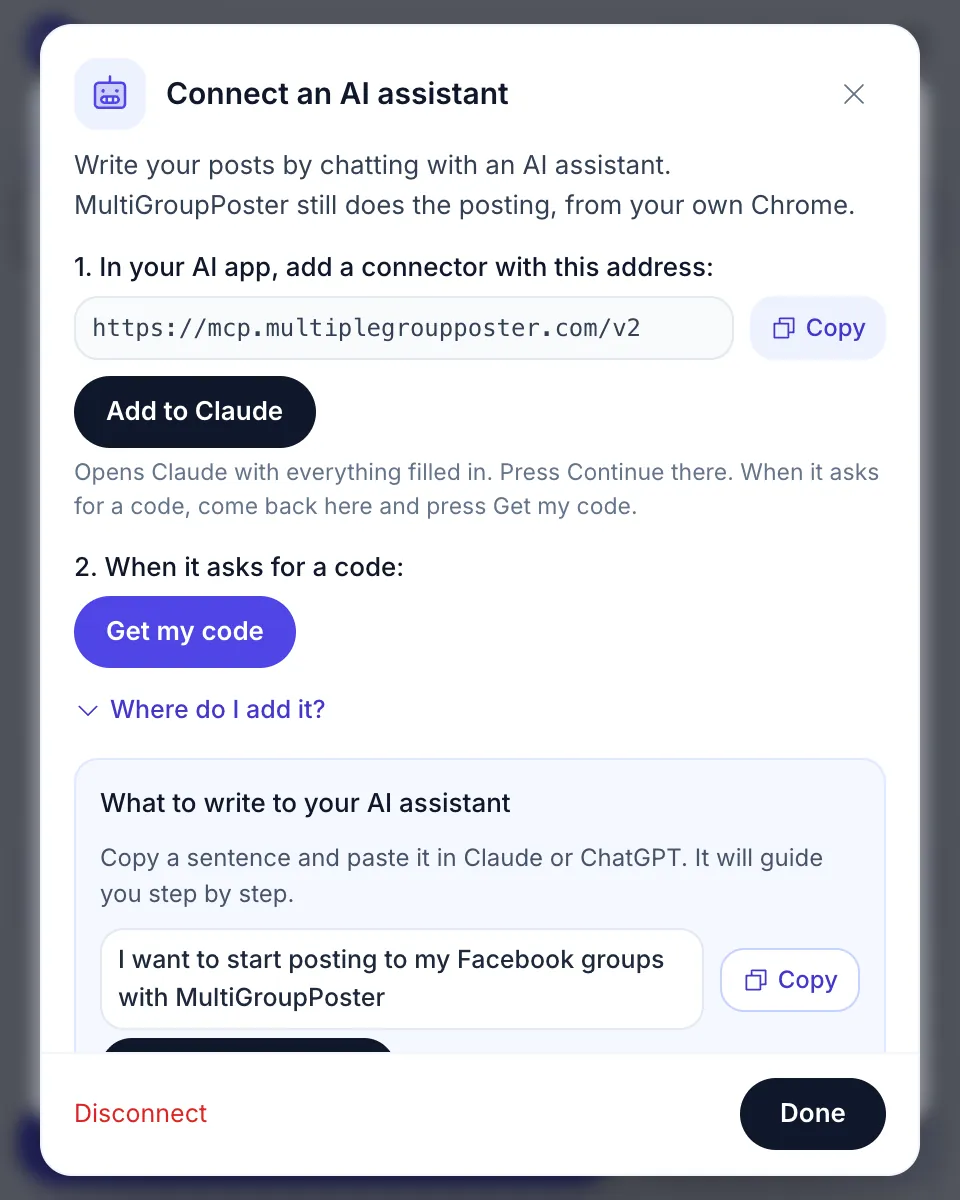
- In MultiGroupPoster, open Help, then Connect an AI assistant.
- Click Add to Claude. Claude opens with everything filled in. Press Continue, then Connect. For ChatGPT or another app, click Copy and add the address as a custom connector.
- A MultiGroupPoster sign-in page opens. Click Get my code in the extension and type the 8 digits on that page.
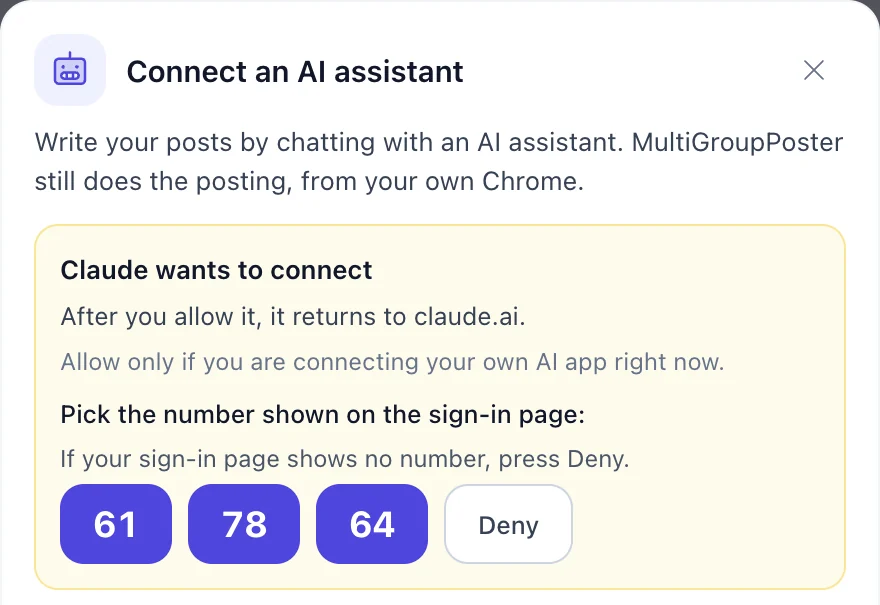
- The page shows a number. Pick the same number in MultiGroupPoster. That’s the whole setup.
The number step is there so a code someone saw or guessed connects nothing on its own. If the extension ever asks you to pick a number and you didn’t start a sign-in, press Deny.
Want to look around before installing anything? The sign-in page has a Try a demo account option with sample group lists. Posts there are only simulated; nothing reaches Facebook.
What to ask: example prompts
Talk to it the way you would talk to a helper. When it needs something (which list, which photos, Safe or Fast, now or later) it asks one short question at a time. These are example sentences you can copy and change, not a recorded chat; the assistant answers in its own words.
- “Show me my group lists in MultiGroupPoster.”
- “Write a short post about my bakery’s weekend special and save it as a draft for my local groups.”
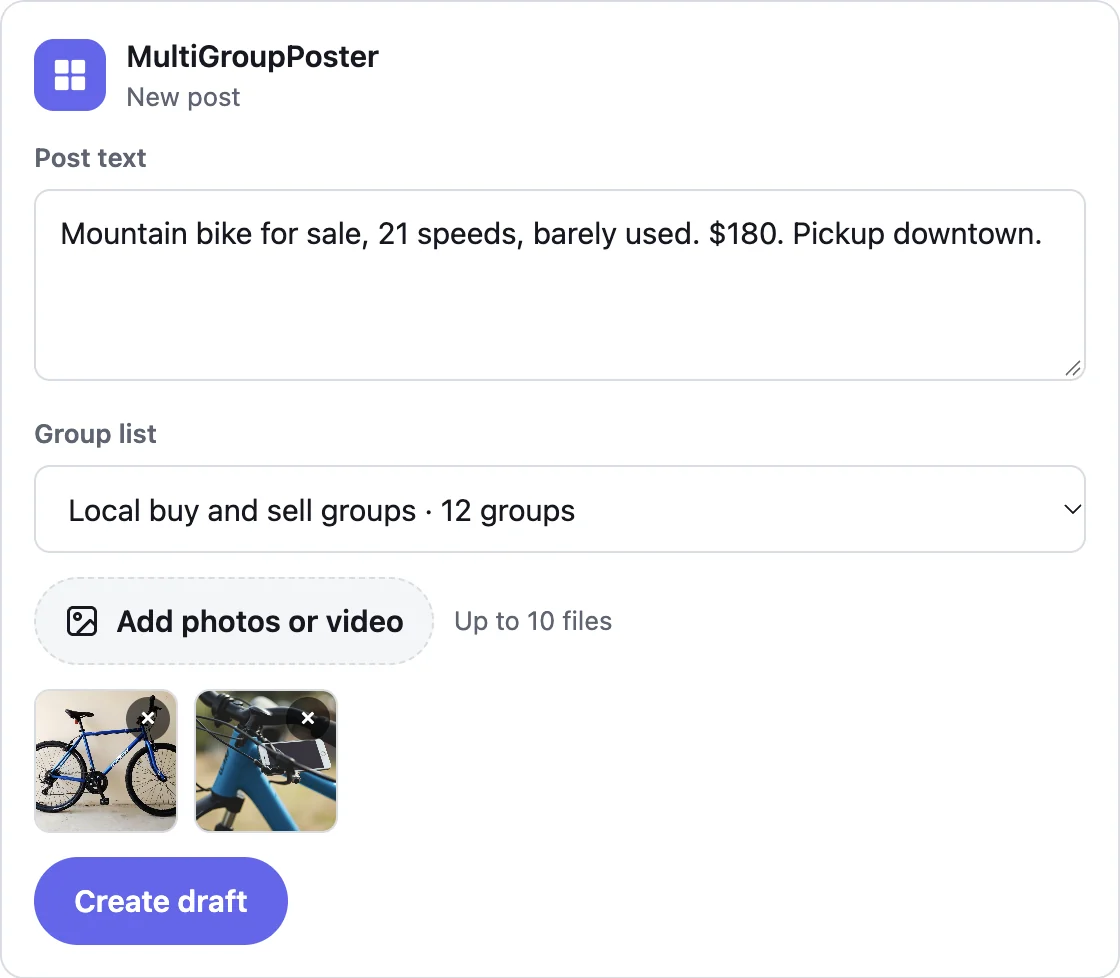
- “Here are 3 photos of my car. Write a for-sale post and send it to my buy and sell groups.”
- “Write this post in 3 different versions and schedule it for tomorrow at 9:00 to my real estate groups.”
- “Post this to my real estate groups with a first comment that has my phone number.”
- “Did the post go out? Give me the links.”
Photos can come from a one-time upload link (it works from a phone), from a public link, or from the small post card that Claude and some other apps show inside the chat.
What the assistant can do now
With MultiGroupPoster 1.2.9.105 or newer (released November 2026, the Chrome Web Store updates it by itself), the assistant can do more than write and send:
- Dashboard. A read-only summary of the last 7 days: what is live, what is waiting for approval, what failed, the next scheduled posts and your templates.
- Headings and bold. A big or small heading line and bold words, the same as the editor’s H1, H2 and B buttons.
- Versions A to E. Up to 5 versions of one post. Each group gets one, spread evenly, so your groups don’t all see the same words.
- Templates. List your saved templates, post one as it is, or save a post from the chat as a new template.
- Post as a Page. It shows the Pages the extension sees and can post as one of them, once or by default.
- Schedules and first comments. Once, daily, weekly or monthly, and up to 3 comments under the post, right away or delayed.
- Remove failed groups. After a post, it shows the groups that refused it and takes them out of your lists only after your yes.
- Biggest groups. It sees member counts and can sort the groups you’re in by size, then make a list.

On an older version the assistant tells you what to update instead of trying. The full tool list for developers is on the MCP server docs.
What happens when it posts
Letting an AI near your Facebook account sounds risky, so here is exactly what happens:
- Draft is the default. The post waits in MultiGroupPoster until you check it and press Publish.
- Posting now needs your yes. The assistant first shows a summary (list, number of groups, text, photos, first comment, method, who it posts as) and goes ahead only after a clear yes. Claude also asks before it runs any posting tool.
- It runs in your own Chrome. No server of ours logs in to Facebook. The extension posts with your session, Safe (Facebook’s own post box) or Fast, with a pause between groups.
- No double posts. If a group fails, the assistant tells you why and doesn’t blindly try again.
- You can stop it. A post that is going out can be paused, resumed or stopped from the chat.

One thing a chat doesn’t change: volume. A hundred groups in an hour is as risky from Claude as it is by hand, and no tool can promise your account won’t be limited. Start with what you already post, grow slowly, and read how many groups you can post to per day before a big run.
What it can’t do
- Post while Chrome with MultiGroupPoster is closed. The post waits until Chrome opens.
- Publish or schedule without your yes.
- Read likes, comments or reactions, or comment on anyone else’s post.
- Join groups for you. It posts only where you are already a member.
- See your Facebook password, your messages or your chats with the assistant.
Only want AI to write the post?
You don’t need a connector for that. Any assistant can draft the post, and you paste it in yourself. Our guide to using ChatGPT to write Facebook group posts has the prompts, including how to turn one post into Spintax so every group gets different wording. Then post it to multiple Facebook groups with the extension as usual.
The connector is for the next step: when you’d rather say “send it to my real estate groups at 9” than open the extension at all.
FAQ
Can ChatGPT post to Facebook groups by itself?
No. ChatGPT writes text but has no way into your Facebook account on its own. It needs a connector (an MCP server) that does the posting, and Meta closed group posting to outside apps on 22 April 2024. MultiGroupPoster’s connector gets around that by handing the post to the extension in your own Chrome, which posts with your own session.
Can Claude post to Facebook groups?
Yes, with a connector. Claude on its own can’t, but with the free MultiGroupPoster connector added (one click from the extension) Claude can prepare a post for one of your group lists, and the extension posts it from your Chrome. The post waits as a draft until you press Publish, unless you clearly tell it to post now.
Which ChatGPT plan can post to Facebook groups?
Business and Enterprise. On those plans ChatGPT can run the posting tools of a custom connector. On Plus and Pro, custom connectors can’t post, so you would use Claude (the free plan allows one custom connector) or another app that supports MCP connectors.
Is there a Facebook MCP server that posts to groups?
Most Facebook MCP connectors post to Pages only, because Meta’s API no longer lets outside apps post in groups. The MultiGroupPoster MCP server (https://mcp.multiplegroupposter.com/v2) is different: the server never posts, it passes the job to the MultiGroupPoster extension, which posts to your groups from your own browser.
Does the AI get my Facebook password?
No. The assistant only talks to the connector. Your Facebook session stays in your own Chrome, and the extension does the posting there. The connector sees your group list names, the post, photos and results, keeps photos 24 hours and posts 7 days, and deletes everything when you disconnect.
Do I need to keep my computer on?
Yes, while the posts go out. The extension posts from Chrome on your computer. If Chrome is closed, a post you asked for waits and starts when Chrome opens again. The same goes for scheduled posts.
Is the AI connector free?
The connector costs nothing. Posting counts against your MultiGroupPoster plan the same way as posting from the extension: 6 free posting runs to try it, then $9.99 a month or $69.99 a year. Drafts don’t count.