
Already know which groups allow promotion and want the posting playbook? See how to advertise in Facebook groups. This guide is about choosing the groups in the first place.
What “best” actually means for business groups
Search “best Facebook groups for marketing” and you’ll get a dozen listicles naming the same handful of big communities. Those lists are useful as a starting point, but they answer the wrong question. There is no universal “best” group. The best group for you is the one where the people you want to reach — your peers, or your buyers — are already talking every single day.
That means “best” is two things at once: relevance and activity. A group can be famous and still be wrong for you if its topic doesn’t match your niche, and it can be perfectly on-topic and still be worthless if nobody’s posted in a week. The whole skill of choosing groups is holding both filters at the same time: does this community fit what I do, and is it actually alive?
The trap most people fall into is sorting by member count and joining the biggest names first. That’s backwards. A 200,000-member group with four posts a month is a mausoleum — your posts and your presence disappear into a feed nobody opens. A 4,000-member group with twenty posts a day and real comment threads puts you in front of an audience that reads. Big and dead loses to small and active, every time.
So the rest of this guide is about doing the discovery well: how to find candidates in your specific niche, which groups actually allow promotion, how to vet them fast, how many to join, and how to keep the list lean.
How to find the right groups in your niche
You won’t find your best groups from a listicle — you’ll find them by searching. Facebook’s own search is the primary tool, and used well it surfaces communities no roundup will ever mention.
Start by getting specific about who you want to reach. “Small business owners” is too broad; “handmade candle sellers,” “Austin real estate agents,” or “Shopify store owners doing $10k/mo” are the kinds of phrases that map to real, tight communities. The narrower your buyer, the better your search terms.
Then work the search bar:
- Type a niche keyword and filter to Groups. Facebook defaults to a mixed feed; switch the results to Groups so you only see communities.
- Try several keyword variations. Synonyms surface different groups — “ecommerce,” “online store,” “Shopify,” and “dropshipping” each return their own set. Don’t stop at the first search.
- Add location and intent modifiers. City and region names (“[Your City] entrepreneurs,” “[Your City] small business”) find local groups that convert well. Buyer-intent phrases like “buy/sell/trade” or “for sale” find people already in a purchasing mindset.
- Go past the first screen. If a search looks thin, open the full list of group results — good communities often sit below the first few.
Discovery tools that still work in 2026
- Facebook search, filtered to groups. Type the keyword, then use the filters in the left column so only groups are listed.
- The Discover tab. On a computer, open Groups and choose Discover to see Suggested for You and More Suggestions; in the app it’s Menu → Groups → Discover. Suggestions follow your interests and the groups you’re already in, so they improve once you’ve joined a few good ones.
- Location. Admins can give a group a location so local people find it, which is why “[city] + keyword” searches work so well for local businesses.
- Google, limited to Facebook groups. Search
site:facebook.com/groups "your keyword". Google indexes public groups, and this often surfaces established ones that Facebook’s own search ranks low. - The groups’ own homes. Associations, newsletters, podcasts and courses link to their official group from their website — the surest way to know you’ve found the real one and not a copycat.
One note on third-party tools, because it comes up: since Meta removed public Groups API access in April 2024 (what changed), there’s no official pipeline for third-party tools to bulk-discover or auto-join groups on your behalf. Directories that promise “10,000 groups to join” are snapshots that go stale quickly. Discovery is a manual, in-session job — which is exactly why doing it well matters. For the mechanics of joining efficiently, see how to find and auto-join Facebook groups.
A list of group types to join, by niche
Rather than a fixed list of names that goes stale, think in terms of the kind of group that fits your business — and the search phrases that find it. Paste these into Facebook search, switch to Groups, and vet whatever comes back.
| Niche | Search phrases that surface active groups |
|---|---|
| Marketing & social media | ”social media managers”, “digital marketing”, “content creators”, “[platform] marketing” |
| SEO & search | ”SEO”, “local SEO”, “SEO questions”, “Google Ads” |
| Paid ads | ”media buyers”, “ad buyers”, “Facebook ads”, “performance marketing” |
| Ecommerce & DTC | ”Shopify”, “ecommerce”, “Amazon sellers”, “dropshipping” |
| Founders & small business | ”small business owners”, “small business networking”, “startup founders”, “[city] entrepreneurs” |
| Local & service businesses | ”[city] small business”, “shop local [city]”, “[city] buy and sell”, “[neighbourhood] community” |
Examples that exist today — and how active they are
Named lists go stale, so every group below was checked on its own About page in October 2026: it exists under this name, and the member and post counts are what Facebook showed. Treat the numbers as a snapshot and re-check before you join.
| Group | Focus | Privacy | Members | Posts a month |
|---|---|---|---|---|
| Small Business Networking | Small business owners | Private | ~296,000 | ~36 |
| Google SEO Mastermind | SEO and search marketing | Private | ~193,000 | ~106 |
| Facebook Ad Buyers | Media buying, paid social | Private | ~162,000 | ~25 |
| Founders Space Group – Startups Entrepreneurs Investors | Startup founders | Public | ~128,000 | ~437 |
| Shopify Entrepreneurs | Shopify store owners | Private | ~105,000 | ~9 |
| Empreendedoras RME | Women entrepreneurs, Brazil | Private | ~101,000 | ~118 |
| Women in Marketing | Marketing professionals | Private | ~96,000 | ~179 |
| A Better Lemonade Stand (formerly Ecommerce Entrepreneurs) | Ecommerce | Private | ~72,000 | ~5 |
| Social Media Managers | Social media managers | Private | ~56,000 | ~41 |
| Dumb SEO Questions | SEO questions and answers | Public | ~36,000 | Latest post days old |
| Tamo Junta! – Todas podem Empreender | Women micro-entrepreneurs, Brazil | Private | ~26,000 | ~198 |
| HeyOrca Community | Social media managers | Private | ~21,000 | ~112 |
| The Daily Carnage | Marketers | Private | ~20,000 | ~4 |
Now compare members with posts. Founders Space has fewer than half the members of Small Business Networking and about twelve times the posts. Shopify Entrepreneurs has about 105,000 members and roughly nine posts a month. The whole argument of this guide fits in that gap: the famous name and the big number are not the same thing as an audience that reads.
A few names that still circulate in older lists were left out on purpose: Online Geniuses is now a Slack community rather than a Facebook group, and at least one “entrepreneur” group quoted in older roundups could not be found at all.
A few patterns hold across all of these. Private groups usually beat public ones — the admission questions and active moderation that keep spam out also keep the community focused. Tightly moderated tactical groups beat loose promo swamps — the best ads and SEO groups ban self-promotion precisely because it protects the signal. And local and buy/sell groups convert differently than networking groups — the first are full of people ready to transact, the second are peers to build relationships with. Match the group type to your actual goal.
Several niches have their own playbook on which groups to target, what to post and how often:
- Selling products: e-commerce sellers, Etsy sellers, dropshippers, affiliate marketers
- Selling services: real estate agents, recruiters, agencies, SaaS founders, local service businesses
- Coaching and direct sales: coaches and consultants, fitness coaches, network marketers
- Creative and community work: photographers, musicians, authors, event promoters, nonprofits
Big niche communities for professionals
If you are looking for peers rather than buyers — the “niche professionals forum” kind of group — the best ones share a few traits you can spot from the outside:
- An admin team from the industry. The admins post, answer and moderate under their real names and job titles. A professional group run by an anonymous Page is usually a lead-generation funnel.
- Membership questions that ask what you do. Groups that ask for your role or company keep vendors and spammers out, which is exactly why the conversation stays useful.
- A no-pitch rule that is enforced. Look at the last twenty posts. If they are questions, case studies and answers, the rule works. If half are “DM me” offers, it doesn’t.
- A home outside Facebook. Many strong professional groups belong to an association, a podcast, a newsletter or a course, and link to the group from their own site. That is also the easiest way to confirm a group is the official one.
Expect some of the best professional communities to have moved off Facebook altogether, to Slack, Discord or LinkedIn. If the people you want to reach are there, follow them — a group is only the best one if your audience is actually in it.
Best Facebook groups to advertise or promote your business
Most groups worth joining for networking ban advertising, so “the best groups to advertise in” is a different list. Five kinds of group reliably allow promotion, and each has its own catch:
| Group type | What you can post | Search phrases | The catch |
|---|---|---|---|
| Local buy-and-sell / classifieds | Listings with photos and a price | ”[city] buy and sell”, “[city] marketplace”, “[city] classifieds” | One listing per item; some ban services |
| Local community groups with a business day | Your business, once, on the named day | ”[city] community”, “[neighbourhood] moms”, “shop local [city]“ | Posts outside the day are removed |
| Niche groups with a promo thread | A comment under the admin’s weekly thread | ”[niche] group”, then search inside it for “promo” | Only inside the thread |
| ”Promote your business” groups | Direct promotion and links | ”promote your business”, “small business promotion”, “business networking [region]“ | Mostly other sellers, few buyers |
| Your own group | Anything within Facebook’s rules | Create it | Takes months to build an audience |
So which are the best? The ones with the most buyers per seller. A local buy-and-sell group of 30,000 people where neighbours ask “does anyone know a good electrician?” every day beats a 200,000-member “promote your business” group where every post is an ad nobody reads. Before you post anywhere, scroll the last twenty posts: if they are all offers, you are in a room of sellers.
The posting side — format, timing and how to run one offer across several groups without it being removed — is covered in how to advertise in Facebook groups, and the rules admins enforce are in Facebook group promotion rules.
The largest Facebook groups — and why size misleads
Facebook doesn’t publish a ranking of its largest groups, so any “biggest Facebook groups” list is a snapshot of somebody else’s search. What you can see is each group’s own numbers: its About section shows the member count, how many posts it got recently, when it was created and when its name last changed.
The groups with the most members tend to be the same kinds everywhere: buy-and-sell and classifieds groups, city and neighbourhood groups, jobs groups, and big hobby or fan communities — some with more than a million members. Business groups are smaller: the largest one in the table above has about 296,000 members and roughly 36 posts a month.
To find the biggest groups in your country or niche:
- Search a broad category plus a place — “buy and sell [country]”, “jobs [city]”, “small business [country]”, “entrepreneurs [country]” — and switch the results to Groups.
- Open the strongest candidates and read the About section: members, recent posts, creation date and name history. A recent rename can mean a group was bought or repurposed.
- Divide posts per month by members in your head. A million-member group with thirty posts a month is a billboard nobody walks past.
Why size misleads for business:
- Member counts rarely shrink. They include years of people who joined once and stopped opening the group.
- Big groups tend to be stricter. Post approval and link bans are common in large groups, so your post may wait in a queue or never appear.
- Busy big groups bury you. Where hundreds of posts arrive a day, yours drops off the first screen within hours.
Use size as a tiebreaker between two groups that are equally relevant and equally active — never as the first filter.
Vet before you join (not after)
Joining is cheap, but a bloated list of dead groups costs you later — every posting run wastes effort on communities nobody reads, and a wall of irrelevant groups makes your good ones harder to work. So vet each candidate before you commit, right from its preview page. Five signals tell you almost everything in under a minute:
- Recent post frequency. Read the timestamps on the newest posts. Today or this week means alive. If the freshest post is a week or a month old, close the tab. A useful rule of thumb: fewer than three posts in seven days and the group is effectively dead.
- Comments per post. Comments are the truest engagement signal because they cost a human real effort — someone had to stop and type. Reactions are cheap and easily inflated. Posts with five-plus genuine comments mean a reading audience; posts stuck at zero mean people post but nobody’s there.
- Rules on promotion. Open the About section and pinned rules. Some groups welcome promotion, some restrict it to a weekly promo day, some ban links outright. Know which before you join, so you don’t waste a join on a group where you can never post an offer.
- Topical relevance. The stated topic and the members’ intent should match your offer. A “Local Moms of Austin” group fits family photography and not B2B SaaS — reach without relevance is just noise.
- Moderation health. Signs of a recent, active admin — pinned announcements, spam removed, posts approved — mean your future posts won’t rot in a queue forever.
This is the same discipline covered in depth in how to find which Facebook groups are worth posting to — that article is about vetting groups you already have, while this one is about vetting before you join. Same signals, applied one step earlier so your list starts clean.
How many groups should you join?
Two limits matter here, and they’re different from each other.
The hard cap is 6,000 groups per account, according to Facebook’s Help Center — a number almost nobody organic ever approaches. The one that actually bites is joining speed. Facebook publishes no daily joining limit, but joining more than about 20–30 groups in a single day can trigger a temporary restriction, with an error like “You’ve been trying to join groups too fast.” It typically lifts in 24–48 hours, and it’s easy to avoid by joining in small batches over several days.
Beyond Facebook’s mechanics, there’s a strategic ceiling that matters more: focus beats volume. For most businesses, a lean set of 20–50 genuinely relevant, active groups outperforms hundreds of loose fits. A smaller list means every group is one you’ve vetted, every post lands somewhere real, and you’re not spreading yourself across communities that were never a fit. It’s also gentler on your account — posting the same thing across a smaller, well-chosen set looks far more natural than blasting a huge list.
For the full breakdown of joining limits, posting caps, and healthy pacing, see how many Facebook groups you can join. The short version: join slowly, keep the list focused, and let quality set the number.
Organize and post to your list
Once you’ve joined a vetted set, organize it so it stays useful. Two tags do most of the work: niche (which segment of your audience this group serves) and promo policy (“links ok,” “promo day,” “no promo”). With those, you never accidentally drop a sales link where it doesn’t belong, and you can send the right message to the right cluster.
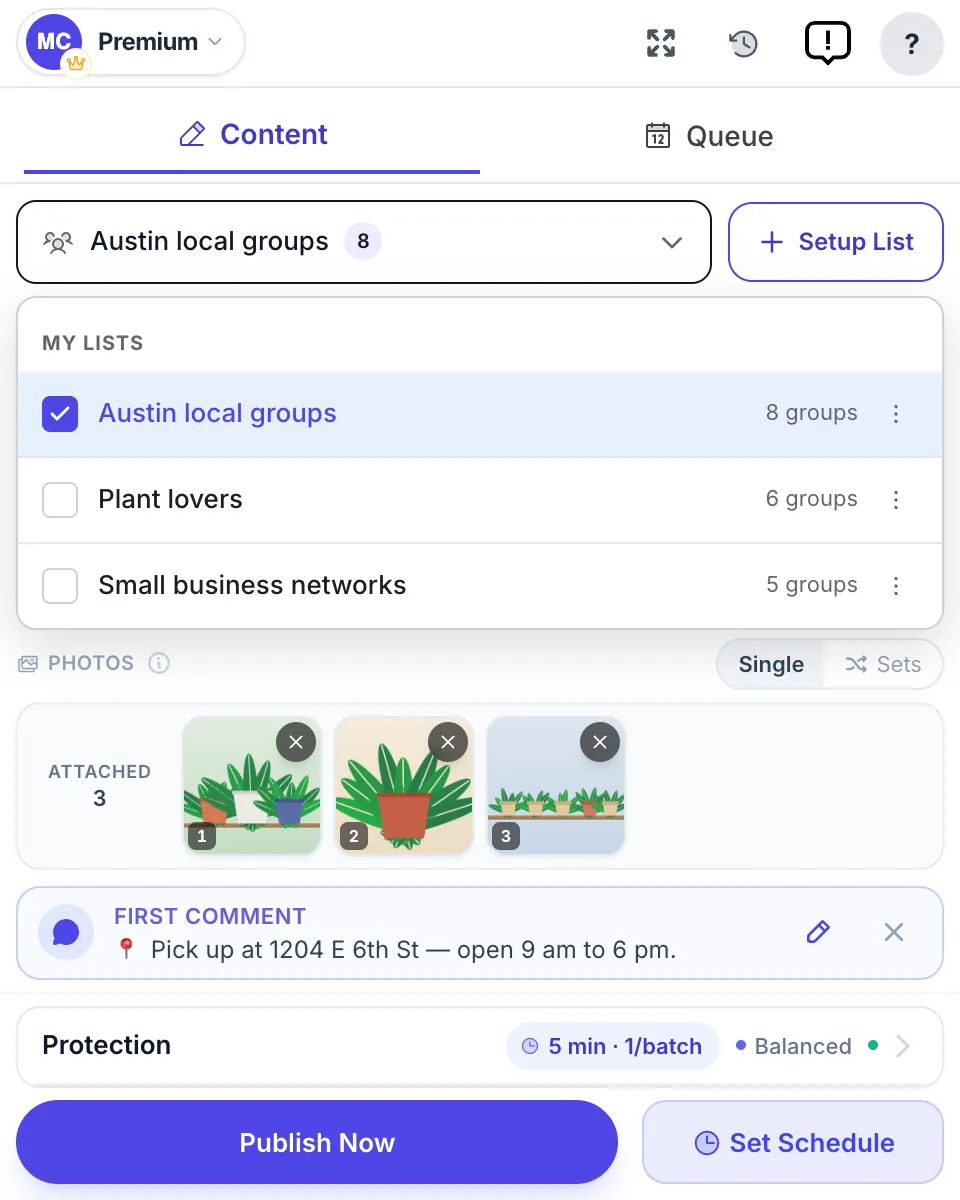
This is also where posting to many groups by hand becomes the bottleneck. If you’ve joined 30 or 40 active groups, manually copying your post into each one — respecting each group’s rules and spacing things out so it doesn’t look mechanical — eats hours. That’s the job MultiGroupPoster is built for, with a clear line about what it does and doesn’t do.
Be precise: MultiGroupPoster is a Chrome extension that runs inside your own logged-in Facebook session — it never asks for your Facebook password, and it posts to the groups you’re already a member of. It can scan and import your existing groups into reusable lists so you’re not re-selecting them every time. What it does not do is find groups for you, auto-join them, or rank them by engagement. Discovery and vetting — the whole first half of this guide — stay your manual call.
For the posting itself, it’s built to behave like a careful human rather than a firehose:
- Posting Method — Fast sends each post through the same request the Facebook web app uses; Safe fills in Facebook’s own composer.
- Natural Presence and Randomized Time Spacing — natural, varied gaps between posts instead of a machine-gun burst.
- Spintax — each group gets a slightly different wording, e.g.
{Hi|Hey|Hello}everyone. - Image Sets — rotate genuinely different photo sets across groups.
- Auto First Comment — for the value-first, link-in-comments pattern many groups prefer.
- Scheduler — Once, Daily, Weekly or Monthly, so promo-day groups get posts on their day.
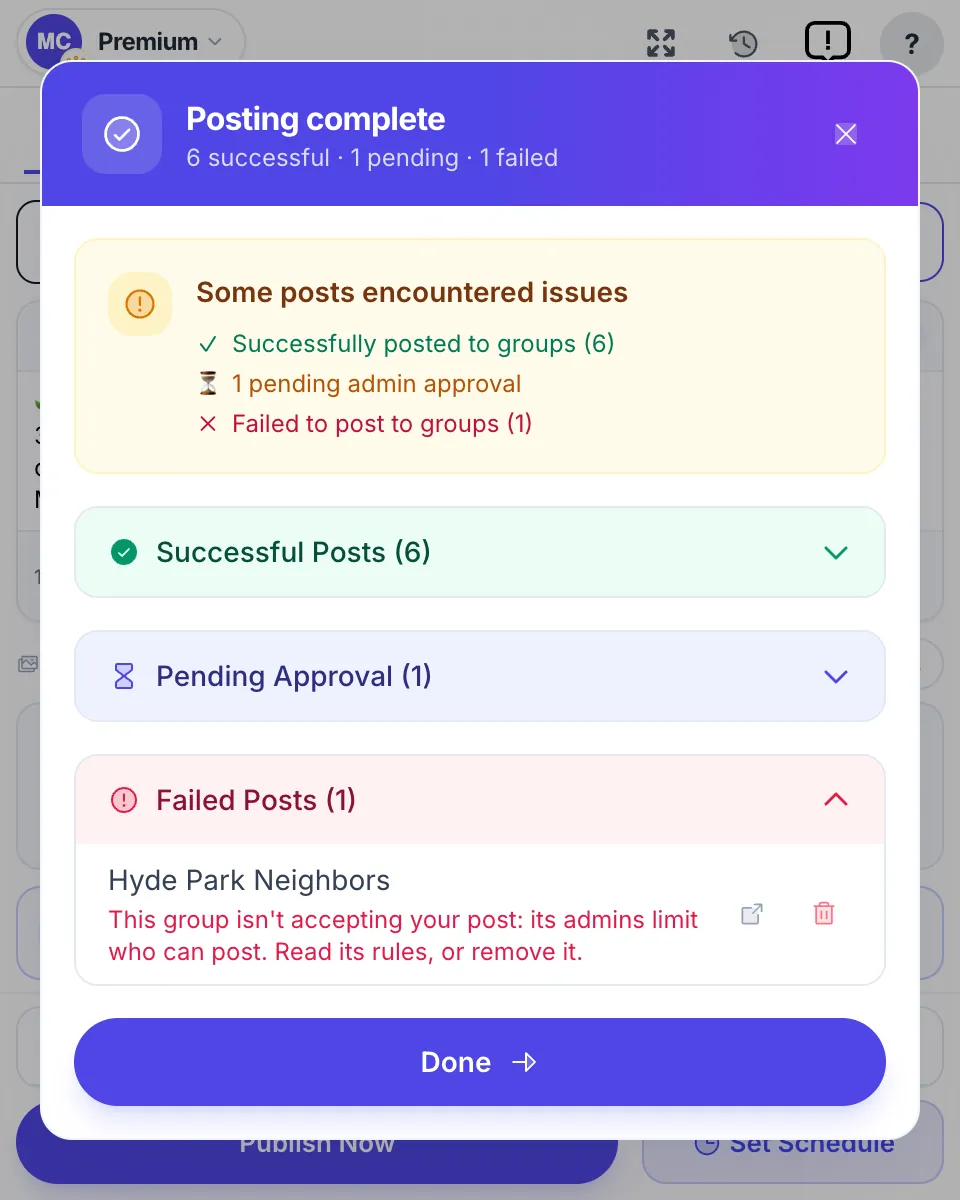
- Per-group results — after each run, see which groups published your post, which are holding it for approval and which refused it, with the reason.
None of that decides which groups are worth joining — that’s your vetting — but it makes posting to your chosen list fast and respectful of each community’s rhythm. For a wider view of how discovery, posting, and engagement fit together, see the Facebook group marketing strategy for 2026. You can try MultiGroupPoster on a free plan — 6 posts, no credit card, with Pro from $9.99/mo (annual $69.99).
Common mistakes to avoid
A few errors show up again and again when people build their group list:
- Joining by member count. The biggest groups are often the deadest or the most spam-choked. Sort by activity, never by size.
- Joining too fast. Blasting through 50 joins in an hour triggers Facebook’s restriction. Batch it over days.
- Skipping the rules. Joining a “no self-promo” group and then dropping a sales link gets your post removed and can get you banned from the group. Read the About section first.
- Advertising in a room of sellers. “Promote your business” groups feel productive and rarely sell anything. Check who is buying before you post.
- Never pruning. Groups drift — admins leave, activity fades, rules tighten. Re-check your list every few weeks and cut what’s gone quiet.
Avoid those five and your list stays lean, relevant, and worth posting to — which is the entire point.
FAQ
What are the best Facebook groups to join for business and marketing?
The best groups fit your niche and show daily activity. As of October 2026, verified active examples include Women in Marketing (about 96,000 members, ~179 posts a month), Google SEO Mastermind (about 193,000, ~106 posts) and Founders Space (about 128,000, ~437 posts). Search your niche keywords, filter to Groups, and vet each candidate before joining.
How do I find good Facebook groups in my niche?
Type a niche keyword into Facebook search and switch the results to Groups. Try synonyms, city names and buyer-intent phrases like buy/sell/trade, because each surfaces different communities, and run the same keywords through Google limited to facebook.com/groups. Then check each candidate’s newest post and comment counts before you join.
What are the best Facebook groups to advertise or promote a business?
Groups built for promotion: local buy-and-sell and classifieds groups, community groups with a weekly business day, niche groups with a pinned promo thread, and “promote your business” groups. The best of them have more buyers than sellers — scroll the last twenty posts, and if every one is an ad, nobody there is buying.
What is the largest Facebook group?
Facebook doesn’t publish a ranking, so there is no official answer. The groups with the most members are usually buy-and-sell, local, jobs and hobby groups, some with more than a million members. For business, size is a poor guide: in an October 2026 check, a 105,000-member group had about 9 posts a month while a 128,000-member group had about 437.
How many Facebook groups should I join for business?
Joining slowly matters more than the total. Facebook’s hard cap is 6,000 groups, and although it publishes no daily limit, joining more than roughly 20–30 in a single day can trigger a temporary restriction. For business, a focused set of 20–50 genuinely relevant, active groups usually beats hundreds of loose fits.
Are bigger Facebook groups better for marketing?
No. Member count is a vanity metric. A 3,000-member group with 20 posts a day and real comment threads will get your message seen far more than a 200,000-member group where nothing gets posted. Weight daily activity and comments over raw size.
How often should I revisit my group list?
Every few weeks. Groups drift as admins leave and activity fades, so treat your list as living. Prune the ones that go quiet or start rejecting your posts, and search for fresh candidates in your niche.
Can MultiGroupPoster find or join groups for me?
No. MultiGroupPoster posts to groups you’re already a member of — it runs in your own logged-in Chrome session, never asks for your Facebook password, and can import your existing groups into reusable lists. It does not auto-join groups or rank them by engagement; finding and vetting groups stays a manual job.
Ready to post to the groups you’ve joined? Add MultiGroupPoster to Chrome — it imports the groups you’re a member of, posts to your chosen list with Spintax and randomized pacing, and hands you a success/failure list so you can prune the losers. Free plan, no credit card.