MultiGroupPoster Add to Chrome
Product · Chrome extension

The Facebook auto poster for 100+ groups — in one click.

The category that handles Facebook groups (not Pages) — a Chrome extension that posts to 100+ groups in one click without flagging your account.

Free for 6 posts to try · No credit card · 30-second uninstall

Updated Updated

What is a Facebook Auto Poster?

A Facebook auto poster is any software tool that publishes content to multiple Facebook destinations automatically. The destinations can be groups, pages, profiles, or all three. The "auto" in auto poster means you write a post once and the tool handles the repetitive work of clicking into each group, pasting your text, attaching media, and clicking publish — with appropriate delays so Facebook doesn't flag your account.

The category splits into two architectures, and the difference matters more than most marketers realize:

1. Browser-extension auto posters (recommended)

These run as a Chrome extension inside your own browser, using your own logged-in Facebook session. They click your buttons, type into your composer, and submit your posts — exactly like you would, just faster. Because the requests come from your home IP, your browser fingerprint, and your real session, Facebook's automation detection has very little to flag.

Examples: MultiGroupPoster, PilotPoster, GroupPosting.

2. Cloud-based auto posters

These run on a remote server. You connect your Facebook account via OAuth, and the cloud service calls Facebook's official Graph API on your behalf. Cloud tools can schedule far in advance and don't require your computer to be on — but they post from data-center IPs and standard server fingerprints, which Facebook's automation detection treats with much more suspicion.

Examples: Buffer, Hootsuite, Later, Sprout Social. Note: most cloud tools cannot post to Facebook groups at all — only to pages you own. That's a different Facebook permission scope than groups.

How does it work?

The mechanics differ slightly between extensions and cloud tools, but the core flow is identical:

  1. Group selection. The tool reads the list of Facebook groups you're a member of (extensions read it from your session; cloud tools fetch it via API). You pick which groups to target.
  2. Content composition. You write your post once. The tool offers Spintax syntax ({Hi|Hey|Hello}) so it can serve a different version to each group.
  3. Pacing & safety. The tool inserts randomized delays between posts (30–60s is a common default), mimicking human review-and-publish behavior.
  4. Publishing. Posts go out one by one with your selected pacing. Most tools show a real-time dashboard with success/failure per group.
  5. Reporting. Per-group analytics tell you which groups accepted the post, which silently dropped it (admin moderation queue), and which threw a hard error.

👉 See it click-by-click: Follow our 10-step Get Started tutorial with mockups of every screen — install to first 50-group post in about 12 minutes. Then maximize results with engagement tactics and group analytics.

Manual posting vs an auto poster

Manual posting still works — and for very small batches (under 5 groups), it's fine. For anything bigger, the math gets brutal.

TaskManualAuto Poster
50 groups~90–120 minutes~38–50 minutes (mostly waiting on safe delays)
Spintax variationManual rewriting (60+ min extra)Automatic (seconds)
SchedulingStay awake until post timeSet it and walk away
Per-group success trackingManual spreadsheetBuilt-in analytics
SafetyYou control pacing — but easy to slipEngine enforces safe defaults

The break-even point is around 5–8 groups per session. Below that, manual is faster than configuring a tool. Above that, you're losing 10× the time you'd spend if you'd installed the extension.

Safe settings (delays, limits, templates)

The single biggest variable in auto-posting safety is pacing. Facebook doesn't care about volume per se — it cares about patterns. Here are the settings that the data shows reduce flag rates dramatically:

Recommended baseline

What to avoid

For a deeper explanation of account-safe pacing, see our guide on posting to many groups safely.

See the demo

Below is a live walkthrough of the four steps that replace a two-hour morning routine.
Behind the scenes

How the engine keeps your account safe.

Three things every Facebook auto poster has to get right: typing, timing, and content variation. Here's exactly how MultiGroupPoster handles each.

01

Realistic typing simulation

Bots type at constant speed. Humans don't. Our engine pre-bakes a typing schedule with variable cadence, micro-pauses after punctuation, and a 6% chance of typo + backspace.

  • Base cadence: 70–120ms per character (jitter ±35%)
  • Punctuation pauses: +180–400ms after , . —
  • Thinking pauses: 4% chance of 250–650ms pause mid-word
  • Typo simulation: 6% chance of typo + backspace + correction
Sample schedule (first 20 keystrokes)
J(72ms) u(98ms) s(81ms) t(74ms) [pause 312ms] l(88ms) i(67ms) s(112ms) t(94ms) e(78ms) d(85ms)…
02

Smart delays between posts

Cloud tools post 50 groups in 50 seconds — that's how accounts get flagged. We pace posts with randomized delays in a configurable window.

  • Default range: 30–60 seconds between posts (randomized)
  • Burst cap: Auto-pause after 25 consecutive posts (60s cooldown)
  • Daily limit: Default 100 posts/day; warning above 200
  • Adaptive: Slows down if Facebook returns any rate-limit response
Sample inter-post delays (12 posts)
47s · 38s · 52s · 41s · 33s · 58s · 44s · 51s · 36s · 49s · 45s · 53s
03

Spintax content variation

Posting identical text to many groups looks repetitive. Spintax syntax lets you write one post and serve a fresh, unique version to every group.

  • Syntax: {Hi|Hey|Hello} in your post
  • Combinations: 3 variables × 3 options each = 27 unique posts
  • Nested supported: {Just listed: a {gorgeous|stunning} home}
  • Distribution: No two consecutive groups receive the same version
Same post, three groups
→ "Hi friends! This stunning 3BR..."
→ "Hey there! This gorgeous 3BR..."
→ "Hello! This beautiful 3BR..."

These three layers work together. None alone is enough — the combination is what makes your posting look natural and well-paced, the way a careful person posts. Read the full safety guide →

The actual tool

Everything you need to post to Facebook groups — safely.

Real screens from the extension. No mockups, no stock photos — this is exactly what you'll use.

One-click bulk posting

Write it once. Post to 100+ groups.

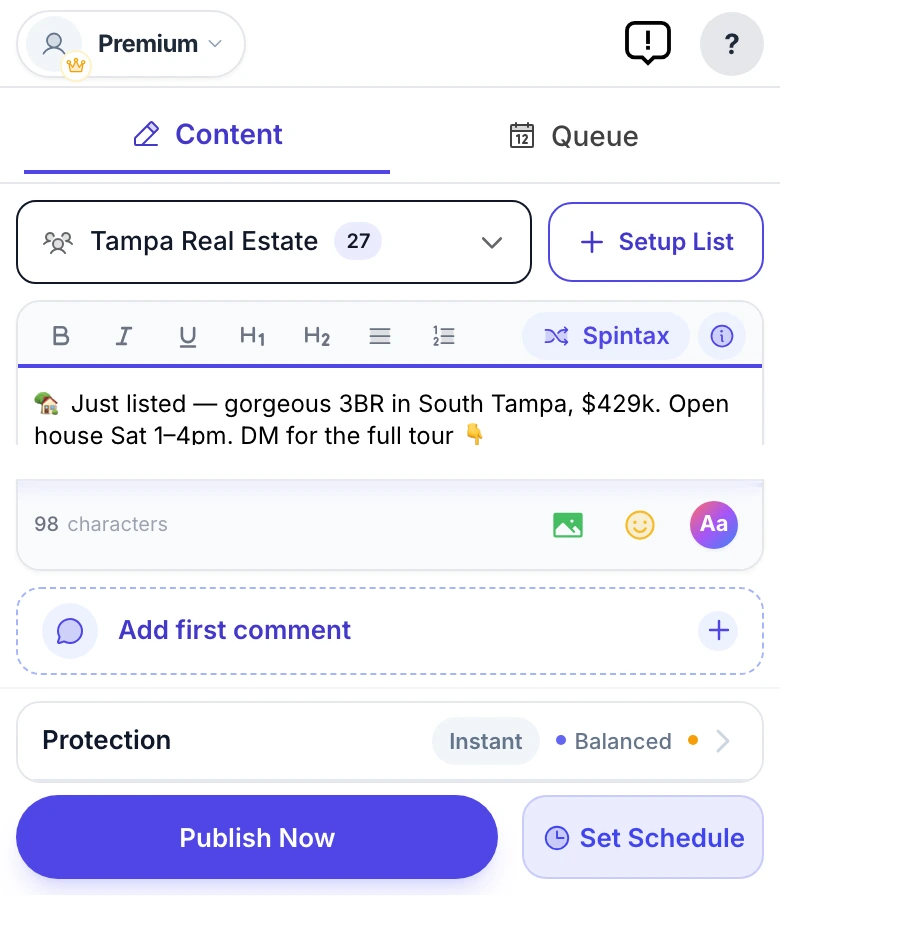
Stop copy-pasting the same post 50 times. Compose once, pick a saved group bundle, and MultiGroupPoster delivers it to every Facebook group on your list — one clean, native post at a time.

  • Reusable group bundles you set up once
  • Text, photos, video, emoji, link previews & color posts
  • Watch every group go out, live, with per-group results
MultiGroupPoster main screen (real extension popup) — composing a Facebook post with the Spintax, first-comment, color, and Protection controls, ready to publish to every group
Unique every time · Spintax

Every group sees a different version.

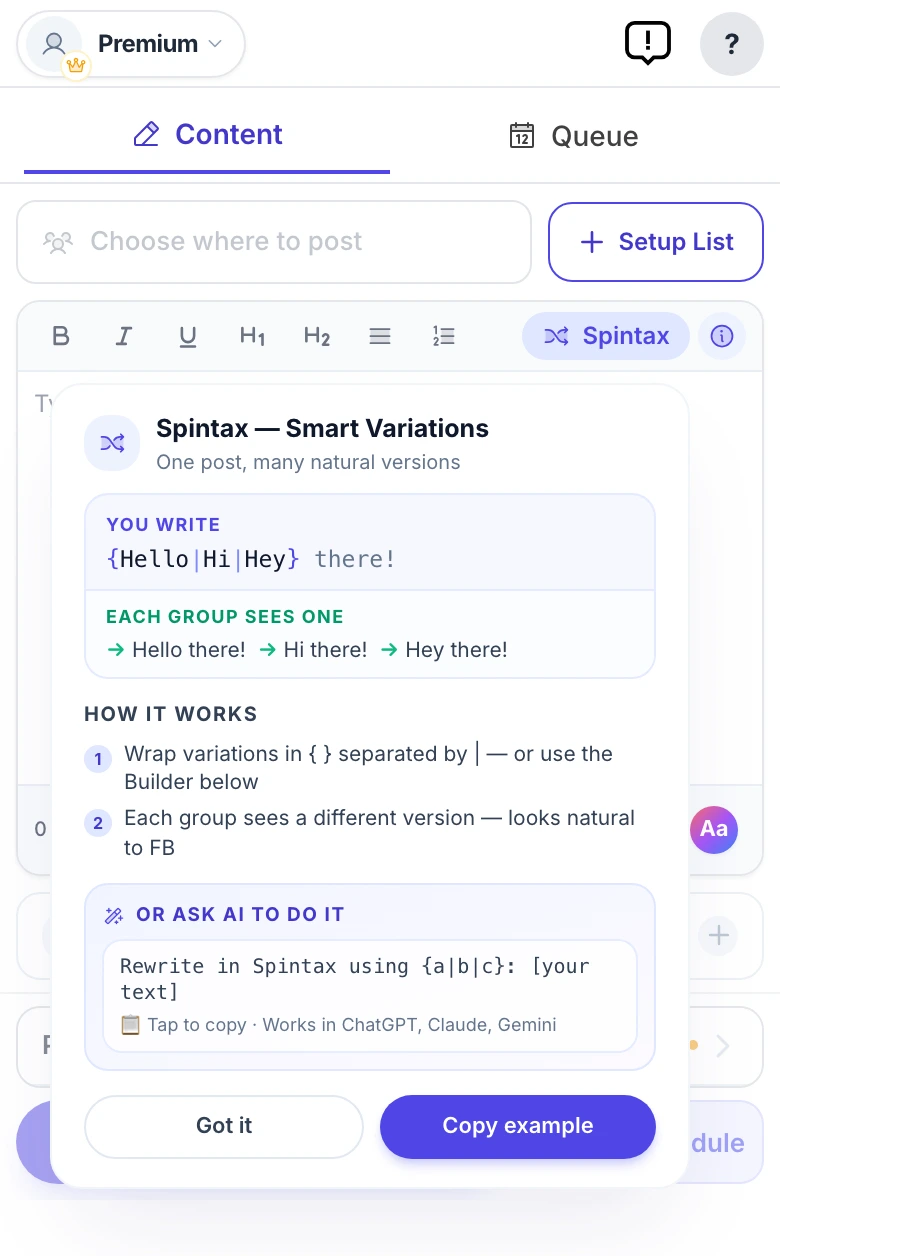
Facebook flags identical text pasted across groups as spam. Spintax rewrites your wording on the fly — {Hi|Hey|Hello} becomes a fresh variation for every group — so you post at scale and stay under the duplicate-content radar.

  • No two groups get the same post — automatically
  • Fewer spam flags, better reach per group
  • Paste ChatGPT or Claude variations straight in
MultiGroupPoster Spintax variation builder generating a unique version of a Facebook post for each group, with a live preview — avoids duplicate-content spam flags
Account-safe by design

Pacing that keeps you off Facebook's radar.

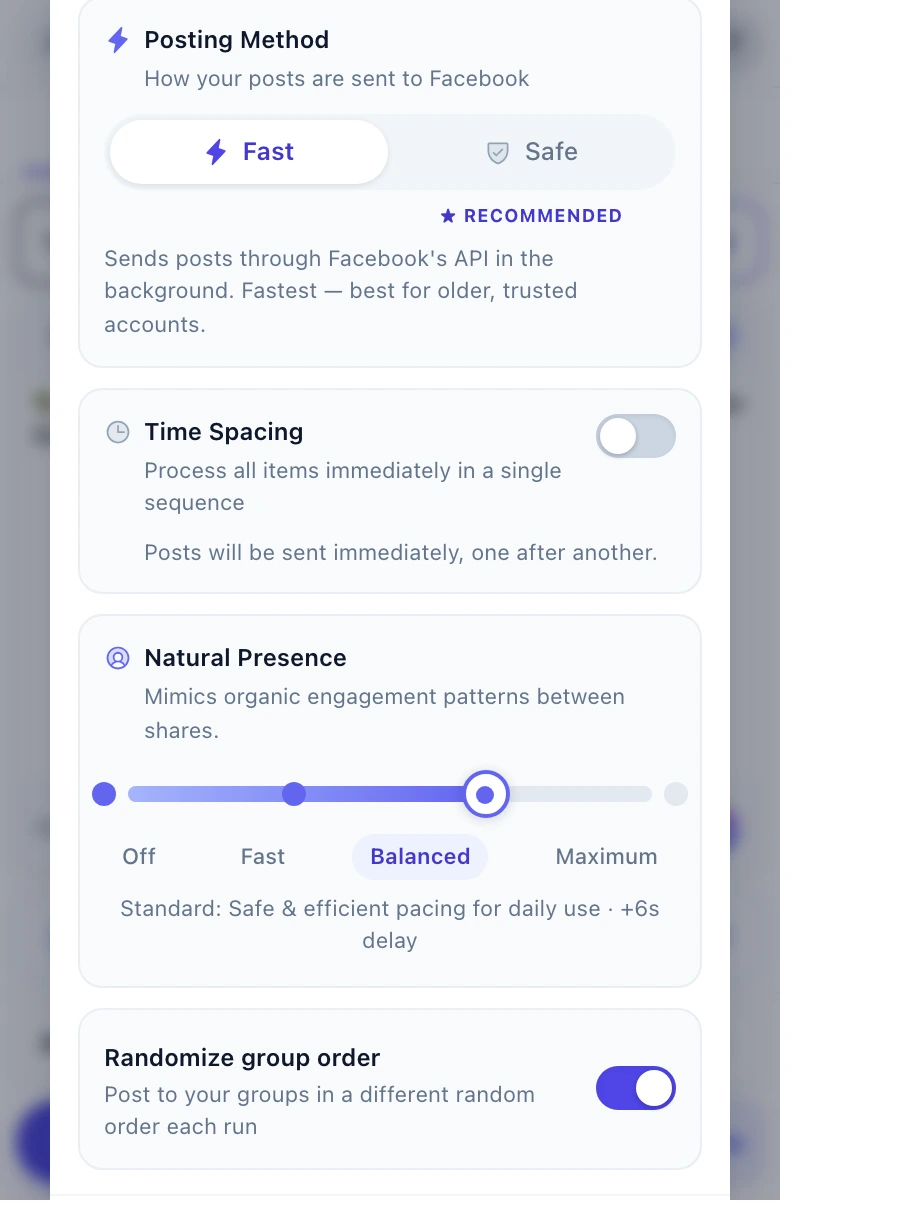
Blasting 50 posts in 50 seconds is how accounts get restricted. Time Spacing drips your posts out in natural rounds, and Natural Presence adds human-like browsing between them — so your activity looks like a person, not a bot.

  • Time Spacing — gradual rounds with randomized pauses
  • Natural Presence — four levels of human-like activity
  • 200-a-day safety floor + strike monitor with auto-cooldowns
MultiGroupPoster Security & Stealth — Time Spacing between posting rounds plus a four-level Natural Presence slider that mimics organic Facebook activity to protect your account from bans
Set it and forget it

Schedule once. It runs on autopilot.

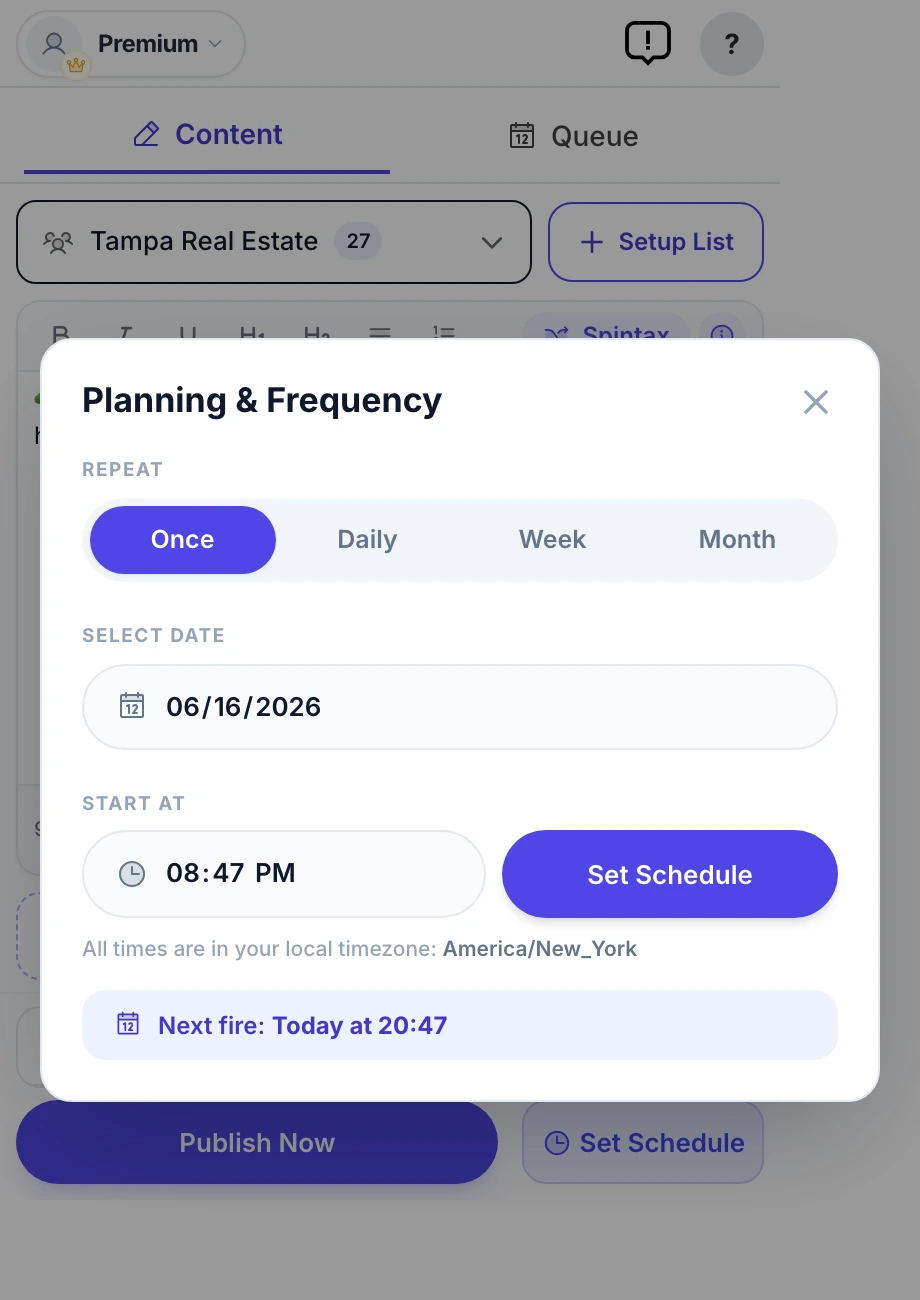
Queue your posts for the perfect moment — once, daily, weekly, or monthly. MultiGroupPoster fires them on schedule and shows you exactly what landed in every group.

  • Once / Daily / Weekly / Monthly frequencies
  • Per-group results you can open on Facebook
  • Pause, edit, or reorder the whole queue anytime
MultiGroupPoster Planning & Frequency scheduler set to auto-post to Facebook groups on a recurring weekly schedule
Build lists in seconds

Pull all your groups straight from Facebook.

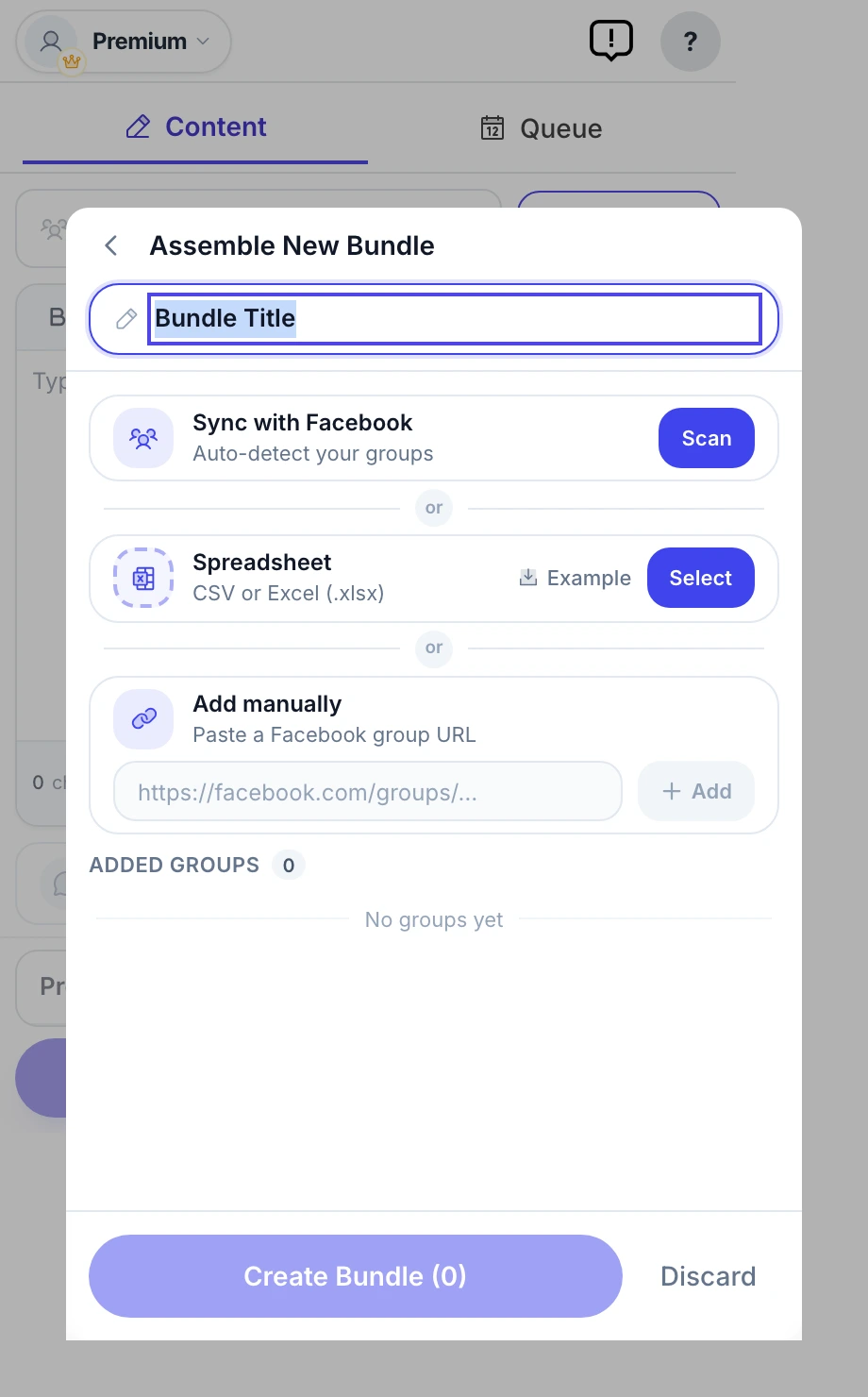
No manual copy-pasting of group URLs. Sync scans your Facebook account and imports every group you're a member of — then save targeted bundles you reuse for each campaign.

  • One-click sync from your own Facebook account
  • Or import a CSV / add group URLs manually
  • Save reusable bundles per niche or campaign
MultiGroupPoster Assemble Bundle screen — sync Facebook groups automatically, import a spreadsheet, or add group URLs by hand to build a reusable posting list

Auto first comment

Drop your link in the first comment of every post — the safe spot Facebook rewards, not penalizes.

Color background posts

Eye-catching text-on-gradient posts that stop the scroll — no image required.

Post as a Page

Switch between your personal profile and any Facebook Page you manage — per campaign.

Photos, video & emoji

Attach up to 10 images or a video per post, plus a 90+ emoji picker.

Reusable templates

Save your winning posts and reload them into a new campaign with one click.

Scheduling queue

Every scheduled post in one place, sorted by next run — pause the whole queue anytime.

Per-group results

See success / pending-approval / failed for each group, and open any live post on Facebook.

One-click diagnostics

A built-in self-test and downloadable report — no DevTools needed if anything looks off.

Pricing

$8.99 per month for unlimited. Or 6 free posts to try.

Start free. Upgrade when you need unlimited posting. Cancel in one click.

Free
$0

Try it free — 6 posts, one-time. No credit card.

  • 6 posts to try (one-time)
  • Manual scheduling
  • Basic group lists
  • Community support
Add to Chrome — Free
→ Most users start here
Pro Monthly
$8.99 /month

For solo marketers who post most days.

  • Unlimited posting
  • Schedule + Spintax
  • Advanced organization
  • Priority email support
  • Per-group analytics
Start Pro
$8.99/mo replaces $400/mo VA · 7 hours of your time · Several scheduler subscriptions

7-day money-back guarantee. Cancel anytime. No questions asked.
All plans run in your browser. Your Facebook credentials never leave your computer.

Why teams switch

How MultiGroupPoster compares to the real alternatives.

Six options compared head-to-head: two direct rivals (PilotPoster, GroupPosting), two general schedulers most marketers already pay for (Buffer, Hootsuite), and the manual baseline.

Feature comparison: MultiGroupPoster vs PilotPoster, GroupPosting, Buffer, Hootsuite, and manual posting.
Feature
★ Recommended
MultiGroupPoster
pilotposter.com
Direct rival
groupposting.com
Direct rival
buffer.com
General scheduler
hootsuite.com
General scheduler
No tool
Posts to Facebook groups (not just pages)
Human-like typing simulation
API-based engine (resilient to FB updates)
Spintax variations (keeps each post unique)
Schedule weeks ahead
Group list management & tagging Limited
Per-group analytics Limited Limited Limited
Free plan Free, 6 to try No Free trial Free, limited 30-day trial Free + 7h/wk
Starting paid price $8.99/mo $25-50/mo $15-30/mo $15/mo $99/mo Free

Real public competitors verified June 2026. Pricing reflects publicly listed entry-level plans on each vendor's site — check directly for current rates. We update this table when pricing changes.

vs PilotPoster → vs GroupPosting → vs Buffer → vs Hootsuite →

Frequently asked questions

What is a Facebook Auto Poster?

A Facebook Auto Poster is software that publishes a post to multiple Facebook groups, pages, or profiles automatically — without you copying and pasting into each one. The category includes browser extensions like MultiGroupPoster (which work inside your own logged-in session) and cloud tools like Buffer or Hootsuite (which require granting them access to your Facebook account).

Are Facebook auto posters allowed by Facebook?

Facebook does not officially endorse third-party auto-posting tools. In practice, tools that mimic real user behavior (typing simulation, randomized delays, varied content via Spintax) and run inside your own browser session are far less likely to trigger Facebook's automation detection than cloud-based tools that post from data-center IPs at high speeds.

What are safe settings for a Facebook auto poster?

Recommended baseline: 50–100 posts per day, 30–60 seconds between posts, randomized within that range, with Spintax variations on. Avoid identical text across groups. Posts with images, videos, or link previews look more natural than text-only. Newer Facebook accounts (under 6 months) should stick to the lower end.

How is MultiGroupPoster different from PilotPoster?

Both are Chrome extensions for Facebook group posting. MultiGroupPoster uses a direct-API engine (the same APIs Facebook uses internally), which makes it more resilient to UI updates. PilotPoster uses traditional DOM scraping, which is faster to build but breaks when Facebook ships a UI change. MultiGroupPoster also offers a free trial (6 posts, one-time), while PilotPoster requires payment to start.

Can I post to Facebook groups as my page or profile?

Yes. MultiGroupPoster lets you post as your personal profile or as any Facebook page you manage. Some groups restrict page posts — the extension shows you which groups accept which identity before you publish.

5.0 · 450+ reviews 8,000+ marketers since 2022 Read them on the Chrome Web Store →

Try the safest Facebook auto poster on the market.

Marketers use MultiGroupPoster every week. Free for 6 posts to try · Pro from $8.99/mo.

Add to Chrome — Try Free
Free trial · No credit card
Add to Chrome