

Is there an official Facebook group posting limit?
No. Facebook deliberately does not publish a posts-per-day number for groups, because the limit isn’t a fixed quota — it’s a real-time judgement made by its anti-spam systems. Two accounts can post the exact same content to the same groups and get different outcomes: one sails through, one gets a “You’re Temporarily Blocked” message. The difference is behavior and reputation, not a counter.
That means the useful question isn’t “what’s the limit?” but “what posting pattern looks like a real person?”
Safe daily limits by account age
These are conservative ranges that keep the vast majority of accounts healthy:
| Account age | Safe posts/day | Notes |
|---|---|---|
| Under 6 months | 20–40 | New accounts are watched closely. Warm up slowly. |
| 6–12 months | 40–80 | Increase gradually if no warnings appear. |
| 12+ months, active | 50–100+ | Aged accounts with real engagement get the most room. |
Start at the low end of your range and only increase if you see zero warnings for a week or two. If you ever get a temporary block, drop back down and rest the account 24–72 hours.
Why velocity matters more than volume
The single biggest signal Facebook uses to detect automation is regularity and speed. Posting to 30 groups in 90 seconds is a pattern no human produces. Spreading those same 30 posts across 4–6 hours, with gaps of 31s, 48s, 39s, 55s, looks exactly like an active member catching up.
This is why a good Facebook group tool focuses on pacing, not just bulk. MultiGroupPoster drips posts out in randomized rounds and shows a live daily count against a built-in safety floor, so you never blow past a safe pace by accident:
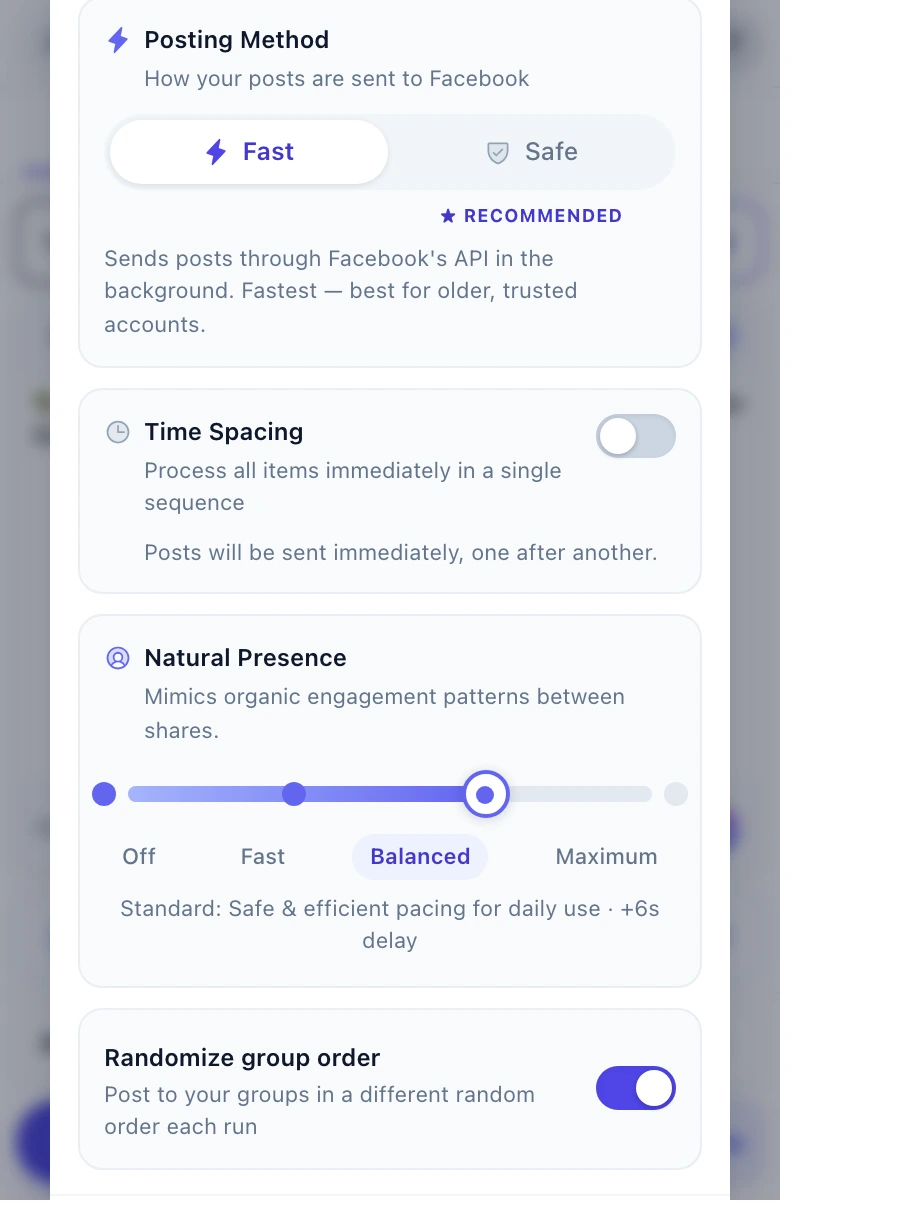
The Time Spacing controls suspend posting between rounds, and Natural Presence adds light, human-like activity between posts — together they keep you inside a safe daily limit without you having to watch the clock.
Warning signs you’re over your limit
- A “You’re Temporarily Blocked” or “this feature isn’t available right now” message.
- Posts that appear to publish but don’t show up in the group.
- Posts silently going to a group’s pending-approval queue every time.
- A sudden drop in reach on posts that used to perform.
If you see any of these, stop, rest the account for 24–72 hours, and resume at a lower volume with longer gaps.
How to stay safely under the limit
- Warm up. New account? Start at 10–20 posts/day and climb slowly.
- Randomize delays. 30–60 seconds, never the same gap twice. (More on safe settings.)
- Vary every post. Use Spintax so no two groups get identical text.
- Attach media. Image or video posts get flagged less than text-only.
- Spread it out. 4–8 hours, not one burst — and leave a daily rest window.
- Respect each group. Some groups have their own posting limits and approval queues; that’s separate from your account limit.
For the complete behavioral playbook, see bulk posting without getting restricted.